
gaphablicmnhfaekbnomijgopiifgodo

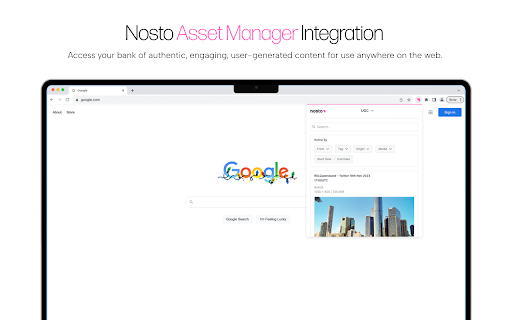
Connect Nosto to Chrome so you can quickly and easily perform various actions with user-generated content directly from your… Connect Nosto to Chrome so you can quickly and easily perform various actions with user-generated content directly from your browser. With this extension, you can: - Aggregate content from any social network into Nosto. - Send rights requests to creators. - Use your earned content across the web. - All within Chrome. Why should you add the Nosto Chrome extension? Fuel your asset library with any great piece of content you find on your way. Save time and effort in managing rights requests for any user-generated content. Make your user-generated content readily available for publishing anywhere.

Helper Extension for Gridiron Dynasty
This extension is for coaches who play Gridiron Dynasty on Whatifsports.com (WIS). When you search for recruits, the web page displays the recruits hometown (City, ST). This extension modifies the hometown to be a URL that opens the The Next Guess website (www.thenextguess.com) and leverages its mapping capability to show you where the recruit is located compared to all human coaches in that world and division. The extension will also highlight a recruit's row BLUE if you are watching the recruit, YELLOW if you are in a battle for the recruit with other schools, and GREEN if the recruit is considering only your school. In addition, in the active team's schedule page, as well as the team's profile schedule tab, the extension will insert a link to the active team's schedule/game analysis page on The Next Guess website. Finally, next to each boxscore link, the extension will insert a small green plus icon that is hyperlinked to The Next Guess game analysis. Clicking the green plus icon will open The Next Guess in a new tab and instantly analyze the boxscore. Release Notes: v2.0.0.3 Fixed broken location link in recruit profile page due to space between city and state. v2.0.0.0 Migrated all of the links to use The Next Guess website as the full replacement for the GDAnalyst website which will be deprecated soon. v1.0.0.2 Fixes a minor issue that may or may not appear depending on the browser. v1.0.0.1 Fixes issue where links were not getting inserted for the upcoming scheduled game. Adds GDAnalyst Schedule page and GUESS page links for the previous game's opponent. v1.0.0.0 Added links to GDAnalyst Schedule Page and GUESS page for the Active Team. Added GDAnalyst Analyze link for the previous game's box score. Added GDAnalyst Schedule Page and GUESS page links for the current game's Home and Away teams. Added GDAnalyst Analyze link for the current game's box score. (Only visible at half-time of current game). On the Recruit Profile page, GDAnalyst link to the recruit's Hometown will now show on every tab of the Recruit Profile page. v0.0.2.3 Fixed an issue with 8-digit gameId's. v0.0.2.2 Renamed the extension to Helper Extension for Gridiron Dynasty. Release Notes: v0.0.2.1 Corrects GDAnalyst link on the Team Profile page's Schedule tab. v0.0.2.0 1. In the active team's schedule page, as well as the team's profile schedule tab, the extension will insert a link to the active team's schedule/game analysis page on GDAnalyst website. 2. Next to each boxscore link, the extension will insert a small green plus icon that is hyperlinked to GDAnalyst game analysis. Clicking the green plus icon will open GDAnalyst in a new tab and analyze the boxscore. v0.0.1.2 Resolves an issue where the page updates made by the extension may disappear if certain actions are taken on the page (e.g. clicking check box to add a recruit to your watchlist or changing some of the search filter options at the top).

ReadAnything
Read anything with the power of AI Are you bothered by long and tedious papers filled with jargon? Are you frustrated by bad writing that seems to prevent you from understanding? Don't worry, let's harness the power of GPT to help us read anything!

FYBR
fybr is the new generation of email management. Increase your productivity and your ease of mind by using fybr to clean your email inbox. fybr links to your gmail seamlessly - just open the extension once a day, and see who’s clogging your email.. Then, you can choose which senders you want out of your inbox. These emails aren’t deleted, they’re just tucked away in a fybr folder, accessible with all your other gmail folders. And just like that, emails from those senders will automatically move out of your inbox (and new emails will redirect to the fybr folder too!). From there, you can either delete those emails or undo the process at any time in our extension! How we’re different from all the other email apps: We help you automate and clean your inbox. It’s no longer a manual process - we will give you recommendations of who to block. fybr uses a simple sorting algorithm to parse through your emails, and determines whether or not you’ve ever responded to this sender. Don’t worry – we never read your emails or collect your data. You can also block any number of senders you want, just with a simple click of a box. You can also unblock emails through the same process. Again, nothing is actually deleted either, you’ll have your own fybr folder to see the emails! We want to reduce the headache of dealing with a messy inbox in a way that doesn’t waste your time!

Validation Rule Extractor - Salesforce
This extension helps you to extract salesforce object Validation Rule.
