
galldaghkdpokmbnnnhgokbicphpehfj
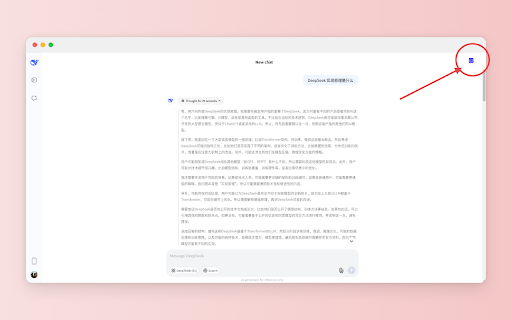

Print your DeepSeek chats as PDF. Print your DeepSeek chats as PDF.

ChatGPT to Word or PDF
Convert the ChatGPT content into a Word or a PDF format in a single click. Save your ChatGPT conversations as Word or PDF documents with ChatGPT to Word or PDF Chrome extension. With a single click, you can convert ChatGPT responses into a well-formatted Word or PDF file, ensuring easy access, sharing, and reference. Also, the ChatGPT to Word or PDF Chrome extension lets you export ChatGPT Deep research into Word or PDF files in a single click without loosing formatting. This extension preserves formatting, ensuring your content appears just as it does on ChatGPT, including: - Supports exporting the complete conversation as a Word or PDF file. - Supports exporting only ChatGPT responses as a Word or PDF file from the entire conversation, excluding user prompts. - Ideal for research, content creation, brainstorming, and archiving purposes. Whether you need a ChatGPT to Word converter, a ChatGPT table to Word converter or to copy chatGPT equations into Word without loosing formatting, this extension makes it effortless.

ChatGPT to PDF by PDFCrowd
Turn your chats into neatly formatted PDF. The add-on adds a button to the ChatGPT webpage and with just a quick click, you can turn your chats into neatly formatted PDF files. It's super easy to use - perfect for keeping or sharing your interactions. The add-on uses the PDFCrowd API to create PDF. Features: - PDF page size and orientation - Color theme selection - Print selected sections only - Option to exclude prompts from PDF - Adjustable font size - Customizable page margins Important: All generated PDFs include a banner at the bottom which cannot be removed. Purchasing a PDFCrowd license does not remove the banner. Install/Upgrade: To enable the button, open a tab with ChatGPT, click the puzzle icon in the toolbar, then click the three dots next to the plugin icon and confirm the permissions.

DeepSeek to PDF: Export DeepSeek Chats to PDF, Markdown, JSON
Export DeepSeek chats to PDF or Markdown instantly. Save DeepSeek conversations, download chats, and archive discussions with one. Never lose an important AI conversation again. DeepSeek to PDF lets you export chats to PDF, Markdown, or JSON instantly. Save, download, and archive your AI conversations with one click — including code, images, math, and full formatting. Perfect for saving DeepSeek and other AI chat conversations as clean, shareable files. DeepSeek to PDF captures your conversations exactly as you see them: • Code blocks keep their syntax highlighting • Tables, math (LaTeX), and structured content stay intact • Images and attachments are included • Links, headings, and formatting are preserved • The original layout remains clean and readable • Even very long chats export without breaking Your exported files are polished, easy to read, and ready to share, store, or revisit anytime. • One-Click Export — Save the current chat instantly • Batch Export — Export multiple conversations at once • Multiple Formats — PDF, Markdown (.md), JSON, or Plain Text • High-Quality PDF Export — No cut-off pages or broken layouts • Formatting Preserved — Headers, lists, links, and styles stay intact • Works Offline — Export chats without an internet connection • Works with Long Chats — Handles large conversations smoothly • Automatic backups to Google Drive, Dropbox, Notion, or Yandex Disk • Access your exported chats from anywhere • Keep your AI conversations organized and secure Your data stays on your device. Everything is processed locally, making it safe for sensitive work, research, and personal use. 🛠️ WHO IT’S FOR Developers, students, writers, professionals, and researchers who want to save, organize, and revisit AI conversations. • Developers — Save code snippets and debugging sessions • Students — Keep study material and research organized • Writers & Creators — Store ideas, drafts, and content • Professionals — Document workflows and planning • Researchers — Preserve detailed discussions ✔ Fast and reliable, even for very long chats ✔ Cleaner and more accurate than copy-paste or print methods ✔ Designed specifically for AI chat export ✔ Lightweight, simple, and easy to use ✔ Supports multiple export formats Install DeepSeek to PDF and start saving your AI chats as clean, shareable files in seconds.

ChatGPT to PDF
Use ChatGPT to PDF extension to save chatgpt chat as pdf and print. Export chatgpt conversations to PDF easily. 🚀 ChatGPT to PDF: Your Ultimate AI Chat Export Companion Transform your ChatGPT AI conversations into beautifully formatted DOCX files with ChatGPT to PDF – the essential tool for preserving and sharing your valuable interactions. Whether you're storing research discussions, capturing creative brainstorming sessions, or recording technical solutions, ChatGPT to PDF ensures reliable results every time! ✨ What ChatGPT to PDF Can Do: 🧠 AI-Powered Conversation Export to PDF 🔸 Preserve all formatting, code blocks, and special characters 🔸 Maintain the natural flow and structure of conversations 🔸 Convert entire chat histories to PDF with just one click 🔸 Smart conversation parsing for optimal readability 🔸 Automatic table of contents generation 🔸 Intelligent page breaks and section organization 💬 Advanced Conversation Management 💎 Organize your ChatGPT discussions by topic, date, or project 💎 Create custom groupings for different conversation types 💎 Build a searchable knowledge base from your chats 💎 Monitor and manage multiple conversation threads ✍️ Professional Export Features 🔹 Save Conversations as PDF - Export entire ChatGPT chats 🔹 Choose from several professional formatting templates 🔹 Export selected parts of a conversation 🔹 Add notes and highlights 🔹 Customize page sizes and orientations 🔹 Automatically generate a table of contents 🎨 Customization Options ♦️ Custom Titles — Add optional document headers to your ChatGPT to PDF files ♦️ Custom Filenames - Name your exports without the .docx extension ♦️ Setting the font size and font family (in development) ♦️ Page Formats - Support for A3, A4, A5, Letter, and Legal page sizes (in development) 🚀 Getting Started with ChatGPT to PDF 1. Access your ChatGPT chat interface 2. Click the Save as DOCX button 3. Download or share instantly! 💡 Perfect for Wide Range of Users: 📚 Students: 🔹 Save research conversations and study materials 🔹 Create well-structured study guides from AI discussions 🔹 Export assignment assistance and explanations 🔹 Build personal knowledge libraries 🔹 Monitor learning progress over time 💼 Professionals: 🔹 Document technical solutions and code snippets 🔹 Archive AI discussions related to projects 🔹 Create shareable reports from conversations 🔹 Build reference materials for teams 🔹 Maintain compliance documentation 🎨 For Creators: 🔹 Save creative brainstorming sessions 🔹 Export chatgpt chat content to word file 🔹 Archive writing assistance conversations 🔹 Preserve discussions around artistic concepts 🔹 Create inspiration libraries 🔬 Researchers: 🔹 Document research methodologies 🔹 Export literature review discussions 🔹 Save conversations related to experimental design 🔹 Create citation and reference lists 🔹 Archive research insights 🏆 ChatGPT to PDF's Advanced Features: ➤ Performance & Reliability ➤ High-speed processing ➤ Batch export support ➤ Efficient resource usage ➤ Offline processing capability ➤ Automatic optimization and secure handling ✅ End-to-end encryption ✅ Password protection options ✅ Watermark capabilities ✅ Access control features ✅ Secure storage solutions 🌈 User Experience Enhancements 🔄 ChatGPT to PDF Regular Updates: - New features based on user feedback - Performance improvements - New template options - Security enhancements - Bug fixes and optimizations 🔮 ChatGPT to PDF Future Development Roadmap: ⚡️ Advanced AI summarization features ⚡️ Enhanced collaboration tools ⚡️ Cloud integration options ⚡️ Mobile app development ⚡️ Advanced analytics capabilities 🌍 Making Knowledge Sharing Better By choosing ChatGPT to PDF, you're not just exporting conversations—you’re creating valuable knowledge assets. Our tool transforms casual AI interactions into professional documentation, enabling better knowledge sharing and preservation. 📘 Best Practices for Using ChatGPT to PDF: 1. Organize conversations before exporting 2. Use consistent naming conventions 3. Apply appropriate templates for different content types 4. Regularly back up important conversations 5. Create custom templates for repeated exports 🎯 Technical Specifications: 🔻 Supported input formats: All chatgpt chat formats 🔻 Output format: High-quality word file 🔻 Processing speed:
