
galbkjnfajmcnghcpaibbdepiebbhcag
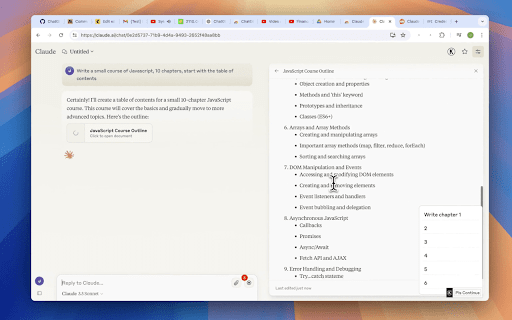
Queue messages for your Claude. Achieve maximum productivity with Prompt Chains and Bulk prompting. From the creators of ChatGPT Queue, 🚀 Introducing Queue for Claude! 🚀 🤖 Ever feel like you're just waiting...and waiting...for Claude to reply? Say goodbye to downtime and hello to productivity with Queue for Claude, the Chrome extension that lets you queue up your messages in advance! Just type, hit Enter, and watch your messages line up like magic. 🎩✨ Why You'll Love Queue for Claude: 🕒 Save Time: No more waiting around. Queue your questions and keep your flow going! 🚀 Efficiency at Its Best: Multi-task like a pro. Queue for Claude works silently in the background, making every chat smoother and faster. 💬 Long Conversations, Better Answers: Great answers come from great conversations. Queue your queries for accurate, in-depth insights. 🔍 Tailored for Detailed Inquiries: Researching multiple items? Queue them individually for thorough details, avoiding missed specifics. 🌟 Endless Possibilities: From app inquiries to research, coding, writing, and more, Queue for Claude handles it all. 🎯 Easy to Use: Just load it up with Claude, start typing, and your queue will build as you press Enter. It's that simple! 🌟 Go Pro for Unlimited Power: 🚀 Upgrade to the Pro version for an unlimited queue for both Claude. Unlock endless possibilities with a one-time investment! 🛡️ 100% Cash-Back Guarantee: Not satisfied? Get your money back within the first 24 hours of purchase. No questions asked! 📢 Free ChatGPT Queue Pro license included with Queue for Claude Pro Select an item in the queue to delete it, it'll have a red underline. The queue will pause while you're typing, keep your text field empty to keep it rolling.

Promptly – AI Prompt Enhancer & Manager for ChatGPT, Claude, Gemini
Optimize, save & reuse AI prompts for ChatGPT, Claude, Gemini & more. Prompt library, one-click enhancer & conversation exporter. Promptly is your all-in-one prompt engineer, enhancer, optimizer, and prompt manager. Write better prompts, get better AI responses — in one click. Whether you're new to AI or an experienced prompt engineer, Promptly helps you craft clear, well-structured prompts that get dramatically better results from the AI tools you already use. Instantly improve any prompt with a single click or keyboard shortcut (Ctrl+M / Cmd+M on Mac). Promptly rewrites your input into a well-structured, context-rich prompt that gets more accurate and useful responses — whether you're working in ChatGPT, Claude, or Gemini. NEW: Highlight any text on any website and optimize it as a prompt. Works everywhere, not just inside AI chatbots. Save your best prompts and build a personal prompt template library. Access everything from a clean side panel. Pin your top prompts for one-click reuse across any AI platform. Save prompts instantly with Ctrl+S (Cmd+S on Mac). Never lose a great prompt again — organize, search, and reuse your templates whenever you need them. Explore our FREE community prompt library at https://www.promptly.fyi/library with hundreds of curated templates for writing, coding, marketing, research, and more. Favorited prompts sync directly to your extension. Save, export, and fork your AI conversations to continue them later or share with your team. Summarize long chats into concise overviews. Export any conversation with Ctrl+E (Cmd+E on Mac). This is perfect for bypassing context window and token limits, saving research sessions and brainstorming threads, creating documentation from AI-assisted workflows, or simply picking up where you left off without losing context. 🧩 COMPATIBLE WITH Works directly inside your favorite AI tools: - ChatGPT (OpenAI) - Claude (Anthropic) - Gemini (Google AI) - DeepSeek - Copilot (Microsoft) 👤 WHO IS PROMPTLY FOR? Content Creators — Write better AI-generated blog posts, social media content, video scripts, and marketing copy with optimized prompts. Students & Researchers — Get clearer, more structured answers from AI. Save and organize research conversations. Export summaries for notes and papers. Developers & Engineers — Optimize technical prompts for code generation, debugging, and architecture decisions. Marketers & Copywriters — Craft sharper ad copy, SEO content, email campaigns, and brand messaging. Product Managers — Summarize meeting notes, automate repetitive tasks, and organize prompt workflows across projects. ✅ Three tools in one — prompt optimizer + prompt manager + conversation exporter ✅ Free community prompt library with hundreds of templates ✅ Keyboard shortcuts for power users — Ctrl+M to optimize, Ctrl+S to save, Ctrl+E to export (Cmd on Mac) ✅ Lightweight and fast — no bloat, no slowdowns ✅ Privacy-focused — your prompts stay yours Install Promptly, pin it to your toolbar, and start getting better AI responses in seconds. Open any AI chatbot, type your prompt, and press Ctrl+M (Cmd+M on Mac) to see the difference instantly.

MarkGPT – Bookmark Messages in ChatGPT, Claude & Gemini
Bookmark and quickly jump to important messages in ChatGPT, Claude, and Gemini conversations. MarkGPT lets you bookmark any message inside your AI chat conversations — whether you're using ChatGPT, Claude, or Gemini. Long AI conversations can get hard to navigate. Important answers get buried. MarkGPT solves this by letting you save any message with a custom name and jump back to it instantly. How it works: • Hover over any message to see the bookmark icon • Click it and give your bookmark a name • Open the MarkGPT panel to see all your saved bookmarks • Click any bookmark to jump directly to that message Works on: Why you'll love it: • Never lose an important AI response again • Organize long research or coding sessions • Lightweight — doesn't slow down your browser • Simple, clean interface

Claude to Obsidian & Markdown Export
Sync, backup, and bulk export Claude conversations to Obsidian/Markdown with one click. ✨ Save, export, sync, and back up your Claude conversations to Obsidian/Markdown with ease. This extension helps you organize, archive, and preserve your AI chats as clean Markdown files for long-term reference. 🚀 Key Features (Export • Sync • Backup): • One-click export: Save any Claude conversation to Obsidian-ready Markdown • Bulk export: Batch export multiple chats to build a durable local backup/archive • Smart formatting: Preserves structure (markdown, code blocks, images, lists) for readable notes • Flexible options: Skip or overwrite existing files to control versioning • Full artifact history: Export all artifact content from Claude chats, including every version in a session • Local-first: Files are saved directly to your Downloads folder for Obsidian import 🎯 Perfect for (Why to use it): • Researchers collecting AI insights • Students organizing study materials • Professionals documenting work discussions • Teams building an Obsidian knowledge base • Anyone who needs a reliable backup/archive of Claude content 📝 How to use (Step-by-step): 1) Open a Claude chat page 2) Set your download folder and filename pattern 3) Click Save to export a chat as Markdown 4) Use Bulk Save to export multiple chats at once 🔎 What you get in Markdown: • Title: Uses the current conversation title • URL: Source link for context • Date: Conversation time (fallback to current time) 💡 Get started today and transform your Claude conversations into an organized, searchable Obsidian vault — export, sync, and back up your AI knowledge with confidence. 🔄 Changelog 2026-03-31 • 1. Fixed and optimized the handling of save paths 2. Added filtering conditions 3. Added prompt documentation 2026-03-19 • Fixed the issue where Claude's org id retrieval failed, so that export can work normally 2026-02-21 • Fix bug 2026-01-22 • Added bulk export for Claude conversations 2025-11-25 • Initial release for Claude to Obsidian • Added single conversation export

Claude Limit & Usage Tracker - ClaudeKarma
Track your Claude AI usage limits at a glance. See session and weekly limits with a beautiful toolbar icon. Track your Claude usage and Claude limits the moment they change. ClaudeKarma is the Chrome extension every Claude AI user should pin. It puts your 5-hour session limit, your 7-day weekly cap, your per-model usage and Anthropic's peak hours one click away from any tab. Stop guessing how many hours of Claude you have left. Stop hitting "you have reached your limit" mid-prompt. Free, local-first, privacy-respecting. Works with Claude Pro, Claude Max 5x, Claude Max 20x, Team and Enterprise. Peak hours drain your Claude session 3 to 5x faster (weekdays 5 to 11 AM Pacific Time, per Anthropic's official schedule). ClaudeKarma shows a live peak/off-peak banner with a countdown to the next change, so you can shift your heavy work to off-peak windows. The schedule is fetched from a public configuration file and updates automatically when Anthropic adjusts it. No extension update required. For Pro and Max plans, the banner correctly reflects Anthropic's May 2026 change: peak hours no longer impact Claude Code on those plans, only chat sessions. Live Session Gauge: a circular gauge with the percentage of your 5-hour Claude limit used, color-coded green to red as you approach the cap. Per-Model Breakdown: track All models, Opus, Sonnet, Haiku and Claude Design as stacked bars on your weekly cap. Daily Routines Tracker: monitor your scheduled Claude Code routines (Max plans, X / 15 per day). Plan Badge: see your tier at a glance (Pro, Max 5x, Max 20x, Team, Enterprise). A GitHub-style hourly grid that shows when you actually use Claude across the week or the month. Spot your patterns. Plan around peak. Work smarter. A small progress system that tracks your milestones from your first install to surviving a 90% session usage spike. Six levels: Tracker, Daily, Power, Halfway, Marathoner, Foresight. A subtle star badge in the popup header, with a popover explaining where you are and what unlocks next. Toggle off in settings if you prefer it hidden. The toolbar icon shows two concentric rings: - Outer ring: 5-hour session limit - Inner ring: 7-day weekly limit (all models) Colors shift from green to yellow to orange to red as you approach your Claude limits. At 90% and above the icon blinks to grab your attention before you hit the wall. Smart browser notifications fire at 75%, 90% and 100% (configurable, all off by default if you prefer no interruptions). The popup, tips page and update page now fully support light mode. A toggle in the header cycles between auto (follows your OS setting), light and dark. Your preference is saved and applied instantly with no flash on open. ClaudeKarma keeps your data on your device. Your usage history, your settings, your Karma progress all live in your browser, in chrome.storage.local. The extension makes only two outbound network calls during normal use: one to Claude.ai to read your own usage data (using your existing session, no password ever stored), and one to a public peak hours configuration file on tokenkarma.app (no auth, no cookies, same response for every user). No analytics, no third-party tracking SDKs, no fingerprinting inside the extension. When you uninstall, Chrome opens a short feedback page on tokenkarma.app where the extension version, your browser language and your operating system are passed as plain query parameters. You can close the tab and we never see anything. Full transparency on this and everything else: https://tokenkarma.app/claudekarma/privacy - NEW: Light mode with auto, light and dark options, follows your OS by default - NEW: Theme toggle in the popup header, preference saved across sessions - Improved contrast on small text in both dark and light modes for better readability - Fixed usage bar tracks and gauge ring invisible on light backgrounds - NEW: Karma Levels progress system with milestone unlocks - NEW: Live peak hours schedule fetched from tokenkarma.app, updates without an extension push - FIX: peak hours now anchored to Pacific Time so the schedule stays correct year-round, including during US daylight saving transitions - Smarter peak banner for Pro and Max plans (Anthropic's May 2026 Claude Code update applied automatically) - Doubled 5-hour Claude Code limits reflected automatically (Anthropic May 2026 increase) - Refreshed extension name in the Chrome Web Store for clearer search discoverability - Optional uninstall feedback page so you can tell us what we got wrong - An active Claude AI account on claude.ai - You must be logged into Claude in your browser ClaudeKarma is the first product in the TokenKarma family. More AI usage trackers are on the way for ChatGPT, Gemini and other tools, with cloud sync planned for the long-term roadmap. Free, simple educational tips at tokenkarma.app/tips. Independent project. Not affiliated with Anthropic.
