
gafcmengeceombcikkeibggkleiabmmb
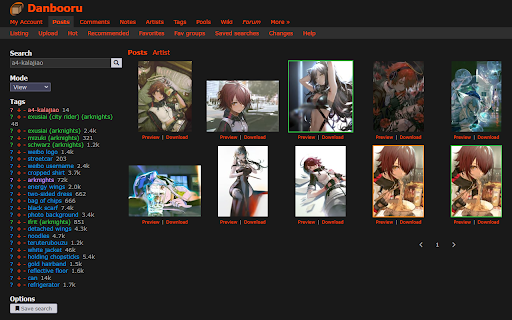


Adds some small features to Danbooru: - Preview and Download links under posts listing * Preview opens a modal window with a link to the post and a download link - A custom dark mode - An additional download button on post pages to easy mass-downloading

DanTagCopy
Tags to clipboard, for diffusion on webpages. In web page collect tags for diffusion prompt. 画像に付けられたタグをクリップボードに集めるアドオンです。 StableDiffusion, NovelAIDiffusionのプロンプトに使うタグを一括で取得することで、AI画像生成などに用いる呪文探しを助けます。

Illust Downloader for pixiv.net
You can easily download images, comics, and novels from pixiv.net! *This extension is unofficial and is not affiliated with Pixiv Inc. "pixiv" is a registered trademark of Pixiv Inc. *As of May 17, 2025, this extension has been renamed to "Illust Downloader." [About Illust Downloader] Illust Downloader is an extension that allows you to automatically assign file names and download illustrations, manga, and novels from Pixiv. It also offers features to enhance your Pixiv experience, such as the ability to enlarge illustrations directly on the gallery page. [Introducing Illust Downloader EX] The basic features of Illust Downloader are available for free indefinitely. However, by purchasing a license (¥195 per month), you can upgrade to Illust Downloader EX. Illust Downloader EX allows you to download Ugoira (animated illustrations) as video files (AVI, WebM, etc.), APNG, GIF animations, SVG, and more. Additionally, it offers advanced features such as organizing illustrations into folders based on criteria like artist or time, compiling manga into ZIP files, identifying downloaded items directly on the gallery page, batch downloading, and many other convenient functionalities. The premium features are available for a one-month free trial, so feel free to try them out. [Regarding Bugs and Suggestions] If you encounter any bugs, have suggestions for improvements, or other requests, please use the "Feedback, Suggestions, and Bug Reports" option within the Illust Downloader settings to get in touch with us.

Improved Gelbooru upload
Reconstruct the Gelbooru upload page with a bunch of useful features. This extension reconstructs the Gelbooru image upload page with multiple features that make posting images as convenient and fast as possible. Interface - Uses nicely formatted tags instead of plain text - Displays a large preview of the uploaded image on the side - Makes it possible to upload multiple pictures in different tabs Tagging - Shows warning if an entered tag likely contains a typo or is non-standard - Type multi-word tags more easily using spaces instead of underscores - Built-in artist search for quickly adding artist tags given their URL - Option to split the tag input into custom groups to get a better overview over entered tags and facilitate a more systematic approach to tagging - Change the type of a tag (e.g. to artist/character) with just two clicks Image upload - Easily upload images by dragging them from other webpages - Automatically fills in the source URL when uploading images from Pixiv - Automatically checks if a picture is already uploaded on Gelbooru: 1. Starts with a fast MD5 hash check to find posts with the same image 2. For images from Pixiv, it conducts a source check using the Pixiv ID 3. If the searches above didn't find anything, it tries to find posts with similar images via reverse image search in the IQDB database

Powerful Pixiv Downloader
Note: After installation, open pixiv.net to use it. If you want to download all of a user's works, you can click the "Start crawl" button on that user's homepage. 注意:安装之后,打开 pixiv.net 方可使用。如果你想下载一个用户的所有作品,可以在该用户的主页点击”开始抓取”按钮。 【English】Use this tool, you can: - Batch download all the artist's works, your bookmarks, your following, rankings, search results, etc.; - One-click download of any work you see; - Manually select the work you want to download on the page; - Set filter conditions to filter the works you want to download; - Download illustrations, manga, ugoira(animations), novels; - Save ugoira in GIF, WebM, WebP, APNG, ZIP formats; - Save novels in TXT, EPUB format; - Create folders with various data such as artist name, date, title, etc.; - Customize file names and sort them; - Add 0 in front of the serial number, so that the sorting will not be confused; - Save user avatar and cover image; - display larger thumbnails for easier viewing; - Preview the image on the thumbnail, and view the original image; - Save download records to avoid repeated downloads; - Save download progress, resume unfinished downloads; - export work data; - Collect works in batches; - Help you manage your bookmarks; - Timed crawl; - Highlight following users;
