
gadhbombinbjddndfkhclckgcdmfnfji
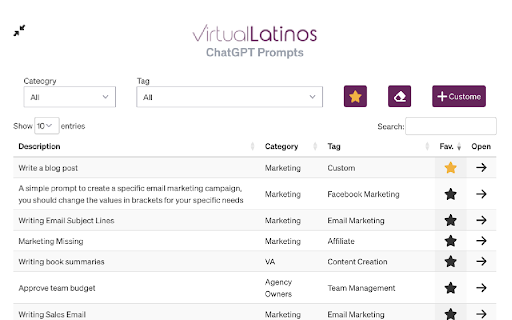
VL Prompt Manager makes it easier for users to catalog and re-use their favorite prompts. It also connects to a database of common… VL Prompt Manager makes it easier for users to catalog and re-use their favorite prompts. It also connects to a database of common prompts they may want to use.

MagicFridays Prompt List
Instant access to your prompt library from a side panel, 1-click prompt inserts, shortcuts, and easy backups. 1-click prompts for your favorite AI chatbots: All your prompts in a side panel, just click to insert. The ✨MagicFridays Prompt List allows you to effortlessly create, store, and insert prompts directly into popular AI chatbots like ChatGPT, Claude.ai, and Microsoft Copilot, making it a must-have for anyone serious about working with generative AI. ✨ Easy Access from Any Browser Tab: - Access your stored prompts from any browser tab with a simple side panel, ensuring you have the right prompt at your fingertips whenever you need it. ✨ Effortless Prompt Insertion: - One click prompt insertion into the AI chat interface from the side panel. - Use shortcuts to insert prompts at the cursor's position within text fields, saving you time and effort. ✨ Create and Manage Prompts: - Easily create new prompts with a user-friendly interface. - Store prompts with unique shortcuts for quick insertion. - Edit and delete prompts as needed to keep your list up to date. ✨ CSV Import and Export: - Import prompts from a CSV file, allowing you to bulk upload and manage multiple prompts efficiently. - Export your prompts to a CSV file, making it easy to back up or share your prompts with others. ✨ Compatible with Popular AI Platforms: - Works seamlessly with ChatGPT, Claude, Microsoft Copilot, Gemini, Perplexity, & Consensus. And more to come. ✨ User-Friendly Interface: - Clean and intuitive design for easy navigation and prompt management. ✨ Example Prompts: - Useful prompt starters are included to give you a head start with the tool. -----How to Use the Prompt List----- 1. Access the Sidebar - Click on the extension icon in your browser to open the sidebar. - From the sidebar, you can create new prompts, manage existing ones, and insert prompts into text fields. 2. Create New Prompts - Click on the "New Prompt" button in the sidebar. - Fill in the prompt name, content, and shortcut, then click "Add Prompt" to save. 3. Insert Prompts - To insert a prompt, simply click on it from the sidebar or type its shortcut in a supported text field and press space. - The prompt will be inserted at the cursor's position. 4. Import Prompts - To import click on the "New Prompt" button followed by clicking the "Import prompts from CSV" link - Download the example CSV to view the correct CSV format - Click on the "Import prompts from CSV" button and select your CSV file. 5. Export Prompts - Click on the "Download prompts as CSV" link on the main screen below the Instructions 1. What is the ✨MagicFridays Prompt List? The Prompt List is a Chrome extension designed to help you manage, store, and insert prompts efficiently. It's ideal for people who frequently need to use predefined text prompts across various platforms. 2. Is the ✨MagicFridays Prompt List free to use? Yes, it is free to use and there are no premium plans. 3. What platforms are supported? The Prompt List supports ChatGPT, Claude, Gemini, Microsoft Copilot, Perplexity, and Consensus. More platforms to be supported shortly. 4. Do I need an account to use the ✨MagicFridays Prompt List? No, you don't need an account to use this extension. All prompts are stored locally in Chrome Storage, synchronized across your devices for privacy and convenience. -----Why choose the ✨MagicFridays Prompt List?----- The Prompt List was designed with user convenience in mind, providing an intuitive interface and powerful features to enhance your productivity. Whether you're a student, parent, or professional, the ✨MagicFridays Prompt List offers the tools you need to work efficiently with your favorite generative AI tools.

AI Prompt Manager
AI Prompt Manager is a FREE and versatile Chrome app designed to help users store and manage their favorite GPT prompts. With an intuitive and stylish user interface, this app makes organizing your prompts a breeze. Create custom categories to sort your prompts, and use the built-in search feature to quickly find the ones you need. The 'GPT' button enables you to effortlessly use your stored prompts in chat GPT, while the 'Export' feature makes it simple to export / import your favorite prompts with friends and colleagues. Streamline your GPT prompt management with AI Prompt Manager - an essential tool for anyone looking to unlock the full potential of GPT-powered AI.

AI Prompt Manager
AI Prompt Manager is a handy Chrome extension that helps you effortlessly organize and manage your AI prompts. Introducing AI Prompt Manager, your new best friend for handling AI prompts! This super handy Chrome extension makes organizing and managing all your prompts a breeze. With AI Prompt Manager, you can: Stay Organized: Keep your prompts neatly arranged in folders, so you always know where to find them. Add Flexibility: Use variables in your prompts to make them more adaptable and reusable. Easily label final prompts vs WIP. Versioning: Access all versions of a prompt at your fingertips. Easily revert to a previous version if needed, ensuring you always have the perfect prompt ready to go. One-Click Backup: Secure all your prompts with a single click – no more worries about losing your work. All versions are exported as well. Easy Sharing: Export individual prompts effortlessly to share with others. Dark Mode: Give your eyes a break with our sleek dark mode option. Ready to make prompt management simple and fun? Give AI Prompt Manager a try! --- LAST UPDATE: Final version: Switch to material design due to problems on mac. Various bug fixes and optimizations.

Prompt Library Manager
A simple extension to manage a library of text prompts Introducing the Prompt Library Manager – the ultimate tool for anyone who needs to manage a library of text prompts! Whether you're a writer, a blogger, or just someone who frequently uses templates and standard responses, this simple Chrome extension will make your life a whole lot easier. With the Prompt Library Manager, you can easily store, organize, and access all of your favorite text prompts in one convenient location. No more digging through old emails or searching through countless files – now you can have all of your go-to responses right at your fingertips. The extension is incredibly easy to use. Simply add your prompts to the library, categorize them however you like, and then access them whenever you need them. You can even customize the interface to fit your personal style and preferences. Plus, the Prompt Library Manager works seamlessly with Midjourney AI tool, allowing you to easily generate content based on your saved prompts. The integration is designed to streamline your workflow and boost your productivity, making it easier than ever to create high-quality content in less time. And, of course, the Prompt Library Manager is also designed to work seamlessly with all of your favorite productivity tools, including Google Docs, Gmail, and more. So no matter where you're working, you'll always have your favorite prompts right there with you. Say goodbye to disorganized files and endless searching – try the Prompt Library Manager today and take control of your text prompts!
