
fpdjekiilgikecdmbeobhjboihmkgknm
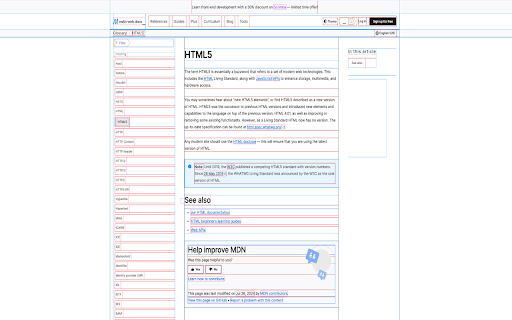

Outlining each HTML element to help audit your CSS This extension injects CSS into the page to outline each element, making it easier to see their placement on the page.

Inspect Element
Use Inspect element – a CSS viewer with Chrome inspect element shortcut. Learn how to inspect element easily using this simple tool! Inspect Element – A Powerful Yet Clean CSS Viewer Curious about how websites are built? Want to explore page layouts, rules, and responsive design logic with zero friction? Inspect Element is your answer. Whether you're a developer, designer, tester, or student – this tool is made for you. The interface is clean. The setup is simple. Shortcuts are ready. Privacy? You won’t need an account or leave a trace. It just works – in dark mode, too. Enjoy our Chrome inspect element extension across devices – whether you're on macOS, Windows, or Linux. Top Highlights ✨ Easy access to visual structure ✨ Minimal interface – no bloated tools ✨ Inspect Element has a dark mode ✨ Keyboard-friendly with inspect shortcut support ✨ Safe, anonymous use – no data collection Windows & Linux Keyboard Shortcuts 🔎 Open: Alt + E 🔎 Close the extension: Esc 🔎 Copy the code: C MacOS Keyboard Shortcuts 🍏 Open Inspect element: Cmd + E 🍏 Close the extension: Esc 🍏 Copy the code: C Who Is It For? ▸ Developers – scan CSS, debug styles, test structures, validate and fix layout behavior ▸ Designers – visually inspect element, check layout accuracy, and match designs precisely ▸ QA Engineers – explore web page components, track issues, and verify responsiveness ▸ Students – learn how to inspect element easily while gaining real-world debugging skills ▸ Anyone curious – explore what’s behind the visual magic and learn how websites are built Ideal for All Skill Levels Whether you're just starting out or deep into web projects, the tool offers value. It's equally useful for quick design checks, learning how pages are structured, or debugging layout inconsistencies. What You Can Scan with Inspect element • Fonts, sizes, colors • Shadows and borders • Positioning and spacing • Responsive breakpoints • Full page structure with hidden layers What Sets It Apart 1️⃣ Built to review typography, colors, and padding 2️⃣ Full css checker that shows live styles 3️⃣ Integrated shortcuts for Mac and Win 4️⃣ Inspect the element without console 5️⃣ Runs quietly in the background What Makes It Better Than the Default Inspect Chrome? 🚀 No distractions – just CSS scan functionality, no clutter included 🚀 Pre-styled for readability in both light and dark modes, always elegant 🚀 Quicker exploration with shortcuts for faster access 🚀 Instant css checker feedback with real-time accuracy Use Cases 💡Running a css scan to quickly explore and compare site styles 💡Finding out how to do inspect element and troubleshoot padding issues 💡Learning how to inspect element on mac for accurate design and layout checks 💡Exploring inspect shortcut Chrome for faster access and smoother workflows Smart Layout Insights ➤ Inspect elements on hover ➤ View margin, padding, and borders ➤ Use a shortcut to explore a component ➤ Work without distractions or login prompts ➤ Understand site behavior in real-time Built for Focused Exploration This extension simplifies the process of exploring any website’s design structure. With a clean UI, shortcut support, and no login fuss, it gives you fast access to layout, spacing, and styling details. Additional Benefits of this CSS Viewer 📌 You’ll find every layout detail easily with our css inspector tool 📌 Use the inspect element shortcut to save time and clicks 📌 Works as an inspect element in Chrome replacement tool seamlessly 📌 The page won't refresh when you open or close the extension 📌 Launch using shortcut inspect from anywhere on any webpage Other Cool Features 🧪 Supports interactions for dynamic content 🧪 Can be used for accessibility and performance reviews 🧪 Enables simple code learning for beginners 🧪 Anonymous by design – no tracking of personal info ❓FAQ - Frequently Asked Questions Q: How to inspect element on mac? A: Click on the extension icon or use a shortcut. For mac: Cmd + E. For windows: Alt + E Q: How is this different from the built-in Chrome inspector? A: Ours is faster to launch, easier to read, and stripped of distractions. Great for quick CSS scan needs. Q: Do you collect my data? A: Nope. This extension was designed to respect your privacy. We don’t use, store, or share personal information. Q: Can I use this extension offline? A: No. It works only with an active internet connection. Q: Does it work as a CSS checker and CSS peeper? A: It has a similar functionality for getting real-time insights on active, computed, and inherited styles Q: Is this a full inspect element chrome replacement? A: It’s a simpler, lighter version built for fast, everyday use. Think of it as your friendly css viewer companion. Try this modern, private, and fast extension now. Whether you're wondering how to check CSS, need to debug layout shifts, or simply want a faster css viewer extension, you’ll love this lightweight tool. ✨ Built for productivity. Designed for clarity. Made for the curious.

CSS Debugger
Instantly debug CSS layouts by adding colorful outlines to HTML elements. Easily identify and inspect elements with a simple click. This extension, is designed to simplify CSS debugging and layout inspection. It instantly adds colorful outlines to HTML elements, making it easy to visualize and identify different elements on a webpage. The extension solves the common problem of struggling to understand the structure and layout of a website. Instead of manually inspecting elements in the browser's developer tools, this extension provides a quick visual overview of the page's underlying structure. When the extension's icon is clicked, it injects a script into the current tab that toggles the CSS outlines. The script uses predefined color mappings for different HTML elements, and it dynamically generates and injects CSS rules to apply the outlines. It functions similarly to the old Pesticide extension but is compatible with Manifest V3. The source code contains no third-party dependencies. 🌐 Open source repository: https://github.com/aydgn/css-debugger-extension

HTML Validator
🧩 This Chrome extension provides a comprehensive set of features designed as an HTML checker to identify in code HTML error checker. With a user-friendly interface, it allows you to conduct validate HTML right from your browser, simplifying your workflow and enhancing productivity. ❗ With the extension it is possible: 1️⃣ to do Real-time; 2️⃣ to scan; 3️⃣ check W3C compliance; 4️⃣ check HT ML for errors; 5️⃣ fix markup; 6️⃣ to optimize each page. ➤ HTM L Syntax Checker: The tool highlights syntax errors and suggests corrections, making it easier to write error-free code. It supports both new and older standards, ensuring comprehensive coverage. ➤ Error Explanation and Guidance: The H T M L Validator offers detailed explanations and potential fixes for each detected error, serving as an educational tool valuable for both novice and experienced developers. ➤ Customizable Features: Tailor the Hyper Text Markup Language verifier rules to fit the specific requirements of your project, creating a versatile HTML verify environment. Options include disregarding certain rules or setting unique validation parameters for a customized approach. ➤ User Experience Focused: With a clean and intuitive design, the H TML corrector ensures that HTML check is a seamless part of your development process. It integrates smoothly into your development environment, providing tooltips and contextual menus for easy access to its features. 1. Extensive HTML check review alerts you to errors, outdated tags, and additional problems. 2. Immediate HTML code checker verification enables rapid modifications. 3. Validate HT ML online confirms your web markup's compliance with W3C standards. 4. The online HTML validator is capable of operating offline. 5. HTM L validation online is designed to process multiple files at once swiftly and effectively. 6. Validate web document markup system in real-time as you draft or modify your markup. 🎯 Offline Capabilities: Need to check markup language for web pages for errors but don’t have internet access? No problem! Our HTML Validator works offline, so you can perform language for creating web pages validation wherever you are. 🎯 One-Click Operation: With just one click, the Hyper Text Markup Language check is underway. It’s that simple to validate H T M L online and ensure your code is polished and professional. 🎯 SEO Enhancement: Clean and correct Web markup is a critical component of SEO. Validator helps ensure your markup is free of errors that could impact search engine rankings. 🖥️ W3 HTML Validator and CSS Web Markup Validator: Ensure your website's coding language and CSS meet the industry standards set by the World Wide Web Consortium (W3C). 🖥️ HTML code validator: Instantly scan and fix your internet markup to ensure it meets the latest web standards and SEO practices. ✅ HTML validatpr and HTML validator online: Quickly validate your HTMLvalidator against the latest web standards. With both offline and online capabilities, you can check your code directly in your browser or as part of your development workflow. ✅ Validate H T M L: This feature provides immediate feedback on the structure of your digital document, ensuring it is free from syntax errors and fully compliant with standards. ✅ Use validator to prevent runtime errors on your website, make sure to perform an HTML syntax check during development. 🧩This Chrome extension reduces the complexity of validate HTML online and testing, for maintaining excellence in your code. ⭐Include Validator HTML, HTML Validate, and w3c HT ML validator in your daily Internet development toolkit and watch your website climb in search engine rankings. ❓ How do I check my H T M L code? 💡 To check your Hyper Text Markup Language, simply install our extension. ❓ How do I install the extension? 💡 To add the extension, click the "Add to Chrome" button. The installation is quick, and you'll soon be able to check code directly on the website. ❓ Is it necessary to register or create an account to use the extension? 💡 You can use our extension immediately without the need for signing up or creating an account. ❓ Is my privacy protected while using the extension? 💡 The extension operates solely within your browser, safeguarding your privacy and security. It does not gather or store any personal data. ❓ Can I share ideas and feedback with the developers of the extension? 💡 We welcome feedback from our users. Please feel free to share your suggestions, ideas, or reviews. Your input is highly valued. ❓ If I run into issues while using the extension, is customer support available? 💡 Should you encounter any issues, please do not hesitate to reach out to us via email or submit a ticket in the Chrome Web Store. We are here to assist you

HTML Visual Validation
HTML Visual Validation gives you information about the html elements, live, on page. It makes easy to inspect the structure of a page with no need to open the browser console. Just select the type of html tag to outline, on page, and to display a label with basic info. - List the most common html tags - Get info about the tittle and description tags - Display tags id and class attributes - extra info: “alt” attribute value - extra info: tells you if it’s an internal or external link, or a javascript call, and if the “target” attribute is set - Mouse over a tag label to bring it to front *** NEW FEATURES *** - Tag selector is now sensitive to tags available on the page - New "DOM Tree" panel, wich can be used with the tag selector - Click on the tag in the DOM Tree to scroll to the element on the page
