
fpbopicbfnjhljdnbpfdjngdgplidbph
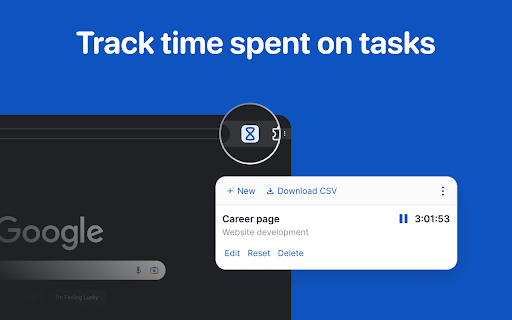
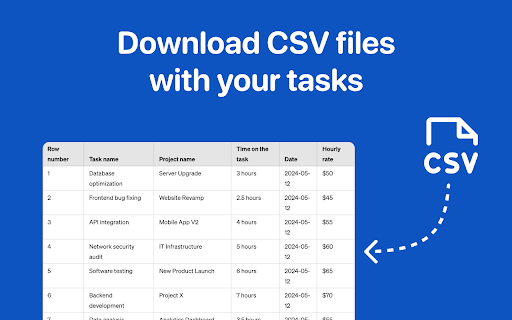
Employee Time Tracking app is a task management software and a time tracker. Calculate hours worked to manage tasks across projects Employee Time Tracking app is designed to help you streamline your workflow, manage tasks, and accurately calculate hours worked. This powerful software lets you log project names, oversee specific tasks, and even adjust timesheets, making it ideal for both office and remote staff tracking. With the tracking software, you can stay on top of your projects and ensure your employee tracking conveniently. 1️⃣ Download the Employee Time Tracking extension from the Chrome Web Store. 2️⃣ Open the extension and start a new task timer by typing the project name and task description. 3️⃣ Log your work, switch tasks, or pause the timer for breaks with a single click. 4️⃣ Export CSV files, perfect for Excel or Google Sheets. 5️⃣ Review your daily task tracker to monitor progress and ensure accurate time tracking. 🕒 Powerful Features for Effective Time Tracking ✅ Track individual and team work with ease using this comprehensive employee tracker app. ✅ Monitor remote employee and stay connected to your team from anywhere. ✅ The time tracker app lets you set goals, manage your workload, and empower productivity. ✅ Export timesheets in CSV format to share with colleagues or upload to payroll systems. ✅ Change logged entries to correct errors and keep your timesheets accurate. ✅ Enhance Your Management Manage tasks more effectively, keeping track of hours and milestones. This project time tracking app allows you to check the exact time spent on each task and project and maintain a record of past projects for better planning and accountability. 🛠️ A Must-Have for Team Collaboration Whether you work in an office or remotely, with the app you can manage teams and ensuring everyone stays on the same page. Use it to: Find out how many hours your team is working with an easy-to-use calculator. Organize and assign tasks with a simple interface of the staff tracker. Improve productivity by keeping everyone focused on their assigned work. Streamline communication and avoid overbooking team members. 💼 Ideal for Remote Workers and Freelancers Employee Time Tracking is a game-changer for freelancers and remote employees. ➤ Keep track of your working hours, even from a remote location. ➤ Manage multiple projects simultaneously without losing track of time. ➤ Provide clients with accurate timesheets to support your billing process. ➤ Use the timer to ensure you're allocating time efficiently across projects. ✨ Boost Your Productivity Get more done with the right tools. This extension offers: 🖥️ A clean, intuitive interface. 📝 Accurate record-keeping of the progress. 📃 Customizable task descriptions to match your workflow. 📅 Daily reports to help you stay organized and focused. 📈 Improve Accountability and Reporting Stay accountable and generate accurate reports. Use it to: Oversee and analyze your work patterns over time. Monitor your progress on ongoing projects and tasks. Generate timesheets for payroll and client invoicing. 🔧 Customization and Flexibility Employee Time Tracking offers flexibility and customization to fit your needs. You can: 🔴 Change the time for any task to correct mistakes. 🟠 Export timesheets in CSV format for easy sharing and analysis. 🟢 Adjust the calculator for work based on your preferences. ❓How do I start time tracking? ℹ️ Simply open the extension and start the timer for your current project. ❓Can I track different tasks at once? ℹ️ Yes, you can switch between tasks easily and maintain an accurate record. ❓How do I export my timesheets? ℹ️ Use the built-in export feature to download a CSV file for Excel or Google Sheets. ❓Does the extension work for remote employees? ℹ️ Yes, it's ideal for tracking staff working remotely or in the office. ❓Can I change the time logged? ℹ️ Absolutely. You can adjust the time entries to keep your records accurate. Ready to boost your productivity and keep track of your work hours? Download the employee time tracking extension now and experience the convenience and efficiency of this software. Whether you need a simple task timer or a comprehensive staff time tracker, this extension has you covered. Improve the productivity of the staff today!

Freelance Time Tracking
Boost efficiency with freelance time tracking, log your work sessions, and keep billing clear. ✨ Why our clients rely on time tracking software for freelancers? Freelancers often juggle several projects Without digital hours tracking, many lose accuracy when invoicing Using hours recorder eliminates this problem: each session is logged, ready to be exported into timesheet software ✅ Benefits include: Honest records of every work session No manual spreadsheets or guessing Automatic logs improve clients’ trust Seamless workflow with hours tracker ⚙️ How does it work? Install the extension from the Chrome Web Store Start a project or task Pause or finish it anytime Review logs and export them instantly This lightweight freelancer time tracking software is intuitive and made for freelancers 💡 Where does this tool help most? Hourly contracts requiring accuracy Fixed-price projects where effort matters Remote teams needing reliable session logs Long-term collaborations where it’s important to keep a consistent record of work progress Short creative tasks that can otherwise be forgotten or undervalued 📈 Extended benefits of freelance time tracking Freelancers gain more than just numbers with an hours tracker. Using timetrack tools ensures: A structured view of daily work Easier negotiations with clients Data for optimizing personal productivity Smooth communication in long-term projects 💎 Scenarios where an hours tracker is essential 📍 For freelance designers: Track sketches, revisions, and delivery phases. Log sessions with an hours tracker. Prove value to clients by exporting clear reports. 📍 For copywriters and editors: Monitor research and drafting sessions. Use timesheet software for reporting. Improve focus with automatically created logs. 📍 For programmers and developers: Capture coding hours automatically. Analyze effort with hours tracker. Share clear records with project managers. 📍 For consultants and coaches: Provide detailed billing through a freelance time tracker. Log preparation, calls, and follow-ups. Use hour tracking software for client reports. 🔧 Features that freelancers love Simple interface: start and stop in one click Works offline: the timetracker continues without internet Export options: connect with timesheet software or with freelancer time tracking app Reliable storage: all logs remain accessible Optimized design: lightweight, fast, and non-intrusive 🤝 Who benefits from hours tracker? 1️⃣ Independent freelancers managing multiple clients using a time tracking app for freelancers 2️⃣ Small agencies looking for lightweight time management software 3️⃣ Students managing study sessions 4️⃣ Contractors balancing multiple projects 5️⃣ Anyone needing a time recorder for personal or business tasks 🔍 Advanced ways to use hours tracker Monitor deep work sessions for maximum focus Keep a consistent daily work diary Analyze weekly productivity with time logging software Use time tracker for freelancers functions to stay on schedule Share logs with clients through detailed reports and export tools. Compare effort across different projects Export data to external tools for long-term archiving ❓ Extended FAQ Q: Can I manage non-billable minutes? A: Yes. This recorder logs everything, from admin tasks to core project work. Q: What if I forget to start the tracker? A: The hours tracker is built for simplicity, so you can easily add that session that you forgot to start. Q: Does it collect personal data? A: No. The hours tracker works locally and respects user privacy. Q: Can I see reports weekly or monthly? A: Yes. The timetrack extension allows custom reporting for different periods. 📊 Why upgrade from manual logs? Using notebooks or spreadsheets may work at first but creates risk of mistakes. A freelancer time tracker automates the process. With professional reporting tools, you get precise logs, better insights, and a professional image with clients. 🚀 Start now with hours tracker Install the extension, log sessions, and rely on a freelance hours tracker to simplify your workflow. Switch to time keeping software, enjoy clear reports from reporting apps, and enjoy the flexibility of using a time tracker for freelancer. From timetracker tools to timesheet software, every feature helps freelancers gain accuracy, trust, and control. Try the freelance time tracking software extension today and experience clarity in your daily workflow.

Task & Time Tracker Management Tool – Track, Analyze & Manage Work
Track tasks, manage time, and boost productivity effortlessly. Stay organized & optimize your workflow with smart time tracker! Task Tracker Pro: Revolutionizing Time Management and Productivity In today's fast-paced world, effective time management is the key to success in both personal and professional spheres. Task Tracker Pro is not just another time management tool; it's a comprehensive productivity ecosystem designed to help you take control of your time, boost your efficiency, and achieve your goals. Whether you're a busy professional, a student juggling multiple courses, or an entrepreneur wearing many hats, Task Tracker Pro is your ultimate companion in the quest for peak productivity. 1. Intuitive Task Tracking: Easily add, manage, and organize your tasks with our user-friendly interface. Each task can be assigned a name and a detailed description, allowing you to capture all necessary information at a glance. 2. Built-in Timer: Start and stop timers for each task with a single click. This feature enables you to accurately track the time spent on different activities, helping you understand your work patterns and identify areas for improvement. 3. Hourly Notifications: Stay aware of your time investment with hourly notifications. This gentle reminder system helps you maintain focus and make informed decisions about task switching or taking breaks. 4. Data Export: Export your task and time data to CSV format, compatible with Excel and other spreadsheet applications. This feature facilitates in-depth analysis of your productivity trends and supports data-driven decision-making. 5. Persistent Storage: Your tasks and time data are securely stored, ensuring that you never lose track of your progress, even if you close your browser or restart your computer. 6. Clean, Modern Interface: With a sleek, intuitive design, Task Tracker Pro is not only functional but also a pleasure to use. The visually appealing interface helps reduce cognitive load, allowing you to focus on what truly matters - your tasks. 1. Time Awareness: By tracking time spent on tasks, you gain a clear understanding of how you're allocating your hours. This awareness is the first step towards optimizing your time usage. 2. Focus Enhancement: The timer feature creates a sense of urgency and helps you stay focused on the task at hand. By breaking your work into timed sessions, you can leverage techniques like the Pomodoro method to maintain high levels of concentration. 3. Priority Management: As you track tasks and their durations, you'll be better equipped to prioritize your workload. You can identify which tasks are taking up most of your time and adjust your schedule accordingly. 4. Progress Tracking: With Task Tracker Pro, you can easily monitor your progress over time. This not only provides a sense of accomplishment but also helps in setting realistic goals for future tasks. 5. Work-Life Balance: By having a clear picture of your time allocation, you can ensure a healthy balance between work and personal life. The hourly notifications serve as gentle reminders to take breaks and avoid burnout. 6. Data-Driven Improvements: The ability to export and analyze your task data allows you to make informed decisions about your work habits. You can identify patterns, optimize your routines, and continuously improve your productivity. 1. Software Development: For software developers, Task Tracker Pro is an invaluable tool for managing complex projects. Use it to track time spent on coding, debugging, and testing. The detailed task descriptions can be used to note specific issues or implementation details. How to use: - Create separate tasks for different features or modules - Use the timer to track coding sessions and ensure balanced work on various aspects of the project - Utilize the description field to note down important code snippets or debugging steps - Export data to analyze time spent on different phases of development 2. Marketing and Advertising: Marketers can use Task Tracker Pro to manage multiple campaigns and client projects simultaneously. Track time spent on content creation, social media management, and campaign analysis. How to use: - Set up tasks for each client or campaign - Use timers to track time spent on creative processes vs. analytical tasks - Leverage hourly notifications to ensure balanced attention to different clients - Export data to provide accurate time reports to clients or for internal billing purposes 3. Education: Teachers and educators can utilize Task Tracker Pro to balance lesson planning, grading, and administrative tasks. Students can use it to manage study sessions and assignment work. How to use for teachers: - Create tasks for lesson planning, grading, and administrative work - Use timers to ensure efficient use of prep time - Track time spent on different subjects or classes to ensure balanced attention How to use for students: - Set up tasks for different subjects or assignments - Use timers to implement effective study techniques like the Pomodoro method - Track time spent on various subjects to ensure balanced study habits 4. Healthcare: Medical professionals can use Task Tracker Pro to manage patient consultations, research, and administrative tasks. It's particularly useful for maintaining work-life balance in a demanding field. How to use: - Create tasks for patient consultations, research, and paperwork - Use timers to ensure appropriate time allocation for each patient - Utilize hourly notifications as reminders for breaks or shift changes - Export data to analyze time spent on direct patient care vs. administrative tasks 5. Legal Profession: Lawyers and legal professionals can benefit from Task Tracker Pro in managing case work, client meetings, and billable hours. How to use: - Set up tasks for different cases or clients - Use timers to accurately track billable hours - Leverage the description field to note important case details or action items - Export data for precise client billing and internal productivity analysis 6. Freelancing and Creative Professions: Freelancers in various fields (writing, design, consulting) can use Task Tracker Pro to manage multiple projects and clients efficiently. How to use: - Create tasks for different clients or projects - Use timers to track billable hours and ensure profitability - Utilize hourly notifications to maintain a healthy work-life balance - Export data for accurate invoicing and project management 7. Project Management: Project managers across industries can leverage Task Tracker Pro to oversee multiple projects, team members, and deadlines. How to use: - Set up tasks for different projects or project phases - Use timers to track time spent on various aspects of project management (planning, execution, monitoring) - Utilize the description field to note key project updates or action items - Export data to analyze time allocation across projects and optimize resource distribution 8. Customer Service: Customer service representatives can use Task Tracker Pro to manage call times, follow-ups, and administrative tasks. How to use: - Create tasks for different types of customer interactions (calls, emails, chat) - Use timers to ensure efficient call handling - Leverage hourly notifications to manage break times effectively - Export data to analyze performance metrics and identify areas for improvement 9. Human Resources: HR professionals can benefit from Task Tracker Pro in managing recruitment processes, employee relations, and administrative tasks. How to use: - Set up tasks for different HR functions (recruitment, training, employee relations) - Use timers to track time spent on various HR activities - Utilize the description field to note important details about candidates or employee cases - Export data to analyze time allocation across different HR functions and optimize processes 10. Finance and Accounting: Financial professionals can use Task Tracker Pro to manage various accounting tasks, audits, and client consultations. How to use: - Create tasks for different financial processes (bookkeeping, auditing, tax preparation) - Use timers to track time spent on various financial tasks - Leverage hourly notifications to ensure timely completion of time-sensitive financial processes - Export data for accurate client billing and internal productivity analysis 11. Research and Academia: Researchers and academics can utilize Task Tracker Pro to manage research projects, writing tasks, and administrative responsibilities. How to use: - Set up tasks for different research projects or paper writing stages - Use timers to implement focused work sessions and avoid burnout - Utilize the description field to note important research findings or references - Export data to analyze time spent on various academic activities and optimize research productivity 12. Retail Management: Retail managers can leverage Task Tracker Pro to balance various responsibilities including inventory management, staff scheduling, and customer service. How to use: - Create tasks for different retail management functions - Use timers to ensure balanced attention to various aspects of store operations - Utilize hourly notifications to manage shift changes and break times - Export data to analyze time allocation across different retail management tasks and optimize store operations 13. Real Estate: Real estate agents can use Task Tracker Pro to manage property viewings, client communications, and paperwork. How to use: - Set up tasks for different properties or clients - Use timers to track time spent on property viewings, client meetings, and administrative tasks - Leverage the description field to note important property details or client preferences - Export data to analyze time allocation and optimize the sales process 14. Non-Profit Management: Non-profit managers can benefit from Task Tracker Pro in balancing program management, fundraising efforts, and volunteer coordination. How to use: - Create tasks for different programs, fundraising campaigns, or administrative responsibilities - Use timers to ensure balanced attention to various non-profit activities - Utilize hourly notifications to manage volunteer shifts effectively - Export data to provide transparency in time allocation for grant reporting or board meetings 15. Journalism and Media: Journalists and media professionals can use Task Tracker Pro to manage research, interviews, writing, and editing tasks. How to use: - Set up tasks for different stories or projects - Use timers to track time spent on research, interviews, writing, and editing - Leverage the description field to note important quotes or story angles - Export data to analyze time spent on different stages of the journalistic process and optimize workflow 16. Hospitality Management: Managers in the hospitality industry can utilize Task Tracker Pro to balance guest services, staff management, and administrative tasks. How to use: - Create tasks for different aspects of hospitality management (guest services, housekeeping, food and beverage) - Use timers to ensure efficient handling of guest requests and operational tasks - Utilize hourly notifications to manage shift changes and peak hours effectively - Export data to analyze time allocation across different hospitality functions and optimize service delivery 17. Event Planning: Event planners can leverage Task Tracker Pro to manage multiple events, vendor communications, and client meetings. How to use: - Set up tasks for different events or event planning stages - Use timers to track time spent on various planning activities - Utilize the description field to note important event details or vendor information - Export data to provide accurate client billing and analyze time allocation for different types of events 18. Construction Management: Construction managers can use Task Tracker Pro to oversee multiple projects, coordinate with subcontractors, and manage timelines. How to use: - Create tasks for different construction projects or phases - Use timers to track time spent on site visits, planning, and administrative tasks - Leverage hourly notifications to manage work shifts and ensure project timelines - Export data to analyze time allocation across projects and optimize resource distribution 19. Public Relations: PR professionals can benefit from Task Tracker Pro in managing media relations, content creation, and client communications. How to use: - Set up tasks for different PR campaigns or clients - Use timers to track time spent on writing press releases, media outreach, and client meetings - Utilize the description field to note important media contacts or campaign ideas - Export data to provide accurate client reporting and analyze campaign efficiency 20. Graphic Design: Graphic designers can use Task Tracker Pro to manage multiple design projects, client revisions, and administrative tasks. How to use: - Create tasks for different design projects or clients - Use timers to track time spent on conceptualization, design execution, and revisions - Leverage hourly notifications to maintain a healthy work-life balance in a creative field - Export data for accurate client billing and to analyze time spent on different design phases Maximizing Productivity with Task Tracker Pro: 1. Set Clear Goals: Before you start using Task Tracker Pro, take some time to define your goals. What do you want to achieve in your work or personal life? Having clear objectives will help you create meaningful tasks and prioritize effectively. 2. Break Down Large Projects: When faced with a big project, break it down into smaller, manageable tasks. This approach makes the project less daunting and allows you to track progress more effectively using Task Tracker Pro. 3. Use Descriptive Task Names: When creating tasks in Task Tracker Pro, use clear and descriptive names. Instead of "Write report," try "Draft Q2 Sales Report Introduction." This clarity helps you quickly understand what needs to be done when you review your task list. 4. Leverage the Description Field: Make full use of the task description field in Task Tracker Pro. Use it to note important details, subtasks, or resources needed for the task. This reduces the need to switch between different apps or documents while working. 5. Implement Time-Blocking: Use Task Tracker Pro to implement time-blocking techniques. Allocate specific time slots for different types of tasks. For example, you might block out 9AM-11AM for focused work on high-priority tasks, and 2PM-3PM for responding to emails. 6. Regular Review and Analysis: Set aside time each week to review your Task Tracker Pro data. Look for patterns in how you're spending your time. Are you allocating enough time to high-priority tasks? Are certain types of tasks taking longer than expected? Use these insights to adjust your work habits and improve your productivity. 7. Combine with Productivity Techniques: Task Tracker Pro can be used in conjunction with popular productivity techniques. For example: - Pomodoro Technique: Use the timer feature to work in 25-minute focused sessions, followed by short breaks.

Time Tracker
An easy to use time tracker for keeping track of time. Tracker with sound notification and different settings. Maximize your productivity with our time tracker! It's designed to help you understand how to use time management in your life, optimize your daily activities, and boost your efficiency. Whether you're a professional looking to manage deadlines, a student aiming to balance study, play, or someone interested in personal productivity, this tool is your perfect companion. Why Choose Our Extension? ✅ Efficiency. ✅ Nice to view ✅ Dark mode ✅ Simplicity ✅ Projects rename capability Why should I track my time? Tracking extensions involves measuring and recording the time spent on tasks or projects. This practice is essential in various fields, such as project management, employee management, personal productivity enhancement. With the right project time-tracking program, users can gain insights into resources spent, identify areas for improvement, and ensure accurate billing or payroll. Some online time tracker software use cases: 👉🏻 Case Study: A tech company implemented a time tracker software across its development teams and saw a 25% reduction in project overruns, a 40% improvement in work estimation accuracy. 👉🏻 User Testimonials: 85% of users from various industries report that time-tracking tools have significantly eased the administrative burden of manual hours recording. As you may see - the projects tracking program makes sense. Why our tracker app? Improving efficiency starts with a simple software solution. Our project tracking extension doesn't just help you get things done; it changes how you think about the hours you spend on a project. Find out where your time is being spent using simple time tracker data. Exceptional Features: ☑️ Easy tracking: Toggle easy ON/OFF to track how long you work on projects - offering a hassle-free approach to time management. ☑️ Visual analytics: Nice view, easy interface to make your management with the project tracker easy and comfortable. ☑️ Project setting: Set custom goals for specific projects and receive the sum of the total spent on them. It keeps you aligned with your productivity objectives! ☑️ Privacy-Focused: Your data stays private. All data is stored locally on your machine and never shared with third parties. ☑️ Intuitive interface: Designed for ease of use, the interface is straightforward and allows you to start managing your efficiently without a learning curve. ☑️ Pause/Resume Feature: You can control the tracker extension by pausing it during breaks and resuming it when you return, ensuring your stats are always accurate. Added Benefits: 🔸 Enhance Motivation: See tangible progress as you reduce non-productive indexes, providing a powerful motivational boost. 🔸 Flexibility: Adapt the extension to suit your needs through customizable settings and preferences. 🔸 Effortless Setup: Installation is straightforward and user-friendly, getting you up, running quickly. Getting Started is Simple: 1️⃣ Install the extension: Search for our Time Tracker in the Chrome Web Store and add it to your browser. 2️⃣ Choose the project to trace: Click on the extension icon to tailor your tracking settings, define the projects you work with, and project time tracking will run. 3️⃣ Accuracy: Regularly check whether the project time tracker tracks the project you are currently working on. Make the time track extension your partner. Time management was not so easy before. Transform how you manage your efficiency in projects, work, and study. Say goodbye to untracked hours, welcome to a more organized, purposeful browsing experience. Embrace the journey towards a more productive you!

Simple Time Tracker
Start tracking it right now with Simple Time Tracker. No need any registration, permissions or unnecessary features. How much time spend on tasks? Start tracking it right now with Simple Time Tracker. Tired of complicated time tracking applications? No need any registration, permissions or unnecessary features. Add a task, start and stop the timer. And that's it 🎉 - Fix reset tasks - Added dynamic ordering and sort by option - Added Migration WebSQL to IndexedDB (Origin Trials for WebSQL) and will be removed v3. Up to Chrome 123 (ends with the rollout of next Chrome release), no later than 29 May 2024
