
fonflmjnjbkigocpoommgmhljdpljain


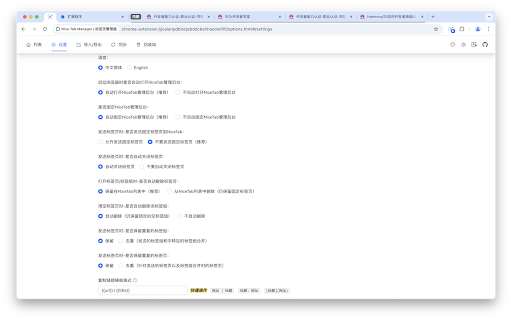


开源的标签页管理器,OneTab、Toby、SessionBuddy 等扩展的升级替代品,功能丰富易用 | A nice, convenient, powerful tab manager (open source) - 方便快捷,功能丰富,开源的标签页管理工具 - 本工具是 OneTab 扩展的升级替代品,并不管理浏览器收藏夹 - 支持分类、标签组、标签页管理,包括一键收集保存、恢复、星标、锁定、增删改查、拖拽排序等功能。 - 分类支持展开/收起,支持创建分类和标签组,方便移动其他标签组/标签页到新分类/新标签组。 - 支持多种插件格式的 **导入/导出** 功能,支持导出到本地。目前支持 `NiceTab`、`OneTab` 格式的交叉导入导出(比如:可选择导入OneTab格式并导出为NiceTab格式;或者将NiceTab格式导出为OneTab格式),后续可根据需求增加其他插件格式的导入导出功能。 - 支持**远程同步**,您可根据需求将标签页同步到自己的 github 和 gitee 账号,只需要配置自己的 access token 即可,(注意 token 权限只勾选 gists 操作)。 - 支持手动切换**亮色/暗黑主题**。 - 支持**皮肤主题切换**,目前暂时设置了有限的几种主题色提供选择,后续可根据需求扩大选择范围。 - 支持**多语言**,目前暂时支持中英文切换 (非地道英语,期待英语大佬帮忙校正)。 - 支持**回收站功能**,回收站中的标签页可还原到标签列表或者彻底删除。标签列表和回收站支持根据分类和标签组归类合并,方便管理。 - 支持设置 **发送标签页时-是否自动关闭标签页**。 - 支持设置 **发送标签页时-是否打开NiceTab管理后台**。 - 支持设置 **发送标签页时-是否发送固定标签页到NiceTab**。 - 支持设置 **恢复标签页/标签组时-是否保留或删除标签页/标签组**。 - 支持设置 **是否固定NiceTab管理后台**。 - 支持设置 **删除标签页时, 是否自动删除空标签组** - 支持设置 **发送标签组/标签页时是否去重** - 支持标签页手动去重。 - 支持一键发送 所有标签页、当前标签页、其他标签页、左侧标签页、右侧标签页。 - 支持发送新版浏览器自带的标签组到NiceTab, 支持以标签组形式打开到浏览器。 - 支持快捷键(目前只添加了分类、标签组的上下移动排序的快捷键操作,后续可根据需求添加其他功能的快捷键操作)。 - 标签页支持自定义编辑修改标题和url。 - 添加固定置顶的特殊分类-**中转站**,发送标签页/标签组时自动收集到中转站中。 - 添加标签组按字母排序功能。 - 支持一键复制标签组所有标签页的链接, 复制链接支持自定义模板。 - 支持标签页和url搜索。

TheTab - OneTab Alternative | Tab Manager
Frustrated with OneTab changes? Save all tabs with one click, undo mistakes, stay private. Free forever. No account. Works offline. Save all tabs instantly with one click. The modern OneTab alternative with undo, dark mode, side panel, and privacy-first design. Free forever, no account needed. Frustrated with OneTab's recent changes? TheTab brings back the simplicity you loved: the classic one-click tab saving experience without the bloat. Turn tab management into an achievement-hunting adventure. Earn XP, unlock 19 achievements, track streaks, and level up through 10 progression tiers while freeing up gigabytes of RAM. The only tab manager that makes productivity rewarding. - Save all open tabs with one click (Ctrl+Shift+1) - Automatic grouping by date and browser tab groups - Undo tab deletion instantly (feature OneTab still doesn't have!) - Restore tabs individually or all at once - Quick access without leaving your current page (Ctrl+Shift+2) - View and manage saved tabs in a convenient sidebar - Drag-and-drop organization while browsing - Toggle open/close instantly with keyboard shortcut - Powerful search across all saved tabs and history - Find any tab in seconds with keyword filtering - Type "tt" in the address bar to search without leaving your page - Unlimited storage: save thousands of tabs without errors - Export/import tab lists as JSON backup - See how your browsing connects pages together - Track which websites you use most with domain analytics - Activity charts and heatmaps show productivity patterns - See exactly how much RAM you've saved (real calculations) - Automatic tracking of recently closed tabs - Restore tabs closed weeks ago with one click - Choose retention period (1–30 days) - Visual timeline shows your browsing path - Earn XP points every time you save tabs - Unlock 10 levels and 19 achievements - Build daily streaks to stay consistent - Track your tab-saving milestones - 100% local storage: all tab data stays on your device - No cloud sync, no account required - Anonymous analytics only (PostHog) — no personal data, no tab URLs, no browsing history is ever collected - GDPR-friendly: your tabs, your business - Lightweight and fast: works even with 100+ tabs - Works 100% offline: no internet required - Side panel for quick tab access (Ctrl+Shift+2) - Dark mode support with instant toggle - Clean, intuitive interface with multi-page navigation - Statistics dashboard with 30-day activity charts and weekly heatmaps - Domain analytics: track browsing patterns across unique websites - Folders, tags, and starred favorites for advanced organization - Available in 27 languages: Arabic, Bengali, Czech, Danish, German, English, Spanish, Finnish, French, Hebrew, Hindi, Indonesian, Italian, Japanese, Korean, Dutch, Norwegian, Polish, Portuguese, Romanian, Russian, Swedish, Thai, Turkish, Ukrainian, Vietnamese, Chinese Chrome may warn that TheTab can "read your browsing history." Here's why: The "tabs" permission lets TheTab read tab titles and URLs so it can save them — this is the core function. Chrome categorizes any access to tab URLs as "browsing history," but TheTab only reads your tabs when you click Save. It does not monitor or record your browsing activity. - tabs — Read tab titles/URLs to save them, close tabs after saving - activeTab — Access only the focused tab during right-click actions - storage — Persist saved tab groups in local browser storage - unlimitedStorage — Save thousands of tabs without hitting the 10 MB limit - tabGroups — Preserve tab group names and colors when saving/restoring - sidePanel — Provide the side panel interface (Ctrl+Shift+2) - contextMenus — Add 7 right-click save options - alarms — Schedule background tasks (auto-cleanup, statistics) - notifications — Notify when tabs are saved successfully - bookmarks — Enable "Save as bookmarks" export feature Anonymous analytics: TheTab uses PostHog to track anonymous feature usage (button clicks, extension version, browser language). No tab URLs, no personal information, no session recordings, no cookies. Full details: [thetabextension.com/privacy-policy](http://thetabextension.com/privacy-policy) 🆚 Better Than the Competition - Modern UI with dark mode - Undo button (OneTab still doesn't have this!) - Side panel for quick access - Gamification: 10 levels, 19 achievements, streaks - Statistics dashboard with domain analytics - Recently closed tab tracking (1–30 day retention) - 27 languages (vs 5) - Unlimited storage - Active development - Free forever (no $60/year paywall) - Side panel access - Unlimited storage - Gamification system - Advanced search with address bar integration - Domain analytics - 27 languages - Recently closed tab tracking - Faster and cleaner interface - More intuitive navigation - Side panel - Gamification (10 levels, 19 achievements) - Streak tracking - Tab history visualization - Browsing insights 🎯 Perfect For - Researchers managing dozens of reference tabs - Developers juggling documentation and Stack Overflow - Students organizing study materials and research - Professionals managing multiple projects - Anyone overwhelmed by tab clutter - Former OneTab users seeking a better alternative - Data enthusiasts who love tracking productivity metrics - Users who need tab recovery beyond browser's basic "recently closed" - Privacy advocates seeking full offline functionality - Multilingual users needing native support (27 languages) - Power users who want quick side panel access while working Works seamlessly on Chrome, Brave, Edge, Opera, and other Chromium browsers. Also available on Firefox with dedicated builds and native sidebar support. 1. Install TheTab 2. Click the icon (or press Ctrl+Shift+1) 3. All tabs saved instantly 4. Open side panel anytime (Ctrl+Shift+2) 5. Restore anytime with one click Unlock achievements, track statistics, and level up your productivity. All features available immediately — no premium upgrade, no setup, no account, no hassle.

Tabli
Tabli is a free tab manager for Google Chrome that provides fast switching between windows and tabs and the ability to save and restore windows. Tabli runs entirely as an extension in your browser. Tabli does not make any outbound data connections and does not send any data whatsoever to any external application, extension or cloud service. You can learn more about Tabli on the Tabli web site (under "Additional Information")

Tabbiy - Auto Group & Sidebar Tab Manager
The ultimate sidebar tab manager! Auto-group, customize titles, save, hibernate & switch tabs fast for a clutter-free browser. 🚀 Tabbiy: The Ultimate Sidebar Tab Manager & Auto-Organizer Tabbiy is an elegant sidebar tab manager designed to end the headache of having too many tabs. By providing a powerful vertical tab list and auto-grouping features, Tabbiy turns your cluttered browser into an organized, high-performance workspace. Whether you want to reduce Chrome memory usage or find a specific page in seconds, Tabbiy is the productivity tool you’ve been looking for. ✅ End Tab Clutter: Transform a messy horizontal tab bar into a clean, searchable sidepanel list. ✅ Smart Auto-Grouping: Automatically group tabs by domain or custom rules to keep related tasks together. ✅ Save Memory & CPU: Hibernate tabs or move idle pages to a "Staging List" to drastically boost browser speed. ✅ Custom Tab Titles: Rename any tab to eliminate vague labels and identify your content at a glance. ✅ Fast Switching: Use shortcuts to jump between current and recent tabs instantly, perfect for cross-page comparison. ✅ Pro Data Portability: Export your tab lists and titles in JSON, HTML, CSV, or Markdown (Pro). 1️⃣ Sidepanel Management (ALT+D): A dedicated vertical interface for grouping, saving, hibernating, and drag-and-drop reordering. 2️⃣ Auto-Grouping: One click to categorize tabs by domain. Pro unlocks 3 sets of custom rules, fixed colors, and unlimited groups. 3️⃣ Tab Hibernation: Suspend active tabs to free up RAM and quickly resume access whenever you need them again. 4️⃣ Tab Staging (Saving): Move temporarily unused tabs to a staging list to clear your interface while maximizing memory release. 5️⃣ Rename Tabs: Easily edit any tab title directly from the list to clear up vague labels. Your custom titles are saved automatically for quick identification. 6️⃣ Multi-Format Export: Free JSON export; Pro version unlocks CSV, HTML, and Markdown for professional backups. 7️⃣ Quick Switch (ALT+E): A lightning-fast shortcut to toggle between your current page and the last opened one. 8️⃣ Dark & Light Themes: Beautifully designed UI that matches your system theme for a comfortable visual experience. 💬 How do I disable auto-grouping? 🌲 Simply click the "Auto" button at the bottom of the sidepanel to turn off grouping and clear all current groups. 💬 How can I group tabs more effectively? 🌴 Go to "Settings" -> "Grouping Rules" to define custom patterns, then click "Apply" to see the magic happen. 💬 Does it support collapsing groups? 🌵 Currently, we focus on a "visible at a glance" design to help you find tabs faster without extra clicks. 💬 Can I use individual features without Auto-Grouping? 🍀 Yes! All features—sidepanel, hibernation, saving, and renaming—work independently to fit your specific workflow. ✅ Added one-click button to close duplicate tabs in the toolbar. ✅ Added an option to view all custom grouping rules in the saved list. ✅ Configure 3 sets of auto-grouping rules and switch freely. Pro.feat ✅ Configure fixed colors for auto-groups, including renaming and recoloring the "Others" group. Pro.feat ✅ Create an unlimited number of custom groups. Pro.feat ✅ Support import/export of all saved links and edited titles; JSON available in free version, and HTML, CSV, Markdown unlocked in Pro. Pro.feat ✅ Optimized:Added skeleton screen for the first screen of the sidebar. ✅ Fixed: When auto-grouping and default selection are enabled, changing the current tab URL may incorrectly trigger the default selection. 🍺 Productivity starts with a clean browser. Tired of messy tabs slowing you down? Install Tabbiy today and refresh your browsing experience! 📨 Questions or Feedback? We’d love to hear from you: support@tabbiy.top

Tabme Mini — Tab & Bookmark Manager | Save, Organize & Sync Tabs
The easiest way to manage tabs, bookmarks, and sticky notes – all in one Chrome extension Save open tabs instantly with drag-and-drop, organize them into color-coded folders, and find anything with fast search. No registration needed! Try as a guest for free with an unlimited number of saved bookmarks. 👉️ WANT TABME AS YOUR NEW TAB PAGE? Alternatively, get the full Tabme experience by setting it as your new tab page: https://chromewebstore.google.com/detail/tabme-%E2%80%94-organize-tabs-and/jnhiookaaldadiimlgncedhkpmhlmmip 👆 Save Tabs With Drag-and-Drop Drag tabs and tab groups from the sidebar into any folder to save. 📦 Stash & Restore Tab Sessions Save all open tabs into a folder with one click. Reopen an entire session just as easily. 🗂 Spaces — Organize by Project or Topic (Pro) Create separate workspaces for different projects. Share spaces with your team. 📱 Sync Across Devices (Pro) Access your saved tabs from any device. No extension needed — use https://gettabme.com/app/ 📐 Vertical Tabs & Side Panel Manage your tabs in the Chrome Side Panel for a vertical Tabs (like in Arc browser) experience. 🌈 Color Coding & Visual Layout Categorize folders with colors and arrange them spatially for quick visual access. 🧹 Close Duplicate Tabs Detect and close duplicate tabs with a single click. 🌙 Dark Mode Switch to dark mode for a comfortable, easy-on-the-eyes interface whenever you prefer it. ⌨️ Keyboard Shortcuts Navigate and manage everything without touching the mouse. ✍️ Sticky Notes Jot down ideas and to-dos right alongside your bookmarks. 📥 Import & Export Import from Chrome bookmarks, HTML, TXT, CSV, or JSON files. Export anytime for backup or migration. WHO IS TABME FOR? • Managers organizing project docs and references • Researchers managing tabs across multiple topics • Students collecting study materials • Anyone drowning in open tabs • Teams sharing curated link collections (Pro) Tabme 100% privacy guarantee means: 1. We respect your privacy. 2. Any usage analytics are fully anonymous. 3. We never share your data with anyone. • Pin the Tabme Mini icon in the Chrome toolbar for quick access • Click the icon to open Tabme in a new tab • Drag tabs from the sidebar into folders to save and organize them
