
fmkhphcddlhkmggaldkibecjmgpkbpdl

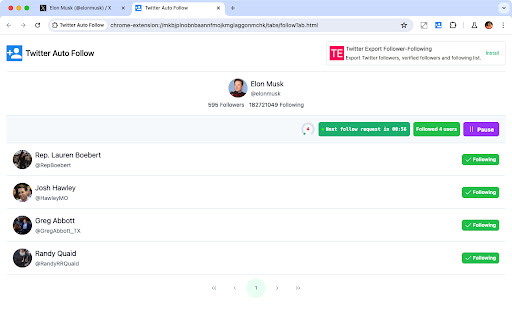
Grow Twitter/X Followers with auto Follow-Unfollow growth hack. Automatically follow Twitter accounts and build a high-quality audience of real and organic followers for your business. Twitter Auto Follow-Unfollow is more than a regular auto follow extension. It also unfollows accounts you followed before, so your following number stays reasonable. 👨🏻💻 Features ✓ Automatically follow the Followers of a Twitter account ✓ Automatically follow the Following of a Twitter account ✓ Automatically unfollow users who do not follow you ✓ Automatically unfollow users who you are following ✓ Keep a whitelist of usernames to not be unfollowed ✓ The process is being executed in the background ✓ A well-developed strategy to bypass restrictions ✓ Automatically retry after an error occurs 📌 Strategies to Prevent Being Limited - For every 6 users followed, take a 10 minutes cooldown period - You can customize the number of people and the number of minutes for cooldown in the settings. 🩹 Intelligent error handling - If a request error occurs, pause for 30 minutes before retrying - You can customize the number of minutes for pause in the settings 🟢 indicates the normal time interval for requests 🟠 indicates the cooldown period's time interval 🔴 indicates the time interval for request errors 📃 How to Start Following? - Enter the Twitter username or open the extension on the Twitter user’s profile, and the extension will automatically fill in the username - Select which List to Follow: Followers or Following - Click the 'Start Following' Button 📃 How to Start Unfollowing? - Switch to the second tab - Choose the type of unfollowing - Click the 'Start Unfollowing' button 📖❓ FAQ ❓Why can't we follow and unfollow an unlimited number of users? Unfortunately, Twitter has limits, and these limits vary from account to account. To prevent future lockouts or account suspension, we limit the processing time and the number of follows and unfollows. We recommend using the extension sparingly to ensure its continuous functionality. 📬 Contact If you have any questions or suggestions to improve the extension, please feel free to contact us at jfl913@gmail.com. 📃 Terms You can automatically follow/unfollow 6 users every day. Upgrade to Pro, you can follow/unfollow 80 users per day. 🔒 Data Privacy All the data you process stays on your local computer and never goes through our servers. ℹ️ Disclaimer Twitter/X is a trademark of Twitter/X, LLC. This extension is not affiliated with, endorsed by, sponsored by, or otherwise related to Twitter/X, LLC or any of its affiliates or subsidiaries.

Superpowers for X
Mass follow, mass unfollow, mass like, mass unlike, mass retweet and mass unretweet on X with powerful options. Mass follow, mass unfollow, mass like, mass unlike, mass retweet and mass unretweet on X with powerful options. = MASS FOLLOW = It works on the followers, following, likes, retweets, list members/subscribers and search view. = MASS UNFOLLOW = It works on your following view. = MASS LIKE/RETWEET = It works on the list and search view. It also works with the advanced search and saved searches. = MASS UNLIKE = It works on your likes view. = MASS UNRETWEET = It works on your profile view. = AUTOPILOT = Performs a series of actions and repeats them after a certain pause. = CUSTOMIZE WITH POWERFUL OPTIONS = At the top right click the icon (bird) and then click Options. Note: You need to add the extension first. = CAUTION = Please carefully read the X rules and best practices. Please find FAQ and Changelog on the website https://www.clemensteichmann.com/superpowers-for-twitter Superpowers for X is free to use. You can also buy the PRO version (https://www.clemensteichmann.com/superpowers-for-twitter/pro). Please activate your PRO on the extension options page.

X (Twitter) Mass Unfollow Pro
Take control of your X (Twitter) following — select users to unfollow 👥❌ or select all to clean your entire list in one click 🧹🚀. 🌟 Advantages of the Extension ⏱️ Save Time on X (Twitter) – Quickly manage your X (Twitter) followings without manual effort. 🖱️ User-Friendly Interface – A simple and intuitive design made specifically for X (Twitter). ✅ Customizable Selection – Select all accounts or only the ones you wish to unfollow. 🔄 Keep or Unfollow Accounts as You Choose – The extension allows you to select all accounts or individual ones to unfollow. 🌟 Unique Features – Exclusive functionality designed for X (Twitter) users to manage their following list. 🎁 Free Trial – Try it free with a limit of 5 unfollows! 🛠️ How the Extension Works on X (Twitter) 📥 Install the Extension – Download it directly from the Chrome Web Store. 🔧 Activate the Extension – Click the extension icon in your browser toolbar to begin. 🧑🤝🧑 Navigate to the X (Twitter) Following Page – If you're not already on your following list, use the "Go to Following List Page" button in the extension popup. ✅ Add Checkboxes to X (Twitter) Following List – Click "Add Checkboxes to Profile" to enable selection on your following list. 🔍 Make Your Selection – Select all profiles or pick specific individuals by checking the boxes next to their names. ❌ Unfollow Selected X (Twitter) Accounts – After making your selection, click "Unfollow Selected Profile" to unfollow the chosen accounts. ⚠️ Note: This extension is not authorized by X (Twitter).

Twitter Auto Follower - Auto Follow / Unfollow
Automatically follow and unfollow Twitter users to rapidly grow your follower count. Automatically follow and unfollow users to optimize your social media engagement. Our tool helps you connect with relevant users by automatically following those who match your interests and unfollowing those who do not engage or follow back. Streamline your Twitter management, ensuring you build a meaningful and active follower base. Maximize your social media strategy with ease and watch your online presence grow. 👨🏻💻 Features ✓ Automatically follow the followers of a Twitter account. ✓ Automatically follow the following of a Twitter account. ✓ Automatically unfollow users who do not follow you back ✓ Automatically unfollow users who you are following. ✓ Automatically retry when an error occurs. ✓ An Intelligent strategy that allows you to customize the pause time prevents being banned on Twitter. 📃 How to start following? Choose the "Follow" tab Select the follow type and enter the value Click 'Start Following' 📃 How to start unfollowing? Choose the "Unfollow" tab Select the unfollow type Click 'Start Unfollowing' We also offer 'more tools' in the plugin, which can recommend several powerful plugins for you. 🔒 Data Privacy Your data privacy is paramount. All data processing occurs on your local machine; it never transits through our servers, ensuring no one else has access to your collected data. ⚠️ Disclaimer TWITTER and X are trademarks of X Corp. Twitter Auto Follower – Auto Follow / Unfollow is an independent tool and is not affiliated with, endorsed, sponsored, or otherwise connected to X Corp., Twitter, Inc., or any of their affiliates or subsidiaries.

TwFollow - Twitter Mass Follow Tool
✓ Auto Follow for TW. ✓ Auto Unfollow and Auto Like a tweet. ✓ by user's followers / following. ✓ by tweet retweet, quotes, replies/comments and likers. ✓ by specific user list and import from CSV file. v1.5.0 CHANGE LOG - Fix the init issue v1.4.0 CHANGE LOG - Fix the fetch replies and quotes issue v1.2.1 CHANGE LOG - Fix the 404 error issue # FOLLOW SETTINGS - Skip protected Profiles - Skip accounts without image - Skip profiles without bio - Skip accounts you ever followed, only applies to profiles followed with this extension - Skip profiles that already follow you - Black list, Profiles you will never follow # UNFOLLOW SETTINGS - Skip profiles that follow you - Skip verified accounts - Only unfollow profiles previously followed with this extension - White list, Accounts you will never unfollow Kindly do not use for SPAMMING which is Twitter strictly prohibited. https://twmassfollow.extensionsfox.com/#faq If you have any questions, please keep in touch via help@extensionsfox.com. All data is processed in your local computer, never passing through our web server, and no one knows what you exported.
