
fmjhiebpgmabjblophfkehpciiiacgpa
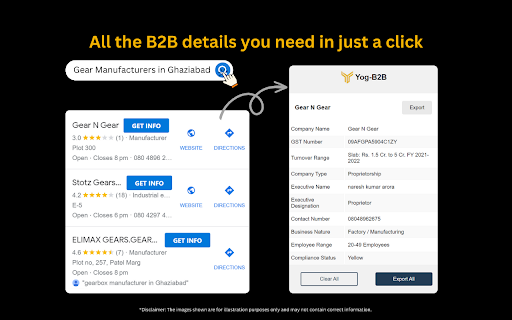

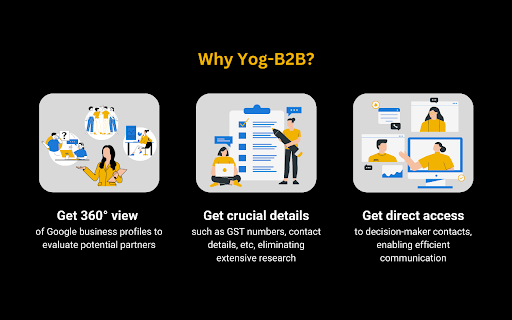

Yog B2B gives Information about businesses on Google maps.It provides GST and turnover details of a business. With Yog B2B, you can scale up your business by doing the right prospecting and lead generation. 🚀🚀 Install and start growing your business today! 📈📈 Yog B2B helps you know more details about the businesses on Google maps so that you can evaluate your prospects thoroughly. It helps you enrich your business leads with the following information: - Company Name - GST Number ✅✅ - Turnover 🪙🪙 - Employee Count - Phone Numbers 📱📱 - Email IDs 📧📧 - Website - Social Media Links The tool gives you option to either extract ⬇️ all the details in excel file or send whatsapp message to your prospects from the panel itself (whatsapp feature is coming soon)!! Happy Lead Generating to you 💰💰

EmailMaster - Email & Phone Number Scraper
Email and phone number scraper with Google dork search capabilities for social media lead scraping. 🚀 Extract Emails and Phone Numbers from Any Webpage in Seconds — No Coding, No Hassle. Whether you're a freelancer, marketer, recruiter, agency owner, or founder, EmailMaster helps you instantly find contact details hidden in the source code of any webpage — and even lets you extract leads from social media platforms like Instagram, LinkedIn, Twitter, Facebook, and more using smart Google-powered search. 🔥 Key Features: ✅ One-Click Scraping Extract emails and phone numbers from the website you're currently viewing — with one click. ✅ Google Dork Search Assistant Find emails and phones from niche-targeted social media profiles using powerful Google search filters. ✅ CSV Export Download your scraped leads in .csv format — perfect for importing into CRMs or email tools. ✅ Beautiful, Simple Interface No learning curve. Just install, open the extension, and start scraping. 💼 Who Uses EmailMaster? Salespeople looking to build targeted lead lists Agencies running outreach campaigns Freelancers finding potential clients Recruiters sourcing candidates with verified contact info Founders & growth hackers needing fast, clean lead generation 💬 Loved by over 15,000 users and growing. ⚡ Download now and unlock smarter lead generation in seconds!

Maps Scraper by Presto
Extract Business Listings from Bing Maps and OpenStreetMap. Powerful Way to Find Clients. Presto is Maps Scraper and Lead Extractor Maps Scraper by Presto (also known as Presto Maps Scraper, and Presto Map Lead Extractor) helps you extract business listings from Bing Maps and OpenStreetMap. FOR WHOM AND WHY Is your business targeting small businesses: Restaurants, bars, grocery stores, garages, hairdressers, small clothing shops, art galleries, and so on? If that's the case, you've probably found yourself spending COUNTLESS hours browsing the Web building a prospection file. Emails, websites, addresses, and phone numbers are scattered all over the place, and, if not an intern, YOU will have to spend precious time gathering them before you can even get started prospecting. This is the modern equivalent of "Take the phone book, go to 'A' and start dialing". Using this software and data from maps, you can: * Find leads literally at any place in the world * Quickly filter and analyze leads in Excel The app is not magic. It extracts all available data from Online maps. Without this software, you can do it manually or hire a virtual assistant to do this job. Functionality: 📍 Extract listings from Bing maps 📍 Extract listings from Open Street maps (OSM) 📊 Download as Excel with proper column types or in CSV ✨ The resulting spreadsheet contains 22 columns including phone numbers, venue name, and address (both English and localized variants), website, average rating, etc. Please note: this app is freemium software. You can use a limited version for free or upgrade for unlimited usage. The download feature is limited to the recent 40 records. 1. Click on the “puzzle” icon at the toolbar. Find Presto’s icon and pin to the toolbar for quick access. 2. Search for something on Bing Maps - http://bing.com/maps/ 3. See the number of results increasing over the toolbar icon 4. Download all records collected by clicking the “Download records” button in the extension’s popup 1) Click on the “puzzle” icon at the toolbar. Find Presto’s icon and pin to the toolbar for quick access. 2) Go to https://overpass-turbo.eu/ You can use any Oversee gateway - https://wiki.openstreetmap.org/wiki/Overpass_API 3) Perform search by pressing “Run” - the query language is described there: https://wiki.openstreetmap.org/wiki/Overpass_API 4) See the number of results increasing over the toolbar icon 5) Download all records collected by clicking the “Download records” button in the extension’s popup 5.1) Clear results if you don’t need them and want to collect from scratch If you see that your queries are slow on the web it could break Presto functionality. uuid: Unique ID listing_url: URL of the listing created_at: Record timestamp query: First search query that returned this listing | name: Venue name (International) fulladdr: Full address (International) local_name: Venue name (Local) local_fulladdr: Full address (Local) phone_number: First phone number international_phone_number: First phone number (International format) phone_numbers: Comma-delimited phone numbers latitude: Latitude longitude: Longitude primary_category: Primary category categories: Comma-delimited categories reviews: Reviews count rating: Rating url: Venue website URL domain: Venue domain name thumbnail: Venue thumbnail URL addr1, addr2, addr3, addr3: Address components district: District timezone: Timezone reviews_url: URL of the place's reviews claimed: Is the place claimed by the owner fid: Feature ID: Unique identifier for geographical features on the map cid: Customer ID: Unique identifier for a business listing The OpenStreemMap is a trademark of the OpenStreetMap Foundation, and is used with their permission. This product are not endorsed by or affiliated with the OpenStreetMap Foundation. The Bing is a trademark of the Microsoft Corporation. This product are not endorsed by or affiliated with the Microsoft Corporation.

Maps Extractor by Leads Extractor
Extract data in seconds from Maps in Google Chrome for generating B2B leads, including email, phone numbers and much more. Use this Maps Scraper extension to extract information of companies to save time, boost productivity and prospecting! If you are "I like to find my leads within minutes" type of person, then today is your lucky day. * Find leads for you business in any industry across all countries * Qualify leads faster than ever before * Increase productivity by reducing hours spent looking for leads This is the fastest way to extract valuable leads from businesses (e.g., web designers in London, bicycle shops in Amsterdam, restaurants in New York, etc.) within Bing Maps. How it works? All you have to do is use Bing Maps Scraper like you normally do (similar to a Google Maps Scraper), while the extension finds the business emails and more automatically in the background for you - ready to be downloaded when you open up the extension. You can use the TRIAL version (limited data) to see how the bing maps scraper / google maps scraper tool works and decide to upgrade to our unlimited results plan for a fair monthly subscription - cancel anytime you like, no questions asked! ======= Leads Extractor for Bing Maps Scraper is a powerful extraction tool to boost your company or product for a fair monthly price and unlimited access. If you are having troubles with either PixLeads Extractor, Presto G Map Extractor or even GMaps then this might be an alternative for you as a business explorer. It works like any Google Maps Scraper extraction would, but this extension is for Bing Maps to enrich company data to save time, boost productivity and prospecting! DISCLAIMER: All data collected by the leads extractor google maps scraper extension will not be stored locally on the computer where you install the extension. The extension will NOT attempt to offload, distribute, broadcast, sell or in any way share collected data. We designed Leads Extractor with the privacy of the user's data in mind.

G Maps Leads Finder - MapsLeads
Uncover valuable leads on Google Maps. Find business websites, phone, emails, and social media details with just a click. With just one click of the "Find Leads" button, you can now effortlessly uncover key contact details and insights about any business, including: ✅ Business Name ✅ Full Address ✅ Website URL ✅ Phone Number ✅ Email Address ✅ Social Media Profiles ✅ And more... No more wasting time digging for crucial sales and marketing intelligence. The G Maps Leads Finder finds all the data you need and presents it in a neat, organized popup, saving you hours of manual research. Supercharge your lead generation and outreach with rich profiles from this clever Chrome extension. Key Features: 🌈. Streamlined Business Search: Effortlessly find businesses on GMaps and access their contact information with a single click. 🌈. Comprehensive Data: Discover the business name, address, website, phone number, email, and social media profiles - all in one place. 🌈. Enhanced Efficiency: Save time and effort by eliminating the need for manual research and data collection. 🌈. Seamless Integration: Our extension seamlessly integrates with Google Maps, ensuring a smooth and intuitive user experience.
