
fmjcdfedpdpgegomehbbdakblcdnkdfj


Extract and export all WhatsApp contacts from groups, chats and labels. Choose from CSV, Excel, JSON, or VCard formats. Export & Analyze WhatsApp Contacts Effortlessly: The Ultimate WhatsApp Contact Extractor & Analyzer Chrome Extension Tired of manually saving contacts from WhatsApp chats and groups? Wish there was an easier way to export and understand your WhatsApp contact list? Introducing the WhatsApp Contacts Extractor & Analyzer, the powerful and user-friendly Chrome extension designed to revolutionize your contact management. Our tool is the perfect solution for sales professionals, marketers, community managers, business owners, and anyone looking to quickly extract, analyze, and export contacts from WhatsApp Web. Stop wasting valuable time copying and pasting names and numbers one by one, or struggling to understand your contact base. With just a few clicks, you can download WhatsApp contacts from any chat or group directly to a file format of your choice. 1️⃣ Effortless Contact Extraction: Easily extract contacts (names and phone numbers) from individual chats, group chats, and even unsaved contact lists on WhatsApp Web. 2️⃣ Insightful Contact Analysis: (New) Go beyond simple extraction! Gain valuable insights into your contacts. Analyze contact activity, identify key connections within groups, and understand your network better. 3️⃣ Flexible Export Formats: Export WhatsApp contacts to the most popular and useful formats: CSV, JSON, Excel (.xlsx), and VCF (vCard). Seamlessly import them into your CRM, email marketing tools, phone contacts, or custom applications. 4️⃣ Extract from Groups: Seamlessly extract all contacts from WhatsApp groups, saving you hours of manual work. 5️⃣ Simple & Secure: Our intuitive Chrome extension integrates directly with WhatsApp Web. It's easy to install and use, and your data stays private – all processing happens locally on your computer. 6️⃣ Save Time & Boost Productivity: Automate the tedious process of gathering and analyzing contacts, freeing you up to focus on what matters most – connecting with your audience and leveraging insights. ✅ Best WhatsApp Number Extractor & Analyzer: Not only extract but also understand your contacts. ✅ Efficient Contact Management: Keep your contacts organized, accessible, and well-understood. ✅ Data-Driven Decisions: Use contact analysis to inform your communication and marketing strategies. ✅ Ideal for Business & Community Building: Perfect for generating leads, managing customer relationships, understanding group dynamics, and networking. Download the WhatsApp Contacts Extractor & Analyzer Chrome extension now and start exporting and analyzing your WhatsApp contacts the smart way. Simplify your workflow, gain deeper insights, and unlock the full potential of your WhatsApp network!

Contact Saver for WhatsApp - Export & Backup
Export your WhatsApp chat and group contacts in one click. 💡 Features ✓ Export contacts from chat history ✓ Export contacts from the user’s address book ✓ Export contacts from groups ✓ Export as XLSX/CSV/VCard ⚙️ Get Started 1. After successfully installing the plugin, reopen WhatsApp Web 2. Open the plugin and click on "Export" 🔒 Data Privacy Your data privacy is our top priority. All data processing occurs locally on your device, ensuring that your collected data never passes through our servers and remains secure. ⚠️ Disclaimer WHATSAPP is a trademark of WhatsApp LLC. Contact Saver for WhatsApp is not affiliated with, endorsed, sponsored, or otherwise related to WhatsApp LLC, Meta Platforms, Inc., or any of their affiliates or subsidiaries.

Save Leads - Exporte os contatos do Whatsapp™
English If you've made it this far, your Whatsapp must be full of customers who purchased or were interested in your product or service, and you want to export WhatsApp contacts to send messages, make a backup of customers or even do remarketing on Facebook or Instagram. With our tool you can: Export Saved Whatsapp Contacts Export Unsaved Contacts from Whatsapp Export Whatsapp Contact List Export Archived Contacts from Whatsapp Export Contacts from Whatsapp Groups Export Contacts from Whatsapp Tags Stop wasting time exporting contacts manually, and focus on what's really important to you or your company! Take advantage and download our trial version today! And see how it can help by optimizing your time!

Contact Saver For WA & Download Group Phone Numbers | WPPME.COM
Download WhatsApp group phone numbers and extract, save, and export WhatsApp contacts from chats and labeled contacts to files. Our WhatsApp Contact Manager provides an efficient way to extract and save contacts from various sources, such as your added contacts, chats, groups, labeled conversations, and even by country. This tool ensures flexibility and reliability for managing and backing up your contacts. 🔺Extract contacts from multiple sources, including chat lists, groups, labeled contacts, and country-based filtering. 🔺Export contacts in multiple formats, such as CSV, Excel, JSON, and VCard, giving you the freedom to choose the format that best fits your needs. 🔺Save contacts directly to your device or have them emailed to you for convenience. 🔺Manage both saved and unsaved contacts, ensuring you never lose important information. 🔺Intuitive interface designed for quick and easy extraction of contact details, even for large datasets. 🔺Save time by effortlessly extracting contact details from various WhatsApp data sources. 🔺Organize your contacts efficiently, whether they are saved or unsaved. 🔺Keep a secure backup of all your important contacts, making it easy to transfer data when changing devices or in case of data loss. 🔺Simplify integration with your CRM or other systems through the flexible export options. Our tool is designed to provide a streamlined experience for managing contacts, without compromising on security or compliance. Whether you need to extract contacts from your groups, chat lists, or labeled conversations, Contact Manager offers the flexibility and control you need to keep your contacts organized and backed up. WhatsApp Contact Manager is an independent tool not affiliated with WhatsApp LLC. The tool complies with legal standards and respects all applicable terms of service.

WAContactSaver
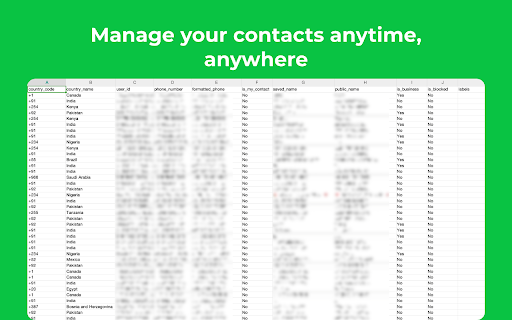
Extract & Export WhatsApp group members, unknown phone numbers and unsaved contacts to Excel/CSV/JSON/VCard. Extract & Download all phone numbers from your WhatsApp groups and chats. Extract contacts' phone numbers and download them to Excel. The best extension for marketing and sales companies, easy to save phone numbers from a WA group to an Excel file, CSV, JSON or even VCard file. Very useful for prospective leads or contacts. # HOW TO GET STARTED? Open web.whatsapp.com, and scan to log in; select the group to which you want to export contacts' phone numbers, and Click the Export button. ✓ Export contacts from all WhatsApp groups ✓ Extract contacts from a specific WhatsApp group ✓ Download contacts from all chats ✓ Save contacts from a labels ✓ Save contacts from a specific country ✓ Includes the users country information ✓ Export data to XLSX(Excel)/CSV/JSON/VCard # SUPPORTED FORMATS Export contacts from WhatsApp into Excel, CSV, JSON and VCard formats WA TOOL FAMILY You can explore our additional WhatsApp tools by selecting the tools menu - WA Sender - Send messages to multiple recipients - WA Group Scraper - Scrape group link from any website and join them, extract members # DATA PRIVACY No Email address is needed to log in. No data is shared with third parties. All data is processed in your local computer, never passing through our web server, and no one knows what you exported. # STATEMENT WhatsApp™ is a WhatsApp Inc. trademark registered in the U.S. and other countries. This is an independent project not related to WhatsApp™ Inc. # FAQ If you have any questions, don't hesitate to contact us at help@whatsabot.com.
