
fmfkpdmdiaoafgooamkgdjdibkflhemm
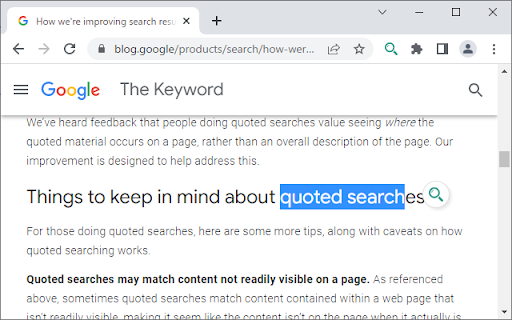
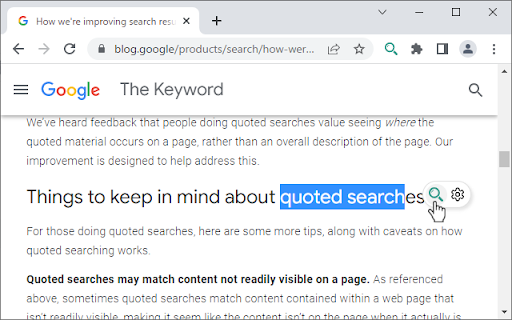
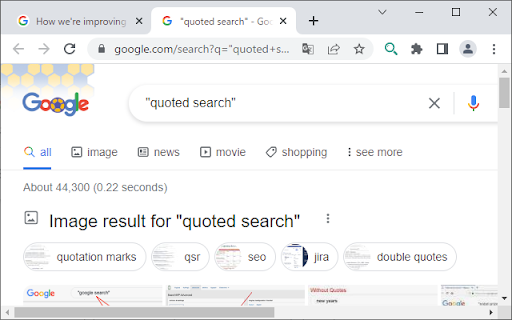
Exact match search (i.e. quoted search) can be performed quickly via popup icon, keyboard shortcuts or context menus after selecting text in any web page. No need to type double quotation marks to quote your search words every time! If you're wondering why we do quoted search, the following article may help. https://blog.google/products/search/how-were-improving-search-results-when-you-use-quotes/ UPDATE(v1.1.1): - Fixed a bug where Quick Quoted Search does not press Enter key automatically after putting quotes around the selected text in the input field on Bing. UPDATE(v1.1.0): - Add a tooltip to each button in popup icon. You can choose not to display it via options.

Timer
Displays a configurable timer on every page that persists across tabs and reloads. Ever hidden your taskbar for an interview and completely lost track of time? I have. That's why I built Timer—a no-nonsense, persistent time-management tool designed for developers, students, and anyone who needs to stay focused without the clutter. While modern platforms have made their timers more complex, this tool brings back the simple, minimalist design that just works. Why is this the timer you've been looking for? Dual Modes for Total Control: Whether you are tracking how fast you can solve a problem or setting a strict time limit for a task, we have you covered. Switch effortlessly between a classic Stopwatch and the new Countdown Timer (up to 24 hours). Always Visible, Never Intrusive: Unlike other extensions that live in a popup, Timer stays on the page. Switch tabs, navigate to a new problem—it stays with you. No extra clicks needed to see how much time is left. Inspired by Classic Minimalism: If you miss the simple, clean design of older coding platform timers, you're in the right place. We built a scaffold of that beloved design, giving you just the controls you need. No complexity, no distractions. Perfect for Interviews & Deep Work: Born from the pressure of technical interviews, this is the perfect companion for platforms like LeetCode or HackerRank. Use the stopwatch to track your speed, or use the countdown timer to simulate real-world, time-boxed interview slots. Total Placement Freedom: Position the timer exactly where you want it with smooth drag-and-drop, or snap it to any corner via the settings. Always-On & In Sync: The timer runs persistently and syncs its state (running, paused, time remaining) across all your open tabs and windows. Minimalist & Distraction-Free: A clean interface with simple Start, Stop, and Reset controls. No complex menus—just pure focus. Collapsible UI: Need more screen space? Collapse the timer into a single, unobtrusive icon with a smooth animation. Lightweight & Fast: Built with performance in mind to ensure it never gets in your way. This is just the beginning. As a developer building for developers, I plan to add more customization options in the future, but the core will always remain simple and minimalistic. Install Timer today and take back control of your focus.

Youtubeコメント非表示
Youtubeのコメントを非表示 youtubeの動画及びショート動画のコメントを非表示にします。 コメントの投稿は可能ですが、投稿後に自分のコメントも非表示にされます。 コメントを見たい場合は拡張機能を管理からコメントの非表示を「ON・OFF」選択できます。 導入後に不要になった場合は、画面上部の拡張機能のアイコンをクリックし、Youtubeコメント非表示のメニューアイコンから「Chromeから削除」を選択して下さい。

Visual Timer
Simple visual countdown timer. No beep by default. If the timer stops and you are still concentrating, you can leave it on. ■ A simple timer for focused work This extension displays a timer on the side panel and automatically starts a countdown when the timer is open. By default, there is no beep to interrupt your concentration. Even after the timer ends, you can keep it running if you're still focused. ■ Key features - Minimal timer display: Easily track time in the side panel. - Automatic countdown: Starts counting down as soon as you set the time. - No distractions: No sound or notifications when the timer ends by default. - Stay focused: Keep working even after the timer stops. - Create your own preset: Customize your preset with emoji and timer color. - Customize: Beep / auto-restart is configurable. Perfect for those who want to concentrate without interruptions. Manage your time quietly and efficiently. ■ Changelog - change the design of the timer based on user requests. We've made it so that the entire clock face is covered by color when it starts. Thank you.

IP Whois View by Shohel
View website IP, Whois, and tools with country flag icon. Easily view website IP, Whois, country, and trust score—right from your browser! Features: - Website Information: Instantly see the IP address, country (with flag), daily visitors, trust score (with emoji), and global rank for any website you visit. - Whois Lookup: View detailed Whois information in a convenient tab, powered by whois.com. - Tools: Quick access to SimilarWeb and Archive.org for deeper site analysis. - Country Flag Icon: The extension icon updates to show the website’s country flag and trust score for the current site. Minimal, Modern Design: Clean, easy-to-read popup with clear sections and helpful visuals. How It Works: - Click the extension icon while browsing any website. - Instantly see key website info, Whois data, and useful tools. - The extension icon updates to show the country flag and trust score for the current site. Privacy First: - No personal data is collected, stored, or shared. - All lookups are performed locally in your browser. - Data is fetched from public APIs (myip.ms, whois.com) and cached temporarily for speed. - Perfect for web professionals, researchers, and anyone curious about the sites they visit! Thanks to myip.ms and whois.com for their free data APIs.
