
flkdejchjaibellgdhchhjpacegdgmin

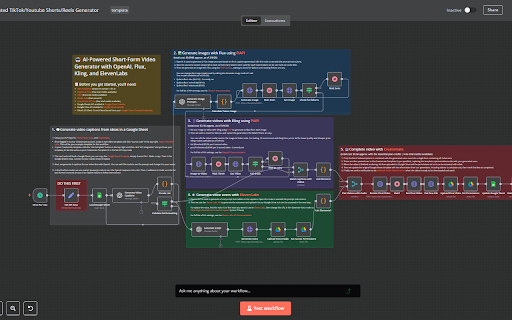

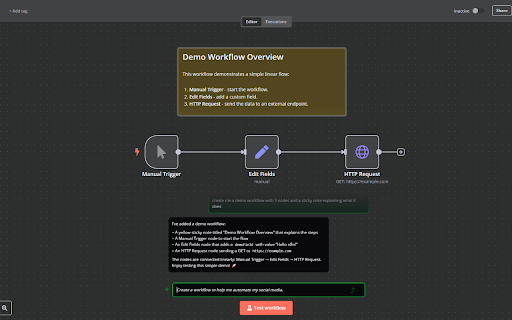

Cursor for n8n - create, edit, debug, and optimize n8n workflows using a simple chat. Transform How You Build n8n Automations n8nChat is a powerful extension that brings the intelligence of AI directly into your n8n workflow editor. Simply describe what you want to accomplish in plain language, and watch as the extension generates complete nodes, complex workflows, and automation solutions in seconds. Seamlessly Integrated with n8n Our extension works directly within your existing n8n environment, whether cloud-hosted or self-hosted. The intuitive chat interface appears right inside your workflow editor, making it easy to create nodes and build automations without switching contexts or disrupting your workflow. 🧠 AI-Powered Node Generation Describe the functionality you need, and n8nChat instantly creates the appropriate nodes with all the necessary configurations. Nodes appear directly in your workflow canvas, ready to use. 🔄 Complete Workflow Creation Need to build an entire workflow? Describe your automation goal, and n8nChat will generate a full multi-node workflow with proper connections and configurations. 🖼️ Clone n8n Workflows From a Screenshot Attach a screenshot of any workflow and simply ask n8nChat to recreate it for you. 🔎 n8n Chat can search the web when it needs up-to-date information to fulfill your request. 🤖 Multiple AI Model Support - OpenAI and Gemini supported with your own API key. 💬 Natural Language Interface No need to memorize complex node parameters or syntax. Just chat with the AI in plain English, and it will understand your requirements. 🔌 Instant Integration Generated nodes and workflows are instantly added to your canvas - no copy/paste required. Connections between nodes are automatically created based on your requirements. 🚀 Accelerated Development Complete complex automations in minutes instead of hours. Perfect for both n8n beginners and experienced workflow builders. 🛡️ Privacy-Focused Your data stays secure. The extension uses your own API keys for AI services, and all conversations and workflow data remain on your device. 1. Install the Extension - Add n8nChat to Chrome and navigate to your n8n workflow editor 2. Enter Your API Key - Provide your chosen AI service API key (OpenAI or Google) 3. Describe Your Needs - Tell the AI what you're trying to automate 4. Watch the Magic - See nodes and connections appear directly in your workflow 5. Fine-tune if Needed - Adjust the generated components to perfectly match your requirements ✅ Perfect For: n8n Beginners - Flatten the learning curve and start building powerful workflows immediately Experienced Builders - Accelerate your workflow development and automate repetitive tasks Developers - Rapidly prototype complex integrations without memorizing every node parameter Business Users - Create automation solutions without deep technical knowledge API Integrations: "Build a workflow that fetches data from the HubSpot API and sends it to Slack when new contacts are added." Data Transformation: "Create a workflow that normalizes CSV data into a consistent JSON format." Conditional Logic: "I need a workflow that routes emails based on their content to different departments." Multi-step Processes: "Build an onboarding sequence that creates accounts across multiple systems when a new employee joins." Scheduled Tasks: "Create a workflow that sends a weekly performance report every Monday at 9 AM." - Works with n8n cloud (n8n.cloud) and self-hosted n8n instances - Supports all native n8n nodes and functionality - Supports custom and community nodes - Requires your own API key - Stores all data locally NOTE: Please make sure to refresh your workflow page after installing the extension! n8nChat is a third-party tool and is not affiliated with n8n or n8n.io. n8n is a powerful workflow automation tool that allows you to connect different services and build automated workflows. With its open fair-code distribution model, n8n can be self-hosted or used through n8n.cloud. Our extension enhances the n8n experience, making it more accessible and powerful for users of all skill levels.

Nanobrowser: AI Web Agent & Automation
Automate web tasks with AI! NanoBrowser is an open-source Chrome extension that lets you extract data, fill forms, and more. An open-source and local-first web automation agent that runs in your browser. 1️⃣ 100% Free: No subscription fees or hidden costs. Just install and use your own API keys 2️⃣ Privacy-Focused: Agent runs in your local browser instead of cloud 3️⃣ Flexible LLM Options: Supports SOTA LLM models as well as local models 4️⃣ Fully Open Source: Complete transparency in how your browser is automated ✅ Multi-agent System: Specialized agents collaborate to accomplish complex web tasks. ✅ Interactive Side Panel: Intuitive chat interface with real-time status updates. ✅ Task Automation: Seamlessly automate repetitive tasks across websites. ✅ Follow-up Questions: Ask contextual follow-up questions about completed tasks. ✅ Conversation History: Easily access and manage your interaction history. ✅ Multiple LLM Support: Connect your preferred LLM providers and assign different models to different agents. ⚠️ While Nanobrowser may work on some Chromium-based browsers, they are not officially tested and supported. 1️⃣ Click the Nanobrowser icon in your toolbar to open the sidebar. 2️⃣ Click the Settings icon (top right). 3️⃣ Add your preferred LLM API keys. 4️⃣ Choose which model to use for different agents (Navigator, Planner, Validator). 5️⃣ Send your commands to Nanobrowser 1️⃣ Go to TechCrunch and extract top 10 headlines from the last 24 hours 2️⃣ Look for the trending Python repositories on GitHub with most stars 3️⃣ Find a portable Bluetooth speaker on Amazon with a water-resistant design, under $50. It should have a minimum battery life of 10 hours We are open source. We need your help to make Nanobrowser even better! Contributions of all kinds are welcome: 1️⃣ Share prompts & use cases in our Discord server 2️⃣ Create issues or even submit pull requests on our Github repository ❤️ Loving Nanobrowser? Leave us a review on the Chrome Web Store and help others discover this powerful extension! Your support means everything to us.

Ultimate Web Scraper
Extract data instantly: Grab text, images, emails & links from any website with a single click. Fast, simple & powerful web scraper Your all-in-one tool for effortless web scraping, lead generation, and data extraction. No code, no setup — just instant results. + AI Assisted extraction for better results 😲 👇 One-Click Scraping Point the web scraper at any page with lists, tables, or directories and extract structured data instantly. Pagination and infinite scroll are handled automatically. 📄 Bulk Page Scraping Feed the data scraper a list of URLs and pull emails, business details, contact info, or custom fields from every page at once. 🖼️ Image Downloader Grab every image from a page in one click. 📬 Email Extractor Run the email scraper on one page or thousands — it finds and collects every address. 📊 Data Export Send your scraped data to CSV, Excel, or Google Sheets. 📧 Email Scraper — Pull email addresses for outreach and lead gen 📞 Phone Scraper — Collect phone numbers for sales follow-up 🏢 Business Scraper — Grab company names, addresses, and details 👤 People Scraper — Extract names, job titles, and work history 🌐 Social Scraper — Collect website URLs and social media profiles 💼 B2B Scraper — Get company size, industry, and revenue data 💬 Review Scraper — Scrape reviews and comments from any site 📄 Page Text Scraper - Scrape pages for clean text 📈 Sales & Marketing — Build lead lists with verified contact data 🎯 Recruiters — Scrape candidate info from job boards and LinkedIn 🛒 E-commerce — Monitor competitor pricing, products, and stock 🔬 Researchers & Data Scientists — Collect datasets for analysis and ML ✍️ Content & SEO — Gather data from blogs, news sites, and forums 📉 Brand & BI Teams — Track reviews, sentiment, and competitor moves ✅ AI‑powered extraction improves accuracy on messy, unstructured pages. ✅ No coding required, so anyone can start in seconds. ✅ Runs entirely in your browser, keeping your data private. ✅ Works on login‑protected pages and complex layouts. ✅ Handles pagination and infinite scroll for complete results. ✅ Fast exports to CSV, Excel, or Google Sheets. ☁️ Cloud Web Scraping — Run this web scraper in the cloud with cloud browsers for large‑scale data scraping. ⏱️ Scheduling — Automate web scraping and data extraction on a schedule. 🔗 Integrations — Connect your data scraper to n8n, Google Sheets, and Make.com. 1️⃣ Install the web scraper from the Chrome Web Store 2️⃣ Go to your target site 3️⃣ Click to scrape 4️⃣ Export your data

n8n AI Assistant - n8n Workflow Generator
🚀 Supercharge Your Automations with n8n AI Assistant n8n AI Assistant is your AI-powered partner for building, editing, and troubleshooting workflows—all using natural language. Whether you’re a seasoned automation pro, a developer, or brand new to no-code tools, this extension makes working with n8n faster and smarter. n8n AI Assistant brings intelligent workflow creation right into your n8n editor. Simply type what you want to achieve—in plain English—and watch as AI designs your workflows, connects nodes, and even replicates complex automations for you. Works perfectly with: ✅ n8n.cloud ✅ Self-hosted n8n instances The AI chat panel lives inside your n8n editor, so you never have to leave your workspace to build or refine your automations. Here’s what makes n8n AI Assistant a game-changer: 1. 🧠 AI Node Builder • Describe any task in your own words, and instantly generate pre-configured nodes—no fiddling with settings. 2. 🔗 Complete Workflow Generation • Want a multi-step process? Just describe your goal, and get a fully wired, ready-to-run workflow. 3. 🖼️ Visual Workflow Reconstruction • Upload screenshots of n8n flows, and let AI rebuild them for you automatically. 4. 🌐 Real-Time Web Search • Fetch the latest info, APIs, or services directly into your workflows using live web data. 5. 🤖 Choice of AI Models • Connect your own OpenAI or Gemini API key for maximum flexibility and custom AI behavior. 6. 💬 Conversational AI Interface • Talk to AI as you would a teammate—no technical jargon or manuals required. 7. ⚡ Instant Workflow Deployment • AI-generated workflows appear directly in your editor—skip the copy-paste and manual wiring. 8. 🚀 Rapid Automation Development • Build complex workflows in minutes—perfect for solo builders, development teams, and automation experts. 9. 🛡️ Privacy First Design • Your workflows and data stay on your machine. Nothing is stored or shared externally. Getting started takes just a few steps: 1. 🧩 Install the extension from the Chrome Web Store. 2. 🔐 Add Your API Key (OpenAI or Gemini). 3. 💡 Describe Your Workflow in natural language (e.g. “Send Airtable data to Slack when a new row is added.”) 4. 🎯 Watch It Appear instantly in your n8n editor. 5. 🛠️ Fine-Tune your workflow if you’d like to adjust details. 💡 Tip: Refresh your n8n editor after installing the extension for the best experience! n8n AI Assistant is perfect for: • 🧑💻 Developers — Prototype integrations without memorizing nodes or APIs. • 📈 Business Users — Automate tasks without technical skills. • ⚙️ n8n Beginners — Gain confidence with guided workflow building. • 🏗️ Automation Experts — Speed up repetitive tasks and complex builds. Here’s how people are using n8n AI Assistant: • 🔁 API Integrations “Connect Pipedrive to Slack to share new deals automatically.” • 🔄 Data Transformation “Convert Google Sheets data into JSON and push it to a webhook.” • 📥 Email Automation “Save email attachments to Dropbox and notify me on Telegram.” • 👥 Employee Onboarding “Set up Google Workspace, Notion, and Slack for new team members.” • 📊 Scheduled Reporting “Email me a weekly KPI summary from Airtable every Friday at 5 PM.” The free version covers most essentials. Want even more power? Upgrade to Premium and enjoy: • 🚫 Ad-Free Experience • 🔄 Free Updates • ⚡ Priority Support ⚙️ Technical Details • ✅ Compatible with both n8n.cloud and self-hosted setups • ✅ Works seamlessly with custom and community nodes • 🔑 Requires your own OpenAI or Gemini API key • 🔐 All data stays local on your device—no third-party storage n8n AI Assistant is an independent Chrome extension and is not affiliated with n8n.io. n8n itself is an open-source automation platform that connects hundreds of apps and services, letting you create powerful automations. This extension makes working with n8n simpler, faster, and smarter—so you can focus on what matters most.

n8n extension for Chrome
n8n extension for Chrome. Start n8n workflows directly from the browser. Display the information you need from any webhook. Start n8n worflows directly from the browser. Display the information you need from any webhook. n8n extension for Chrome. Steps to use the chrome extension : 1. Create a workflow 2. Add a Workflow name and your Webhook URL from n8n 3. Open your new folder add your inputs 4. Push the data to your webhook 5. Then make your own mix in n8n
