
fljjbncabmimokfbcaclkokkkeoafccf
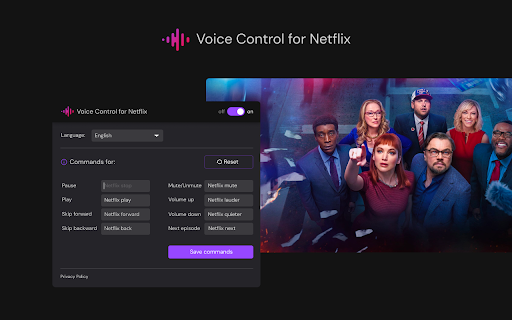
🔊Netflix experience with 'Voice Control for Netflix' 🚀 Play, pause, fast-forward, and more, all without lifting a finger! 🙌🎬 🔊 Revitalize your Netflix experience with "Voice Control for Netflix" 🚀, an innovative Chrome extension that enables voice command control of Netflix. Play, pause, fast-forward, and more, all without lifting a finger! 🙌🎬 Main Features: 🗣️ Voice Control for Netflix: Control Netflix with simple voice commands. With the voice control extension, watching your favorite series and movies becomes even easier! 🌍 Support for Voice Commands in 8 Languages: Whether you speak English, Spanish, French, German, Polish, Japanese, Korean, or Thai, our extension will understand your commands. 👤 Command Customization: Tailor voice commands to your preferences. Instead of the standard "Netflix play", set your own phrases to activate specific functions. 🔌 Easy Installation and Use: Simply install the extension and start playing any video on Netflix. Your streaming experience will be transformed. 🖥️ Compatibility with Chrome Devices: Works perfectly with any device using the Chrome browser. Supported Commands: ⏯️ Pause / Play: Easily manage your video playback. ⏩⏪ Skip Forward / Backward: Fast-forward or rewind videos effortlessly. 🔇🔊 Mute / Volume Up / Down: Control the volume without the need for a remote or keyboard. 📺 Next Episode: Automatically move to the next episode of your favorite series. ⚙️ The Control Panel Pop-up gives access to settings and command customization For Whom: 👨👩👧👦 Perfect for any Netflix fan looking for a more convenient and innovative way to control their favorite content. Whether you have limited mobility or simply appreciate convenience and modern solutions, our extension is for you. Get Started: 🌟 Transform the way you watch Netflix today. Install "Voice Control for Netflix" and enjoy the freedom that voice commands offer! 💬🎉 ❗**Disclaimer: All product and company names are trademarks or registered trademarks of their respective holders. This extension holds no association or affiliation with them or any third-party companies.**❗

HBO Max HQ: change video quality [QVI]
Extension to change video quality on HBO Max. Choose your preferred video resolution on HBO Max. We've updated the extension to work after some changes on HBO Max website. Adjust HBO Max video quality to your needs and your internet connection. With this extension, you will never experience annoying buffering again! You can choose your preferred video resolution in a simple popup window and watch the content in one of the available options: ➡️ None ➡️ Low Definition ➡️ Standard Definition ➡️ High Definition ➡️ Full HD ➡️ QHD All you need to do is add the HBO Max HQ extension to your browser and enjoy your favorite series in preferred video quality. It's as simple as that! ⭐ How does it work? ⭐ Extension forces the video to reload in the chosen resolution. Please note that if you set higher quality than is available in HBO Max, the extension will automatically reload video for the best quality available. This extension is part of the Quality Viewership Initiative, a collaborative effort to enhance the understanding of audience engagement. It collects anonymous, aggregated viewing insights to support creators and studios in improving the quality of their content. You can stop sharing your information at any time by switching the toggle on the options page. Disclaimer: HBO is a trademark of Home Box Office, Inc. This website & extension hold no association or affiliation with HBO Max or any third-party companies.

FindFlix : see Netflix hidden categories [QVI]
Extension enables access to all hidden categories on Netflix. Are you tired of the fixed list of the same few categories Netflix’s trying to impose on you? Did you know that there are thousands of hidden categories that you can explore? (and I bet you haven’t heard of the majority of them before). All you need to do is add Findflix extension to your browser and you're ready to explore all the secret categories that are hidden by default. It's as simple as that! This extension is part of the Quality Viewership Initiative, a collaborative effort to enhance the understanding of audience engagement. It collects anonymous, aggregated viewing insights to support creators and studios in improving the quality of their content. You can stop sharing your information at any time by switching the toggle on the options page. Disclaimer : Netflix is a trademark of Netflix, Inc.. This website & extension hold no association or affiliation with Netflix or any third-party companies.

Voice Control for HBO
🔊Voice Control for HBO 🚀 Play, pause, fast-forward, and more, all without lifting a finger! 🙌🎬 🔊 Revitalize your HBO experience with 'Voice Control for HBO'🚀, an innovative Chrome extension that enables voice command control of HBO, including MAX. Play, pause, fast-forward, and more, all without lifting a finger! 🙌🎬 Main Features: 🗣️ Voice Control for HBO: Control HBO and MAX with simple voice commands. With the voice control extension, watching your favorite series and movies on HBO becomes even easier! 🌍 Support for Voice Commands in 8 Languages: Whether you speak English, Spanish, French, German, Polish, Japanese, Korean, or Thai, our extension will understand your commands. 👤 Command Customization: Tailor voice commands to your preferences. Instead of the standard "HBO play", set your own phrases to activate specific functions. 🔌 Easy Installation and Use: Simply install the extension and start playing any video on HBO or MAX. Your streaming experience will be transformed. 🖥️ Compatibility with Chrome Devices: Works perfectly with any device using the Chrome browser. Supported Commands: ⏯️ Pause / Play: Easily manage your video playback on HBO and HBO MAX. ⏩⏪ Skip Forward / Backward: Fast-forward or rewind videos effortlessly on both HBO and MAX. 🔇🔊 Mute / Volume Up / Down: Control the volume without the need for a remote or keyboard. 📺 Next Episode: Automatically move to the next episode of your favorite series on HBO. ⚙️ The Control Panel Pop-up gives access to settings and command customization for HBO and MAX. For Whom: 👨👩👧👦 Perfect for any HBO and MAX fan looking for a more convenient and innovative way to control their favorite content. Whether you have limited mobility or simply appreciate convenience and modern solutions, our extension is for you. Get Started: 🌟 Transform the way you watch HBO and MAX today. Install "Voice Control for HBO" and enjoy the freedom that voice commands offer! 💬🎉 ❗**Disclaimer: All product and company names are trademarks or registered trademarks of their respective holders. This extension holds no association or affiliation with them or any third-party companies.**❗

Netflix SubStyler : customize subtitles
Extension to customize captions and subtitles on Netflix. Change text size, font, color and add background. Wake up your inner artist and express your creativity by customizing Netflix subtitle style. Even though you usually don’t use movie captions, you may consider starting after checking out all the settings this extension has to offer. Now you’re able to: - Choose custom text color, - Adjust text size, - Add text outline and choose its color, - Add text background, choose its color and adjust the opacity - Choose font family Feeling artistic? Here’s another bonus: all the colors can be chosen either from a built-in color picker or by entering RGB value, creating almost endless style possibilities. Take the subtitle customization to the next level with Netflix SubStyler and let your imagination run wild!! Too many options? Worry not! Check out some basic settings, such as text size and background. All you need to do is add Netflix SubStyler extension to your browser, manage available options in the control panel and adjust subtitles to your own preferences. It’s as simple as that! Disclaimer : Netflix is a trademark of Netflix, Inc. This website & extension hold no association or affiliation with Netflix or any third-party companies.
