
flieihjecdghlbgbmjbilfcabbdplanh
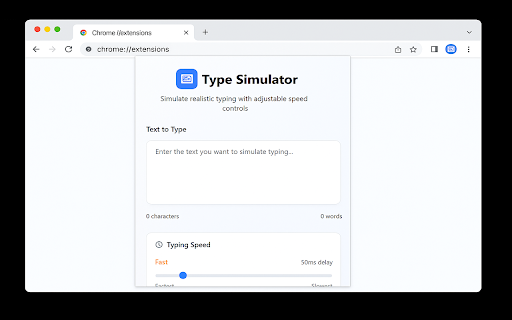

Intelligent typing simulator extension for web developers with adjustable speed controls Transform any clipboard text into lifelike, human-style typing across websites. Control speed, timing, sounds, and field detection—no more robotic pastes. Smart Field Detection – Automatically find and prioritize all input fields on the page Batch Typing – Fill multiple forms in one click with custom ordering Recording Mode – Hide the extension UI for seamless video demos ⚠️ Note on Compatibility Works with input fields, textareas, and most editable areas (like Google Docs or text boxes in Google Slides). Not supported in canvas-based editors (e.g., main Google Slides canvas outside text boxes). Authentic Human Typing – Realistic speed variation, natural mistakes, and auto-corrections Precision Speed Control – Adjustable from ultra-slow to lightning fast with per-character delays Typing Sounds – Optional keystroke audio for immersive demos Two Powerful Modes: – Basic Typing – Single-field focus with classic controls – Advanced Typing – Auto-detect and batch fill multiple fields with timing and delays 🎯 Perfect For Content creators – Tutorial and demo recordings Developers – Form testing and automation 💼 Why You’ll Love It Type Simulator elevates form-filling from mechanical to organic, delivering professional-grade demos and efficient automation. Whether you need realistic typing for user guides or rapid batch entry for testing, this extension adapts to your workflow. Install now and leverage v2.3.0’s Smart Field Detection and Recording Mode to streamline your demos and automation—experience precision typing anywhere it’s supported!

AI Humanizer
Pastes and types text letter by letter to simulate manual writing. Description: AI Humanizer helps you input text in a natural, human-like way by simulating manual typing. Perfect for testing, demonstrations, or when you want to make automated input look more natural. Key Features: • Adjustable typing speed - from very slow to ultra-fast • Pause and resume functionality • Progress indicator • Keyboard shortcut support (Ctrl+Shift+Y or Cmd+Shift+Y on Mac) • Works with any text input field or rich text editor How to use: 1. Click the extension icon 2. Paste your text 3. Adjust typing speed 4. Click "Start" and focus on any text input field 5. Watch as the text is typed naturally 6. Use the pause/resume features as needed Perfect for: • Testing applications • Creating demonstrations • Educational purposes • Any situation where natural typing simulation is needed

Duey.ai — Auto Typer for Google Docs, Slides & Microsoft Word Online
Duey.ai's Auto Typer types your work naturally in Google Docs, Slides & Microsoft Word Online. Includes humanizing tools. Duey.ai Humanizer + Auto Typer for Google Docs, Google Slides & Microsoft Word Online ------------------------------------------------------------------------------------------------------------------------------------ 🚀 Duey.ai v2.4.8 — What's new We added the ability to move the typing window around on your document/slides window. We also fixed a couple issues based on your feedback. ⚡ Type in the background — for real now - Last update warned you that switching tabs slows Duey down. Not anymore: Duey now keeps typing at full speed even when the tab is in the background, minimized, or hidden behind another window. Start a run, go do something else, and come back to a finished document — we'll even notify you when it's done. 🏷️ Progress in your tab - Check how far along a run is straight from the browser tab. Your tab title shows the live percentage — like "[42%] My Doc" — so you can keep an eye on progress from anywhere without switching back. ✍️ More natural typing - Refined the rhythm of typos and corrections so a run reads even more like a real person at the keyboard. 🖼️ Smoother Google Slides - Stray keystrokes no longer slip in while Duey is typing into a slide, for cleaner, more reliable Slides runs. ------------------------------------------------------------------------------------------------------------------------------------ 🚀 Duey.ai v2.4.5 — What's new 🕶️ Stealth Mode - Hide Duey's in-page UI when you don't want it visible to passersby. Toggle the floating pill and the Docs titlebar button independently, or swap the Duey icon for a neutral pencil, file, or clock so a glance at your tab reveals nothing. 🎚️ Adjust speed mid-session - Realized your run is too slow (or too fast) after Duey started? Expand the pill and tune the speed live. Pro users get a smooth slider; everyone gets − / + nudge buttons. ↔️ Move and minimize the pill - Drag the pill anywhere on screen with the new grip handle, or collapse it to a small side tab when you want it out of your way. Click the tab to bring it back. ⚠️ Smarter tab-timing - If you switch away from your document while Duey is typing, Chrome slows things down dramatically. Your tab title now shows a clear warning so you notice from anywhere in your browser — and a one-time tip explains how to keep your run on schedule. 📊 Cleaner Slides output - Typos introduced for realism on Google Slides are now corrected the same way they always have been on Docs. Quality of life - Refreshed extension popup with cleaner branding and real toggle switches - New "Open Duey on this page" button in the popup - Custom typing settings save reliably across sessions - Keyboard shortcut moved to ⌘/Ctrl + Shift + E (rebindable at chrome://extensions/shortcuts) ------------------------------------------------------------------------------------------------------------------------------------ 🤖 Humanize your text in Google Docs and Word Online! 🦾 Let our AI Auto Typer write your Google Docs & Word Online documents for you ⏰ Free up your time by letting this extension write your documents for you ✅ Use our Essay Checker to get AI-powered feedback on your writing ☑️ Generate Citations from any website! Our Auto Typer is a Chrome extension that simulates human-like typing in Google Docs and Microsoft Word Online. You've already done the hard work — researched, outlined, written your content. Duey handles the last mile: getting it into your document with a full Version History, so you can spend your time on what matters. NEW IN 2.2.4 — - Session Summary — See your typing stats at a glance when a session completes: duration, word count, average WPM, and more - Dark Mode — The panel now matches your system theme automatically - Smarter Notifications — Get browser notifications at 25%, 50%, 75%, and 100% progress so you can safely tab away - Dedicated Window Support — Duey detects your window setup and guides you to an optimal configuration for hands-free typing - Paste & Go — Paste your text and the Start button highlights automatically - Improved Reliability — Better handling of extension updates, error recovery, and Word Online free plan tracking - Dark Mode Support for Word Online — Consistent theming across Google Docs and Word Online NEW IN 2.2 — Word Online Support (Pro): Auto Typing and Humanizing now work seamlessly in Microsoft Word Online for Pro users, so whether your workflow lives in Google Docs or Word, Duey has you covered. NEW IN 2.0 — Auto Typer Pro: Our most realistic typing mode yet. Pro simulates natural human typing with adaptive rhythm, context-aware pauses, and realistic error correction — so your sessions are indistinguishable from a real person at the keyboard. Every free user gets one Pro session to try it out. Paired with Duey.ai's proprietary AI, the extension can also humanize your text, making it read more naturally and authentically in your own style. • Free to use — Get started with no limitations on how much it will type for you, no account required. Sign up for free to unlock additional settings, or upgrade to Pro for the most realistic typing experience available. • Works where you work — Supports Google Docs for all users, plus Microsoft Word Online for Pro subscribers. • Save your valuable time — You've already done the hard work of creating your text. Let Duey write it for you so you can get back to research, studying, family, or whatever matters most. • Show your work — Duey writes it keystroke by keystroke, so your document has a full Version History for review. • AI that writes naturally — Can be configured to match your natural writing style and speed. • Humanize your text — Duey.ai's Humanizer makes your text flow like authentic writing, helping you stand out and pass AI detection. • Know how long it will take — Duey tells you the estimated typing time upfront, so you know exactly how much time you're getting back. • Set it and forget it — Start it, walk away, come back to a finished document. Start and stop whenever you want. • Auto Typing in Word Online — The same realistic, human-like typing experience now works natively in Microsoft Word Online. • Humanizing in Word Online — Run Duey.ai's Humanizer directly in your Word Online documents, just like in Google Docs. • Seamless cross-platform workflow — Switch between Google Docs and Word Online without changing your process. • Available to Auto Typer Pro and Duey.ai Unlimited subscribers. • Adaptive typing rhythm — Speed fluctuates naturally instead of staying robotic and constant. • Context-aware pacing — Pauses at paragraph breaks and sentence boundaries, the way a real person stops to think. • Realistic error correction — Occasional typos with natural backspace-and-fix behavior, just like a human would. • Configurable WPM — Set your target speed and Pro builds a realistic typing session around it. • Pre-computed sessions — Your entire session is planned before it starts for smooth, uninterruptible execution. • One-click upgrade — Switch to Pro mode directly from the standard auto typer. • Free trial — Every user gets one Pro session to try, no card required. • Bring your text from wherever you created it and paste it into the extension. • Optionally humanize it with Duey.ai before typing. • Pick your configuration — standard or Pro — and set your preferences. • Open your Google Doc or Word Online document (Pro), click Start, and Duey takes care of the rest. • Writes naturally in Google Docs and Microsoft Word Online (Pro), including pauses and corrections. • Humanize text automatically using Duey.ai's proprietary AI. • Enhance your writing using the Duey.ai app (https://app.duey.ai) to create and humanize your documents. • Check for AI detection using the Duey.ai app (https://app.duey.ai). • Essay Checker for AI-powered writing feedback. • Citation Generator — create citations from any website. • More features coming soon! • Free — Full auto typer for Google Docs with no limitations. Always free. • Free with account — Additional settings and configurations at no cost. • Auto Typer Pro — $5/month for the most realistic typing simulation available, including Word Online support. Every free user gets one Pro session to try. • Duey.ai Unlimited — $9.99/month for Pro typing + Word Online + all Duey.ai tools.

Typing Simulator
🎯 Perfect for: • Screen recordings and tutorials • Live demos and presentations • Coding videos and walkthroughs • Any time you want text to appear naturally ⌨️ How it works: 1. Copy any text to your clipboard 2. Click in any text field 3. Press Cmd+Shift+V (or Ctrl+Shift+V on Windows) 4. Watch your text type itself realistically ⚙️ Customizable settings: • Adjust typing speed (20-100ms per character) • Add natural pauses after spaces • Slower typing for capitals and symbols • Optional realistic typos with auto-correction • Press Escape anytime to stop ✨ Why Typing Simulator? • Zero configuration needed—works out of the box • Lightweight and fast • Works on any website • Clean, modern interface with dark mode • No account required Built with care by Etna Labs in Switzerland.

Human Typing Simulator
Simulate realistic human typing on any website. Configurable WPM, natural timing, QWERTY typo simulation, and keyboard shortcuts. Paste your text. Click your target field. Press Start. Watch it type itself — character by character, at human speed, with natural rhythm, realistic hesitations, and even occasional typos that get corrected on the fly. Whether you're filling out forms, writing in a web editor, or need text to appear as if someone typed it in real time — Human Typing Simulator handles it seamlessly on any website. WHY THIS EXTENSION EXISTS Many websites and platforms detect when text is pasted all at once and either block it, flag it, or format it incorrectly. Some tools require you to type content manually for it to register properly. Copy-pasting into rich text editors often strips formatting or breaks the editor's internal state. Human Typing Simulator solves all of this. It simulates actual keystrokes — one character at a time — the way a real person would type, including the natural speed variations, micro-pauses between sentences, and occasional finger slips that make typing feel authentic. HOW IT WORKS Copy the text you want to type Click the clipboard icon in the popup to paste it in Click the target field on the page (a textarea, input box, or rich text editor) Press [ Start Typing ] — or use the keyboard shortcut Alt+T The extension begins typing one character at a time into the active field, using real keyboard events that websites and JavaScript frameworks treat as genuine user input. A floating ⌨ activation button appears whenever you click or focus a recognized input field. Click it to open the extension popup with that field already detected — no need to open the popup first. FEATURES Natural Timing Engine Typing speed follows a Gaussian distribution — some characters come faster, some slower, just like real human rhythm. The WPM (words per minute) setting acts as a minimum floor: typing is frequently faster than the set value, never slower. Speed drifts in waves across the text, accelerating during common words and slowing slightly before unfamiliar ones. Sentence and Paragraph Pauses After a period or exclamation mark, the typer pauses 400–1800ms — like a person thinking about their next sentence. After a paragraph break, it waits 1200–4000ms, simulating the natural rhythm of composing text. QWERTY Typo Simulation When "Simulate Typos" is enabled, the extension occasionally types a nearby QWERTY key instead of the intended character — then catches the mistake, deletes it, and types the correct character. The adjacent-key algorithm mirrors real typing errors: "e" might become "r", "s" might become "a". The error rate is fully adjustable (0–20%). Cursor Lock While typing is in progress, mouse clicks on the page cannot move the text cursor. This prevents accidental position jumps that would cause text to be inserted in the wrong location. Live Progress Bar A progress bar in the popup shows how far through the text the typer has reached. The extension icon badge also displays percentage progress so you can monitor typing even while viewing other tabs. Works on Rich Text Editors The extension uses three parallel insertion methods: For contenteditable editors (Notion, Medium, Quip, Trix, etc.): uses execCommand('insertText') which generates events the browser marks as trusted — the same trust level as real keyboard input. For Google Docs: dispatches keyboard events directly into the hidden text event iframe that Google Docs uses to capture input, bypassing the canvas layer entirely. For standard textareas and input fields (Twitter, Reddit, contact forms, etc.): uses the native HTMLInputElement setter combined with InputEvent, making it compatible with React, Vue, Angular, and other JavaScript frameworks. Smart Element Detection The extension automatically detects the focused input element on the page. It checks the active element, looks inside Shadow DOM (for Reddit-style components), and searches inside same-origin iframes (for editors like Google Docs that use a hidden text event iframe). If you click away from the field before opening the popup, the extension remembers the last field you interacted with. KEYBOARD SHORTCUTS Alt+T — Start typing (uses last detected field and last pasted text) Alt+P — Toggle Pause / Resume Escape — Stop typing immediately All shortcuts are fully customizable via chrome://extensions/shortcuts. SETTINGS Simulate Typos (ON by default) Controls both QWERTY typo simulation AND random speed variation together. When ON, typing speed fluctuates naturally and occasional mistakes are made and corrected. When OFF, speed is flat and exact — every character takes the same time. Lock Cursor (ON by default) Prevents mouse clicks from repositioning the text cursor during typing. Turn OFF only if you need to interact with the page while typing is in progress. Show Icon (ON by default) Controls whether the floating ⌨ activation button appears when you focus an input field. Turn OFF to hide the overlay entirely and rely on the popup or keyboard shortcuts. Speed (WPM) — Range: 20–150 WPM, Default: 120 WPM Sets the typing speed. When Simulate Typos is ON, this is the minimum floor — actual typing will often be faster. When Simulate Typos is OFF, this is the exact speed with ±8ms jitter. Settings are saved automatically via Chrome sync storage — your preferences persist across browser sessions and devices. FLOATING ACTIVATION BUTTON Whenever you focus a recognized input field, a small ⌨ button appears near the top-right corner of that field. Clicking it opens the extension popup on Chrome 127 and above. This eliminates the common problem where opening the popup blurs the target field — the extension remembers which element you were interacting with and connects to it automatically. While typing is active, the ⌨ button is replaced by [⏸ PAUSE] and [■ STOP] quick-action buttons — allowing you to pause or stop typing directly on the page without opening the popup. The button repositions itself as you scroll or resize the window, always staying near the active field. PRIVACY Human Typing Simulator does not collect, transmit, or store any of your data on external servers. The text you paste into the extension lives only in your browser's local storage for the duration of your session. No user accounts, no tracking, no telemetry.
