
flgjjdchpmnjlimpjihnpgfinpldpgob
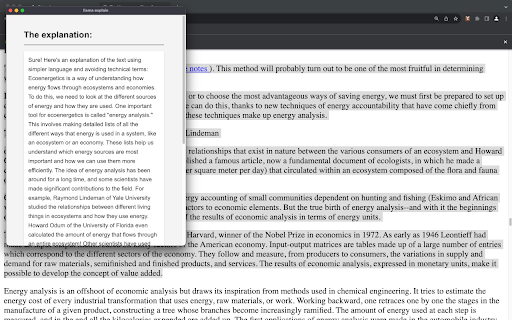
Get an explanation from a llama (or another local LLM) about the selected text on a website, ELI5 style. All local. llama explain is a Chrome extension that explains complex text online in simple terms, by using a local-running LLM (Large Language Model). All is done locally on your machine. No data is sent to OpenAI's, or any other company's, server. No need to pay for any service. Just select the text you need help understanding, right click, and select 'llama explain' from the context menu. It's built on top of Ollama (https://ollama.ai/) and as such, currently runs only on MacOS. For full installation steps (on top of this extension, you also need to install Ollama and create models), please refer to https://github.com/welniak/llama-explain. The extension is open source, you can find the code at https://github.com/welniak/llama-explain.

Contextual
AI/Chat/GPT with page - click a [reference] to see more - or Just Ask! When reading a summary don’t you want to read more? Get links to the parts you're interested in! The world's only tool of its kind? Summaries and chats, but with links to read more.

WebextLLM
Browser-native LLMs at your fingertips Unleash the Power of AI in Your Browser! WebextLLM is the first extension to embed large language models in the browser. The LLMs run in an isolated environment within the extension with zero configuration or external dependencies, making it the easiest method to run local inference on any platform (with 7 supported LLMs for you to choose from!). Experience a growing ecosystem of AI-based applications (with window.ai) as a user, and fuel it further as an application developer. Key Features * Own your models: Experience the freedom of owning your LLMs, enjoying a limitless, offline, private, and secure environment * Control: Exercise complete control over access to your LLM, granting or denying permission to any application at any time * Visibility: Gain insights into the history of prompts and responses to your model across different applications Why should you use WebextLLM? It's: 1. Free: The model runs on your hardware, eliminating the need for costly service providers 2. Private: Your data remains securely on your device, safeguarding your privacy 3. Unlimited: Take full control of the model without any quotas, censorship, or limitations 4. Highly available: Overcome limitations of internet connectivity and cloud-based LLM availability Disclaimer This extension is a proof-of-concept using experimental technologies. It is not recommended for production. By using this software, you assume all risks, including potential data loss, system failure, or other issues. The models and applications featured in this project are not endorsed by the author and the author is not responsible for any issues arising from their use.

Chatty for LLMs
Helps you to chat and RAG with your LLMs via ollama This tool is designed to help to chat with your LLMs running locally using Ollama and perform RAG on the document in the active tab. Uses ollama to chat with your local LLMs installed. run ollama using this command: export OLLAMA_ORIGINS=chrome-extension://* ; ollama serve

sidellama
Sidellama is a tiny browser-augmented chat client for open-source language models. CONNECTIONS Connect to your local ollama / LM Studio server, or talk with open-source models via groq. PERSONA Create and modify your own personal assistants! You can create, configure and use various system prompts and custom instructions to enhance your conversations. PAGE CONTEXT Augment your conversation with the content of your (currently visited) web page. - select `text mode` to share the text content of your page - select `html mode` to share the source code of the site (resource intensive, only for development purposes) - adjust `char limit` to control the maximum amount of characters you want to share in your conversation. decrease this amount if you have limited context window. WEB SEARCH Basic web-augmentation for your chats. Enter your web search query, and sidellama will load up an async web search to answer your questions based on live public data. - you can choose `duckduckgo` or `brave` as your web source - adjust `char limit` to control the maximum amount of characters you want to share in your conversation. decrease this amount if you have limited context window.
