
fldkjjjalojppegnjbdiepcggdejhdob
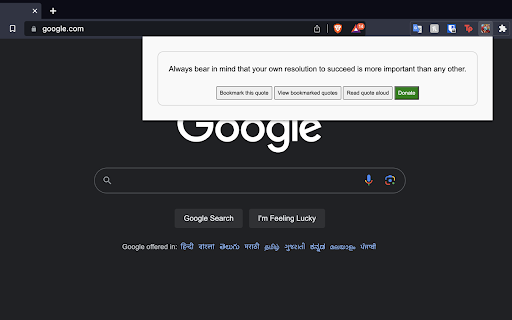

Shows a fortune cookie quote when clicked. You can also bookmark the quote, read it out loud, and view your bookmarks list. Our Fortune Cookie Quotes extension is a delightful way to inject a moment of joy and wisdom into your busy day. This extension offers a simple yet fulfilling experience - a click on the extension button reveals an insightful quote, just like opening a real fortune cookie. Here's why you should consider adding this gem to your browser: 1. Daily Inspiration: Get inspired with thought-provoking quotes that can motivate you, make you think, or simply put a smile on your face. Use these quotes to kickstart your day, as a midday pick-me-up, or to reflect upon at the end of the day. 2. Bookmark Your Favorites: Loved a quote and want to remember it for later? Our extension allows you to bookmark your favorite quotes. Whether it's a piece of advice you want to implement, or a quote that touched your heart, you can easily save and revisit it anytime. 3. Read Aloud Feature: Our extension can read the quote out loud for you, making it more accessible and convenient. This feature comes with a soothing female voice and slow speech, making the experience even more enjoyable. 4. Minimalistic and Easy to Use: The extension is designed to be straightforward and user-friendly, with a clean, simple interface. It's light, fast, and won't slow down your browser. 5. No Ads, No Distractions: We value your peace of mind and focus. That's why our extension is ad-free, offering you an uninterrupted experience. Whether you're seeking a bit of wisdom, a dash of motivation, or a spark of joy in your day, our Fortune Cookie Quotes extension is just a click away. Install today and let the wisdom of the fortune cookie guide your browser journey! Let us know if you would want us to add any more features!

Basecamp: Sprint, Task Management
Sync daily tasks or work between Basecamp & Moon HRM. Use filters & enhanced features for seamless collaboration. From organizing tasks and tracking sprint progress to viewing work through smart cards and flexible filters, every element is built to simplify how your teams plan, execute, and stay aligned. View ongoing, completed, and on-hold tasks, manage workflows, and stay on top of your project deadlines. Get instant access to pinned projects, real-time activity tracking, and quick updates. Always know what’s happening and what truly needs your attention. It makes sure no information remains scattered. Project managers and team leaders can track the progress of the Basecamp sprints and todos using our extension. They can check and take necessary steps to meet the project timeline. Here’s why you should choose our extension for your Basecamp project management and time tracking over other traditional software. Centralized dashboard: Get a complete overview of your workspace from a unified dashboard. Direct access to key project details and everything that matters. Hey section: Never miss a beat with “Hey section,” which provides updates from across the team. For uninterrupted visibility, you can also enable it as a sidebar on your left, so that nothing slips through the cracks. Latest activity: Keep a close eye on recent activities across different projects. See updates, changes, and contributions, helping you stay aware of how work is progressing in real time. Sprint progress and status: Observe how your sprint is advancing with a clear view of task status and upcoming stages. Understand the current status at a glance and assure everything is progressing as planned. Task filters: Smart filters to refine your task view and concentrate on what matters most. Sort tasks based on whatever criteria you want and quickly access relevant work without distractions. Project list: Zoom into all your projects in an organized list that makes navigation pretty much easier. Switch between projects and keep track of ongoing and completed work without confusion. Smart card view: Users can visualize tasks in a structured card layout that highlights details at a glance. Such a format makes it very easy to oversee and act on tasks with better clarity. Work Summary: Review a comprehensive summary of work done across tasks and projects by different team members. Take a closer look at whether efforts are being utilized in the right way. Connect with Moon HRM: Directly link an advanced HRM software, Moon HRM, with Basecamp in order to align project activities with employee management. Organize tasks, teams, and monitor performance without any extra effort. Download Basecamp: Sprint, Task Manager Extension & follow these steps. 1. Open Basecamp and log in to your Basecamp account 2. In the top right corner of the screen, click on the sign-up button 3. Choose Moon HRM while signing up 4. Complete the sign-up process by filling in the required details. 5. Start adding projects and managing workflow with time log reports Why integrate with Moon HRM? Basecamp: Sprint, Task Manager integration using Moon HRM is best for managing the workflow of your team members. It helps track each sprint’s card or to-do status management and the time to complete the assigned tasks. Once integrated with Moon HRM, it automatically syncs the time log for each employee as per the tasks completed or the time dedicated to each task. Using Moon HRM integration, the project manager can closely monitor each sprint’s progress, thereby checking the performance and status of each employee’s tasks.

BoomConsole - Web Organizer & Contact Management
BoomConsole is the organizational tool to capture your online viewing experience with your description and folders. Bank Your Connections with BoomConsole Bank Your Insights, Chats, Contacts and Web views to your personal database, Safe and Secure in the Cloud. BoomConsole is a button and sidebar for your web browser that lets you describe your thoughts on the web page you are visiting, capture texts, images and screenshots of the page and secure the composition of all the captured information in folders you remember in your own personal safe database. Search, Find, Organize, View and Review the insights in your safe. We help you Secure Your AI Chats from Chat GPT, Google Gemini, You Chat and Poe Chat. The Boom Console button known as an ‘‘Extension’’ or ‘Add-on’ that you download from the Google Chrome Web Store. The Boom Console Button works on the Chrome Browser, Edge Browser and Brave Browser. (Firefox and Safari coming soon) --------------------------------------------------------------------------------------------------------------------- Key Features: 1. Bank Your AI Chat Interactions: Save and secure the chats you had with AI Chatbots like: ChatGPT, Gemini, You Chat, Poe Chat, then edit and export memories of your chats into Word, PDF, JSON, and CSV formats. 2. Bank Your Online Contents: BoomConsole helps you to Describe and file the web pages you visit. Capture screenshots, HTML, URLs, images, off a website. Revisit your web pages whenever you need it. 3. Bank your Contact information Import your contacts from social media platforms like: LinkedIn, WhatsApp, Google Maps, Indeed, and Monster. Store phone numbers, emails, map locations into your personal contact manager and find them whenever you need it. 4. Smart Categorization Consolidate all your chats, emails, contacts, and contents into the private organized directory system you create. Assign unique title names to the folders you remember. Who Can Benefit? -> Any internet user can benefit from BoomConsole by using it as a personal memory bank to save and remember important information, web pages, and online interactions. -> Professionals and entrepreneurs can save LinkedIn profiles and industry-related online content for networking, market analysis, and business development enhancing project management and creative workflows. -> Sales professionals can capture business locations, helping them keep track of important addresses and contact information. -> Marketers can benefit from the screen capture feature to save visual elements, such as social media posts or website designs, for inspiration or content planning. -> Professors can use BoomConsole to capture and combine online educational resources and course materials for curriculum development. Disclaimer: BoomConsole is an independent platform and is not affiliated with or sponsored by any of the companies whose data it captures, including LinkedIn, Google Maps, Indeed.com, and Monster.com. The use of trademarks and logos is for informational purposes only and does not imply endorsement.

Social Media Analyzer
Sort and filter instagram profile posts by likes, comments and dates Sort Instagram profiles by likes or comments with our dynamic Chrome extension. Fed up with the hassle of scrolling to find high-performing posts? Our extension is your solution, efficiently showcasing the most engaging content right away. Discover the Benefits: Targeted Sorting: Filter posts by the number of likes or comments to immediately identify what's resonating with audiences. Date Range Filtering: See what's popular within custom date ranges— in the last week, month, six weeks, or sift through all-time popular posts. Insightful Analysis: Leverage the power of data to enhance your content strategy by studying what drives high engagement. Time Efficiency: Save hours of manual research with instant sorting and filtering, giving you more time to create and engage. Our Chrome extension is an indispensable tool for anyone serious about leveraging Instagram's potential!

Where is Cookie?
Hidden clues, sharper mind! Find Cookie & boost your brain As you search for Cookie, our adorable hidden dog, on website pages, you're actually enhancing your cognitive skills. Each level is designed to improve your attention to detail, speed up your visual processing, and sharpen your observational abilities. Enjoy the thrill of the hunt while giving your brain a beneficial workout. Ready to play and train your brain with Cookie? Let's get started!
