
flcjpmclceacigbihncndfafbcnpibdm


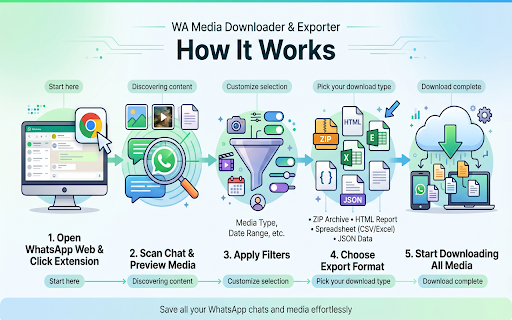
Save photos, videos, voice messages, documents & stickers from WhatsApp. Export media in bulk as ZIP. Filter by date and file type. Save everything from WhatsApp Web — photos, videos, voice messages, documents, and stickers — all at once. WA Media Downloader & Exporter connects directly to your open WhatsApp Web session, scans any conversation, shows you exactly what it found, and packages your files for download. Most tools stop at photos. This one handles everything your contacts have ever sent: · 📷 Photos — JPG, PNG, and WebP images · 🎬 Videos — MP4 and WebM clips in original quality · 🎙️ Voice Messages — every push-to-talk recording · 🎵 Audio — OGG, MP3, and M4A audio files · 📄 Documents — PDFs, Word files, spreadsheets, and more · 🏷️ Stickers — the sticker packs shared in your chats · 📎 Other Attachments — any file type your contacts have sent Different jobs call for different formats. Pick the one that fits: ▸ ZIP Archive — All media neatly sorted by type into a single compressed download. The go-to for bulk backups. ▸ HTML Chat Record — A clean, scrollable replay of your conversation with every photo and video displayed inline. Great for offline reading or sharing with colleagues. ▸ JSON — Fully structured message data including timestamps, sender names, and content. Designed for developers, researchers, and long-term archiving. ▸ CSV — A flat table that opens instantly in Excel or Google Sheets, ready for sorting, filtering, and pivot tables. ▸ Excel (.xlsx) — A native spreadsheet export with proper column formatting, no conversion needed. ━━ SCAN BEFORE YOU DOWNLOAD ━━ Before a single file hits your hard drive, the extension scans the selected chat and shows you a full breakdown — how many photos, how many videos, how many documents. Review the numbers, tweak your filters, then start the export with confidence. No surprises, no wasted time. ━━ PRECISE FILTERS AND CONTROLS ━━ You stay in full control of what gets saved: ◆ Media Type Toggles — Turn individual file categories on or off. Only want photos and documents? Done in two taps. ◆ Date Range Filter — Set a start date and end date to pull files only from a specific time window. Perfect for isolating a project period or a vacation album. ◆ Scan Limit — Define how many messages to scan, so you can work through long chats in comfortable batches. ◆ Download Timeout — Configure a per-file timeout to keep large exports moving without stalling. ━━ RUNS ENTIRELY IN YOUR BROWSER ━━ WA Media Downloader & Exporter processes everything locally, between Chrome and WhatsApp Web. No files are uploaded to external servers. No screen capture. No background data collection. Your messages and media stay on your device. Open the extension as a popup, a floating side window, or a full browser tab — whichever fits your screen and workflow. ━━ BUILT FOR ━━ ✓ Backing up years of family group chat photos in one go ✓ Collecting project files and documents shared in a work chat ✓ Archiving an important conversation before switching phones ✓ Downloading voice message logs for transcription or record-keeping ✓ Saving sticker collections and GIFs shared by friends

Free WA Chat Export - Download WA Number to Excel/CSV/VCard - WAExport
Export WA chat with media to HTML, save group number & download contact to Excel. Local, Secure, Private. Zero data collected. 🔒We promise never to collect any user data, 100% privacy and security guaranteed. 🌟 Powerful WA Export Features 1. Advanced WA Group Number Export Batch Download WA Group Number from all or selected groups. Includes smart filtering to exclude Admins and exports rich data (Group Name, Public Display Name, Business Status). 2. Comprehensive Chat List Export Extract WA Number from your entire history. Use Country Filters to specific Download WA Number lists (e.g., +1, +86). Includes analytics like "Is Blocked", "Last Message Date", and "Unread Chats". 3. Flexible Contact Saving Efficiently Save WA Contact and Save WA Number. Keep your lists clean by filtering out existing contacts and focusing on new leads. 4. All Major File Formats Support WA Number to Excel (CRM ready), WA Contacts to CSV, and WA Contacts to VCard/VCF for easy import to iOS/Android. 【NEW!】 Ultimate WA Chat Export Tool Looking for the best way to export WA chat history? Our latest update brings a powerful and secure way to export your messages directly from your browser. Whether for business records, legal evidence, or personal archiving, we've got you covered. 🔥 Key Features: ● Export WA chat to Excel, HTML, or CSV: Choose the perfect format for your data. Excel and CSV are ideal for data analysis, while HTML provides a beautiful, readable offline interface. ● Export WA chat with media: Don't lose your valuable files! Seamlessly export images, videos, and documents attached to your conversations. ● Custom Date Range: Only need specific messages? Filter and export chats between specific dates to save time and storage. ● Safe & Fast Export Modes: Choose 'Safe Mode' to minimize account risks and ensure stable data extraction, or 'Fast Mode' for lightning-speed processing. ● Target Specific Chats: Easily select and export individual group or private conversations without exporting your entire inbox. 🎯 Who is this WA Export Tool for? ● Marketers: Download WA phone number lists for campaigns. ● Sales: Save WA Contact details to Excel for lead management. ● Analysts: Analyze activity with fields like "Last Message Date". ● Users: Easily Backup WA Number and save lists to PC. 💡 Why Choose This Extension? Native WA Web lacks a bulk WA Export function. Manually saving a WA Group Member or copying numbers is tedious and time-consuming. This tool bridges that gap. It is the most complete WA Contact Export utility that allows you to extract WA contact details with precision. Stop wasting time—automate your WA Group Number extraction and WA Number to Excel conversion today. We make WA Export simple, secure, and free. Whether for backup or marketing, use this tool to Download WA Group Number lists and extract WA contact details effortlessly. 📝Privacy Note: WAExport respects your privacy. We do not collect personal information or violate WhatsApp's terms of service. We do not request any authorization to user personal data. The extension works solely with the data already available on your device. 🔒 Disclaimer This extension is an independent project and is not affiliated with WhatsApp Inc. "WhatsApp" is a registered trademark of WhatsApp Inc. All WhatsApp Export and WhatsApp Number Export operations are processed locally on your device for 100% privacy and security.

WA Video Download: Video, Image & Audio Saver - WASBB.COM
Batch download WhatsApp Image, Video, Voice, Audio, Sticker, Document with ease using WhatsApp Media Downloader. 🌟WhatsApp Video Download: Video, Image & Audio Saver - WASBB.COM: Your All-in-One Media Solution! 🌟 Hey there! Looking for a handy tool to grab all those awesome media files from WhatsApp? Let me walk you through the WhatsApp Media Downloader, a super intuitive extension that makes downloading media a breeze. Whether it’s photos, videos, or documents, this tool has got you covered. Let’s dive into what it does and how it works—based purely on its full functionality for everyone! 😊 📸🎥📄 What Media Files Can You Download? 📸🎥📄 This tool is your ticket to snagging all types of media from WhatsApp chats and groups. Here’s the lineup of what you can download: 🔹 Images: Family pics, memes, or anything visual you want to keep. 📷 🔹 Videos: Funny clips, tutorials, or heartfelt moments shared in groups. 🎬 🔹 Voice: Voice notes from friends or key meeting recordings. 🎙️ 🔹 Audio: Songs, soundbites, or audio messages you’d love to save. 🎵 🔹 Stickers: Those quirky, fun stickers that make chats pop! 😜 🔹 Documents: PDFs, Word files, or any important docs shared via WhatsApp. 📑 With just a few clicks, you can grab hundreds of these files at once—no manual saving required! 🚀 ⚙️ How Does It Work? The Interface Unveiled! ⚙️ The WhatsApp Media Downloader interface is clean, simple, and packed with options to make your life easier. Picture this: 🔹 Top Bar: The title "WhatsApp Video Download: Video, Image & Audio Saver" sits proudly at the top, so you know exactly what you’re working with. 🔹 User/Group Selection: Pick the chat or group you want to download from—super straightforward with a field displaying the name (e.g., "User Group Name"). 🔍 🔹 Media Type Choices: A handy section lets you check boxes for what you want—Images, Videos, Documents, Audio, Voice, or Stickers. Mix and match as you like! ✅ 🔹 Time Range: Set specific dates (e.g., "2025/01/02" to "2025/02/02") to download only the media from that timeframe. Calendar icons make it a snap to adjust. 🗓️ 🔹 Download Button: One big, bold "Download" button kicks things off, complete with a downward arrow to signal action. ⬇️ Once it’s done, you’ll see a cheerful message like "Media Files Exported Successfully-288!" with options to download them or head back home. Stars and sparkles celebrate your success! ✨ 📲 Why It’s Perfect for Downloading Media 📲 This tool shines because it’s built for convenience and control. Want to back up every image from a family group? Check "Images" and hit download. Need a specific video from last week? Set the date and grab it. It’s fast, flexible, and lets you batch-download everything—Images, Videos, Voice, Audio, Stickers, Documents—in one go. No fuss, no mess! 😄 The interface even includes a toolbar with tabs for each media type (Image, Video, etc.), so you can switch focus effortlessly. Plus, it works seamlessly whether you’re on WhatsApp Web or syncing from your phone. 🌐 🚀 Ready to Get Started? 🚀 The WhatsApp Media Downloader is all about making your WhatsApp media yours to keep. From precious memories to work essentials, it downloads Images, Videos, Voice, Audio, Stickers, and Documents with ease. The clean design, date filters, and media type options mean you’re always in charge. So, why wait? Pop it into your browser, open WhatsApp, and start downloading your media today! Your files are just a click away. 😊👇 This is an independent tool with no official association with WhatsApp LLC.

WA Contacts Extractor - wabulk.net
Export ,extract and backup your WhatsApp contacts by various dimensions such as Contacts, Chats, Groups, Labels, and Countries. This powerful and user-friendly tool lets you extract and export all your WhatsApp contacts, including unknown phone numbers, with just a few clicks. With this extension, you can keep your data secure and choose from popular formats like CSV, Excel, JSON, or VCard to export your contacts. Our tool is perfect for anyone who needs to backup and manage their WhatsApp contacts. Whether you need to export contacts for future use, organize your chat history, or backup your contacts in case of data loss or device transfer, our Export WhatsApp Contacts provides a simple and efficient solution. Features: ✅ Easily extract and export all your WA contacts with just a few clicks ✅ Extract contacts from groups and chats to organize your contacts ✅ Filter contacts by country for targeted outreach or analysis ✅ Save contacts from labeled chats for easy reference and management ✅ Export data to popular formats like XLS, CSV, JSON, or VCard for secure backup and use in other applications. Why use our Export WhatsApp Contacts? ✅ Save time: Quickly extract and export all your WA contacts with just a few clicks. ✅ Keep data secure: Choose from multiple export formats to ensure your data remains safe and confidential. ✅ Get organized: Categorize your contacts by groups, chats, labels, countries, and more for complete control over your data. ✅ Never lose contacts again: Easily backup and export your WA contacts for quick access when you need it. Please note that our Export WA Contacts does not collect any personal data or violate any terms of service. It only extracts and exports WA contacts that are already stored on your device. # Home Page https://export-wa-contacts.wabulk.net/ This extension is an unofficial enhacement for WhatsApp™ Web and is not related in any way to WhatsApp LLC.

WA Contacts Extractor
Extract and export all WhatsApp contacts from groups, chats and labels. Choose from CSV, Excel, JSON, or VCard formats. WhatsApp Contacts Extractor is a simple and powerful tool that allows you to extract and export all your WhatsApp contacts, including unknown phone numbers, in just a few clicks. With this extension, you can keep your data secure and choose from CSV, Excel, JSON, or VCard formats to export your contacts. 🔹 Save time and effort: Extract and export your WhatsApp contacts quickly and easily. Keep your data secure: Choose from multiple export formats to keep your data safe. 🔹 Get organized: Export all your WhatsApp contacts, including unknown phone numbers, in just a few clicks. 🔹 Never lose your contacts again: Backup and export your WhatsApp contacts with a click of a button. 🔹 Export WhatsApp contacts to use in other applications. 🔹 Backup WhatsApp contacts in case of data loss or device transfer. 🔹 Organize and manage your WhatsApp contacts more efficiently. Note: WhatsApp Contacts Extractor does not collect any personal data or violate any terms of service. It only extracts and exports WhatsApp contacts that are already stored on your device. # Feature ✅ Export & save contacts ✅ Extract contacts from WhatsApp groups and chats ✅ Filter contacts by country ✅ Save contacts from labeled chats ✅ Export data to XLS/CSV/JSON/VCard ✅ Continued free updates with premium support # Home Page https://wa-contacts-extractor.watool.online We hope you enjoy using WhatsApp Contacts Extractor! If you have any questions or feedback, please don't hesitate to contact us. (Email: hello@watool.online) #Legal WhatsApp is a trademark of WhatsApp LLC. This extension is an unofficial enhacement for WhatsApp™ Web and is not related in any way to WhatsApp LLC.
