
fkljhmmgafckmkddngafenkpgkjblboj
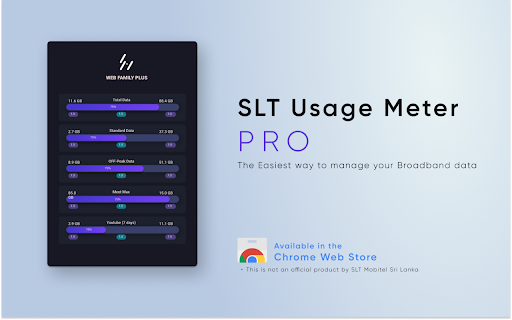

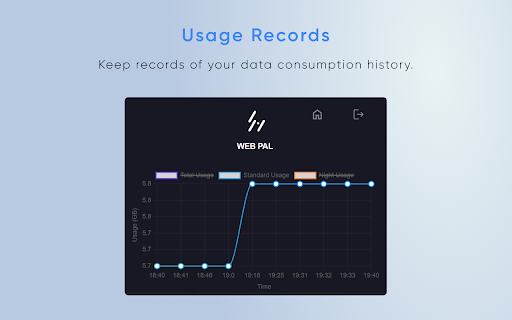
Monitor your SLT broadband data usage SLT Usage Meter Pro is a powerful Chrome extension designed to enhance and simplify your experience of monitoring data usage. With this extension, you can now effortlessly keep track of your data balance, surpassing the capabilities of the SLT portal. We have incorporated numerous features that are not available in the SLT portal, making data management more convenient and efficient. ~What's New in SLT Usage Meter Pro 1.0.0 Passwordless Login: You can now log in without entering your password each time. Simply log in once on the SLT portal, and our extension will securely retrieve the necessary session tokens to keep you logged in seamlessly. Quick Data Balance Overview: Our extension provides a rapid and real-time display of your data balance, giving you an instant snapshot of your usage. Day and Night Time Data Separation: Easily view your data consumption during day and night separately, allowing you to manage your usage patterns more effectively. Daily Quota Tracking: Stay on top of your daily data quota to ensure optimal data usage throughout the month. Our intuitive tracking system helps you make the most of your data allowance. Data Usage History: Access a comprehensive history of your data usage, enabling you to analyze your consumption patterns over time. User-Friendly UI: We have designed SLT Usage Meter Pro with a user-friendly interface to ensure a seamless and enjoyable user experience. Important Notice: Please be aware that SLT Usage Meter Pro has been thoroughly tested with users whose packages renew on the 1st of each month. If your package renewal date falls on any other day, the quota data displayed may not be fully accurate. We kindly request users with package renewals on different dates to reach out to us via the "Contact Developer" option in case of any issues. Disclaimer: SLT Usage Meter Pro is an independent project and not an official product of SLT Mobitel. We are dedicated to providing an enhanced data usage monitoring solution for SLT users, but we are not affiliated with SLT Mobitel. Experience the next level of data usage tracking with SLT Usage Meter Pro and take control of your data consumption like never before. Download now and enjoy a seamless data management experience! No personal data is collected. Your feedback is valuable as we constantly improve the extension.

SLT Broadband Usage Checker (Unofficial)
Check SLT Broadband usage with a single click 🔥 Easily check your SLT (Sri Lanka Telecom 🇱🇰) Broadband Usage with just one click. ✅ Secure Access: Uses your existing MySLT Portal authentication - no separate login required. ✅ Quick Access: View your data usage directly from your browser toolbar. ✅ Comprehensive Data: See usage details for Main Pack, Extra GB, Bonus Data, Add-Ons, and Free Data. ✅ Visual Progress Bars: Easily understand your data consumption with color-coded progress bars. ✅ Auto-Refresh: Data automatically refreshes every 15 mins, or manually refresh anytime. ✅ Last Updated Info: Always know when your data was last refreshed. ✅ Easy Re-login: Quick access to the MySLT portal if re-authentication is needed. ✅ Support Access: Direct link to contact support for any issues or queries. ▪️ Install & Log In: Install the extension and log in to your MySLT account via the official MySLT Portal. ▪️ View Data Usage: Once you’re logged in, click the extension icon to see your current data usage. ▪️ Secure Access: The extension safely uses your active MySLT session to fetch the data—no need to enter your credentials in the extension. ▪️ Refresh Anytime: Hit the ‘Refresh’ button to get the latest data instantly. ▪️ Clear Data: Use the ‘Clear Data & Re-authenticate’ button to reset the data stored in the extension. This won’t log you out of the MySLT Portal. 🛡️ This unofficial extension securely fetches data from SLT's official API using your existing MySLT Portal authentication. 🛡️ It does not store or have access to your login credentials. 🛡️ Your personal information is never transmitted or stored by the extension. ❗Note: ▪️ This is an unofficial extension and is not affiliated with, endorsed by, or connected to Sri Lanka Telecom PLC in any way. It is an independent tool created to enhance user experience. ▪️ Some promotional materials, including screenshots and store tiles, may display simulated data for demonstration purposes. Actual usage data will vary based on individual user accounts.

Donut@Home for ZLT S10
Unlocking the full features of Smart@Home LTE Wireless Router for model ZLT S10. To enable the full functionality available in the console. This work for LTE Wireless Router Model ZLT S10 from Smart Axiata only. This will enable features such as: - Network Lock Disable/Enable (Openline) - Frequency Band Selection - Cell ID Locking - Network Selection (4G/3G/2G) - USSD Dialer (Works on 3G Connection Only) - APN Settings - Internet / Data Limiter - NAT Disable/Enable - Firmware Upgrade - Virtual Private Network - Input Network Unlock Code

LKTips
LKTips is a user-friendly Chrome extension that provides Sinhala meanings for English words. You can easily look up word meanings by hovering over or double-clicking on a word while browsing the web. Additionally, the extension now includes a search feature with autocomplete, allowing users to type English words to get their Sinhala meanings instantly. Ideal for bilingual users, students, and professionals who need quick translations while navigating content online!

Chrome Reporting Extension
Extension for reporting chrome metrics and events. Visibility into browser activity can help IT better secure and manage their enterprise environments. This extension gives IT admins access to log information about Chrome Browser usage. IT can view the logs through their existing enterprise reporting and monitoring tools to better understand their company devices and operating systems running Chrome Browser, the extensions installed in their environment, and verify that policies are applied as expected. This Chrome Browser reporting extension is managed via policy and only works in managed environments. It does not report information about incognito mode sessions. Please visit chrome.com/enterprise to learn more about deploying Chrome Browser for your organization. By installing this item, you agree to the Google Terms of Service and Privacy Policy at https://www.google.com/intl/en/policies/.
