
fkgjfokghiicajjcbfnljekagohnpccm
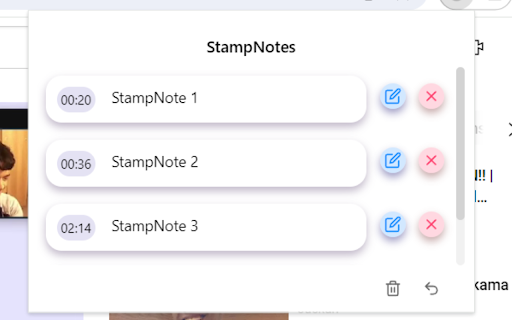


Create and save timestamps with custom notes on YouTube videos Enhance your YouTube experience with StampNotes! Easily create timestamps on YouTube videos, add personalized notes to each timestamp, and click to navigate directly to specific moments. Your notes are auto-saved and organized per video, ensuring you never lose track of important details. Perfect for students, professionals, and avid learners!

YouTube to NotebookLM
Send YouTube to NotebookLM. Save videos, sync YouTube channel to NotebookLM, and manage any NotebookLM video easily 🌐 With this powerful extension, you can easily connect YouTube and NotebookLM to create organized, AI-ready notes and summaries. It supports YouTube videos, playlists, channels, and even search results. The extension transforms your video-watching habits into a productive, research-driven workflow. ✅ Why You Need Youtube to NotebookLM? 1️⃣ Add any Youtube video to NotebookLM instantly 2️⃣ Send an entire Youtube playlist to notebook lm for bulk video research 3️⃣ Extract videos from a Youtube channel to notebooklm seamlessly 4️⃣ Turn your video research into actionable insights 5️⃣ Use Youtube search to notebooklm to batch-import search result videos ⚡ Key Features You’ll Love: 💡 Add single or multiple videos from YouTube to NotebookLM app 💡 One-click to create notebook, or choose notebook from your existing list 💡 Extract summaries, timestamps, and AI highlights using notebooklm video overview 💡 Support for notebooklm video podcast content 💡 Quick access button in the browser for fast action 🎯 Turn your browser tab to notebooklm effortlessly 🎯 Extract ideas, arguments, key points from long-form videos 🎯 Use the extension to send a site tab to notebook lm, not just YouTube 🎯 Works with Notebook LM Plus for advanced AI-powered insights 🎯 Compatible with both light and dark themes 🧠 NotebookLM AI uses your saved videos to: 🔸 Generate contextual summaries 🔸 Create structured Q&A formats 🔸 Offer deeper insights from NotebookLM video overview 🔸 Help you build notebooks with long-term value 🔸 Sync video content across all your learning projects This extension isn’t just a clipper — it's a bridge between video learning and structured knowledge capture using the technology. Perfect for All Types of Learners: 💼 Students organizing lecture content 💼 Podcasters summarizing interview footage 💼 Researchers building video-based citations 💼 Creators looking for inspiration 💼 Anyone using NotebookLM for research videos Just find a video, click, and you’re done — whether it's a single clip or an entire Youtube playlist to notebooklm. 🔹 Choose to Create notebook or just Choose notebook from your list 🔹 Add NotebookLM source for smarter future search 🔹 Built-in support for NotebookLM Reddit 🎯 Looking to turn YouTube videos into actionable notes and summaries? The Youtube to Notebook LM extension is your ultimate tool for research, learning, and content organization. 🎯 In just one click, you can send any YouTube video to NotebookLM, including playlists, channels, and even search result pages! ⚒️ No matter how you learn or work, Notebook LM features ensure your NotebookLM YouTube experience is tailored to your needs. ❓ What is Youtube to NotebookLM? 🧩 It’s a Chrome Extension that sends YouTube content (video, playlist, channel, or search result) to NotebookLM app for AI-powered summarization and note-taking. ❓ Can I use it with playlists and channels? 🧩 Yes! You can send a full Youtube playlist to notebooklm or an entire Youtube channel to notebooklm. ❓ Will NotebookLM summarize the videos? 🧩 Yes! The extension helps you access notebooklm video overview and summaries generated by NotebookLM AI 🧠 ❓ Can I choose where to save my notes? 🧩 You can Create notebook or Choose notebook from your existing list – it’s completely flexible. ❓ What about browser tabs that aren’t YouTube? 🧩 You can send any site tab to notebooklm, not just YouTube. Perfect for additional context and source linking. 🌟 Make your video-watching smarter, faster, and more organized with Youtube to NotebookLM. The perfect solution for anyone serious about content digestion and research. Whether you're dealing with podcasts, lectures, documentaries, or vlogs — NotebookLM for research videos transforms how you think, learn, and remember.

TimeTags for YouTube
Create YouTube time tags with simple keyboard shortcuts TimeTags for Youtube is a tool designed to simplify the task of tagging specific moments in YouTube videos. Say goodbye to manually writing timestamps in a separate text editor. With yt-timetag, you can conveniently add and adjust tags within the YouTube interface using your keyboard. The extension provides precise and accurate timestamps, enhancing your experience when tagging longer videos. Browse to any YouTube video, click the icon of the extension in browser bar to activate it. - [delete, backspace] remove tag (affects active tag) - [left] backward 5 seconds (affects active tag) - [alt+left] backward 1 second (affects active tag) - [right] forward 5 seconds (affects active tag) - [alt+right] forward 1 second (affects active tag) - [space] play/pause - [a] add a tag at current time - [d] edit the description of active tag - [esc] cancel active tag Shortcuts won't work when YouTube's bulit-in shortcuts is active (which means your focus is currently on the video element). - Fix: Icons color for YouTube dark mode - Fix: mouse wheel behavior in tag/comment list - Add "Trash" tab for temporarily holding removed tags - Add options page - Explorer - Custom shortcuts - Data import/export - Standalone Explorer is also available at https://cloud.pymaster.tw/yt-timetag-explorer/ - Remove unnecessary site `permissions` specified for Firefox support in Chrome build - Add `chrome.storage.local` as primary storage option - "Sync" feature of Chrome - Now syncs recently updated 100 videos only - Compress `chrome.storage.sync` data to better utilize the quota (100kB max) - Store video id, video title information for upcoming features - Export in Markdown format - CommentList UI: add time tags in comments to your collection ## 1.2.0 - Remove "tabs" permission - Default to sync storage of Chrome - Add shortcut for "remove" - Update for new YouTube design component change ## 1.1.0 - Support new YouTube design - Tag list will become scrollable when it feels overwhemled - Add keyboard shortcut `d` for editing active tag description, due to `/` is already used by the new YouTube

Youtube Timestamp
Save youtube videos with exact timestamps for later. This is a small extension for saving YouTube videos with exact timestamp. You can find all your saved videos, by clicking on the extension. If you save a video that is already on your saved list, only the timestamp will update. You can right click on saved videos to delete them. This is an open source project, and all source code can be found on GitHub. https://github.com/kotikkir9/Youtube

Youtube Timestamp Saver
It helps you save timestamps in Youtube videos Are you tired of losing track of those golden moments while watching YouTube videos? My YouTube Timestamp Bookmark Extension is here to make your video-watching experience smarter and more efficient. ★ The Problem: We've all been there – watching multiple videos, absorbing valuable insights, and suddenly realizing we've stumbled upon a gem of information. The only hitch? We can't recall where it was in the video. Cue the frustrating hunt through endless playback. ★ The Solution: Introducing my YouTube Timestamp Bookmark Extension – your shortcut to hassle-free video bookmarking. Say goodbye to endless scrolling and searching. With a simple click on the "Bookmark Icon" button within the YouTube player, you can instantly mark that crucial moment. ★ Key Features: - Sync with Google Account: Seamlessly integrate your bookmarks with your Google account, ensuring accessibility across devices and platforms. - Effortless Search: Easily locate specific bookmarks across all your bookmark videos with an intuitive search function. - Customization: Personalize your bookmarks by giving them custom names. No more generic timestamps – now you'll know exactly what each bookmark represents. or you can omit ★ What Sets Me Apart: My commitment to continuous improvement means that I'm open to your feedback and suggestions. Your support fuels my development, and I'm dedicated to enhancing your YouTube experience. ★ Stay Tuned: As interest in my extension grows, I have exciting plans for additional features. Your valuable feedback will help shape the future of this tool, so join me on this journey. Don't let those enlightening YouTube moments slip through the cracks. Try my YouTube Timestamp Bookmark Extension today and unlock a more organized, efficient way to revisit your favorite video insights. Disclaimer: I didn't own any icons used in this extension, I used lordicon for this.
