
fkeapdjkpbdienoljdaeinlchinahibi
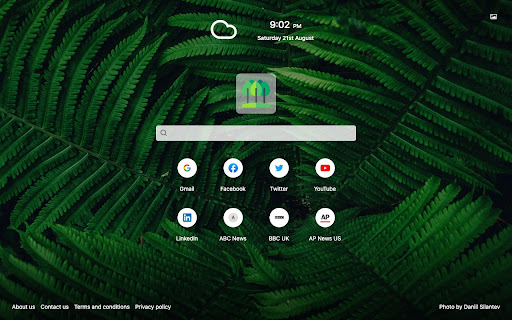
The Nature Extension is designed to bring a beautiful calming nature images to your every day peripheral. Now your first browser page will no longer be a boring search bar but your new extension will bring you the joy and calm of nature's landscapes. Once installed you are able to customize the Nature Tab by choosing your preferred background from one of the many nature settings in our image library. You are also able to view your local time and local weather. We hope you enjoy using the Nature Tab as much as we have. By clicking "Add to chrome", I accept and agree to installing The Nature Tab extension and setting Chrome™ New Tab search to that provided by the service. The search will be powered by Bing. Homepage URL: https://sites.google.com/view/nature-extension Terms & Conditions URL: https://sites.google.com/view/nature-extension/terms-and-conditions Privacy Policy URL: https://sites.google.com/view/nature-extension/privacy-policy Support URL: https://sites.google.com/view/nature-extension/contact-us

Smilebox Tab
With Smilebox Tab you get fast access to your favorite sites and to the amazing selection of Smilebox ecards for all occasions With Smilebox Tab you get fast access to your favorite social, shopping, and entertainment sites, as well as to the amazing selection of Smilebox e-cards/slideshows/invitations for all occasions, all in one place. The extension also features New Tab search functionality, making it easy to search for anything right from the new tab. By clicking “Add to Chrome”, you accept and agree to install the Smilebox Tab Chrome Extension, set the Chrome™ New Tab to Smilebox Tab with Yahoo, and to the Terms of Use and Privacy Policy. - Access 3500+ original designs for every occasion - Enjoy quick access to your favourite sites and create shortcuts - Use New Tab search included in the extension For easy access to shortcuts, we recommend pinning the extension to your browser toolbar. You may uninstall the extension at any time. To remove our extension from Chrome: 1) Click on the three vertical dots icon in the upper right-hand corner of your Chrome browser. 2) Go to "More tools” 3) In the left menu that appears, click on "Extensions.” 4) From the list of installed Extensions, locate the extension you would like to uninstall. 5) To remove the extension, click on the "Remove" button, which is to the right of the "Details" button (for the extension you wish to uninstall). 6) Close your browser completely and reopen it. The extension should now be removed from your browser. For assistance from our customer service team, please email us at extsupport@smilebox.com

FindIt-All
Enjoy a quick and distraction-free search experience Looking to enjoy a rich and fast search experience? Try FindIt-All! FindIt-All - is a distraction-free search extension, offering a search focused experience on the default search without all the background noise: Quick access to search Rich search experience powered by Bing The Findit-All extension sets your default search provider to Bing. By clicking “Add to Chrome”, you accept and agree to install the FindIt-All extension, set the Chrome™ default search to FindItAll, and to the Terms of Use, and Privacy Policy. For easy access, we recommend pinning the extension to your browser toolbar. The extension requests the following permissions: Set your default search to FindIt-All Can read and change your data on sites: https://*.finditall.com/* You may uninstall the extension at any time. To remove our extension from Chrome: 1) Click on the three vertical dots icon in the upper right-hand corner of your Chrome browser. 2) Go to "Settings.” 3) In the left menu that appears, click on "Extensions.” 4) From the list of installed Extensions, locate the extension you would like to uninstall. 5) To remove the extension, click on the "Remove" button, which is to the right of "Details" button (for the extension you wish to uninstall). 6) Close your browser completely and reopen it. The extension should now be removed from your browser. For assistance from our customer service team, please email us at support@findit-all.com

Elevate Tab
Elevate your mood with this amazing New Tab extension. By clicking "Add to Chrome", I accept and agree to installing the Elevate Tab Extension and setting Chrome New Tab Search provider to Microsoft Bing as described by the service in EULA (https://elevatetab.com/eula.html) and Privacy Policy (https://elevatetab.com/privacy-policy.html). Have trouble concentrating? This add-on is intended for everyone who wants to gain laser focus. You won't believe how you used to function with a Chrome default new tab after downloading Elevate Tab. This custom tool will significantly increase your productivity, and your new tab page will be enhanced with numerous useful features. The collection of beautiful wallpapers is the first thing that catches your eye. You get to witness the most incredible landscapes and other works of art on each tab that is opened. The catch is, that you do not have to open a new tab every time. To see these awesome photos just click on the small logo in the top left corner and enjoy. Do not let rain surprise you and ruin your plans! This feature allows you to stay updated on the weather forecast. The temperature for the particular place may be found in the right upper corner. By using Elevate Tab it will come naturally to you to use our search feature which perfectly fits with beautiful wallpapers. We created a new feature for all hard workers out there. You can find it in the left bottom corner and by pressing the chair image you can set reminders. What is the purpose of reminders? Gentle reminders will remind you to take care of your posture because sitting for long periods of time can be harmful to your health. Keep track of time with the clock feature. If somehow you do not like one of these options, you can simply choose to see the ones you like! Just click the Settings and pick your favorites! Feel free to contact us anytime: - By submitting a form on the page: https://elevatetab.com/#contact - By sending mail to the owner's address: Bulevar Šarla de Gola 2, Podgorica, Crna Gora - By sending an e-mail to info@datadesign.me

My Horoscope Pro
MyHoroscope Pro is a free and insightful daily horoscope extension, offering new tab search, favorite sites shortcuts, and news. Discover a daily horoscope reading for your star sign with My Horoscope Pro browser extension. To enable these features, this extension configures your New Tab Search to My Horoscope Pro. It also gives you the ability to add shortcuts and check out recent news from premium publishers. With My Horoscope Pro extension you will: 1. Find out what the stars have in store for you 2. Get daily readings about life, health, and work 3. Receive free, fun and insightful predictions The extension requests the following permissions: - Set your new tab page search to MyHoroscope Pro - Read and change your data on sites: https://.myhoroscopepro.com/ By clicking “ADD TO CHROME”, you accept and agree to install the My Horoscope Pro Chrome Extension, set the Chrome™ New Tab to My Horoscope Pro, and to the Terms of Use, EULA, and Privacy Policy. You can uninstall the extension at any time. To remove our extension from Google Chrome please follow these steps: 1) Click on the menu icon in the upper right-hand corner of your Chrome browser. 2) Go to "Settings". 3) Click "Extensions". 4) Select the extension you wish to uninstall. 5) Click on the trash icon on the right next to the extension you wish to remove. 6) Close your browser completely and reopen it. The extension should now be removed from your Chrome browser. For assistance from our customer service team, please email us at support+myhoroscopepro.extension@nonline-search.com
