
fkbfgpllpbhbofnhkefnfeignnanciie


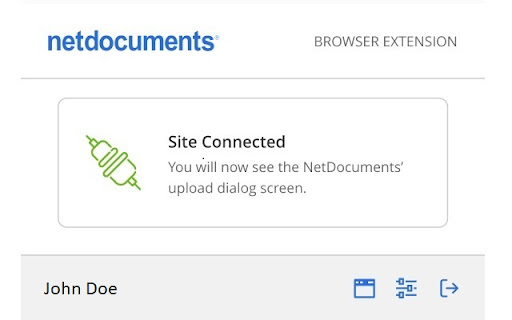
If you wish to remove the NetDocuments Extension, please BACKUP your list of connected sites in case you want to reinstall later. Simplifies the process for uploading documents stored in NetDocuments to other websites! With this new Chrome extension, you can identify websites that you wish to connect to NetDocuments. Once connected, the website's [ Browse ] or [ Upload ] button will display a NetDocuments window which allows you to select the file(s) to be uploaded. Additional options allow you to convert the selected files to PDF, and to return the newly created PDF to NetDocuments as a new version.

Enable local file links
In Google Chrome, links to local files are disabled, unlike IE. This extension allows you to open a link to a local file by clicking it. [Setting] Starting with Chrome 118 in October 2023, you will need to enable the "Allow access to file URLs" setting from the extension settings page. chrome://extensions/?id=nikfmfgobenbhmocjaaboihbeocackld [Security] A malicious page can not open a local file without permission, because this extension reacts only to the click operation by the user.

My Apps Secure Sign-in Extension
My Apps Secure Sign-in Extension This extension is required for both App Proxy link translation and application password-based single sign-on. It may also be optionally used to launch the My Apps portal to search the applications you have access to. With this extension you can: • Sign into password-based single sign-on applications- both directly from the application's login page and from the My Apps portal • Access internal company URLs while remote • Launch into the My Apps portal to search across the applications you have access to THIRD-PARTY SOFTWARE NOTICES AND INFORMATION This software is based on or incorporates material from the projects listed below (collectively, "Third Party Code"). Microsoft is not the original author of the Third Party Code. The original copyright notice and license, under which Microsoft received such Third Party Code, are set forth below. Microsoft reserves all rights not expressly granted herein, whether by implication, estoppel or otherwise. The MIT License Permission is hereby granted, free of charge, to any person obtaining a copy of this software and associated documentation files (the "Software"), to deal in the Software without restriction, including without limitation the rights to use, copy, modify, merge, publish, distribute, sublicense, and/or sell copies of the Software, and to permit persons to whom the Software is furnished to do so, subject to the following conditions: The above copyright notice and this permission notice shall be included in all copies or substantial portions of the Software. THE SOFTWARE IS PROVIDED "AS IS", WITHOUT WARRANTY OF ANY KIND, EXPRESS OR IMPLIED, INCLUDING BUT NOT LIMITED TO THE WARRANTIES OF MERCHANTABILITY, FITNESS FOR A PARTICULAR PURPOSE AND NONINFRINGEMENT. IN NO EVENT SHALL THE AUTHORS OR COPYRIGHT HOLDERS BE LIABLE FOR ANY CLAIM, DAMAGES OR OTHER LIABILITY, WHETHER IN AN ACTION OF CONTRACT, TORT OR OTHERWISE, ARISING FROM, OUT OF OR IN CONNECTION WITH THE SOFTWARE OR THE USE OR OTHER DEALINGS IN THE SOFTWARE. The MIT License Permission is hereby granted, free of charge, to any person obtaining a copy of this software and associated documentation files (the "Software"), to deal in the Software without restriction, including without limitation the rights to use, copy, modify, merge, publish, distribute, sublicense, and/or sell copies of the Software, and to permit persons to whom the Software is furnished to do so, subject to the following conditions: The above copyright notice and this permission notice shall be included in all copies or substantial portions of the Software. THE SOFTWARE IS PROVIDED "AS IS", WITHOUT WARRANTY OF ANY KIND, EXPRESS OR IMPLIED, INCLUDING BUT NOT LIMITED TO THE WARRANTIES OF MERCHANTABILITY, FITNESS FOR A PARTICULAR PURPOSE AND NONINFRINGEMENT. IN NO EVENT SHALL THE AUTHORS OR COPYRIGHT HOLDERS BE LIABLE FOR ANY CLAIM, DAMAGES OR OTHER LIABILITY, WHETHER IN AN ACTION OF CONTRACT, TORT OR OTHERWISE, ARISING FROM, OUT OF OR IN CONNECTION WITH THE SOFTWARE OR THE USE OR OTHER DEALINGS IN THE SOFTWARE.

Page Vault
Easily submit webpage URLs to Page Vault to capture / archive for legal purposes. Page Vault Chrome Extension - V1 Updated: Thursday, July 22, 2025 Get any website, automate social media expansions, and capture video—while staying out of the chain of custody. Page Vault’s Chrome Extension brings the power of Page Vault straight to your toolbar - so you can capture any open web page or media with a single click, preserving it for legal and compliance use. This feature is available to all Page Vault customers at no extra cost. How It Works - Click the Page Vault icon in Chrome. - Navigate to any web page you wish to capture. - Configure capture options - select a folder to save your capture to and add a Case Matter ID, if applicable. - Click "Capture Page" Your captures will automatically be saved to the folder you've chosen. No need to wait for your capture to complete before navigating to the next page you wish to capture! Why Use Page Vault? - Court-Ready Captures: Each capture includes SHA256 hash, timestamp, and capturing account details—perfect for legal review and admissibility start.page-vault.com - Chain-of-Custody Safe: Our patented remote-browser records pages without exposing you to chain-of-custody concerns blog.page-vault.com - Visual & Functional Fidelity: Full-page screenshots, embedded videos, dynamic content, and social media—all captured as they appeared help.page-vault.com - Social Media Support: Scroll and expand Facebook, Instagram, TikTok, Twitter, LinkedIn—with replies, comments, and videos captured Page Vault - Unlimited Export & Affidavits: Download single-capture PDFs or batch jobs. Add affidavit cover pages on demand—no extra storage or export fees help.page-vault.com Need Help? Visit our Help Center or contact support@page‑vault.com for FAQs, training videos, and troubleshooting.

vLex
Improve your Google searches by adding related documents at vLex.com The vLex extension automatically adds vLex links to citations in web pages, and enhances Google searches with relevant vLex content. Vincent - our AI-assisted research companion - can recommend related vLex material based on the web content you are looking at.
