
fjoagddmgjaigidfdaicocmmjdjbgmmg
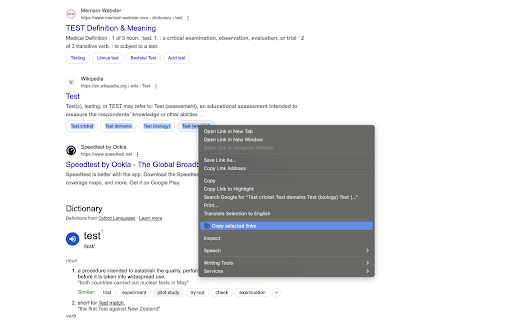
Right-click selected text to copy the URLs of any links it contains This is a lightweight extension that makes copying multiple URLs from text a breeze. WHAT IT DOES ------------ Simply select any text containing links, right-click, and choose "Copy selected links". All URLs within your selection will be copied to your clipboard, each on a new line. PERFECT FOR ----------- • Researchers collecting references • Saving multiple links for later • Sharing lists of URLs • Content curation • Quick link extraction from articles or documents This extension is designed to be simple, fast, and respectful of your privacy. It requires only the minimum permissions needed to function and doesn't track your browsing or collect any data.

Copy Paste URLs
Copy Paste URLs, an alternative to the "Copy All Urls" extension (now discontinued): - Copies the URLs of all tags/selected tags to the system clipboard. - Opens multiple URLs in the system clipboard in batches. - Supports Ctrl+C and Ctrl+V keyboard shortcuts. - Supports edit mode, allowing you to manually enter several URLs to open at once. - Compatible with Chrome Listing 3. - Keeps it clean and simple.

Copy Highlighted Links
Copy Highlighted Links is a lightweight, privacy-focused extension that makes collecting URLs from web pages effortless. Simply highlight any text containing links, right-click, and select "Copy Selected Links" to copy all URLs to your clipboard. Perfect for: • Researchers collecting multiple reference links • Students gathering study resources • Professionals compiling lists of relevant websites • Anyone who needs to quickly grab multiple URLs Key Features: ✓ One-click URL copying from highlighted text ✓ Works on any webpage ✓ Clean, minimal interface ✓ No ads or tracking ✓ Minimal permissions required ✓ Open source ✓ No cloud services, no network, everything stays on YOUR computer How to Use: 1. Select (highlight) any text containing links 2. Right-click on the selection 3. Choose "Copy Selected Links" 4. Paste your collected URLs anywhere Privacy First: This extension only requests essential permissions and doesn't collect any user data. It only activates when you explicitly use it, and it only accesses the current tab when you highlight text and use the context menu. You can read our privacy policy here: https://github.com/CraftedIntuition/copy-highlighted-links/blob/main/PRIVACY.md Required Permissions Explained: • activeTab - Only used when you interact with the extension • clipboardWrite - Needed to copy URLs to your clipboard • contextMenus - Adds the right-click menu option • scripting - Needed to discover currently highlighted links • notifications - Show you the result of copy actions Open Source: The complete source code is available on GitHub for transparency and community contributions. Support: For issues or suggestions, please visit our GitHub repository https://github.com/CraftedIntuition/copy-highlighted-links

Copy URLs
Copy all open pages (title and/or address) to clipboard. Select what to export (all tabs or just the web-pages; all windows or current window only) and how to export it (choose between several formats -- simple url list, HTML, CSV etc.) You can define your own (custom) format to generate specific url list (for example -- JavaScript array or XLS table ready to be copy/pasted in Excel)

Enable Copy Everywhere
Allow right-click for copying text from restricted web pages. Enable copy-paste on all the websites. Unlock the freedom to enable copy-paste on websites with the Enable Copy Everywhere Chrome extension in 2025! This powerful text copy unblocker Chrome tool empowers users to bypass copy restriction Chrome on popular websites, allowing seamless text copying, even from protected websites that have disabled the right-click function. Perfect for researchers, students, and anyone needing to capture content without limitations, this easy-to-use tool makes copying restricted text as simple as a single click. Bypass Restrictions: Effortlessly copy text from protected websites with disabled right-click or copy functions. One-Click Enable/Disable: Instantly turn the extension on or off with a single click from your toolbar. Simple and Free: A free copy-paste Chrome extension that is user-friendly and completely free to install and use. Cross-Browser Support: Available on Chrome and Edge for maximum compatibility. Install the "Enable Copy Everywhere" Chrome extension by clicking on "Add to Chrome." Activate the extension by selecting the icon in your Chrome toolbar. Allow copy-paste everywhere and enjoy unrestricted access to text across the web with Enable Copy Everywhere. This disable copy protection extension is the ultimate Chrome extension for copying restricted text, giving you the power to enable right-click on restricted websites and bypass copy restrictions Chrome effortlessly. 1. What does the Enable Copy Everywhere Chrome Extension do? The extension allows users to copy text from any website, even if the site has disabled right-clicking or copy functions. It's ideal for accessing content without restrictions. Yes, Enable Copy Everywhere is entirely free to download and use. The extension is designed to work on most websites with copy restrictions, though a few heavily protected sites may still block copy functions.
