
fjldhjdclpmehigldnbgbllchcjdgccc
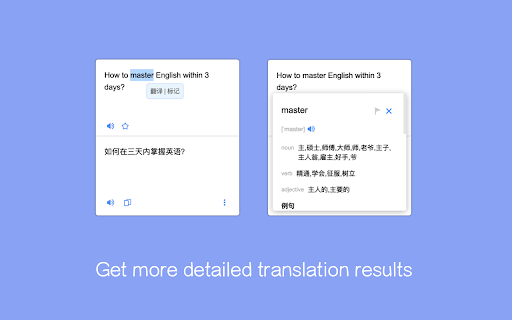
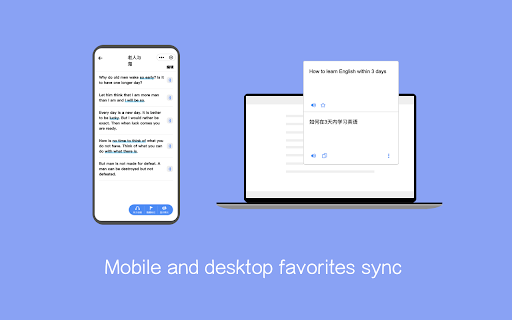
Provide professional domain translator such as financial, medical, electronic technology, mechanical and so on, so that translation is more accurate. Provide the plug-in and WeChat small program end collection management, and provide learning tools such as hearing training. Provide two models of professional and minimalist intelligence, can be configured according to requirements Built-in PDF reader for translation for PDF documents Shortcut: Mac (Command + K), Windows and other (Alt + K) Note: Please refresh the open page after installation.

AI Translation
Generate AI translation to read global content. Translate English into 100+ languages with natural, fast and accurate ai translator. 🌍 AI Translation is your all-in-one AI language translator extension for Google Chrome. Instantly trasnlate words, sentences, and paragraphs into English or over 100 languages without copy-paste or switching tools. Whether you need to translate English to Spanish, Japanese or German to English, this AI translation tool makes multilingual browsing effortless. ✨ Effortless to start: install the extension, select text, click the bubble, and see results. Compare original and translated text side by side, perfect for language learning apps, professional reading, or casual browsing. 🚀 Why choose AI Translation? 1️⃣ Context-aware artificial intelligence instant traslate words on a page 2️⃣ Accurate and fast ai translations across 100+ languages 3️⃣ Clean, distraction-free design you can trust ✅ Everyday uses for AI language translation • Social media: ai translate twitter / X, Instagram, Facebook, Reddit, LinkedIn • Read global content in web Telegram, WhatsApp with AI Translation • For fun: captions, lyrics, jokes, slang • Use the translator on forums to follow popular discussions • Seamless shopping: translate Temu, AliExpress, JD.com, Amazon, and others • Find answers in your native language • It translates news, blogs, and research articles into your language • Learn how to say good morning in spanish or hello in korean directly from webpages • Get contract translation, medical or academic translation support without leaving Chrome • Use as your AI powered translator for work, study, and travel 👩💻 Who benefits most? ⭐ Internet users ⭐ Students and language learners ⭐ Professionals needing legal translation and technical translation services ⭐ Researchers working with multilingual sources ⭐ Freelancers and teams worldwide ⭐ Travelers needing quick AI translater app support on the go 🌍 Language Coverage 🌐 Popular everyday pairs: Use english to spanish for work, study, and travel. Translate to German is perfect for product manuals and academic papers. Translate English to Italian and Portuguese to English help retail, design, and creative professionals reach international audiences. 🌐 Asia & the Pacific: Handle japanese to english, english to chinese translator, and english to korean for study, wikipedia translate research, and global tech. Vietnamese ai translation supports training packs and local operations, while filipino to english and ai translate english to indonesian are valuable for community services and regional business. 🌐 South Asia & the Middle East: From english to hindi and english to urdu, to farsi to english and english to arabic, the extension supports chatgpt translation for education, business, and healthcare. Convert English into Malayalam helps adapt learning and professional resources, use as notion translator. 🌐 Africa & the South: Translate Swahili, Somali, Haitian Creole to English for community support, policy, and outreach. These ai translation services are especially valuable for NGOs, aid organizations, and local governments. 🌐 Specialized translations: The extension also supports bosnian to english for compliance and contracts, Hebrew for investor updates, translating professional reports and documents in Turkish, and many more languages and purposes! ⚡ A complete translation workflow From quick highlights to in-depth editor review, AI Translation gives you three flexible modes: 1) Highlight → click "AI Translate" - the fastest way to tranlate text on any webpage. 2) Right-click translation inside PDF - inderstand important documents. 3) Side-by-side editor mode - copy the full page or type text in an editor for structured comparison. This multi-mode workflow ensures you can instantly transalte sentences on a page while also managing longer texts with precision and control. 💼 Translate selected on any website 🔥 Highlight → click “AI Translate” → enjoy the ai translation. 🔥 Instantly translate words, sentences, or paragraphs on any webpage. 🔥 Simple, fast, and accurate - powered by advanced AI for translation. 📑 Translate PDF text 🏆 Open a PDF in Chrome, select paragraph, and right-click AI Translate. 🏆 Get immediate, accurate translation of document text. 📝 Editor view for side-by-side comparison 💻 Click “Open in Editor” (pen icon) for a split view. 💻 Translate text that you type or copy it. 💻 Original paragraph on one side, ai translation on the other. 💻 Perfect for contracts, academic papers, legal or medical translations where precision matters. 🛡️ Security and Privacy 🔹 Text is processed only for AI translations, never sold. 🔹 No personal data is shared with third parties including ads. 🔹 Built on Chrome Manifest V3 for extra security. 💬 Frequently Asked Questions ❓ How do I tranlsate sentence in Chrome? 💡 Highlight text, click the AI Translate bubble, and read the result instantly. ❓ Can I use it for language learning? 💡 Yes - compare translation AI results line by line to learn faster. ❓ What makes this different from google translate ai? 💡 AI Translation tools use advanced LLMs (ChatGPT, Gemini) alongside AI Google Translate-style engines for smarter results. ❓ Does it support translating professional documents? 💡 Yes - use it for legal translation, contract and academic translation right in your browser. ❓ Can it translate social media? 💡 Yes - translate tweets on twitter, replies on X, captions and comments on Instagram, comments on Facebook, posts on LinkedIn, forums. Feel free to use it as Reddit translater, and web telegram or whatsapp translator of messages.

Translator - translation of selected text
Translate selected text with Google Translate Translate selected text with Google Translate on any webpage. - Select-and-translate: highlight text and click the button to get a translation - Quick pop-up translation via keyboard shortcut or browser-bar button - Support for 100+ languages and alternative translations - Dictionary: definitions and examples for single words or phrases - One-click reverse translation, plus history with quick navigation - Text-to-speech with selectable voices (if supported by browser) - Light and dark themes

Web Translator
Translate selected text in your prefered language The Web Translator tab extension is an everyday helper that translates important keywords, articles, and phrases on a web page with just one click. This web translator extension for Chrome gives accurate translation results fast. All you have to do is highlight a keyword on a page or text, right click and then the Web translator option will appear in a pop up menu for you to select the action. By clicking "Add to Chrome", I accept and agree to installing the Active8 Chrome extension and setting Chrome™ New Tab, Homepage takeover, and Default Search to that provided by the service and the Terms of Use and Privacy Policy. Included features: - Web translations. Web Translator is your everyday helper to help you translate an word in any language. it’s a simple and fast way to translate text into another language with simple and easy to use functionality. - Supports multiple languages. The Web Translator extension also allows you to set your language in the extension settings. The Web translator will determine the language of the site where you are located - Extremely user-friendly and free. The Web Translator extension is very easy and simple to use. Terms of Use: https://browser-labs.com.au/terms-and-conditions/ Privacy Policy: https://browser-labs.com.au/privacy-policy/

Input Translator
Translate your input text with AI. Overview Input Translator is a lightweight browser extension that enables quick text translation directly within input fields and text editors. No need to copy-paste or switch tabs - just type and translate instantly. Key Features • Instant Translation - Translate text directly in any input field • Free Google Translate - Works out of the box with Google Translate • AI Integration - Optional OpenAI API support (including OpenRouter and compatible providers) • Universal Compatibility - Supports standard input fields and rich text editors • Privacy Focused - No data collection, all settings stored locally Triple Space - Type your text and press space 3 times Keyboard Shortcut - Press Alt+T (customizable) Context Menu - Right-click and select "Translate Text" Supported Sites Works on all websites including: • Gmail, Outlook, and email services • Google Docs, Notion, and online documents • Twitter, Facebook, and social media • GitHub, GitLab, and development platforms • All standard web forms and text areas Advanced Settings: • Configure OpenAI API for enhanced translations • Support for OpenRouter and compatible LLM services • Choose between different AI models Privacy & Security • No personal data is collected or stored • Translations processed through Google Translate or your configured API • API keys encrypted and stored locally in your browser • Open source and transparent Use Cases Perfect for: • Writing emails in multiple languages • International social media communication • Multilingual document collaboration • Code comment translation • Language learning assistance Support For issues, feature requests, or questions, please visit our Discord group. https://discord.gg/gFhKUthc88
