
fjefgkhmchopegjeicnblodnidbammed
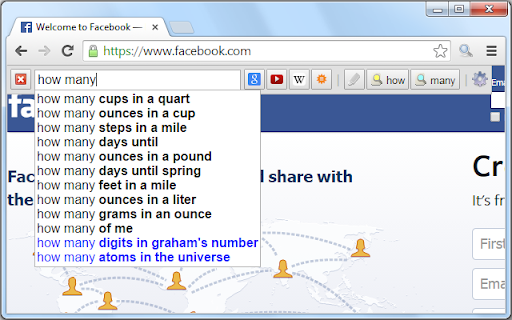
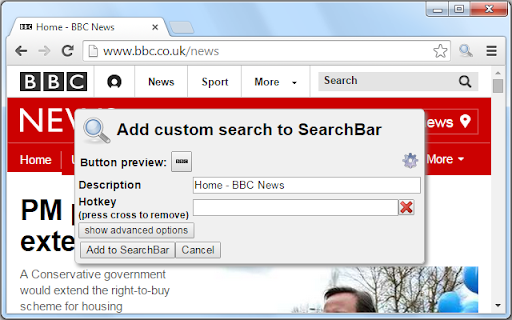
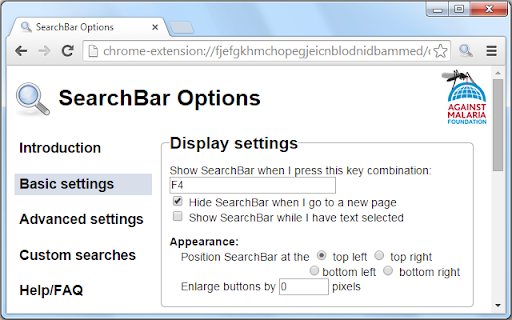
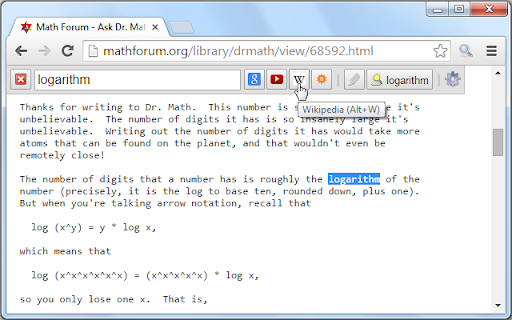
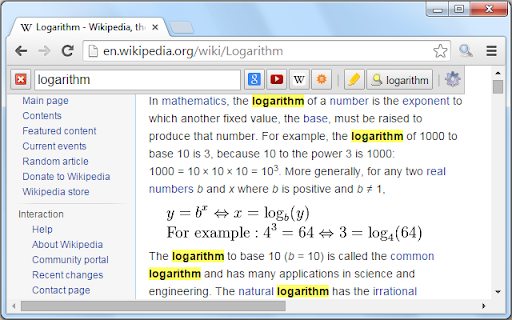
The most efficient way to use your favourite search engines. Search selected text, use customizable hotkeys and much more. To get started with SearchBar, wait for it to finish installing, go to a web page such as www.google.com and press F4. If nothing happens, you may need to refresh the page. ___________________________________________ SearchBar brings the best features of Google Toolbar to Chrome, and much more besides: ● one-click search customization ● search selected text ● new tab search ● customizable hotkeys ● search suggestions ● search history ● highlight search terms ● find search terms in page ● search current site ● pre-populate with search terms ● resize, reorder and reposition ● completely customizable ● all in one convenient toolbar ___________________________________________ Please click "Support" to submit bug reports, questions and feature suggestions. Please do not leave bug reports in your review. If you have found the extension valuable, then please consider sponsoring me here: http://www.againstmalaria.com/SearchBar ___________________________________________ HOW DO I USE THE ONE-CLICK SEARCH CUSTOMIZATION? Right-click on any search engine's input field and select "Add to SearchBar...". HOW DO I SEARCH SELECTED TEXT? Selected text is automatically detected, eliminating the need for copy/pasting. HOW DO I DO A NEW TAB SEARCH? Hold the Ctrl key while pressing a button or hotkey. HOW DO I GET THE HOTKEY FOR SHOWING SEARCHBAR TO WORK ON THE NEW TAB PAGE? Set another hotkey by selecting "Keyboard shortcuts" from the menu of Chrome's Extensions page. WHY DOES THE EXTENSION NEED TO "ACCESS MY DATA ON ALL WEBSITES"? Chrome requires this permission to be asked for in order for the extension to be inserted onto every page. However, the extension does not change or use any of your data outside of its declared features. For more information, please see the privacy policy (link below "Additional Information"). WHAT INSPIRED YOU TO CREATE SUCH AN AMAZING EXTENSION? This extension was borne out of personal frustration with Chrome's default search system and dissatisfaction with the features of similar extensions. I hope it improves your browsing experience as much as it has mine. This extension incorporates images from the Tango! Desktop Project.

price2alert
adds function to see price history charts and a function to notification on Rakuten's site.

Simple = Select + Search
It's simple: select some text, right-click, and search on your preferred search engines. Configuring your search engines is very easy: There are multiple pre-configured search engines to pick from (like Amazon, BBC, CNN, etc.), plus you can add any other you might like. To add new search engines, follow instructions in the Help section of the Options page. Once a new search engine is configured, it will show up the next time you select some text in your browser, right-click it, and go to the Simple = Select + Search menu option. It's my first public extension. I hope you like it.

自動価格比較/ショッピング検索(Auto Price Checker)
ショッピング中に自動的に他のショッピングサイトを検索し、安い価格順に10件表示します。検索対象の8万店以上。自動比較の対象はAmazonや楽天Booksなどショップサイトだけでなく価格.comなど価格比較サイトでも可能。テキストを選択して右クリックでの価格比較も。 【使い方】 ・自動価格比較 ショッピングサイトを閲覧すると、自動的に他の通販サイトも検索して、安い10件を表示します。 ・テキストを選択して右クリックで価格比較 商品名や型番などのテキストをなぞって、右クリックから「価格比較」選択すると、なぞった文字列での価格比較結果を表示します。 ・フォームからテキストや価格を指定して価格比較 右上に表示されるアイコンをクリックすると、フォームが表示されます。 価格比較したい商品名や型番を入力し、価格、対象サイトを選択してショッピングサイトを横断して検索することができます。 ・メルマガOFF機能 オプションページの「メルマガ自動解除」において「メルマガ購読チェックを外す」を選択すると、楽天での購入時にメルマガのチェックを自動で外してくれます。 ・自動価格比較のフレームが邪魔なときは右クリックで簡単にON/OFFを切り替えられます。 ※ オプションページから中古品を表示させるかどうか、表示対象のサイトの設定などを選択できます。 ※ アップデートした際に対象サイトが増えている場合、拡張機能を再度有効にする必要がある場合があります。 【自動検索機能が使えるサイト】 Amazon、価格.com、ヤフーショッピング、楽天、ヨドバシカメラ、ヤマダモールなどでご利用いただけます。 【こんなときに便利】 ネットショッピング中に他のショッピングサイトの価格を調べたいと思ったとき。 【個人情報等や閲覧情報について】 ショッピング中の個人情報などには一切触れません。 また、何かデータを取得して保存することも一切やっておりませんので安心してお使いください。 【リンクについて】 本拡張機能は、各ショッピングサイトのデータを取得するために、各社のアフィリエイトAPIを利用しております、そのため提供されるリンクはアフィリエイトリンクとなります点、ご承知ください。 また、レビューに強制アフィと記載されてますが、強制アフィとはページを開いただけでリンクを踏まなくても何らかの方法でアフィリエイトリンクを踏んだことにすることです。当拡張機能はそのようなことは一切ありません。 【更新履歴】 3.0.2 Yahooショッピングにおける不具合を修正 3.0.1 7net、ロフト、NTTストアなどの通販サイトで自動価格比較が稼働するように修正 3.0.0 manifest V3に対応。zozoタウンやエディオン、コジマ電気など精度を改善。 2.1.126 Amazon、Qoo10、Yahooショッピングでの精度を改善しました。 2.1.125 楽天で自動価格が機能しない不具合を対応しました。。 2.1.124 文字を選択して右クリックから各種ショッピングサイトの検索結果を直接参照できるようにしました。

All in one web searcher
Search anything on the internet easily by typing into ONE unified search box All in one web searcher allows to search any website easily by typing in one search box. All in one web searcher is a simple yet powerful extension to search multiple sites with ZERO click. Add sites to search, customize the order and search anywhere quickly. USING THE EXTENSION ---------------------------------- - Click the extension icon, simply hover over the search tabs and type the search term. - Press enter to search the keyword in the selected search engine. - Press "tab" or "alt" keys to cycle through tabs if needed. - Add custom search engine sites as you need. - Simple and quick way to search any page without a click ! FEATURES --------------- - Simple and fast UI for quick searches - Add multiple search sites easily and customize the order. - Add sub search sites like "Images" search, "Map" search etc. for easy search. - Keyboard shortcuts to cycle through the tabs. - Custom/Automatic icons for the tabs can be used. - No unwanted background process and memory. Light and fast extension. - Available in two themes - Text free extension and hence multilingual DEFAULT SEARCH ENGINES --------------------------------------- All popular search engines like Google, Bing, Wikipedia, DuckDuckGo are available out of the box. You can customize and add any search engine you want to this list with "sub search" engines like searching images, books, news etc. as needed. PRIVACY -------------- All in one web searcher extension does NOT collect any kind of information. The last used search keyword is saved locally. For any concerns, please contact me at aakashweb.com NOTE -------- After installing, please go to options page and change the "Tab selection method" to hover or click according as per your preference. Set a keyboard shortcut for opening the popup under "Manage extensions" page for even quicker search. CHANGE LOG ------------------- 5.0: - New: Move to manifest version 3.0 - New: Modernized search form styles. - Included new search engines as default. - Fix: Remove unused and old search engines from the default list. - Fix: Minor code refactoring - Fix: Last search term was not saved when button was clicked 4.1: - New option to open the results in new/same tab. - Minor enhancements to design and options page. - Updated jQuery and jQuery UI to the latest versions. - Fix issue where 'alt' key not cycling through tabs. - Replace deprecated events. 4.0: - Removed tabs permission. - Reorganized the assets used by the extension. - Updated default search URLs to HTTPS - Minor changes to the options page. 3.1: - Added feature to export and import search engine customization settings 3.0: - New simple Icon. - Reorder tabs easily. - Libraries updated to newest version. - Small interface changes. 2.0: - Core code re-written from bottom. - New Icon. - Instant popup load - Customize the default order of the list.
