
fihdnfkfpjmipmlggdknalpfjjnjbboj
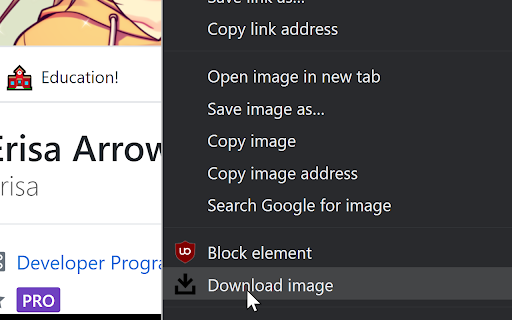
Adds a context (Right click) menu item to images which allows you to directly download them without a prompt. This extension simply adds a context menu item which allows you to (Directly) download an image. The simple idea for this extension was born from saving multiple images at once, and rapidly pressing enter after each save to go through the "Save as" prompt.

Double Click Image Downloader
This Chrome extension provides a simple way to download images directly from any webpage. With a straightforward double-click on any image, the extension automatically saves the image to your default download location. No need to right-click or open additional menus—just double-click to instantly download the image. Easy Image Download: Double-click on any image on a webpage to download it quickly. No Extra Clicks: Streamlined process with no context menus or additional steps. Universal Compatibility: Works with images across all websites and web applications. Enjoy a hassle-free experience with quick image downloads using this lightweight and efficient Chrome extension.

Paste to download
Paste to download makes it easy to save images copied to your clipboard. It's especially useful to download media embedded in tough to export places like Google Slides. Get the chrome extension to quickly paste to download from wherever you are. Built by Maya Man (mayaontheinter.net) with design by Hana Tanimura (hanatanimura.com).

Click Image Download
A quick right-click tool for downloading images, supporting JPG, PNG, WebP, BMP, SVG formats, convenient and fast. Help users quickly download web page images, provide two convenient image download functions, and also support image format conversion. One-click image download, easily convert image format and download: 2. After turning on the "right-click download" switch, right-click on the image on the web page to download the image. 3. After turning off the "right-click download" switch, right-click on the image on the web page, and you can download the image in the format you need through the first-level menu "Save Image as JPG/PNG/WEBP/BMP/SVG" in the menu bar. 1. No need to manually set the image download path, the file download save path follows the browser settings. 2. The name of the downloaded image remains the original image name, no need to manually adjust the image name.

Image Download Helper
Image Download Helper is a convenient Chrome extension that allows you to easily download images from web pages. - Quick Image Downloads: Adds a download button directly on images, allowing you to save them with a single click. - Automatic Format Addition: If an image lacks a file extension, the extension automatically adds .png, ensuring proper file saving. - Simple Toggle Functionality: Easily enable or disable the extension when you don't need it. - Intelligent Page Change Detection: Uses a MutationObserver to automatically add download buttons to new images that appear on the page without requiring a refresh. - User-Friendly Interface: The straightforward design and ease of use make downloading images convenient for all users. - Time-Saving: You can save desired images effortlessly, avoiding the need to navigate through context menus or copy image URLs. - Flexible Settings: The extension is easily customizable, allowing you to choose when and how to utilize its features. - Compatibility with Various Web Pages: Works on any website with images, regardless of the site's complexity or dynamic content. Image Download Helper is compatible with a wide range of popular websites, allowing you to download images from: - Instagram: Save photos directly from your feed or profiles. Facebook: Easily download images from your feed, pages, or groups. - Twitter: Quickly save images from tweets, including those in media-rich threads. - Pinterest: Download pins directly to your device with one click. - Tumblr: Save images from blogs and dashboards effortlessly. - Reddit: Grab images from posts and comments without hassle. - Flickr: Download high-quality photos from user profiles. - Google Images: Capture images directly from search results. - Websites: Supports almost any website with images, from blogs and news sites to e-commerce platforms. Whether you’re a social media enthusiast, a professional blogger, or just someone who loves collecting images, Image Download Helper provides a simple, reliable, and efficient way to download images from across the web.
