
fhopflmcgdgodhdppfoclgimibnimocg

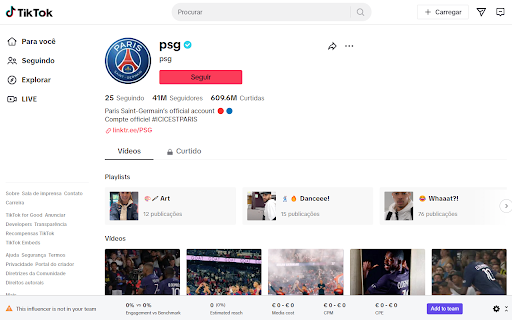

Introducing our carefully crafted browser extension, seamlessly working with socialtalk.io. This extension makes your work easier by letting you bring in influencers, posts, stories, and metrics from Instagram, YouTube, and TikTok. You get real-time updates and insights while keeping your data safe. Simplify your work processes, get insights that help you make better choices, and enhance your campaign strategies for better results. Our extension combines productivity with data-driven decisions, leading to successful outcomes that define your journey. Ready to elevate your project management and campaign insights? Download our extension now to experience enhanced efficiency. Create an account on socialtalk.io to access the power of integrated data, real-time updates, and informed decision-making. Your path to more effective project management begins here.

Follows You GitHub
Adds a "follows you" label on a GitHub follower profile or hovercard Follows You GitHub adds a label on a GitHub follower profile or hovercard. It also works on gist.github.com.

Add to Benevolist.org Button
Benevolist.org extension simplifies the donation process to help increase the number donations for all your item collection drives. Add items from top-brand retailers to create the perfect drive for all of your charitable collection drives when you use Benevolist.org. With our “Add to Benevolist.org Button" extension, you can quickly and easily add items from any of our merchant partners (Walmart, The Home Depot and Target) to your drives on Benevolist.org. Streamline your charitable food, toy, clothing drives and more, while easily tracking the progress as your donors purchase much-needed items. You’ll be amazed at how Benevolist.org helps make your work so much easier and more efficient. And your donors will love contributing to the success of all your charitable donation drives.

Open in GPT
Open selected text directly in ChatGPT with a customized prompt. This extension enables you to quickly open selected text in ChatGPT by right-clicking. Customize ChatGPT's behavior by setting a pre-filled prompt to provide contextual information. This ensures ChatGPT behaves like you want it to behave and enables you to make it solve repetitive tasks for you -- Automate the automation 🚀 • Answer questions in a specific manner (e.g. only ever answer with A, B, C, or D) • Give general context for tasks like summarizing a paragraph • Resolve code errors • Get language assistance • Translate text • Generate content in specific ways • Anything that you find yourself always copying into ChatGPT manually ... Click the extension icon to configure your custom prompt. Select text and right-click, then choose "Open selection in ChatGPT!" (Alternatively, press ALT + S). If you're working with other programs, use ALT + C to populate the prompt from your clipboard instead of selecting text. If there is a new version of ChatGPT and this plugin doesn't work with it please send me an email and I will also release an update :) Last Fix: 06.10.2024

GitHub File Diff
View diffs of files and directories on GitHub. To use this extension, go to a file or directory in GitHub and click the **History** button. Then, click on any commit. The extension will override the click to show the diffs of only the relevant files instead of GitHub's default behavior of showing the entire commit's diff. This is especially helpful when a commit is very large and GitHub only shows a partial diff or none at all. To get the regular view, simply refresh the page.
