
fhodoilamkcbaconfnnagmiblgngebef

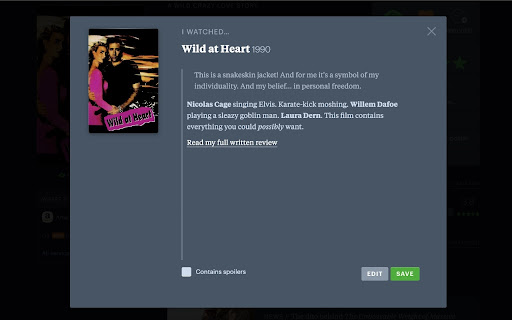
A simple interface for formatting Letterboxd reviews, comments, and more. Minimal, light-weight, open-source extension for implementing the somewhat "hidden" formatting options in Letterboxd, similar to those in the official mobile app. It also implements the ability to preview your formatted post before submitting. The formatting tags can be inserted using the on-screen buttons, or using the following keyboard shortcuts: - Bold: (Cmd/Ctrl) + b - Italic: (Cmd/Ctrl) + i - Hyperlink: (Cmd/Ctrl) + Shift + l - Quote: (Cmd/Ctrl) + Shift + k Formatting tags will automatically wrap a selected area of text. Otherwise, the tags will be inserted at the caret position. Keyboard shortcuts can be disabled in the extension options. Check out the project on GitHub: https://github.com/SAMPPLUS/letterboxd-review-formatter v0.7.0 (01/07/2025) - fixed UI irregularities with new Letterboxd UI - fixed extension breaking the trailer modal v0.6.1 (01/06/2025) - quick fix for the format bar not showing up in the review modal with the recent changes to Letterboxd's UI v0.6.0 - made format buttons disappear while preview active - reduced size of icon - various visual and bug fixes v0.5.0 - added option to disable keyboard shortcuts - fixed modal opening animation - sanitizing preview output for improved security - various fixes and improvements v0.4.0 - made styling and layout more consistent across different text areas - performance improvements v0.3.0 - added support for comments, list descriptions, and reviews accessed via the "Diary" page - changed default keyboard shortcuts - fixed the review modal becoming scrollable on Windows v0.2.0 - support for the profile bio - renamed to "Letterboxd Text Formatter" - new icon - various small fixes v0.1.0 - implemented support for the undo stack. All changes can now be undone using Cmd+z (mac) or Ctrl+z (PC) - limited the URL patterns on which the extension script loads

True Blue FriendsBoxd - Letterboxd Friends Filter
Filter Letterboxd activity feeds by marking closest friends as 'True Blue'. Focus on content from people you actually care about. This Chrome extension enhances your Letterboxd.com experience by adding the ability to categorize your followed users into "Real Friends" and regular friends. The extension is only active on the Letterboxd domain. When you follow many people on Letterboxd, it can be difficult to distinguish between your actual close friends and other users you follow for their film opinions. This extension solves that problem by adding a "Real Friends" categorization system. Friend Profile Enhancement: - When viewing any friend's profile, you'll see a new "Fake Friend/True Blue" toggle button next to the existing "Following/Unfollow" button - The button is styled to match Letterboxd's existing UI - Click to toggle between "Fake Friend" (default) and "True Blue" status - Your True Blue selections are automatically saved and remembered using browser local storage True Blue Profile Section: - When viewing your own profile page, a dedicated "True Blue" section appears above the "Following" section - This section displays only the avatars of friends you've marked as True Blue - Shows the count of your True Blue friends for quick reference - Updates automatically when you mark or unmark people as True Blue - Only visible on your own profile page for privacy Friend Activity Filtering: - Anywhere friends or friend activity is displayed, you'll have the option to filter between: - "All Friends" (default behavior - shows everyone you follow) - "True Blue" (shows only users you've marked as True Blue) - This filtering applies to activity feeds, friend lists, and other friend-related content throughout the site - Focused Activity Feeds: See only activity from people you actually care about - Better Social Experience: Quickly identify and prioritize content from your real friends - Persistent Settings: Your Real Friends list is saved locally and persists across browser sessions - Non-Intrusive: Doesn't affect Letterboxd's core functionality - it's purely additive 1. Download or clone this repository 2. Open Chrome and navigate to chrome://extensions/ 3. Enable "Developer mode" in the top right 4. Click "Load unpacked" and select the extension folder 5. The extension will now be active on Letterboxd.com 1. Marking True Blue Friends: Visit any friend's profile and click the "Fake Friend/True Blue" button to toggle their status 2. Viewing Your True Blue List: Visit your own profile page to see the dedicated "True Blue" section showing only your closest friends 3. Filtering Content: Look for "All Friends" / "True Blue" filter options in friend activity areas 4. Managing Your List: True Blue friends are automatically saved - no additional setup required - All Real Friends data is stored locally in your browser using localStorage - No data is sent to external servers - The extension only operates on letterboxd.com domain - Your friend categorizations are private to your browser

Letterboxd Tweaks
Enhance Letterboxd with cleaner movie cards, instant search suggestions, and various quality of life improvements. 🎬 Cleaner movie cards 🔍 Instant search suggestions 🚫 Hide useless filters, sorts, or navbar items ✨ Various quality of life improvements 🔓 Open source & free - find the GitHub repo here: https://github.com/JSerwatka/letterboxd-tweaks 1. Upon installing the extension, several default options, like better search and film cards, are enabled automatically. 2. To change options, click the extension's icon and select your preferences. 3. Each option has a description. To see visual comparisons, right-click the icon and select "Options" to view before-and-after images for each feature. Letterboxd Tweaks extension does not analyze or send any user data. All the essential data needed for the extension to function, such as your selected themes and color scheme preferences, are stored locally within your browser. This extension requires thorough testing, so if you encounter any issues, please report them as bugs here: https://github.com/JSerwatka/letterboxd-tweaks/issues You can support this project by: ❤️ Rating it 🤗 Proposing changes and contributing to its development 🐛 Reporting any bugs you encounter ☕ Buying me a coffee here: https://buymeacoffee.com/jserwatka - Display the cast member's image when hovering over their name. - Automatically add a movie to the diary after rating it. - Show an indicator if a movie is already in the watchlist. - Allow removing a movie from a list directly from the movie component. - Add keyboard shortcuts for search and make it a command component.

Overratd
An Extension for Letterboxd which adds rating histograms to public lists based on the author's rating Overratd adds histograms to Letterboxd lists which display the list owner's ratings for movies in the list. Currently, the extension is limited to 100 movies at a time. This is because it reads the list of movies from the current page and Letterboxd can only display up to 100 movies per list page. Additionally, the tooltips which display when hovering over bars do not currently work as you would expect them to based on the profile histograms. Overratd is licensed under GPL-3.0 and is fully open-source: https://github.com/garretlowe/overratd

Letterboxd Search Autocomplete
Adds autocomplete or auto suggest to the search bar on Letterboxd.
