
fhkajaliakkbdjolbpjmbeghmhnlipjh
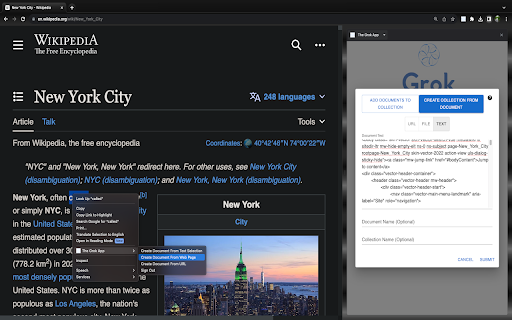


Search For Your Documents Unlock the power of knowledge with The Grok App, a versatile Chrome extension designed to transform your information browsing experience. Whether you're a student, researcher, or just curious about the content you come across, this extension empowers you to delve deeper into your content and gain a richer understanding. Import your documents with the click of a button in your browser and begin asking questions about them to gain meaningful insights. Document Import: Easily import documents in various formats, including PDFs, web pages, and more. The Grok App seamlessly integrates with your browser, making it effortless to access and analyze content from web pages or local files. Content Analysis: Once your document are imported the extensions uses large language models to search through them to answer your questions and help you gain deeper insights. Summarize big documents and learn about their most important points quickly. Interactive Summaries: Don't just read your documents, chat with them to gain interactive summaries. These summaries help you quickly grasp the main ideas, enabling efficient learning and comprehension. Cite Sources: The Grok App cites the sources for all of the questions it answers for you. Share With Others: Easily create links to share your documents and allow others to pick up your chats where you left off Security Any data uploaded through the Grok App is securely stored and will only be accessible by you User-Friendly Interface: The extension boasts an intuitive and user-friendly interface, ensuring that users of all levels can navigate and utilize its features seamlessly. Import your documents with the click of a button and begin asking questions about them right away. * Summarize the main findings of a research paper you're reading * Write a TLDR of a news article * Explain complicated concepts from your lecture notes * Summarize a Youtube video from the subtitles * Write a response to an email

Grok to Obsidian and Html
Save and export your Grok AI chat conversations to markdown files easily. Backup your AI chats with one click Grok Download - Save AI Conversations with One Click Transform your Grok4 Chat experience by seamlessly saving and exporting valuable conversations to your local device. This powerful Chrome extension provides efficient batch downloading and seamless export of AI interactions for your knowledge management needs. 🌟 Key Features: • One-Click Export: Instantly download any Grok4 conversation to your device • Batch Download: Efficiently backup and export multiple conversations at once • Flexible Export Options: Choose between Markdown, HTML, or plain text formats • Image Export: Automatically download and save generated images from conversations • Real-time Progress: Monitor download status with detailed success/failure tracking • Smart Extraction: Automatically captures titles, content, and timestamps • Fast & Efficient: Quick batch processing for multiple chats • Seamless Integration: Works directly with Grok4 interface • Custom export preview page and selective export 💡 Perfect for: • Knowledge Workers: Build your personal knowledge base from AI conversations • Teams: Share and collaborate on AI-generated insights • Content Creators: Archive and organize AI-assisted content • Researchers: Maintain a searchable database of AI interactions • Project Managers: Store and manage AI conversations efficiently • Anyone looking to organize their Grok4 chat history ⚡️ Why Choose Grok Download: • Clean, intuitive interface for easy conversation management • Multiple export formats for maximum flexibility • Reliable download performance with automated backup • Regular updates and maintenance • Professional technical support • One-click conversation export tool • Efficient batch processing capabilities • Smart conversation organization system ChangeLog: 2026-05-21: • Added a custom export preview page and selective export; • Fix issues with image saving, loading and display; 2026-02-03: Fixed minor issues and optimized the experience 2026-01-12: Fixed batch export filename original date issue. Added more filename pattern options (Current Date-Title, Title-Current Date, Original Date-Title, Title-Original Date, Title Only). Fixed HTML export extra div tag issue. 2026-01-06: Added image export support - automatically download and save generated images from conversations. Fixed API endpoint changes that caused save failures. Fixed Grok render custom tag parsing issues for citations and image cards. 2025-11-17: Fixed the issue with pagination processing of data during batch export to ensure all data can be retrieved. 2025-08-14: Added support for exporting to HTML format. This means that Grok conversations can be batch-exported as HTML files for viewing. Save local Grok conversations as HTML files on your local computer. Never lose valuable AI conversations again. Start organizing and managing your Grok4 chats today! Whether you need to export a single conversation or batch download multiple chats, our extension provides the perfect solution for storing and organizing your AI interactions locally. The ultimate tool for Grok4 conversation export, management, and organization. Experience the fastest and most efficient way to save your AI conversations!

Grok2Pdf - Convert Grok AI to PDF
Installing and Using Grok AI to PDF Chrome Extension Grok AI to PDF is a Chrome extension that allows you to easily convert any text content in your browser into a PDF document. This extension is especially useful for those who frequently work with text content and need to save it for later reference or sharing. In this guide, we will walk you through the steps of installing and using the Grok AI to PDF Chrome extension. Installing the Grok AI to PDF Chrome Extension Step 1: Open your Google Chrome browser and navigate to the Chrome Web Store. Step 2: In the search bar, type "Grok AI to PDF" and hit enter. Step 3: Click on the "Add to Chrome" button next to the Grok AI to PDF extension. Step 4: A pop-up window will appear, asking you to confirm that you want to add the extension. Click on the "Add Extension" button to proceed. Step 5: The Grok AI to PDF extension will now be added to your Chrome browser. You can verify this by looking for the Grok AI to PDF icon in the top right corner of your browser window. Using the Grok AI to PDF Chrome Extension Step 1: Navigate to the webpage or text content that you want to convert to a PDF document. Step 2: Click on the Grok AI to PDF icon in your browser's toolbar. Step 3: A pop-up window will appear, showing you the text content that will be converted to a PDF. You can edit the text content and choose the page layout and orientation. Step 4: You will signup and signin. Step 5: You Choose one pay plan before to use . Step 6: Click on the "Down PDF" button to start the conversion process. Step 7: Once the conversion is complete, the Grok AI to PDF extension will automatically download the PDF document to your computer. You can then open the PDF document using your preferred PDF viewer. Customizing the Grok AI to PDF Chrome Extension Settings The Grok AI to PDF Chrome extension comes with several customizable settings that you can adjust to suit your preferences. Here's how to access the extension settings: Step 1: Click on the Grok AI to PDF icon in your browser's toolbar. Step 2: Click on the gear icon in the top right corner of the pop-up window. Step 3: A settings menu will appear, allowing you to customize the page layout, orientation, margins, and other settings. Step 4: Once you have made your desired changes, click on the "Save" button to apply the changes. The Grok AI to PDF Chrome extension is a simple and useful tool for anyone who needs to convert text content to a PDF document. By following the steps outlined in this guide, you can easily install and use the extension in your Chrome browser. Additionally, you can customize the extension settings to suit your preferences and optimize your PDF output. Terms of Service and Privacy Policy --Ensure that your privacy policy includes detailed information about user data collection, processing, storage, and sharing.

Prompt Optimizer - SecondBrain
SecondBrain: The Prompt Optimizer That Refines, Explains, and Saves Your Best Work Stop wrestling with AI to get the output you need. You write an instruction, the chatbot misinterprets it, and you waste ten minutes iterating. SecondBrain is a transparent prompt optimizer built specifically for everyday AI users. We clarify your intent, tighten your wording, and show you exactly what changed. Once you secure the perfect result, you can instantly build a library of repeatable requests. Try it with the next prompt you were about to rewrite manually. WHAT DOES SECONDBRAIN DO? SecondBrain is a Chrome extension that functions as a transparent prompt optimizer. It refines your rough AI instructions into precise, highly effective prompts by cutting fluff and clarifying your core intent. Once you achieve the perfect output, you can save and bookmark prompts directly in your browser for fast retrieval on repeatable tasks. How This Prompt Optimizer Transforms Your Workflow TL;DR Key Takeaways: Clarifies intent: Turns vague requests into precise instructions. Ensures consistency: Delivers reliable formatting for recurring AI tasks. Integrates seamlessly: Works inside your current chat environment. Turn vague input into clear directives We tighten your wording so the AI understands exactly what you require. We preserve your original context. We only add structure when it actively improves the result. We cut the useless filler immediately. Get consistent AI output every time Better task framing leads to reliable formatting. Whether you are writing, researching, or debugging code, you get repeatable results for recurring tasks. You no longer have to guess how the AI will respond. Fit directly into your existing habits You start with a messy research idea, refine it with one click, and send the cleaner version in seconds. Use this tool exactly where you already chat with AI to eliminate manual rewriting. See the Edits Before You Send The fastest way to trust an optimization tool is to see it improve your own words in real-time. Before (The Original Request) Imagine starting with a vague request for a blog draft. It lacks direction. It leaves too much room for the AI to guess your target audience and formatting requirements. After (The Optimized Request) We refine that exact intent with absolute clarity. You receive the specific structure you need without any obvious padding. What changed and why: Goal clarified: The core objective is front-loaded. Filler removed: Unnecessary conversational text is deleted. Format defined: Output constraints are explicitly listed. Context preserved: Your original parameters remain intact. Save Prompts and Bookmark Prompts That Actually Work TL;DR: Never lose good work: Save successful prompts instantly. Organize easily: Bookmark by project or outcome. Build a system: Create a reliable personal library over time. Save prompts by specific task or project Stop losing your best work to the chat history feed. Start saving prompts for repeat use so you can retrieve them instantly. This maintains your output quality over time. Bookmark prompts for instant reuse Keep highly effective instructions close at hand with a lightweight saving habit. This completely eliminates the need for endless scrolling to find that one template that worked last week. Build a highly functional personal library Focus strictly on quality. Keep only the instructions that consistently prove useful. You will build a reliable workflow system instead of a random, messy pile of text. Practical Use Cases Across Your AI Workflow SecondBrain adapts to the exact tasks you repeat daily. Writing and Editing: Clean up tone, tighten drafts, and structure content briefs fast. Researching: Refine complex queries, build comparison matrices, and synthesize scattered notes. Coding: Request tighter code blocks, format debugging tasks, and write precise bug reports. Structuring Output: Generate reliable tables, lists, and reusable frameworks. Works with the AI tools you already use Quick Answers Before You Install (FAQ) Does it always make text longer? No. Highly effective instructions are often concise and well-structured. We cut fluff instead of adding it. Can I save prompts and bookmark prompts for later? Yes. You can bookmark inputs immediately and retrieve them through our streamlined library interface. Is it useful for simple, one-sentence queries? Simple queries often work fine natively. The biggest performance gains occur when your requests are nuanced, multi-step, or frequently repeated. Will it work inside my favorite AI chat interfaces? Yes. It operates directly inside the native environments of major AI platforms. Is an API key required? You do not need an API key to start. Install the extension and begin optimizing immediately. Close the Gap Between a Rough Idea and Perfect Output Start communicating with AI precisely. Generate clearer instructions without the bloat. View exact text improvements and understand the logic behind them. Build an easily accessible library of saved prompts. Install the top prompt optimizer today and watch your next request improve before you hit send.

Grok AI
With Grok AI, you can boost your workflow with fast answers from grok ai and accelerate your success using the grok model. 💡 Sidebar with Grok AI — the intelligent assistant that transforms how you interact with code, and everyday tasks. Unlock creativity, streamline your workflow, transform your digital experience with this model. Available models (also accessible via the extension): Claude Sonnet, Gemini, ChatGPT, DeepSeek etc. This extension is not officially developed by XAI but provides access to its models 📌 Versatile Grok AI Use Cases: ➤ Solves coding challenges and generates snippets with grok3 or grok2 power. ➤ Gives cloud realizations, keeping you updated with grok ai trends and smart records. ➤ Tool automates processes with assistant efficiency, powered by tesla grok precision. ➤ App integrates digital life with model versatility, upgrading every routine task. 🌟 Why Choose Assistant? 1️⃣ Grok AI streamlines mundane, repetitive tasks so you can fully focus on key goals. 2️⃣ X ai delivers natural, context-aware dialogue to simplify all your daily inquiries. 3️⃣ Adapts its responses to local dialects grok intelligence, ensuring precise support everywhere. 🔥 Embrace the Future with Grok AI As technology evolves, staying ahead means embracing adaptive tools. Empowers your success with real-time problem solving, creative project enhancements by Grok AI — your partner in achieving excellence. 📍 Interactive Learning and Broaden academic horizons Grok with immersive lessons that simplify complex topics plus spark engagement. Gronk ai offers real-time Q&A along with tailored guidance to energize each study session. Discover groc ai features uniquely designed to boost your educational journey, inspire critical thinking. ⚡ Supercharge your professional utility ▸ Groc AI delivers instant analysis with structured data for research, coding, ideas. ▸ Expertly manages emails, schedules, lists to streamline your daily routines by gronk ai. ▸ Transforms lessons by grok chatbot into dynamic, interactive sessions for engaging education. 📍 Meet the smartest chat. Download the Grok Chat extension and embrace the present with hidden insights and smarter search powered by breakthrough technology. Driven by gronk ai innovation, grok chat transforms education, work, creativity, personal growth to meet all your needs. 💼 Enhanced Security and Reliability • Advanced encryption protocols in grock ai reliably secure your projects and sensitive data. • Continuous updates and rigorous tests in grok3 fortify digital assets against breaches. • Strict monitoring and proactive fixes in grok maintain peak security, privacy always. • Robust data handling in groc defends against threats, ensuring compliance and trust. 🚀 Community-Driven Enhancements Grok AI success shines in glowing testimonials from a growing community. Use faster decisions, improved workflow, and boosted creativity thanks to context-aware dialogue together with real-time solutions. Community contributions drive continuous innovation and trust. 📌 Continuous Innovation - Grok AI evolves constantly with regular feature enhancements and refined UI upgrades! - Seamless IoT and machine learning integration ensures a future-ready, innovative platform. - Personalized workflow automation and enhanced voice recognition tailor your needs. - Predictive analytics aptly anticipate future challenges, keeping your business ahead. 🎁 Download Chat Today Unlock creativity, streamline your workflow, transform your digital experience by grok chatbot. Discover a tool that redefines success in today’s tech-driven world. 🔥 Embrace Excellence Embrace the future of intelligent assistance by Grok AI. Enhance productivity, secure your digital life, gain smart strategies to overcome modern challenges. Experience seamless integration with precision-engineered features that elevate your professional journey. Boosting productivity: 🔹 Gronk AI tailors clear answers for every need; 🔹 Xai Grok sharpens context and fuels smart replies; 🔹 Elon Musk AI drives deep insights and smart tips; 🧩 Download the extension now and discover a world where intelligent assistance is always at your fingertips.
