
fhicpgkkgeefcfbkfaiigkaakfhakkbc
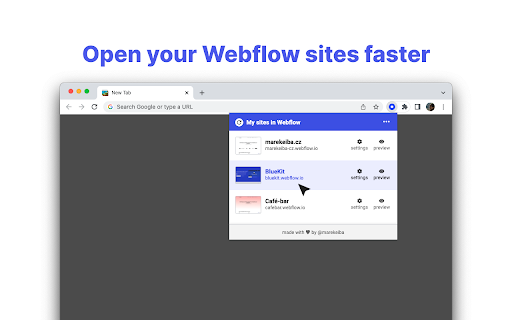
Open your Webflow sites faster: Designer, Settings or Preview. When you open your Webflow Dashboard, your current sites are saved locally to your browser. You can then access them faster (the Designer, Settings or Preview) when you open the popup window of this extension. NOTE: Extension is developed independently, and is not officially endorsed by Webflow, Inc.

Codehub for Webflow
Adds a window to save and manage code snippets for Webflow projects. Codehub for Webflow help you manage your codesnippets. THE PROBLEM: If you often find yourself searching through multiple projects to find those handy code snippets you've used before, Codehub is here to simplify your life. THE SOLUTION: This extension provides a centralized hub where you can save, manage, and easily access all your frequently used code snippets. With Codehub, reusing code across your Webflow projects becomes a breeze, saving you time and effort. It's the perfect tool for developers looking to optimize their coding process and enhance productivity on Webflow. Simply copy the snippets that you have saved and paste them where you need them. Also enjoy the premade community snippets!

Zest for Webflow
Seamlessly integrates a CSS panel into your Webflow projects ** No more embeds ** Eliminates the need for embed elements and writing CSS inside the of your projects ** Work smarter ** Zest for Webflow recognises your Webflow CSS classes, tags and colour variables as you begin to type them ** Write:advanced (CSS) ** Enables more advanced and !important CSS not currently offered by Webflow's style panel ** Work faster ** Write CSS in real-time directly within Webflow projects; no need to go back and forth to site settings Please note: A getzest.io subscription is required to use this extension.

TheSprkl
TheSprkl is an extension for Webflow Seamlessly integrate TheSprkl design system components directly within Webflow. Copy components, blocks, and sections into your project effortlessly with a single click. Class Sync feature ensures synchronized components with updated classes, eliminating duplication. Say goodbye to rebuilding layouts for every project. Install the Chrome Extension for instant access to these components within Webflow ⚡️ 800+ components. Hundreds of components and variations for every taste and purpose. ⚡️ The Class Sync feature. Seamless synchronisation of components with updated classes directly in the designer. Keep your project tidy without the clutter of redundant classes. Experience a new level of simplicity and speed in handling Webflow projects - install TheSprkl Extension today. 🚀 Get to know TheSprkl Figma Kit for free: https://bit.ly/3Ov80rR Note: Using Chrome Extension requires TheSprkl Subscription. More details on website TheSprkl UI Kit Extension for Webflow: https://www.thesprkl.io/thesprkl-ui-kit/webflow

Webflow DEV LINK
Dev link for webflow. Hope this saves you some time! This extension was created because I hated waiting for that long page load with global code to insert a local project script (). So, what does this extension do? First of all it loads and removes the script very fast, you can do it manually or by shortcuts (Shift + + [Add dev link] and Shift + - [Remove dev link]). By default I use vite to create a local project, so port 5137 and main.js file for the entry point. But this can be changed in the settings if you click on the icon that appears in the menu in designer mode in webflow. I am waiting for your feedback to this email - [mailmetelev@gmail.com](mailto:mailmetelev@gmail.com)
