
fgjllkiccpfacobekfcnldelggcgnnic


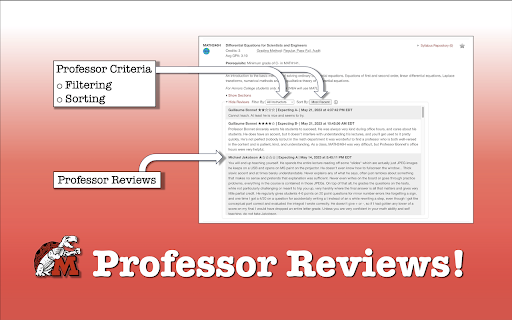
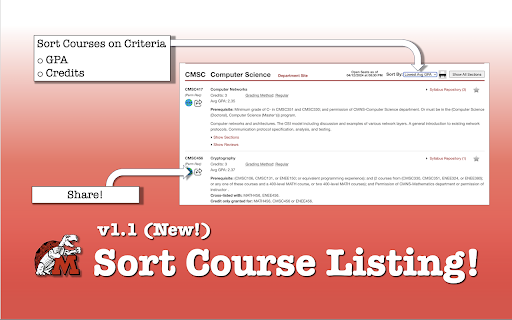
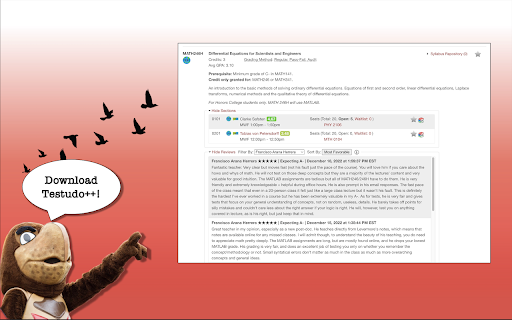
A streamlined process for reviewing course and professor evaluations integrated as a browser extension on https://testudo.umd.edu/. This chrome extension helps UMD students better navigate the 'Schedule of Classes' on https://app.testudo.umd.edu/soc/. It allows users to make easier, faster, and better decisions based on data provided by PlanetTerp. Rather than navigating between tabs to properly vet prospective instructors based on their ratings and student reviews, you can conduct all of that natively within the webpage. With a sleek interface, matching design, and smooth transitions, Testudo++ feels like it's supposed to belong there. It's able to provide the additional information students value to determine whether they want to register for a specific course or professor. Features: - Displays average course GPA - Course link navigates you to the corresponding PlanetTerp course website - Professor links - PlanetTerp link navigates you to the corresponding PlanetTerp professor page - RateMyProfessor link navigates you to the corresponding RateMyProfessor professor page - Professor ratings show the average student ratings given to that professor - Intuitive matching color gradient to indicate positive/negative scale (green, yellow, red) - Scrollable professor reviews window - Able to filter by professor - Organized by active/inactive instructor status - View by grouping - Sorted alphabetically - Able to sort by 'Most Recent', 'Most Critical', and 'Most Favorable' - Additional information popup window

Notion Canvas Assignment Import
This extension parses the assignments from a Canvas LMS course assignments page and loads them into a Notion database, at just the click of a button—unlock your full time-management and productivity potential! 💄 Simple, user-friendly interface 📄 Provided Notion database template 🔧 Configurable options, with input validation 🗄️ 'Category' database property for seamless integration into an existing tasks database 🔍 No duplication of assignments already in the database 📝 Updating previously imported assignments with new Canvas changes ⚙️ Fine-tuning of database property names & values ✏️ Overriding of Canvas course names 😀 Emojis for Notion page icons 🧑💻 Open source 🔒 Private and secure—all data is stored locally. I do not log or save any user data. Refer to the repository on GitHub: • Click on 'Website' →; or • Click the 'GitHub Repository' button in the extension; or • Copy and paste: https://github.com/JamesNZL/notion-assignment-import#readme Join the Discord server! https://discord.gg/k2jjmmVPeK In a nutshell, I store only what data is absolutely necessary. This data is stored locally, and is never transmitted back to me. Refer to the for my full privacy policy. https://github.com/JamesNZL/notion-assignment-import/blob/main/PRIVACY.md 1. Assignments are fetched from the Canvas API. 2. Relevant information is extracted from each fetched assignment, and the following configurations applied: 2(a). Course Code Overrides, and 2(b). Page Emojis. 4. The OAuth2 token is used to authorise with the Notion API. 5. The saved assignment data is retrieved from local storage. 6. The configured database is queried to avoid import of duplicate assignments (by matching assignment URLs). 7. The configured Database Properties are used to create a new database page for each assignment with the Notion API. View the full changelog here: https://github.com/JamesNZL/notion-assignment-import/blob/master/CHANGELOG.md v5.0.4 — Proper fix for invalid database ID issue v5.0.3 — Fixed invalid database ID issue v5.0.2 — Proper fix for corrupted favicon image files v5.0.1 — Fix corrupted favicon image files v5.0.0 — Add updating already imported Notion pages with Canvas changes. Allow importing past assignments. v4.3.3 — Updated valid emojis to match Notion v4.3.2 — Fixed timezone and import reliability issues v4.3.1 — Fixed homepage import bug v4.3.0 — Added support for assignment descriptions, assignment points value, and renamed 'Available Date' to 'Unlock Date' v4.2.5 — Fixed validation of database options, reset 'Authorise with Notion' button when restoring defaults v4.2.4 — Fixed edge case where database select refresh button doesn't appear v4.2.3 — Improvements to keyboard navigation and accessibility v4.2.2 — Fixed unsaved changes confirmation dialogue, accessibility improvements v4.2.1 — Fixed dropdown arrow display, and left margin of 'No saved courses...' in popup v4.2.0 — Added light mode, unsaved changes indicator, and unsaved changes exit confirmation dialogue v4.1.1 — Interface bug fixes and enhancements for wide screens v4.1.0 — Tweaks to input validation and showing/hiding of dependent options, bug fixes for Safari v4.0.1 — Under-the-bonnet bug fixes for Firefox WebExtension auto-validation. v4.0.0 — Major interface re-design, complete overhaul of options page, bug fixes, usability enhancements v3.0.6 — Behind-the-scenes changes, Firefox release v3.0.2 — Fixed another minor UI bug v3.0.1 — Fixed minor UI bug v3.0.0 — Options input validation, UI enhancements (+ new logo!), bug fixes v2.4.2 — Performance enhancements v2.4.1 — UI bug fixes and enhancements v2.4.0 — Graceful error handling, interface enhancements, bug fixes. v2.3.0 — Interface enhancements and bug fixes. v2.2.0 — User experience and performance improvements, start versioning with semver. v2.1 — User interface overhaul. v2.0 — Usability improvements and behind-the-scenes changes.

TerpScheduleSync
Base Level Extension Automatically import your course schedule from Testudo to Google Calendar. This extension supports all semesters (Fall, Spring, Winter, and Summer I & II) from Fall 2025 to Fall 2027. FAQs: Q: Who is this extension for? A: This extension is for students enrolled at the University of Maryland, College Park. Q: What if I update my schedule during the Schedule Adjustment Period? A: No problem! Simply import your schedule again using the extension to create a calendar with your updated courses. Troubleshooting: If your course schedule is not imported after authorizing Google Calendar, please click the import button again as Chrome sometimes fails to mount the extension the first time. It is also recommended that you use Chrome as your browser when running this extension to avoid potential compatibility issues with other browsers.

Better Testudo
Upgrades the Testudo class search system to make it more usable and efficient Better Testudo will make your life so much easier when searching for next semester's classes. Never again will you have 20 planetterp tabs open going back and forth trying to figure out which professor you just searched for and what their rating was. Now, just look under the name of each professor, and if planetterp has a rating, it will automatically be displayed. In the near future, Better Testudo will also add additional filtering options to make searching classes easier. Features like removing schedule conflicts, and removing classes that you don't qualify to take automatically will make searching for classes so much easier.

Gify Weather
Knowing weather made attractive. Get the weather reports in form of awesome GIF images Gify Weather is a modern Chrome extension that delivers real-time weather updates, live forecasts, and detailed weather information right in your browser. Instantly view the current temperature, humidity, wind speed, and weather conditions for your location or any city worldwide. The extension displays the current temperature directly on the browser toolbar icon, so you can check the weather at a glance without opening the popup. Enjoy a clean, customizable interface with multiple themes, including light mode, dark mode, neon, and high-contrast options for accessibility. Gify Weather uses reliable weather APIs to provide accurate, location-based weather data, global weather reports, and timely weather alerts. The extension is lightweight, fast, and easy to use—making it the perfect weather companion for your daily browsing. Features: • Real-time weather updates and live weather forecasts • Current temperature displayed on the extension icon in the toolbar • Detailed weather info: temperature, humidity, wind speed, and more • Location-based and global weather reports • Customizable themes: light, dark, neon, and high-contrast • Weather alerts and notifications • User-friendly, responsive interface • Powered by trusted weather APIs Stay informed about the weather wherever you are, with Gify Weather—your all-in-one weather extension for Chrome.
