
fgeacaodamfkbhdilpeddnnlmjcjfieg

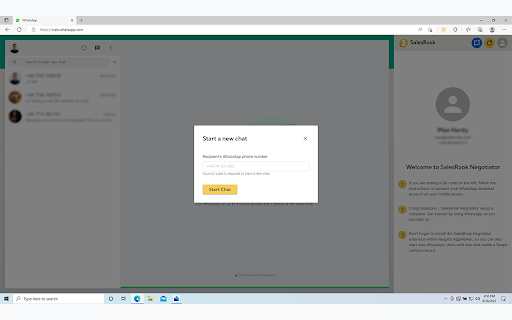
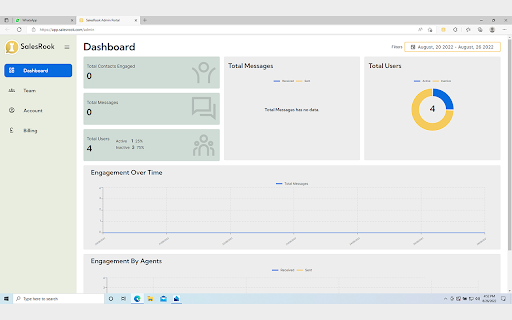
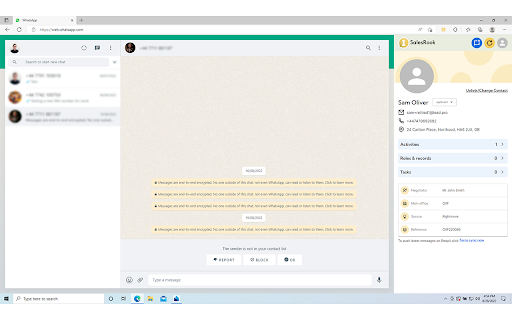
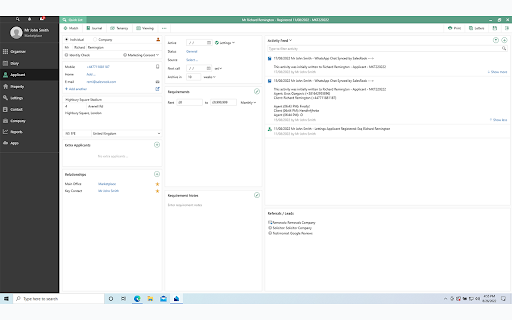
SalesRook brings the messages you exchange with customers on your WhatsApp into Reapit AgencyCloud - the UK's #1 property CRM - sharing your progress and valuable intel with your team. This legitimises instant messaging as a highly-effective, 1-to-1 direct customer relationship channel so you can: ⚡️ Sell more whilst saving time ⚡️ Feel secure on GDPR, and ⚡️ Build business intelligence in seconds SalesRook works on the browser version of the WhatsApp web app and enables Sales, Lettings, Renewals, Customer Service and Support teams to communicate with customers whilst automatically syncing with Reapit for cross-team collaboration, governance and oversight. Negotiators can use their individual work phone number and their own first/last name as a display name on WhatsApp - just like they do on professional email. They can also participate in WhatsApp group chats, build a one-to-one human relationship with the customer, and follow up without restriction to close the deal - all whilst using a desktop interface paired with their work phone or mobile device. With 𝗗𝘆𝗻𝗮𝗺𝗶𝗰 𝗣𝗿𝗼𝗳𝗶𝗹𝗲𝘀, agents can view customer details in real-time, using activity data, related tasks, appointments and other known information to personalise the chat and improve customer experience.... all without leaving WhatsApp or exporting identifiable information to a private contacts book, keeping company data protected. With 𝗔𝘂𝘁𝗼 𝗦𝘆𝗻𝗰, communications are logged directly to the Activity Log in Reapit - either on command or every few hours - as a journal entry in the selected contact record (tenant, applicant, property, etc). With 𝗣𝗲𝗿𝗳𝗼𝗿𝗺𝗮𝗻𝗰𝗲 𝗗𝗮𝘀𝗵𝗯𝗼𝗮𝗿𝗱, managers get a comprehensive overview of the team’s interactions and metrics in a customisable data centre, offering business intelligence on WhatsApp use that was previously unknown. And less email. ✅ Sync chats automatically - works for both 1to1 and group chats ✅ Installation in less than 30 seconds ✅ Effortless, intuitive integration between WhatsApp & Reapit ✅ Dynamic customer profiles - see a customer's details in Reapit whilst you chat with them ✅ Business intelligence - see your team’s interactions and metrics to understand company WhatsApp use ✅ Start WhatsApp chat in one click - to start a new chat simply click the blue 'Start Chat' button in the Negotiator panel ✅ Support for WhatsApp Classic and Business via web.whatsapp.com ✅ Use an individual work phone number and your own first/last name as a display name on WhatsApp - just like on professional email ✅ GDPR & AML aligned 🚫 Bulk or broadcast messaging 🚫 Chatbots or automated responses 🚫 Making WhatsApp calls using a desktop device 🚫 Sharing a single account and company phone number for dozens of staff SalesRook is completely aligned with WhatsApp's terms of use, per https://www.whatsapp.com/legal/ ✅ Increase revenues and do more deals by speeding up interactions & decisions. WhatsApp is 25x faster than email and boasts a 98% open rate - give your agents the tools to be able to use it legitimately and move important conversations along at speed. ✅ For your agents who don't write notes in Reapit, you'll gain full transparency of their conversations with customers. This carries positive customer service & revenue implications, especially when an agent is off sick or leaves the business. ✅ For agents who do make good notes on Reapit, they will no longer need to and will save lots of time - 25 minutes a day on average; the equivalent of 2.68 40-hour work weeks / year. ✅ Agents will continue to use their own, individual WhatsApp number meaning they can offer a human-to-human service as themselves (instead of as the brand), allowing the business to maintain its culture of high-quality personal relationships. ✅ SalesRook Negotiator is a mobile-friendly solution - SalesRook will sync messages sent or received on mobile into Reapit when the agent returns to the office. ✅ Prevent known GDPR and AML risks that you'd prefer to be compliant with. Keeping accurate records whilst working in WhatsApp Business allows you to stay onside. Once you install the Extension we request the following permissions: 🛡 "storage" - Allows us to store, retrieve, and track changes to user data. We store your SalesRook user profile information (name, phone number, and email) to use when performing operations within the extension. For authentication, we store session-based authentication tokens from SalesRook and Reapit. 🛡 "tabs" - Allows us to access to manage the extension's tabs for relevant operations. We use this to operate almost everything SalesRook enables you to do. We only use this permission on the specific and relevant websites. 🛡 "host permission" - Allows us to use Match Patterns to make sure our extension loads when the WhatsApp Web page loads in the browser and retrieve your SalesRook user access token for further authentication 🛡 You will be asked to connect with your Reapit user 🛡 You will be asked to provide your Reapit username for login validation 🛡 SalesRook does not store any company content, contacts or customer data For further information, please review our privacy policy (https://salesrook.com/privacy-policy) and terms of use (https://salesrook.com/terms-of-service) For any questions/concerns, please contact us on support@salesrook.com SalesRook is an independent solution developed by SalesRook Ltd and Zen Scaling Ltd, a certified Reapit AppMarket preferred partner and has no relationship to WhatsApp®, Facebook® or Meta®.

FLOZABLE Tab Monitor
Boost focus with timers, block distractions, get study tips, and stay updated with group alerts using FLOZABLE. Supercharge your focus and productivity with the FLOZABLE Study Focus Chrome Extension. Seamlessly integrated with your browser, this extension is your go-to tool for cultivating efficient study habits and making the most out of your online learning experience. Time Management Mastery: Effortlessly track your study time with our intuitive timer. Set focused intervals, challenge yourself, and stay on top of your study goals. Distraction-Free Browsing: Activate the distraction-free mode to limit access to non-educational websites during your study sessions. Say goodbye to procrastination and hello to enhanced concentration. Personalized Study Plans: Receive AI-generated study suggestions based on your learning habits and preferences. Tailored recommendations to keep your study sessions engaging and effective. Group Study Alerts: Stay connected with study groups seamlessly. Receive instant notifications for group study invitations, challenges, and achievements directly through the Chrome Extension. Progress at a Glance: Get a quick overview of your study progress with a personalized dashboard. See your daily, weekly, and monthly study trends, empowering you to stay motivated and accountable.

BBR Helper
This provides some advanced stats (game score, simple player rating and game box plus-minus) on multiple pages for NBA, WNBA, G-League, international leagues and college basketball. Including: - average stats by season on the player page - average stats by playoff series on the player page - average stats by player on the team_season page - average stats by player on the team_player page - average stats by player on the season_player page - single game/half/quarter stats by player on the game_boxscore page - single game and average stats on the gamelog and split pages - top 5 and top 20 average stats players on the season page - top 20 average stats players on the team_season page - top 20 average stats seasons rankings on the player page - top 50 career stats rankings on the player page - multiple stats rankings on the leader page - player awards column on team season page gBPM = (-0.55 * fga + 1.04 * fg3 + 1.39 * fg - 0.25 * fta + 0.79 *ft + 0.17 * orb + 0.27 * drb + 0.24 * (trb - orb - drb) + 1.34 * stl + 0.43 * ast + 0.64 * blk - 0.34 * pf - 0.95 * tov) / g """ , where orb is treated as 0.3 * trb and drb is treated as 0.7 * trb approximately when stats are not complete in early years.

GimmeThat - Universal Wishlist for Shopping
Simplify shopping with a universal wishlist. Save anything you want to buy from any store globally. See your favorites with a click! Tired of forgetting things you want to buy? Too many open tabs and bookmarked product pages? Give GimmeThat a try! It's a universal wishlist that lives right in your browser. You can save anything you want to buy from any store worldwide. All your favorites in one handy wishlist: see them with one click. Save time and stay organized while shopping. GimmeThat puts a handy button next to your browser's address bar. Seen something you like - but aren't quite ready to buy? Those cool shoes? That new phone? Click the GimmeThat button to add it to your universal wishlist. You can save from any store. Want to see your wishlist? Click the GimmeThat button again. You’ll see all your saved products right away. Ready to buy something? Click on the product, and you'll go straight to its store page. Get started with GimmeThat today. Click 'Add to Chrome' at the top of this page. It's easy, and there's a quick guide to get you started. ➤➤ Your Questions Answered Yes. You can save products from stores worldwide. Just click the GimmeThat button on the product's store page to add it to your wishlist. GimmeThat works its magic and grabs all the product's details from the store page. You can fix things easily if needed. Yes. GimmeThat is free to use. And no annoying ads - we make money from affiliate links. We can earn a commission when you click on product links in your wishlist. There may be paid accounts in future for extra features. ➤ Why does GimmeThat need to "Read and change all your data on all websites"? We need some permissions to work, and only ask for what's needed. When you save a product to your wishlist, this permission lets us fetch the product's image from the website. That's it! Yes. Keeping your data safe and private is top priority. We only store the data needed to work, like your email and products you save. All data is securely stored on our cloud servers. GimmeThat only works for desktop and laptop browsers right now. But we do work to make things better, so watch out for updates. If you have any questions, suggestions or problems, email us at support@gimmethat.me. We're here to help!

OpenText Core SCA Select Extension
Open Source Select will help developers find and use the right open source and reduce friction between organisations and developers Open Source Select helps you find and use policy compliant and great open-source for any development project. The OpenText Core SCA Select Extension is a free plugin created with developers in mind, enabling you to check the health metrics and license information of an open source project at a glance. If you need more granular data, the extension can lead you to Open Source Select for more detailed information. The three types of metrics you can examine are: Community - How healthy the community around a project is. Popularity - Is it used by many? Is the usage declining? Security - How well does the maintainers apply security best practices. The extension now supports Start Left Policies. This lets you immediately see if the open source you are browsing is compliant with your company’s open source policy, without the need to import and scan code with Software Composition Analysis tools and common source code repositories and package registries such as GitHub, pypi, npmjs, nuget and many others are supported.
