
ffojfaoaahdjlpincgecbcmihjnlohbe
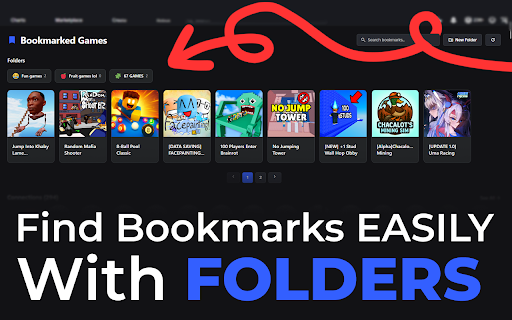

Bookmark and view your favorite Roblox games directly from the homepage. Roblox Bookmarker is a free Google Chrome extension that adds features to the Roblox.com website! Some of the features included are: - UI that matches roblox, and feels like its part of the website - Pin games - Search through bookmarked games - Add bookmarks from game pages - Dark/Light mode - Bookmarks displayed above all other games - Bookmark folders - Import/Export information - Notes for games Not affiliated with Roblox.com in any way, this is a fan made project

Roblox Better Friends Visited
This extension redesigns Roblox's friends visited banner and then accurately calculates the games rating and player count. ** fixed to work with latest update ** This extension revolutionizes Roblox's friends' visited banner on the home page by delivering a stunning redesign, while also providing precise game ratings and player counts. If you experience any bugs or issues, feel free to message bg9 on Roblox.

Roblox Item Autobuyer
Transform your Roblox experience with our powerful browser extension. Key Features: - 🚀 Get over 1,000 items. - 🤖 AutoBuyer: Our bot grabs roblox items before they change value or go off sale. - 🔔 Real-time notifications for recent catalog items. - 👚 Collect all classic t-shirts effortlessly. Join thousands of players and download our extension now to elevate your Roblox wardrobe. Don't miss out – your ultimate Roblox collection awaits!

BetterBLOX - Better Roblox Extension
BetterBLOX is a Better Roblox Extension that shows when users were last online. Adds free server region selector and player popups. BetterBLOX Extension – Adds Roblox last online and Free Server Region selector. Enhance your Roblox experience with BetterBLOX (Better Roblox Extension). Unlock exclusive features like last online status tracking and free server region selection. ✨ FEATURES OF BETTERBLOX: • Last Online Status – See when any Roblox user was last active • Friend Top Game Tracking • Custom V2 Roblox Website Theme • Server Region Selector – Choose your preferred game servers • Smart Notifications: - Friend online alerts - Game join notifications - Friend removal alerts • Reward Functionality - Earn XP for watching Youtube videos or when you invite people to use BetterBLOX. • Account Switcher - We use the Cookie permission to build our own account switcher in the V2 Custom Theme. ⚠️ Experimental Theme Notice: BetterBLOX includes an experimental custom Roblox theme that can be enabled or disabled at any time. To toggle it, click the extension icon and check "BetterBLOX V2 Engine." This theme is a complete overhaul of the Roblox website and includes the latest features of the extension. Theme updates are delivered instantly upon development completion. Note: Some ad blockers (e.g., Brave Shield) or other extensions may cause the V2 theme to malfunction. If you encounter issues, reach out via our Discord server. 🔥 WHY CHOOSE BETTERBLOX: • The only working solution for Last Online status • Regular updates • Actively developed • Confirmed to be safe – Read the pinned comment here: Reddit Safety Confirmation • Have questions or issues? Join our Discord for support. ⚠️ IMPORTANT NOTES: • Detailed permissions info is available in our Discord (#important-information) • This extension is not affiliated with, endorsed by, or sponsored by Roblox Corporation • The extension currently collects zero user data, though this may change in the future (transparency will be maintained) 1. Install BetterBLOX 2. Visit Roblox.com 3. Wait a few moments for the extension to initialize ("warm-up") and generate Last Online data. In the meantime, enjoy other features! ⭐ LOVING BETTERBLOX? Leave a 5-star review if this extension helped you! Your feedback supports future improvements and helps more users discover BetterBLOX.

Efaz's Roblox Verified Badge Add-on
An extension that adds the Roblox Verification Checkmark next to your name or group on the website! [Visual effect] [PLEASE READ THE FULL DESCRIPTION BEFORE INSTALLING!!] This extension allows you to visually insert the Roblox Verified Badge onto your Roblox profile/groups on the Roblox Website! This may allow you to troll with your friends or give a feeling of being verified even though you aren't. You may even make your profiles look like they're verified too using Approved User JSONs! Disclaimers that are important to know: 1. Please know that this is a visual effect and not actually real. This will not affect your Roblox Client, APIs, In-Game Chat or App. Other users will not be able to see the effect since this extension can't even do that; additionally, please don't brag to other players unless you or the other person count it as a joke. 2. Roblox has removed the ability for Custom Verified Badge Users on your game client (THIS IS NOT THE WEBSITE); therefore, you can't show the verified badge in game in any safe way or method. 3. I am not responsible for any actions that you did using this extension and your account gets terminated for it! Please use with caution and don't use for scamming! 4. This extension will use your Roblox Account to identify information such as your Roblox User ID, Groups and Username. This info will not sent to anywhere else! 5. There may be localization issues for some elements when an another language is set! Please be aware of that. 6. If you would like to set the users to approved, use this GitHub link to get started: https://github.com/EfazDev/efazdev-cdn/tree/main/extensions/dev.efaz.verified_badge_add_on/resources 7. This extension may miss some parts on the Roblox Website due to loading or just not added. The start time of the script is able to be changed using the Start Time setting in the extension settings. 8. You may need to clear cache from time to time, make sure to clear that using the Reset User Cache and Reset Group Cache buttons! 9. Please update Google Chrome to the latest version to prevent compatibility issues! Permissions needed (by display): [Read or change your data on all roblox.com sites]: This is used to allow the extension to insert the verified badge effect on the Roblox webpage. How to change verified badge settings: 1. Click on the Extensions icon on the top right of your Chrome window. 2. Click on Efaz's Roblox Verified Badge Add-on 3. Change settings to whatever you like! 4. Save Settings 5. Done! Good luck and happy verified! The source code of this project is available on GitHub: https://github.com/EfazDev/efazdev-cdn/tree/main/extensions/dev.efaz.verified_badge_add_on/chromeExtension If you want more customizations, you can use my bundled extension where it includes all the features of my Roblox extensions into one! Chrome Extension Link: https://chromewebstore.google.com/detail/efazs-roblox-extension/iehkcelgogmkojgggahdefcdncfeiadf This extension is made by EfazDev and is not affiliated, associated or endorsed by Roblox Corporation. Roblox and its various marks are trademarks of Roblox Corporation.
