
ffbgkjjcdkigoedjkebblclfllfoepbg
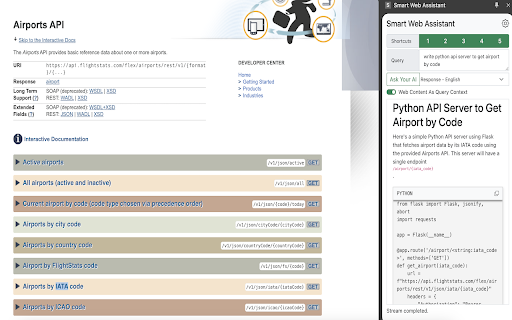


Smart Web Assistant is a Chrome extension that enhances your browsing with AI-powered insights from both cloud and local models. The Smart Web Assistant can operate on local servers that are compatible with OpenAI's API, such as Exllamav2, Llama.cpp, or VLLM, among others. Smart Web Assistant is a powerful Chrome extension that leverages advanced AI technology to provide real-time, context-aware insights directly on the web pages you visit. Whether you're using OpenAI's cloud API or local AI models like llama or mistral, this tool is designed to boost your productivity and enhance your understanding of web content in multiple languages. Instant Insights: Get immediate, relevant information and answers based on the current web content you're viewing, enhancing both comprehension and productivity. Multi-Language Support: Communicate with the AI in various languages, making it an ideal companion for both multilingual users and those learning new languages. Customizable Interactions: Tailor the AI's responses by configuring API settings directly within your browser, ensuring a personalized experience. Secure and Reliable: All settings, including sensitive API keys, are securely stored in Chrome’s local storage, ensuring that your configurations remain consistent and private. Efficiency at Your Fingertips: With up to five customizable shortcuts, access your most frequently used queries quickly, saving time and streamlining your workflow. Key Features: User-Friendly Interface: Designed for ease of use, the interface allows you to navigate seamlessly and manage settings with minimal effort. Flexible API Integration: Choose between using OpenAI's cloud service or your own local models, with support for custom API endpoints and model names. How It Works: Browse: Simply navigate to any website. Query: Activate the extension to use a shortcut or enter a new prompt, and receive AI-generated insights relevant to the content on your screen. Configure: Easily adjust API connections, language settings, and shortcut commands all within the extension’s interface. Smart Web Assistant is the ultimate tool for professionals, students, and anyone looking to supercharge their internet experience. By integrating cutting-edge AI directly into your browser, it transforms how you interact with digital content, making every browsing session more informative and productive. Privacy and Security Commitment: We take your privacy seriously. Smart Web Assistant processes all information locally within your browser and does not transmit personal data externally. For peace of mind, all configuration data, including API keys, are encrypted and stored securely within your own device. For more details on our privacy practices, please review our comprehensive Privacy Policy. Transform your browsing experience today by installing Smart Web Assistant—where intelligence meets convenience right in your Chrome browser! Releases v1.3 - Improved UI experience on Markdown tables and code blocks, openAI api works after bug fixing v1.2 - Support SidePanel mode

Random User Agent
Generate random user agent with chrome extension. Switch browser agents to any device or browser. Perfect for testing and privacy This powerful tool allows you to get random useragent strings with just a single click. It helps to protect websites tracking your browsing habits. Additionally, tool allows you to test any website across different browsers without actually installing them. 🤔 What is a UserAgent? A useragent is a string of text that your browser sends to websites you visit, revealing information about: 1. Your browser type and version - Chrome, Firefox, Safari, Edge etc. 2. Operating system - Windows, MacOS, Linux, iOS, Android etc. 3. Device specifications, rendering engine 💯 Why you need to use random user agent switcher Websites collect your device information to track your online activities. Our tool helps you maintain anonymity by regularly changing your device's identity. Privacy concerns have never been more relevant than today. – Enhanced privacy protection – Bypass geo-restrictions – Test websites across multiple platforms – Avoid browser fingerprinting – Access to region-specific content ⚙️ How Random User Agent works Extension works like a useragent converter that edits native identity to random user agent string seamlessly in the background. Once installed, you can set it to automatically switch user string at intervals or manually select from a comprehensive list of strings. Our privacy tool maintains a database of thousands of different browser agent strings, ensuring you always have fresh options to choose from. Whether you need to switch useragent in Chrome for development or privacy purposes, this extension handles it efficiently. 🔥 Features that set random user-agent extension apart Generate random useragent strings with unparalleled flexibility! Our tool comes packed with features designed to satisfy both casual users and professionals. 🔺 One-click random agent generator (generate browser strings for your purpose) 🔺 Scheduled rotation (for example, change it every 10 minutes) 🔺 Custom profiles (spoof desktop or mobile) 🔺 Useragent switcher with predefined categories (specific OS, devices, browsers) 🔺 Detailed UA information display (answers the question "what is my user agent?") 📊 Use cases for extension The user agetn randomizer for chrome serves numerous practical purposes. Developers particularly appreciate this agent switcher and manager when testing cross-browser compatibility. Privacy-conscious persons rely on this browser spoofer chrome extension to minimize tracking. 1️⃣ Web developers testing responsive designs 2️⃣ Privacy-focused individuals avoiding tracking 3️⃣ Marketers checking geo-targeted content 4️⃣ Bypassing simple site restrictions 5️⃣ Accessing region-specific offers or content 📱 Compatible with all your devices Whether you're using Chrome on Windows, macOS, Linux, the random user agents extension works flawlessly across platforms. The user identity string can be changed with a single click, making it the perfect browser switcher for all your devices. 🔒 Privacy first approach This extension prioritizes your privacy. It doesn't collect your data or track your browsing habits. This tool generates fake user agents follows strict privacy guidelines, ensuring your browsing remains truly private. ⚡ Advanced options of extension For those who need more control, the random useragent generator offers advanced configuration options. Set chrome useragent strings based on specific websites, create rotation patterns, or define custom browser identities with the useer-agent random generator functionality. 🔹 Rotation patterns and schedules 🔹 Custom user agent creation (with random option) 💻 Perfect for developers and testers Web developes love the switcher user agent chrome capabilities for testing responsive designs across multiple virtual devices. Instead of maintaining several physical devices, use this extension to simulate different environment or spoof browser. The user agent check feature allows you to verify your current identity string, while the agent randomizer ensures you're always testing with fresh configurations. This makes random user-agent extension an indispensable tool in any developer's toolkit. 🚀 How to get started 1. Install our extension from the Chrome Web Store 2. Click the extension icon to access the switcher 3. Turn on random generation mode 4. Customize settings based on your preferences 5. Enjoy enhanced privacy and testing capabilities

AI assistant
Use AI Assistant Chrome Extension for ai coding assistant and ai chat online productivity with smart, instant help in your browser. Use the Power of AI in Your Browser with AI Assistant – Your Smart Chrome Companion Welcome to AI Assistant, the ultimate ai chrome extension designed to supercharge your productivity, creativity, and curiosity. Whether you're coding, writing, researching, or just want to ask questions, our smart chatbot is ready to help—right from your browser. Now you can enjoy the ease of conversation with artificial intelligence while browsing, working, or learning. With just one click, unlock an intelligent assistant that does it all. Your All-in-One AI Assistant App in Chrome The AI Assistant app is more than just a chatbot. It combines the power of multiple tools into one sleek chrome chatbot. Whether you're looking for a free for pc, need assisted writing, or want an research assistant, this extension has you covered. With seamless integration into Chrome, AI Assistant becomes your always-available personal assistant, offering support for everyday tasks, schoolwork, professional projects, and more. Top Features of AI Assistant – Built for Everyone 1️⃣ Instant access to chat online from any tab 2️⃣ A powerful code assistant for developers 3️⃣ Easy-to-use interface, perfect for beginners 4️⃣ Fast answer generator for research and Q&A 5️⃣ On-demand chatbot and google assistant alternative Why Choose AI Assistant for Chrome? Fast and accurate answers to any question Intuitive design with no learning curve Versatile tool for students, professionals, and creators Great support for chat, questions, and real-time feedback Smart AI Coding Assistant for Developers If you’re a coder, the built-in this chat is your new friend. Need to debug, write snippets, or explore new languages? The code assistant helps you: ➤ Write clean, efficient code ➤ Fix bugs in seconds ➤ Learn new programming skills ➤ Generate examples and templates instantly Effortless Writing with AI Assisted Writing Tools ✍️ Whether you’re writing essays, emails, or content, the ai assisted writing features help you: Overcome writer's block Rewrite and improve your text Generate ideas and outlines Save time and boost quality With assistance, you can write smarter, not harder. Use AI Chatbot to Ask Anything, Anytime 🤖 Tap into artificial intelligence ask anything mode and start a conversation with artificial intelligence on any topic. Whether it’s science, tech, history, or life advice, just ask questions and get meaningful, accurate responses. ▸ Real-time ai chatbot ▸ Deep, thoughtful answers ▸ Great alternative to traditional search Perfect for Everyday Use Need to schedule your day? Just ask your personal assistant. Working on a report? Get help from your ai research assistant. Coding an app? Ask your chatbot. Learn How to Use AI the Easy Way AI Assistant helps you understand how to use through simple interactions. You’ll discover how assist can transform your work, learning, and browsing. Let the extension guide you into the future of inteligencia artificial right from Chrome. Free AI for PC Users – No Cost, Just Power This free chat for pc Chrome extension gives you premium features without hidden fees. Whether you’re using Windows, Mac, or Chromebook, your app is always ready to help. Boost Your Productivity With Assist AI in Chrome With this chatbot, your browser becomes a command center. Multitask like a pro with: • Quick answers to tough questions • Writing help, coding support, and brainstorming • Integration with daily tasks and workflows Chat Online – Always Available 💬 Use chatbot online when you need ideas, answers, or just want to talk. It’s your always-on chatbot. ▸ Available 24/7 ▸ Safe and secure ▸ Smarter every day Get Started with Chrome AI Assistant Now It takes just seconds to install the chrome. Add the extension, open a new tab, and start chatting with your intelligent partner. Whether you want to ask questions, get assistance, or use it as your go-to assistant app, it’s all just a click away. Join the AGI Revolution 🚀 Thousands are already using the chrome extension to stay ahead. Don’t fall behind. Embrace conversation with artificial intelligence, explore assist tools, and redefine how you work, create, and learn.

Smart Search
Smart Search - Chrome extension for smarter searches. Perform a smart page search to quickly find any text on any webpage with ease Instead of wasting time scrolling through long pages, this intelligent helper highlights the information you need in seconds. It operates as a personal content discovery tool that instantly detects keywords, phrases, and even hidden sections within modern websites. 📌 Why professionals rely on it 1️⃣ Lightning-fast lookup and highlighting 2️⃣ Intuitive interface with modern visuals 3️⃣ Real-time database search for structured content 4️⃣ Automatic data memory and refresh 5️⃣ Works perfectly with all types of online platforms 💡 Better page exploration for everyone Students, developers, and analysts use this extension daily to uncover data that ordinary tools miss. It supports a smart page search that adapts to your query, delivering more relevant and organized results. Its internal logic powers smart background search, helping you keep working while data loads in parallel. And when you need to compare items or evaluate product details, the smart and final product search feature gives precise results in a blink. 📂 How it functions ➤ Activate the floating input bar on any page ➤ Type a phrase, figure, or tag ➤ Instantly view matched results highlighted in context Behind the interface, this extension acts as a lightweight discovery engine integrated directly into your internet browser search engine. It even handles complex elements, supporting canvas smart search for dynamic layouts, charts, and embedded scripts. 🌐 Main advantages • Real-time lookups and auto-highlighting • Simple, ergonomic control layout • Optimized for privacy and stability • Compatible with all modern frameworks • Integrates easily with searchweb portals and tools 📌 Made for multitaskers and data-driven users If you handle multiple tabs, reports, or projects, this browser assistant is built for you: Continue background analysis while navigating the web Perform page-level lookups for fast information retrieval Run database queries and export data snippets Use the integrated finder mode for product comparison 💡 Beyond basic find tools Traditional Ctrl+F stops at visible text. This utility goes deeper, scanning dynamic sections, modals, and hidden frames. Each search and find operation becomes an intelligent exploration powered by contextual understanding. 📂 Technology and logic At its core lies a smart search portal, merging fast access and deep scanning capabilities. Whether you’re doing a simple search or a detailed data lookup, it delivers smooth, consistent performance every time. 📌 Common use cases 1️⃣ Students conducting in-depth database lookups 2️⃣ Developers testing interface behavior via canvas analysis 3️⃣ Shoppers using product comparison tools 4️⃣ Analysts filtering large data volumes 5️⃣ Project managers locating info through page-level lookups 🔒 Privacy & security The https search app ensures every lookup happens through secure HTTPS channels. Queries remain private — no external tracking or data collection. It’s engineered for user confidence and reliability. ❓ What is search app? It’s more than a browser helper — it’s a flexible smart app that combines discovery, filtering, and analysis in one place. Perfect for anyone who wants more efficient ways to search for web content without clutter or lag. 💡 Unique features • Adaptive logic that refines each lookup • Instant navigation between matches • Works smoothly within any smart search field 📌 Why it matters With its intelligent engine, it becomes your go-to smart search app for research, writing, or analysis. It’s fast, private, and always ready to deliver precise context. 📂 For modern professionals From developers running code lookups to marketers gathering insights, this smart serch extension streamlines your digital tasks. It saves time, reduces effort, and adapts to your habits through continuous learning. 🌐 Final thoughts Whether you’re browsing for inspiration, comparing products, or conducting a database search, this Chrome extension gives you a cleaner and faster way to find what you need. Download Smart Search today and experience a new level of intelligent discovery — a tool that transforms web browsing into effortless information mastery. 📌

AI Voice Assistant – Smart Browser Copilot
AI assistant that works inside your browser tab. Ask by voice and get instant, context-aware AI responses. AI Voice Assistant is a context-aware browser extension that brings AI directly into the page you're viewing. You can ask questions by voice, analyze on-screen content, or select text and instantly run AI-powered actions — all without switching tabs or copying content. It's built to reduce friction, eliminate repetitive steps, and help you stay focused while browsing, reading, researching, or working. 🎙️ Ask AI by Voice (Hands-Free) Use voice commands to ask questions and get instant AI responses based on the current webpage. No typing, no prompt writing, and no context loss — AI understands what's on your screen. Great for hands-free use, multitasking, and uninterrupted workflows. 🗣️ Wake Word Detection Say "Hey Assistant" to start recording — completely hands-free. No keyboard shortcuts needed. Just speak the wake word and ask your question. Uses on-device speech recognition for privacy — no audio is stored while listening. Customize your wake word in settings. 🔇 Auto-Stop on Silence Recording automatically stops when you finish speaking. No need to press a button to end — just pause, and AI processes your request. Adjustable silence duration (1-5 seconds) to match your speaking style. Combine with Wake Word for a fully hands-free experience. ⚡ Quick Actions (Instant AI Tasks on Selected Text) Quick Actions let you perform common AI tasks in one step. Simply select text on any webpage and trigger an action like: Summarize content in short or detailed form Explain complex text in simple terms Rewrite or rephrase content Translate text Extract key points or insights You can also create custom Quick Actions for tasks you repeat often. This turns multi-step AI workflows (copy → paste → prompt → adjust) into a single click. No prompt engineering. No switching tabs. Just select and run. 📸 Screen Read & Visual Understanding Ask AI questions about what's visible on your screen: Code snippets and error messages Articles, documents, and webpages Charts, diagrams, and visuals AI analyzes screenshots and on-screen content to provide relevant, contextual responses. 🔍 Real-Time Web Search Mode For questions that need live or up-to-date information, Web Search mode lets AI fetch and summarize current data directly from your browser. ⚡ SMART MODES Voice Mode – AI answers based on the current tab Screen Read Mode – AI help using screenshots and visuals Web Search Mode – AI answers powered by real-time web data Switch instantly using keyboard shortcuts. ✔ No tab switching or copy-paste ✔ Voice + text-based workflows ✔ Wake word activation — say "Hey Assistant" to start ✔ Auto-stop on silence — no button press to end ✔ Instant AI actions on selected content ✔ Custom actions for repetitive tasks ✔ Context-aware responses ✔ Works on any website ✔ Faster, cleaner, more focused browsing 👥 WHO IT'S FOR Professionals working with content and research Developers reading documentation or debugging issues Writers, marketers, and analysts handling text Anyone who frequently uses AI while browsing ⚙️ HOW IT WORKS Open any webpage Ask a question by voice (or just say "Hey Assistant") Trigger an instant AI action or response Get results without leaving the page 🔒 PRIVACY & SECURITY Your privacy matters. Audio is recorded only when you activate it. Wake word detection uses on-device processing — no audio is stored while listening. There is no background listening and no unnecessary data storage. 🚀 GET STARTED Install AI Voice Assistant and turn your browser into a smart, AI-powered workspace. Talk to AI. Select text. Run instant actions. Stay focused.
