
ffalkaakjbfpeicomidfmddhfimmphol
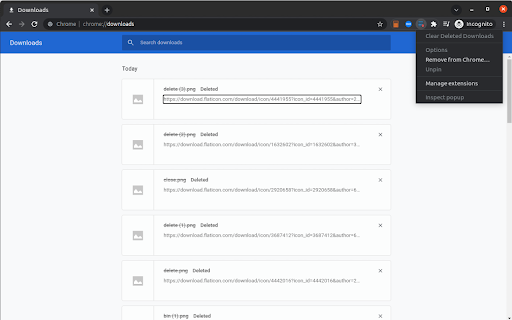

Removes deleted items from the 'Downloads' list Simply clears out all items in the Downloads list, files of which were already deleted. Options: "Enable automatic cleanup" (default: disabled) - when enabled, outdated or interrupted downloads will be automatically removed: * Automatically whenever a download’s state changes (finished, interrupted, or removed). * Immediately when you open the Downloads page (chrome://downloads/)

Clear Downloads
Automatically hides completed download items 5 seconds after the download is complete. It is manifest v3 compliant, so it can be used for a long time. This extension does not possess or collect any personal data, including analytics. The implementation is very simple, so please check it out if you are interested.

Clear Downloads Plugin
This extension will allow you to clear your downloads with one click With the updated google chrome browser, you now have to go through a few clicks to clear your downloads. This can be annoying for an impatient person like me. This simple chrome plugin allows you to clear your downloads with one click :)

FlowTab
A beautiful, elegant, and minimalist new tab for your browser. 👋 Thanks for checking out FlowTab! Experience elegance and minimalism like never before in a clean new tab for your browser. Keep a modern look without sacrificing your productivity, and customize to make FlowTab just the way you like it. ✅ Features include: - Custom quick links - Custom wallpaper from URL - Dark, light, and custom theme - Selection of 5 search engines - 12 and 24 hour time format Check out our GitHub (https://github.com/flowshade/flowtab) to post issues and see what we used to make this project.

OpenText Core SCA Select Extension
Open Source Select will help developers find and use the right open source and reduce friction between organisations and developers Open Source Select helps you find and use policy compliant and great open-source for any development project. The OpenText Core SCA Select Extension is a free plugin created with developers in mind, enabling you to check the health metrics and license information of an open source project at a glance. If you need more granular data, the extension can lead you to Open Source Select for more detailed information. The three types of metrics you can examine are: Community - How healthy the community around a project is. Popularity - Is it used by many? Is the usage declining? Security - How well does the maintainers apply security best practices. The extension now supports Start Left Policies. This lets you immediately see if the open source you are browsing is compliant with your company’s open source policy, without the need to import and scan code with Software Composition Analysis tools and common source code repositories and package registries such as GitHub, pypi, npmjs, nuget and many others are supported.
