
fendbpnhpbeahongbkaegkbmcoaakpnl
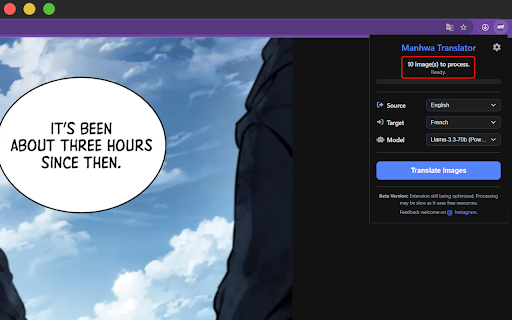


Automatically detect text bubbles in manhwa pages, extract text with advanced OCR, and translate it into your preferred language. Read manhwa in any language! Automatic text detection, OCR, and translation directly in your browser. Tired of switching between tabs or searching for unofficial translations? Manhwa Translator makes reading foreign-language manhwa effortless. With this extension, you can: - Automatically detect text bubbles in vertical comic pages - Extract text using advanced OCR technology - Translate text instantly into your preferred language Whether you’re catching up on the latest chapter or discovering a new series, enjoy a smooth, immersive reading experience without leaving your browser. Why you'll love it: - Fast & seamless: No more copying and pasting text or waiting for third-party translations. - Innovative & practical: Works directly on vertical comic pages for a natural reading flow. - Accessible: Makes manhwa available to readers in any language. - Free to use: And we’re constantly adding more languages and features! ⚠️ Note: The processing may be slow at the moment since it relies on free resources. If you support the project via donations, we could consider implementing a GPU-powered version that would dramatically improve translation times for each manhwa panel. Join thousands of manhwa fans who are already reading faster, easier, and more comfortably. Try it now and dive straight into your favorite series!

OCR Translator
Capture, crop, and instantly translate any on-screen text, including images, with just one click. Take screenshots and get translation right away! With our innovative OCR Translator Chrome Extension, you can capture any part of your screen—even if it's just an image—and instantly receive a translated overlay. Unlike other tools that only work with selectable text, our extension uses advanced OCR technology to extract text directly from images, making it perfect for those hard-to-reach areas like YouTube videos, Google Maps photo reviews or foreign language Instagram posts. ⭐️ Key Features: 1️⃣ Instant Capture & Crop: Quickly take screenshots and crop the exact area you want translated. 2️⃣ Advanced OCR Technology: Extract and translate text from images, not just digital text. 3️⃣ User-Friendly Translation Overlay: See translations appear directly over your original content for a smooth browsing experience. ✅ Perfect for Unselectable Text: Ideal for scenarios where text is embedded in images or rendered in non-selectable formats. ✅ User-Friendly & Efficient: Designed for simplicity and speed, ensuring you get the information you need without any hassle. [Updates] [v1.5] - Massive UI refactorization - Fix 5 reported bugs related to UI. [v1.4] - Massive refactorization - Add notice feature in settings page - [.1] minor bug fixes - [.2] Support Vietnamese (unstable) and Portuguese - [.3] bug fix: sometimes the selection does not work - [.4] security: narrow down the permission scope [v1.3] - Add config page that could customize shortcut - Support Turkish - [.1] Support Polish - [.2] Add rate limit feature [v1.2] - fix a few know bugs - add slider ui for copying the detected text - [.1] fix failover logics for exception cases - [.2] now persistantly saves text size and background opacity. - [.3] change backend endpoint for server relocation [v1.1] - Now you can select a image to translate just by clicking. (not dragging) - Support two more languages, Thai and Hindi - [.1] improve image parsing accuracy - [.1] improve translation quality - [.2] support parsing image displayed by canvas element

Auto Time Zone Converter
Automatically detect the times from text as you browse the web and convert them to your local timezone. 1. Automatically detects time in the websites you visit and converts it into your local or a custom destination time. 2. Works perfectly fine on the web, Gmail, Online Outlook, etc. 3. Detects different timezones with the same abbreviation 4. Accounts for daylight saving 5. Manage the extension with the on and off buttons 6. Add up to 5 different destination time zones from the setting page 7. Personalize the label of each destination time zone

Get Text from Image
Quickly Get Text from Image using OCR character recognition to convert image, copy and extract text from picture in just seconds. Get Text from Image lets you pull text out of any picture in your browser. Select an area on a page, screenshot, or PDF, and the recognized text is copied to your clipboard, ready to paste. It saves you from retyping. Anything you'd normally have to type by hand from an image — a quote, an address, a code snippet, a line from a scanned document — you can grab in a couple of seconds without leaving the tab.

Auto Clipboard
Selected text is automatically copied, resolving the issue of text not being copyable on some websites, and supports viewing… Select text, automatically copy to clipboard, save you every second! By default, the input text is not copied. Hold down Ctrl and select the input text.
