
fellcphjglholofndfmmjmheedhomgin
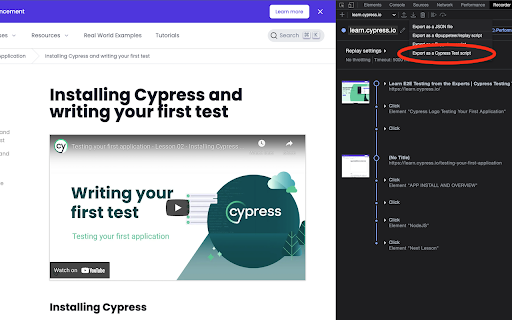
Cypress extension for DevTools that allows you to export tests directly from the Recorder panel. This extension allows you to quickly export recordings from Chrome DevTools Recorder as Cypress tests. Once installed, a new export option will appear in the Recorder panel labeled "Export as a Cypress Test script". Click that and download the exported code as a file. Make sure to save the file with the extension `.cy.{ts,js)` if you are using Cypress >= 10. For more information about the Cypress Chrome Recorder, please watch https://youtu.be/-RJuZrq-wOk

WebPageTest Recorder Extension
An extension for Chrome Recorder to export a recorder session as a WebPageTest Custom Script With Chrome Recorder and the WebPageTest Recorder Extension, you can start testing user flows in WebPageTest with just a few clicks and zero coding. Use the built-in Chrome Recorder functionality to quickly record different user journeys through your sites and applications, and then export them directly as WebPageTest Custom scripts so that you can test those same journeys in WebPageTest and get reproducible, reliable and actionable performance data. If you have any feedback, please file an issue on our extension repository: https://github.com/WebPageTest/recorder-to-webpagetest-chrome-extension/issues For more information about our recorder extension, Visit https://www.youtube.com/watch?v=zlm8KLttkx8 Github: https://github.com/WebPageTest/recorder-to-webpagetest-chrome-extension

Nightwatch Chrome Recorder
Nightwatch Extension for Devtools that allows you to export tests directly from the Recorder panel. Nightwatch Chrome Recorder Extension lets you export user flows as Nightwatch test scripts from the Recorder panel in Chrome DevTools. With Chrome Recorder and the Nightwatch Chrome Recorder Extension, you can start creating test scripts for Nightwatch with just a few clicks. After installing this extension, you will see a new "Export as Nightwatch Test Script" option available under the export menu. Learn more about Chrome Recorder and the Nightwatch extension with our official guide: bit.ly/nightwatch-recorder.

Katalon Recorder (Selenium tests generator)
Selenium IDE alternative to record and export Selenium scripts. With reports & screenshots. Fast & open-source. Katalon Recorder is a free, lightweight web extension that serves as an alternative to Selenium IDE. Designed for automating browser actions and tests, Katalon Recorder is available on Chrome. With Katalon Recorder, you can: Ensure quality by testing your work before passing it on to the QA team. Maintain end-to-end software quality through automated testing. Monitor web application functionality using synthetic testing. Track testing activities with shareable reports, complete with visual dashboards and charts. Save time by automating repetitive browser tasks such as generating reports, filling out forms, and even automating web-based games. Privacy notice: Katalon Recorder is designed with user privacy in mind. Your test artifacts are securely stored on your local machine, ensuring no data is transmitted to our servers. To learn more about Katalon Recorder, visit https://docs.katalon.com/katalon-platform/plugins-and-add-ons/katalon-recorder-extension/get-started/katalon-recorder-overview

BlazeMeter | The Continuous Testing Platform
Record Selenium and HTTP traffic to create a load and functional tests in less than 10 minutes (Apache JMeter Compatible). The BlazeMeter Chrome extension enables you to - Record. Upload. Run. The Chrome extension records all HTTP/S requests and actual user interactions that your browser sends. It creates a JMeter or Selenium script, and automatically uploads it to BlazeMeter.com, where you can execute tests with a single click. No need to install JMeter nor Selenium to record or run GUI Functional, API Functional, or Performance tests, the Chrome extension will create the JMeter (JMX) and Taurus Selenium (YAML) scripts automatically. The extension will also allow you to debug and test your recorded Selenium session on your local Chrome browser. By using JMeter locally, you can debug and enhance the JMX file created by the Chrome Extension to ensure your script is ready to go. WHAT'S NEW: https://guide.blazemeter.com/hc/en-us/articles/115004970329-Chrome-Extension-Changelog-Chrome-Extension-Changelog Features - Record test scenarios without scripting experience - Record all HTTP/S requests made by your browser - Record user GUI actions - Add assertions to your Selenium steps - Add transaction labels (for JMeter and Selenium) during recording - Support for shadow locators (Lightning Web Components) - Apache JMeter Compatible - Taurus Selenium Compatible - Run tests without installing test scripting applications - Run Performance tests for up to 3,000,000 concurrent users - Run load tests in under ten minutes - Run API Functional Tests - Run GUI Functional Tests - Run Selenium tests and JMeter tests side by side to get the best of both worlds - Debug scripts - If you want to record transactions, Chrome version 58 or newer is required - Recommended minimum version of Chrome is 58 - For certain features (e.g. converting to JMX, Scriptless Scenario Editor), a free BlazeMeter.com account is required
