
fekajhhpndhdfgeffgllhfaddnkjmjbo
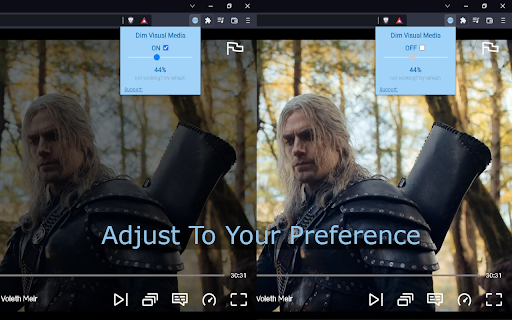

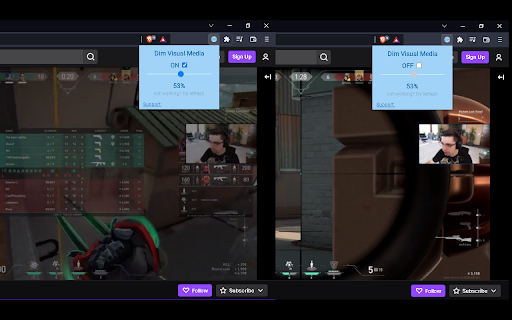
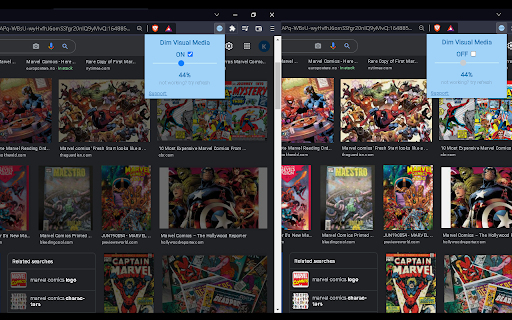
Watch your favourite Netflix show, Twitch Stream, YouTube, Google and other visual media content dimmed Watch your favourite Netflix show, Twitch Stream, YouTube, Reddit, Google and other visual media content dimmed. Change the brightness to your preference Dims Netflix, YouTube, Reddit, Twitch, Videos, Streams and Images For everyone that like their media content dimmed. ★ for you to watch your favourite content at night ★ for your study or work session in the dark ★ for protecting your eyes, bright lighting and too much glare can strain your eyes Simple ★ Simple UI and responsive to almost every site ★ Saves your settings for your convenience ★ Also compliments dark mode extensions Please feel free to contact me if you have any issues or requests Thank you and enjoy! Version Update: 0.4 popup HTML update 0.3 Improvement to extensions UI 0.2 Better implementation of CSS brightness filter for working on more sites. (continuously improving CSS implementation) 0.1 Initial release Permissions & reason storage: for you to be able to save your settings, when closing extension or exiting your browser tabs: for extension to apply filter at current focused tab scripting: for Implementation of CSS brightness filter host permission: for permission to apply filter into current site

Video Ustaad
Fine-Tune The Visual Settings Of Any Video On The Web To Your Liking. Adjust Brightness/Contrast/Saturation And Much More !! The Video Ustaad is a Chrome extension designed to give users greater control over their video viewing experience. Whether you're watching tutorials on YouTube, catching up on the latest news on Twitter, or viewing professional content on LinkedIn, this extension lets you fine-tune the visual settings of any video to your liking. From your late night black-out movie marathons to sensory overloaded video; Video Ustaad comes to rescue every👏🏻single👏🏻time. 1. Adjustable Brightness: Easily adjust the brightness of videos to suit your preferences. Whether you prefer a brighter or darker display, you can customize it in real-time. 2. Customizable Contrast: Fine-tune the contrast of videos to enhance image clarity and detail. Find the perfect balance between light and dark elements for an optimal viewing experience. 3. Vibrant Saturation: Enhance the colors of videos by adjusting the saturation level. Bring out the richness and vibrancy of hues to make videos more visually appealing. 4. Classic Sepia Tone: Apply a classic sepia tone to videos for a nostalgic or artistic effect. Transform modern videos into vintage masterpieces with a simple slider adjustment. - Universal Compatibility: Works seamlessly across popular video-sharing platforms like YouTube, social media sites like Twitter, professional networks like LinkedIn, and more. - Real-time Preview: See the effects of your adjustments in real-time as you tweak the brightness, contrast, saturation, and sepia settings. Fine-tune until you achieve the perfect look. - With Video Ustaad, you can take control of your video viewing experience and tailor it to your personal preferences. Whether you're watching educational content, entertainment videos, or professional presentations, this extension empowers you to optimize the visuals for a more enjoyable and immersive viewing experience.

Dim the Internet - Turn down the brightness.
Sometimes websites don't support dark mode, so just turn down the brightness. Made with ❤️ by ae.studio Same Day Skunkworks Division

Video Brightness Controller
A Chrome extension to adjust video brightness using a slider. You can easily set the brightness of the current main video in the page. Default is 1.0 for every page, you can decrease and increase according to how much you want. If you want something to be fixed or you have some suggestions for the extensions, please let me know.

Lumitabs
This extension lets you easily control the current tab brightness. Does your favorite website or application lack a dark mode? Experiencing eye strain from overly bright screens? Lumitabs is here to solve those issues. Lumitabs is a user-friendly Chrome extension designed to give you control over the brightness of your current tab. It's like adding a personal dimmer switch to each website or application, reducing the luminosity to a level that suits your eyes. Whether you're browsing late at night or simply want a more relaxed browsing experience, Lumitabs provides an immediate solution. No longer do you have to wait for a website or app to add a dark mode – with Lumitabs, you're in control. Simply install the extension, adjust the brightness slider on your current tab, and instantly notice the difference. Lumitabs not only gives you a more personalized browsing experience but also helps to reduce eye fatigue. Give your eyes the comfort they deserve with Lumitabs. Lighten up or darken down, the choice is at your fingertips with Lumitabs.
