
fdndgpohalkoklpaopahkblpomlhmifm


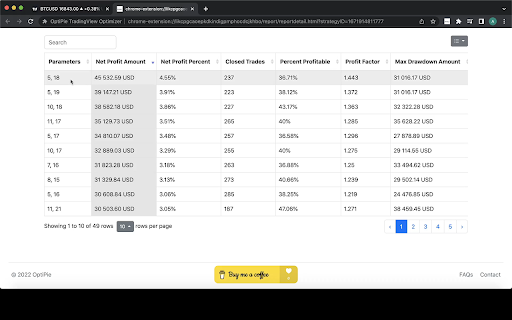

TradingView Parameter Optimizer as an extension OptiPie is an open source strategy optimizer automation tool for TradingView. Easily optimize strategies, store optimization reports and make analysis via simple UI. Download as Chrome Extension Now! 1. Open TradingView and load a chart with a strategy applied. 2. Open the strategy's Settings window (click the gear icon on the strategy) 3. Click the OptiPie extension icon to open the popup 4. Configure your parameter ranges and click Optimize Optimize Strategies Up to 5 Parameters Optimize any TradingView Strategy you want up to 5 Parameters. Limitless Parameter Input Range Unless your Internet or TradingView is broken, you can optimize with any input range you want. Find, Sort, View & Analyze Reports Easily find your report in Reports tab with table search and sorts. Open report detail view to make a deep analysis. Last Entered Parameter Inputs Stored In State During your Chrome Session, last entered parameter inputs are per unique strategy - switch strategies freely. OptiPie Plus, The Ultimate Input Optimizer 📢 Join the OptiPie Plus Membership, discover amazing features, go beyond the limits! - Multi-Timeframe Optimization - Selectable Parameters - Stoppable Optimization with Partial Report - Extended Report Data - Optimize Strategies Up to 20 Parameters Latest Updates 📢 (v1.5.2) New Feature: Save & Restore Your Optimizations! No more re-entering parameters - switch strategies freely. • Keep up with the TradingView changes to maintain app functionality • Try Last Used Parameters: Enable in Settings to automatically carry over parameters when running the same strategy across different symbols or intervals. • Auto-save per strategy: OptiPie remembers your optimization parameters per strategy, symbol, and interval. • Reset Parameters button to clear inputs and start fresh. • Saved configs are automatically cleaned up after 30, 60, or 90 days — configurable in Settings. Checkout news for the latest updates here! optipie.app/news Visit optipie.app for more!

TradingView Supercharged - TradingView Strategy Optimizer
The ultimate TradingView Strategy Optimizer - Supercharge your trading with parameter optimization! Stop guessing—start optimizing with TradingView Supacharged. Built by Pineify (Best Pine Script Generator), this is a purpose-built tool to optimize TradingView strategies with speed and precision. 🎯 Let data lead your decisions. TradingView Supacharged identifies the best-performing parameter sets for your Pine Script strategies, streamlining both backtesting and live decision-making. ✨ Key Features 🚀 Automated Testing: Rapidly evaluate thousands of parameter combinations. 🛠 Comprehensive Optimization: Tune Pine Script inputs including number, checkbox, and select with full flexibility. 🕛 Supported intervals: You can use interval as one of the adjustable parameters to test how different parameters perform across various cycles. 📊 Performance Analysis: Compare strategy outcomes across settings to pinpoint winners. 📁 Data Management: Export and save optimization results for future review and sharing. 🔗 Seamless Integration: Works naturally with TradingView’s interface—no friction. 👥 Perfect For Pine Script Developers: Eliminate manual tweaking and boost iteration speed. Algorithmic Traders: Improve performance with precisely calibrated parameters. Technical Analysts: Validate and lock in the most effective indicator settings. TradingView Users: Optimize without extra coding. Compatibility & Ease Compatible with all TradingView charts and Pine Script strategies. No extra coding—just smarter trading. 💡 Why TradingView Supacharged? Find the Best Parameters Faster: Zero in on the right settings for your strategy. Save Time: Offload tedious trial-and-error to automation. Trade with Confidence: Make decisions backed by clear results and insights. Own your strategy—download TradingView Supacharged and accelerate success through optimization today! 🚀 2016.01.11: v1.4.0 Relase: - In the backtest results, Params will display all parameter data of the current Inputs - Fix the issue where deep backtesting does not take effect 2025.12.30: Fix the bug 🐛 2026.01.20: Experience optimization 2026.02.07: Fix the bug 🐛 2026.03.22: Experience optimization 2026.05.31: Fix the bug 🐛

NewHorizon Optimizer
TradingView Parameter Optimizer as an extension 🚀 Introducing NewHorizon Optimizer: Elevate Your Trading Strategies to New Heights with Our Chrome Extension for TradingView! 🚀 🌟 Crafted for the ambitious TradingView community, the NewHorizon Optimizer is your gateway to refining trading strategies with unparalleled precision. By integrating the latest technological advancements, we ensure your strategies are optimized to their fullest potential. - 🛠 TradingView Strategy Parameter Optimization: Sharpen your trading strategies with meticulous adjustments for peak performance. - 🔄 Unlimited Parameter Optimization: With no cap on the number of parameters, unlock the full spectrum of strategy refinement possibilities. - 🤖 Advanced Algorithm Optimization Support: Embrace the power of exhaustive algorithms, genetic algorithms, Bayesian optimization, and more to discover the optimal strategy settings. - ⏲ Real-time Optimization Time Estimation: Receive immediate estimations of optimization durations based on your internet connection and computer specs. - 📊 Visualization Analysis of Optimization Reports: Leverage intuitive visual reports to analyze optimization results and make data-driven decisions. - 📁 Optimization Report CSV Download: Export your findings effortlessly and share your insights with the world. - ⏩ Parameter Skipping: Select which parameters to exclude from optimization, increasing the flexibility of selectable parameters for optimization. - 🔒 Optimization Process Protection: A browser overlay safeguard prevents inadvertent clicks from interrupting the optimization process, ensuring seamless operation. - ⏸ Pause and Save Optimization Reports: Enjoy the flexibility to pause and save your optimization progress at any point. - 🌓 Dark and Light Mode UI: Personalize your experience with theme options that cater to your preference. - 💬 24/7 Customer Service via Contact Us and Discord: Our dedicated team is always on standby to address your questions and feedback. - 🔧 Rapid Bug Collection and Updates: Committed to excellence, we swiftly act on user feedback for continual improvement. 💡 Become part of the NewHorizon community, where passion for quantitative trading meets technological innovation. With the NewHorizon Optimizer, you’re not just optimizing strategies; you're setting the stage for unparalleled trading success. 🚀 Experience the future of trading strategy optimization today with NewHorizon Optimizer. Start your journey towards optimizing your trading strategies and achieving remarkable trading efficiency!

TradingView Strategy Optimizer (AI Assisted) by Quant Trading Pro
Optimize, backtest, and automate TradingView strategies with precision. The Tradingview Strategy Optimizer by Quant Trading Pro is the latest and innovative back testing tool. Automate and optimize your TradingView strategies—run parameter sweeps, backtest on the fly, and export results in seconds. Backtest hundreds of symbols across multiple timeframes! The Tradingview Strategy Optimizer is well maintained and contains some of the most flexible capabilities. Just navigate to tradingview, select your strategy, then optimize and backtest thousands of combinations through our browser automation or our new cloud optimizer without the browser. Version 3.0 is here with: CLOUD OPTMIZATIONS -Now optimize without tying up your browser -Optimize 5x faster what used to take 20 minutes, now takes 4 -Integrated into Tradingview's Toolbar! -No Browser Automation Version 2.0 is here with: -AI Assisted Optimization! -5x Faster Backtesting! -Run 20k+ Automations without issues -Parameter Library - Save your best parameters!!! Visit us at https://www.quanttradingpro.com for more information and resources. 📈 Overview Take the guesswork out of strategy tuning with a single-click, end-to-end optimizer built right into your browser. One of the best tradingview strategy optimizers there is. Whether you’re a Pine Script veteran or just getting started, this extension equips you with powerful automation tools to: Discover optimal parameter sets via systematic sweeps Backtest instantly using TradingView’s own engine Visualize results in a live side-panel Export data for deeper analysis or reporting Time Machine to load your strategy settings, timeframe, symbol exactly as you had tested. Also access our Discord site to connect with other Tradingview traders optimizing their strategies! Share strategies, tips, and learn. Our Quant Trading Pro Support team is also there to help and answer any questions. No more manual brute-forcing or error-prone spreadsheets—let the extension do the heavy lifting so you can focus on refining your edge. 🤖 AI-Assisted Optimization — Smarter Testing, Faster Insights Version 2.0 delivers a major upgrade to AI-Assisted Optimization — helping traders make smarter decisions with less guesswork and fewer wasted runs. Smarter, History-Aware Recommendations AI now analyzes up to **10 of your most recent test runs**, so it understands what you've already tried and which parameter patterns tend to perform best. • More relevant and accurate suggestions • Less repetition and duplicate testing • AI improves as you optimize Fresh Insights Every Time You Optimize Each Optimize session now triggers a **fresh AI evaluation** — no reused or stale cached results. • Real-time recommendations • Context-aware guidance • Cleaner, more predictable workflow AI That Prioritizes High-Impact Parameters The AI focuses on the parameters most likely to influence performance first. • Faster discovery of meaningful improvements • Less blind trial-and-error • More strategic optimization paths More Context-Aware Strategy Insights With broader historical awareness, AI can: • Detect winning configuration patterns • Recognize already-tested ranges • Avoid diminishing-return areas Cleaner, More Reliable AI Experience We simplified the AI pipeline and improved stability. • Fewer interruptions or edge-case failures • Clearer status feedback • More confidence during optimization Run 20,000+ Combinations — Safely and Reliably Version 2.0 scales from small runs to 20,000+ combinations without crashing. • Built for overnight and long-form testing • Ideal for deeper parameter grids • Professional-grade research capability v.3.0 Introduces: • Faster cloud optmization • Dont' need your browser • Optimize and backtest while you are charting. • Designed for professional traders. Never Lose Results — Even if the Browser Crashes v2.0 introduces: • Real-time backup • Crash recovery • Resume-from-checkpoint capability • Zero data loss Faster Backtests with Smart Timing Detection The optimizer detects when TradingView finishes recalculating — reducing unnecessary wait time. • 20–40% faster execution • More efficient test cycles Smooth Performance — Even on Massive Runs Results stream in chunks and memory usage stays stable. • Browser remains responsive • No slowdown on long runs • Consistent performance at scale A Cleaner, More Guided Optimization Experience • Resume banner for incomplete runs • Clear progress and execution states • Immediate stop control with results preserved 🚀 Key Features 1. Strategy Detection & Injection Automatic scrape of active TradingView strategies on any chart One-click injection of helper scripts and UI overlays Persistent side-panel that follows your tab and updates in real time 2. Parameter Sweep Optimizer Select parameters to configure (numeric ranges, booleans, dropdowns) Define start, end & step values with built-in validation Preview combination count and estimated run time before you start 3. Automated Backtesting Cartesian product of all selected parameter sets Seamless invocation of TradingView’s strategy tester Real-time progress with elapsed, remaining, and speed metrics 4. Best-Result Tracking Live performance metrics (Sharpe, P&L, win rate) displayed in a sticky header One-click snapshot of the top-performing configuration Automatic highlight of new all-time bests 6. CSV Export & Reporting Full CSV export of run results with headers and raw data Easy import into Excel, Google Sheets, or your favorite analytics platform Metadata included: date/time, chart timeframe, symbol, strategy name 🛠️ Getting Started Install from the Chrome Web Store. Open TradingView and load any chart. Click the extension icon to open the Strategy popup. Select your desired strategy; parameters will be scraped automatically. Click “Optimize” to configure ranges and launch the backtest suite. Monitor progress in the optimization wizard or in the Side-Panel. Export your results with one click or click the apply button to test a single configuration on the chart. 🔧 Advanced Tips Use timeframes as a parameter to test multiple intervals in one run. Combine booleans (true/false) for entry/exit toggles to explore all logic branches. Leverage CSV data to build custom dashboards or feed into machine-learning pipelines. Persist your configurations by bookmarking parameter sets in the apply button for later reuse. 🔒 Privacy & Security No data is collected or transmitted off your machine. All scraping and backtesting occur locally within your browser and TradingView. Open-source core: inspect the code on GitHub to verify there are no hidden telemetry calls. ❓ Frequently Asked Questions Q: Will this work with any TradingView plan? A: Yes—basic and premium users alike can run backtests via the Strategy Tester panel. Q: Can I stop or pause a running optimization? A: Pause/resume controls are available in the optimization wizard; you can also cancel at any time. Q: Does it support multiple strategies on one chart? A: You can only optimize one strategy at a time; to switch, return to the Strategy screen and select a different one. You run multiple instances of browsers with simultaneous automations like a chrome browser and a brave browser. v3.1.0 (2026-05-28) TradingView May 2026 UI compatibility Fixed • PnL and Drawdown now display correctly in the side panel and Historical Results (were showing "—") • Save Parameters button works again with the new strategy tester layout • Detailed Performance, Trades analysis, and Risk-adjusted performance tables are now captured during optimization runs (were silently empty) • Deep Backtesting works with TradingView's new auto-update behavior — no more stuck on "Update report" • Chart symbol and timeframe detection updated for the new chart attributes • Cloud Optimizer now sends the correct chart date range and deep-backtest flag Improved • "Show Debug Logs" toggle takes effect immediately on open TradingView tabs (previously required reopening the tab) • More resilient to future TradingView CSS updates — internal selectors now use prefix matching instead of exact hashed class names, so minor TV rebuilds shouldn't break things v3.0.8 (2026-05-07) Dropdown limits removed — Both popup and cloud DropdownMultiSelect no longer cap at 8 values, and legacy Optimizer's silent "max 4 values" validation is gone Selector badge fix Pre-commit hook fix v3.0.7 (2026-04-13) Dropdown numeric values Scrape timeout: Cloud optimizer DOM scrape timeout bumped 12s → 20s for strategies Paste in shadow DOM: CommaSeperatedList now stops paste/keydown propagation v3.0.6 (2026-03-30) Fix to tradingview selector change for timeframe Fix to drop down settings for interval in strategy settings. v3.0.5 (2026-03-19) Cloud optimizer stop fix: Clearing cloudJobStorage on stop so users can immediately start a new optimization Pause/resume sync: cloudJobStorage now stays in sync with actual job status Tradingview selector change to strategy report v3.0.4 (2026-03-10) -Disable concurrency for cloud optimizer -Added warnings cloud optimizer -Added advanced settings for Cloud Optimizer speed -Added 1m to session ranges -Fixed Parameter vault strategy not found dialog was stuck v3.0.3 (2026-03-05) -Strategy IDs tab in Options page (view/search/edit/add/delete cache entries) -Cache now overwrites stale entries when Indicators dialog is reopened -initData fallback disabled (commented out, kept for future) -Mismatch + manual warnings updated with PineScript naming tips + Options → Strategy IDs v3.0.1 (2026-02-28) -Fix Tradingview changes to Timeframe selectors -Added symbols and timeframe to cloud optimizer -Additional warnings for mismatch Strategy ID v3.0.0 (2026-02-26) Cloud Optimizer Backend Server and AI New Historical Results Interface v2.3.4 (2026-02-18) Added Reset Storage Settings in Options Minor bugs for Parameter Vault v2.3.2 (2026-02-16) Parameter Vault minor fixe and timeframe fix v2.3.0 (2026-02-15) New Parameter Vault to save your optimized parameters. Vault stores locally and in secure cloud storage Share best parameters settings with others Manage parameter sets for different instruments and different timeframes v2.2.9 (2026-02-10) Minor fix for date validation v2.2.8 (2026-02-08) Fixed parameter selection and back testing with duplicate names/labels Fixed date field automation as a new type Implemented AI Retry to have AI try again in suggesting parameters for backtesting Updated My Account so that users can get verification code on website v2.2.6 (2026-01-31) Fixed timeframe scraping and symbol scraping Fixed parameter range validation Fixed long delay in viewing best results Implemented Time Machine, full restore of previous combination v2.2.4 (2026-01-22) Updated performance for data chunking Race condition fixed for memory write vs database Timeframe selector fixed Timestamp inconsistency fixed sidepanel not in synch with run fixed clickable best results metrics in side panel now in resume, you can discard or save v2.1.7 (2026-01-16) Minor issues with side panel history not clearing Side panel also was not loading latest backtest v2.1.6 (2026-01-13) Fixed timeframe scraping to read from active radio button Fixed history filtering to only send data for current strategy (removed mixed strategy data) Fixed cluster validation to allow single-value clusters (start === end) Removed history from recommendRanges API call (only sent to recommendParameters) v2.1.5 (2026-01-12) AI Assist V2 parameters classification AI Assist V2 Pre-processor AI Assist V2 Support new parameter modes. Settings Tab fix for input tabs Export state disabled then migrating removed Export results missing data in first record v2.1.0 (2026-01-07) Clustered Ranges - Test multiple value regions in one run. Skip the "dead zones" between optimal ranges and cut your total combinations dramatically. Specific Values - Enter exact values to test. Perfect for retesting known winners or focusing on specific round numbers without wasting time on values in between. Locked Mode - Hold a parameter constant while others iterate. Include parameters in your config without multiplying your combination count. View All Parameters - Historical results now store and display both optimized parameters AND unchanged strategy defaults. See exactly what your strategy looked like during each optimization run, not just what you tested. 2.0.6 (2026-01-06) Fixed issues where intermittently results were not captured Changed to backend driven completion Removed chunking storage causing issues with last record. Fixed Symbol not being displayed in historical results. v2.0.3 (2026-01-02) Deep backtesting timeout implemented Changed Deep back testing based on Tradingview's new indicator. Changed _symbol to always show and load users watchlist on demand v2.0.2 (2026-01-01) Deep backtesting adaptive delay waits for tradingview AI assist that is caching previous suggestions, now always recommends Minor changes to timeout v2.0.1 (2025-12-31) Patched issue where full results history not in side panel Fixed notification for outdated selectors Fixed Apply button using strategyName storage instead of historical results. v2.0.0 (2025-12-29) AI Assited Optmization 5x Faster with adaptive timing Upgraded storage & memory usage Crash backup, recovery, & resume v1.1.4 (2025-12-18) Tradingview changes for symbol search field Selector override system with UI management Server-based selector update sync for future resilience v1.1.3 (2025-12-15) Accomodated for Tradingview changes for legacy UI and new UI Added new object tv_detection to detect if user has new UI or legacy UI Updated tv_results to scrape based on tv_detection. v1.1.1 (2025-12-13) Fixed strategy settings dialog not opening when clicking "Optimize" on a strategy Updated 9 selectors from data-name to data-qa-id to match TradingView's current DOM Updated obfuscated class names for button wrapper and hidden state (See discord for earlier build info) Ready to transform your strategy testing workflow? Install now and unlock the fastest, most flexible TradingView optimizer in your browser!

The Optimiser - TradingView Strategies
Optimise TradingView Strategies An assistant for optimising (Optimize) & backtesting trading strategies in Tradingview Optimise TradingView Strategies An assistant for optimising & backtesting trading strategies in Tradingview. An optimizing assistant for backtesting trading strategies and showing external signals in Tradingview An assistant for backtesting trading strategies and checking (showing) external signals in Tradingview. Functionality 1. Backtesting trading strategies, optimisation of the strategy's parameters: * automatic getting a list of parameters and their types (numeric, lists and checkboxes are supported) * generation of the testing range according to the rule: the beginning value is 2 times less than the current one, the end is 2 times more than the current one. * saving the generated parameters of testing a trading strategy for their correction as a template in a file in CSV format * Loading adjusted parameter ranges from a CSV file * Configuring the optimisation model: * Choosing the type of optimisation: searching for the maximum or minimum values * Selecting an optimised value from the entire list of strategy results in Tradingview (Net Profit, Ratio Avg Win / Avg Loss, Sharpe Ratio, Sortino Ratio, etc.) * Choosing a search strategy in the parameter space(random, sequential, annealing method) * Filtering of unsuitable results. For example, the number of tradings is less than necessary * Setting the number of cycles to search for parameters. * Performing automatic selection of parameters with storing all the results in the browser storage and the ability to save them as CSV files after testing, including in case of an error or page reloading * Showing backtesting results on 3d chartto analyze the effect of various parameters on the result. The sequential improvements optimization method is implement adjusting the best value already found. It does not perform a complete search of the entire parameter space. The logic of it work is as follows. The current best state (parameters for max results) is taken. The first parameter is taken and all its values in the range are checked sequentially. If the best result is found, then further verification is carried out from this state. Then the next parameter is taken and all its values in the range are checked and etc. The brute force optimization method implement backtesting all values in strategy space of parameters. The annealing method is an optimization method in which the search for the maximum possible result is carried out in fewer steps https://en.wikipedia.org/wiki/Simulated_annealing The method works this way: first, the best state and its parameters are determined. One parameter is randomly determined, then its value from range of possible values is randomly selected. The status in this value is checked. If it is better, then it is remembered and further parameter changes are made from it. As the number of tests increases, the spread of parameter values decreases around those already found. That is, if at the beginning of testing the values are randomly selected from the entire range of possible parameter values, then as optimization is carried out, this spread decreases ("cools down") near current values. So in first phase of test - this method is search the most possible state around all space on the finish stage this method trying to improve found best state. So that the system does not get stuck in one parameter area, as it happens with the sequential method, not one random parameter changes periodically, but all at once. The random improvements method is the simplest. One parameter is randomly determined and then a value is randomly selected for it from the entire range of possible values. If the condition is better, then it is remembered. And then the parameters from this state are randomly changed. The random method - always selects random values for all parameters at once (default) This extension is open source and aims to reduce the manual operations of users when working with the Tradingview by implementing the technology of emulation of user actions. At the same time, parsing of the data displayed by the Tradingview's UI is used to obtain data. Extension do not interact with the Tradingview servers. If the interface changes, the extension may stop working and give errors. The developer is not responsible for any possible violation by the user of the extension of the rules for using Tradingview. We are committed to transparency and responsible marketing. Our extension uses affiliate programs to support its development and provide enhanced features. Before installation and in our user interface, we want to inform you that we have partnerships with several affiliate platforms. These include ByBit, OKX, BingX, and BitGet. Participation in these programs helps us continue improving our service for you. For more details, please visit our Chrome Web Store page. 1.4.1 * Added in & out of sample testing. Only for users with deep testing on TradingView. 1.4.6 * fixed a few updates * added in and out of sample testing 1.5.6 * Updates for the placeholders on TradingView 1.5.8 * Removed the uploads of CSV feature. Fixed all errors for the Tradingview UI update. Fixed all errors for the Tradingview UI update. Fixed all updates for TV UI updates. Added X sentiment.
