
fdlopgpbkloofphfpbikfcdhfalkmpmp

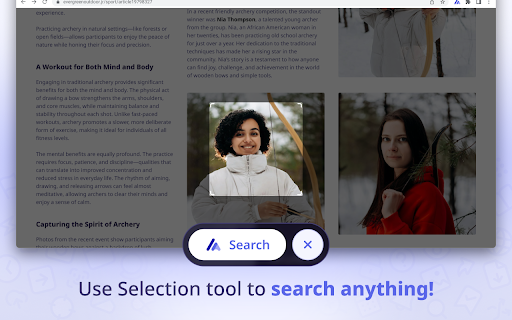
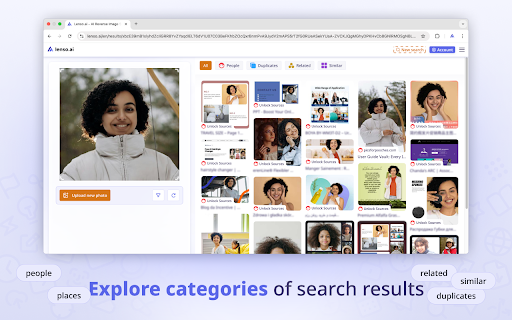

Search by image, text or selection with lenso.ai reverse image search. This is the official lenso.ai Chrome extension. Lenso.ai is an AI-powered reverse image search tool. With lenso.ai’s image search extension, you can quickly find people, places, duplicates, and similar or related images without leaving the website. You can also use this tool to find images based on text. 📷 How to use the extension? The lenso.ai extension adds the following features to your browser, accessible from the context menu: • Search by image: Right-click any image on a website and select “Search by image with lenso.ai.” • Search by selection: Left-click the extension icon or choose “search by selection with lenso.ai” from the context menu to perform a reverse image search on any selected area on the website. • Search by text: Select any text on a website, right-click, and choose “search by text with lenso.ai.” 👉 With this extension, there’s no need to save or copy content — you can quickly search for images without leaving the website. On lenso.ai you can search for: • People • Duplicates (copyright image search) • Places • Related images • Similar images 📷 Use filter/sorting options to narrow your search on lenso.ai: 👉 Filter by: • Text - search by keywords; upload a blue mug and try the keyword “red” to find red mugs • URL - search only on a specific website by providing its URL 👉 Sort by: • Newest/Oldest - sort pictures based on the date of indexing • Best/Worst match - sort based on how well the image matches the pictures in the index • Random - sort randomly for more diverse results • Show diverse results - find the same people or places in different arrangements. 👉 You can create an Alert for a specific image and receive email notifications about new results and save images to Collections for future references! 👉 There is also an API available on lenso.ai. Easily grow your business by implementing the best reverse image search API! Start reverse image search with lenso.ai!

Face Search AI
AI-Powered Facial Recognition & Reverse Image Search for Enhanced Privacy Easily verify faces and detect scammers with a single click. The Face Search AI Chrome extension lets you perform instant, AI-powered reverse image searches directly from your browser. Designed for quick and accurate face recognition, it scans millions of profiles to help you identify people, verify identities, and stay safe online. 📷 How to use the extension With Face Search AI, you can search for faces without leaving the website. Simply: Search by image: Right-click on any image and select "Search with Face Search AI" to start an instant face verification. Search by selection: Select part of a page (such as a cropped photo), right-click, and choose "Search with Face Search AI". No need to manually download or upload images — the extension handles everything seamlessly in the background. 📷 What you can find with Face Search AI Similar faces: Find images with similar facial features for cross-verification. Keyword filtering: Combine face search with keywords (e.g., “LinkedIn” or “dating site”). Alerts: Set up alerts for a specific face to get notified when new results appear. Collections: Save and organize search results for future reference. 📷 For Developers Integrate face search into your own tools with our Face Search AI API for automated, high-accuracy face recognition at scale. 🔍 Start verifying faces instantly — protect yourself from scammers and impersonators with Face Search AI.

Yandex Image Search
This extension adds a context menu option for selected image in order to find it on Yandex. Add an option to the context menu "Search for an image in Yandex" Search for an image with a right click in Yandex. You can choose between Ru and Com!

Reverse Image Search Tools
Reverse Image Search Tools is your smart Chrome extension for identifying where a picture comes from, finding visually similar content, or verifying authenticity in seconds. It combines the most reliable picture finders online — Google, Bing, Yandex, and TinEye — into one streamlined experience. With this powerful picture finder, you can uncover hidden details, locate original files, or explore where photos appear across the web. Perfect for anyone who wants clarity, accuracy, and speed 🌐 This extension transforms how you explore and verify visuals. You can: 🖼️ Upload or drag-and-drop any photo from your computer 🔗 Paste from your clipboard or link directly from a website 🕵️ Perform an image reverse lookup across multiple engines 📊 Discover where the photo is being used online 🧠 Verify originality and ownership All your favorite tools for image lookup are available in one convenient interface — saving time and increasing precision. Access the world’s top image search engines directly from your browser: 🔸 Google – the most popular google picture lookup for general visuals 🔸 Bing – great for product and lifestyle photo identification 🔸 Yandex – ideal for landmarks, faces, and objects 🔸 TinEye – strong at tracking older or modified versions Each reverse image search tool delivers unique insights, so combining them gives you a more complete picture of where your photo appears. 🧠 What You Can Do This Chrome extension is more than an image finder — it’s your visual detective. You can: 🎨 Identify original photographers and artists 🧾 Check copyrights and permissions 🛍️ Find online stores that sell the same product 📰 Detect fake profiles and reused pictures 📸 Locate higher-resolution versions of your photo 💡 Explore related visuals for design or research If you often need to perform photo reverse search or picture lookup, this extension makes the process simple and reliable. ✨ Drag-and-drop uploads and instant lookup ✨ One-click picture search google integration ✨ Supports JPG, JPEG, PNG, WEBP, and other formats ✨ Fast, private, and direct connections ✨ Clean and intuitive design ✨ Works seamlessly in any Chrome environment Our tools for reverse image search run smoothly, are lightweight, and keep your data secure. 1️⃣ Install Reverse Image Search Tools from the Chrome Web Store 2️⃣ Click the extension icon in your Chrome toolbar 3️⃣ Upload, paste, or link a picture 4️⃣ Choose your preferred search engine for pictures 5️⃣ Review the detailed results within seconds Each lookup delivers accurate matches from multiple sources. 👩💻 Bloggers and creators checking originality 🧑🎨 Designers finding similar styles or assets 📸 Photographers tracking their content online 🧑💼 Marketers analyzing competitors’ visuals 🧑🎓 Students conducting picture search reverse research 📰 Journalists verifying photo authenticity If your work involves visuals, Reverse Image Search Tools saves time and provides peace of mind. 🔐 Privacy and Security Your privacy matters. ✅ No uploaded images are stored anywhere ✅ No personal data is collected ✅ Direct and secure connections to each reverse image search tool Every photo reverse lookup request is sent only to your chosen platform — nothing is logged or shared. Q1: What does this extension do? It allows you to search by photo, find similar visuals, or identify where a picture appears online using multiple reverse image search tools online. Q2: Which platforms are included? The extension connects to Google, Bing, Yandex, and TinEye — the most trusted image reverse search tools available. Q3: What file formats are supported? You can use JPG, JPEG, PNG, WEBP, and other formats. Q4: Is my data private? Yes 🔒 Every lookup is direct and anonymous — no data is stored by Reverse Image Search Tools. Q5: Can I use it for products or visual identification? Absolutely. It’s perfect for photo search, image lookup, and finding the same product in online shops. 💠 Combine several pic to pic search engines in one click 💠 Handle uploads, pastes, and URLs easily 💠 Perform image lookup by engine or all at once 💠 Get fast, accurate matches from multiple databases 💠 Use one extension for all your photo reverse search needs This makes our extension to search by image an essential part of your online workflow. 🚀 Explore the Web Visually With Reverse Image Search Tools, discovering the origin of any picture is quick and simple. Whether you’re verifying authenticity, identifying a product, or tracing a photo’s path online, this extension provides an efficient and private way to search image and lookup photo operations. Install Reverse Image Search Tools today and explore the visual web with precision, confidence, and clarity 🔍

Reverse Image Search
Search similar images in the WEB from context menu You can find out who stole your pictures. Image search extension allows you to search in almost all search engines by image. Right-click on an image and discover where else it has been used to find it's origin.
