
fdlcfnimjmkjlajpifhnehgeeiipgmfm
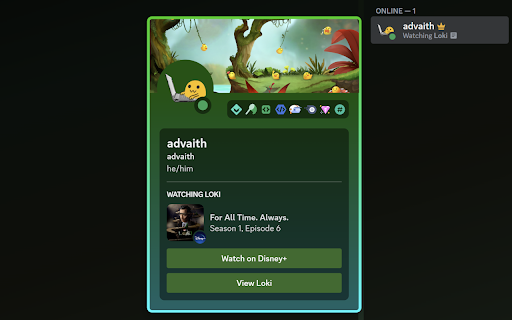

Show what you're watching on your Discord profile! WatchDis lets you show your status for various streaming and video platforms (including Netflix, Disney+, Max, and YouTube) on Discord, with a "Watching" status and Rich Presence! No desktop app required. Simple Setup Just add the extension to your browser, log in with Discord, and you're set! You don't need to download or run anything else. Configuration Easily toggle each service or quickly disable the whole extension with a simple UI. Watching Status People can quickly see what show or movie you're watching, without even opening your profile. WatchDis sets a "Watching" status, not "Playing". Rich Presence Your profile shows the episode or movie info, the image, and buttons to watch the show and view information. Safe WatchDis abides by Discord's ToS and is safe to use. It runs securely in your browser.

YouTubeDiscordPresence
An extension used to create a detailed rich presence for YouTube videos on Discord. Show your friends and others what you're watching on YouTube and YouTube Music! In order for YouTubeDiscordPresence to work, a second desktop application needs to be installed on your computer based on the GitHub instructions: https://github.com/XFG16/YouTubeDiscordPresence/tree/main#installation **The current version only supports the 64-bit version of Windows. YouTubeDiscordPresence does not support the browser version of Discord. Expect compatibility for other operating systems in the future.** YouTubeDiscordPresence works similar to the Spotify rich presence on Discord—it only appears when a video is playing and disappears when there is no video or the video is paused. Idling and searching are not displayed. Maximize your experience with YouTubeDiscordPresence by customizing your settings! To the settings page, click on the small YTDP icon on the top right of the browser under the extensions (puzzle piece) icon.

Vencord Web
The cutest Discord mod now in your browser Vencord is a modification for discord.com that adds plugins and custom styles, blocks Discord's tracking and more! For support or any questions, join our official support server: https://vencord.dev/discord Privacy Practices: Vencord respects your privacy. No info is collected about you, unless you enable the cloud sync integration. In that case, the following info is collected: - Authentication information: Discord OAuth token, used to identify you - Location: Your IP address, stored for anti-abuse purposes For more info, please see our privacy policy. (Vencord is not affiliated with Discord in any way)

YouTube Music Rich Presence
Displays your current YouTube Music activity on Discord via a native helper application. YouTube Music Rich Presence: Share Your Vibe 🎧🎶 Instantly share your YouTube Music activity with friends on Discord and other platforms. This extension seamlessly integrates your listening sessions, displaying the current song, artist, and album in real-time. For this extension to function, you MUST download and run the companion installer from our official GitHub releases page: https://github.com/FishysPop/Youtube-music-rich-presence/releases/ Please ensure the companion application is running in the background for your Rich Presence to update correctly. Why You'll Love It: - Effortless Music Sharing: Automatically updates your status on supported platforms (like Discord) with the music you're playing on YouTube Music. No manual input needed! - Real-time Updates: As soon as the track changes, so does your presence. Keep your friends in the loop with what you're vibing to, instantly. - Detailed Information: Displays essential details like song title, artist, and album, giving a full picture of your musical taste. - Seamless Integration: Works quietly in the background once the companion app is set up. Just install, play your music on YouTube Music, and let the extension handle the rest. - Lightweight & Efficient: Designed to enhance your experience without bogging down your browser or interrupting your listening flow. Perfect For: 1. Install this Chrome Extension. 2. Download and run the installer EXE from our GitHub releases: https://github.com/FishysPop/Youtube-music-rich-presence/releases/. This companion app is necessary for the extension to communicate with Discord. 3. Ensure the companion application is running when you want to share your YouTube Music status. 4. Enjoy sharing your music! Install "YouTube Music Rich Presence" today and let your great taste in music speak for itself! 🎶

Discord Theme Customizer
Try Discord Nitro Theme for Free This extension appends CSS to customize the Discord web app UI. Users can select themes & app icons that are provided by extension.
