
fdkgbabinhpaiebpgbnifjiahinmgcha
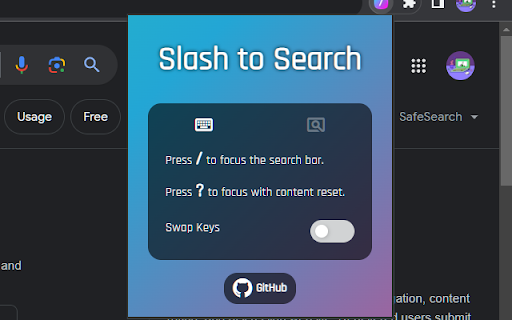

Simply press / to start typing in the search bar without clicking it with the mouse first. ⚡ Focus Search Bar Automatically - Press [ / ] to start typing in a search bar without clicking it with a mouse first. - It automatically finds and focuses a search bar upon key press. ✨ Focus and Clear Content of Search Bar - Press [ ? ] (shift + /) to focus a search bar and clear its content. 👆 Select Mode for Setting Search Bar Manually - Use [ Select Mode ] on websites where the extension cannot find a search bar automatically. - Search bar selected using the select mode will be the default for the site going forward. 🔁 Key Settings - You can swap the function of [ / ] with [ ? ].

SearchBar
Focus on the search bar in web pages by pressing the '/' key. Enhance Your Web Experience with the SearchBar Extension Transform Your Browsing with a Simple Key Press The SearchBar extension is a nifty tool designed to significantly streamline your online browsing experience. Its core functionality lies in its ability to instantly focus the search bar on any website with a single keystroke. By pressing the '/' key, this extension eliminates the need for multiple clicks or manual navigation to a website's search field, thereby saving time and enhancing your browsing efficiency. Why Should You Install the SearchBar Extension? Instant Search Bar Access: With just a press of the '/' key, you can immediately jump to the search bar of any website. This feature is incredibly useful for frequent searchers and enhances productivity by reducing repetitive actions. User-Friendly Experience: The extension is designed with simplicity and ease of use in mind. It requires no complex setup or configuration – just install it, and it's ready to use. Customizable to Your Browsing Needs: Understanding that user needs vary, the SearchBar extension includes a toggle feature. This allows you to enable or disable the shortcut as per your browsing requirements, giving you complete control over its functionality. Seamless Integration: The extension integrates smoothly into your browser without disrupting your usual workflow. It works quietly in the background, activating only when you need it. Safe and Secure: Designed with a focus on privacy and security, the extension does not collect personal data or browsing history. It simply improves your browsing experience without compromising your online privacy. Free and Open-Source: As an open-source tool, it invites collaboration and improvement from the community, ensuring the extension stays up-to-date and aligned with user needs. Ideal for Power Users and Casual Browsers Alike Whether you're a power user who spends hours browsing the web or someone who uses the internet occasionally, the SearchBar extension is tailored to make your life easier. It's particularly beneficial for: Researchers and students who frequently use search functions for academic purposes. Professionals who need to quickly navigate through various websites and databases. Casual browsers looking for a more efficient and streamlined internet experience. Installation and Use Installing the SearchBar extension is straightforward. It's available on the Chrome Web Store and can be added to your browser with just a few clicks. Once installed, it operates automatically – no further action is required from you. Simply press '/' on any webpage to focus on the search bar instantly. The SearchBar extension is more than just a tool – it's an enhancement to your daily browsing that promotes efficiency and ease of use. By reducing the steps required to search, it allows you to focus more on what matters – the content you are searching for. Install the SearchBar extension today and experience a more fluid, efficient, and productive browsing experience!

Slash Search
This extension lets you use '/' (forward slash) as a shortcut key to focus on search fields on any website. Moving your mouse and focusing on search fields is painfully slow. This extension eliminates this by letting you use / (forward slash) as a shortcut key to focus on search fields on any website.

Slash to search
Jump to the search box on any website by pressing the forward slash key on your keyboard. This extension lets you jump to the search box on websites by pressing the forward slash '/' key. It also lets you choose to jump to the search box automatically when a website loads; an option ideal for YouTube and Jumia. By default, it's configured to automatically jump to search on some popular e-commerce sites (Aliexpress, Amazon, Jumia, Konga) and YouTube. There are some sites on which this extension won't work by default: type A sites, where the search box is hidden until you click on a search icon. And type B sites where there's no search icon, but the extension doesn't jump to the search box as expected. To set up this extension to work properly for type A sites, right click on the search icon that reveals the search box and select "add this search trigger" from the menu. After this, the extension will function properly on the site. To set up for type B sites, right click on the search box and select "add this search box". After that, the extension will function properly.

Search Box Focus
Press Tab to quickly access the main search bar or search field of any website. No need to use your mouse! Autofocus available! You hate taking your hand off the keyboard all the time only to access the search bar of the website you’re visiting? You’d love to simply press Tab or a custom shortcut to focus the search field and start typing right away without ever using your mouse? “Search Box Focus” solves exactly these problems. It also comes with an “Autofocus” feature which allows you to access the search bar automatically without pressing any shortcuts. Simply activate it for websites where you do a lot of searching like Amazon or online dictionaries. Whenever you load a website that has “Autofocus” enabled or when you switch to it from another tab, you’ll find that the cursor is already in the search bar ready for you to start typing. The extension is completely free and open-source which means, no tracking or data collection. No ads! After installation, make sure to reload/refresh all open tabs before using the extension! Feel free to suggest new features, report bugs, and so on at: https://github.com/gignupg/Search-Box-Focus Credits: “Search Box Focus” mainly uses the search box detection code of this Github repository: https://github.com/CodeRevver/Focus-First-Input The extension icon can be found at: https://icons8.com/icon/48167/google-web-search
