
fdjdcmfdhllmllkofddfanglebngpalm

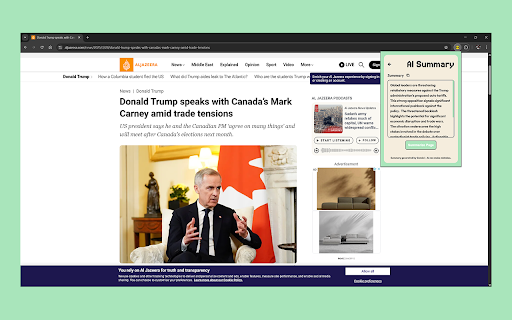


All-in-one productivity tools including OCR, color picker, screenshot, summarizer, and timer. 🚀 Toolz: Your All-in-One Productivity Suite Supercharge your browsing with 5 powerful tools in one sleek, intuitive extension: 🤖 AI Summarizer: Instantly get clear summaries of any webpage using Google's Gemini AI—perfect for quick research. 📝 OCR Text Extractor: Effortlessly extract text from images with a click or drag-and-drop, powered by top-tier OCR tech. 🎨 Hex Finder: Precisely pick and save colors from any webpage. Copy hex codes in one tap—ideal for designers & developers. ⏲️ Smart Timer: Set, pause, resume, and reset countdown timers with browser notifications when time’s up. 📸 Snaps: Capture webpage screenshots instantly with automatic timestamping. Why choose Toolz? Enjoy a clean, user-friendly interface with zero learning curve—no ads, no bloat, just seamless productivity. Perfect for students, professionals, designers, developers, and anyone ready to boost their workflow. Start supercharging your productivity today with Toolz! 🚀✨

Color Picker HEX | Eyedropper | Pick color from image
Pick colors from image or screen. Extract HEX and RGB color codes. Advanced Color Picker for Chrome. Color Picker HEX is a powerful color picker extension for Chrome that lets you pick colors from any webpage, convert HEX to RGB, HSL, and CMYK, save color palettes, and build your personal color collection with one click. Install Color Picker to grab any color instantly, convert between formats, and manage your color palettes — all without leaving your browser. 🎨 Free Color Picker — Pick colors from any website, image, or element on screen 🔄 Color Format Converter — Convert between HEX, RGB, HSL, CMYK, and more 🕐 Color History — Save and revisit recently picked colors anytime 📋 One-Click Copy — Copy color codes instantly in your preferred format 👍 Easy to Use — Pick colors with a single click, no design experience needed 🌐 Works Everywhere — Compatible with any website or web app ✨ What You Can Do with Color Picker 🔽 Pick Any Color — Grab colors from websites, images, gradients, and UI elements 🔄 Convert Formats — Switch between HEX, RGB, HSL, and CMYK in one click 🗂️ Build Palettes — Group colors into collections for your projects 🕐 Browse History — Review and reuse colors you picked earlier 📋 Copy Instantly — Get the exact color code you need without typing 🔄 Multi-Format Conversion Instantly convert colors between HEX, RGB, HSL, CMYK, and more 🕐 Smart Color History Automatically saves your recently picked colors for quick reuse Pick any color from any website in one click Convert HEX, RGB, HSL, and CMYK instantly Review color history without losing picks Simple, fast, and reliable color tool for Chrome 🔐 Privacy and Security Color Picker does not collect, store, or transmit any personal data. All color data stays locally on your device. Color Picker (also known as Chrome color picker, eyedropper extension, or HEX color picker) is fully compatible with Chrome and designed for fast, accurate color picking. Color Picker is an all-in-one color picker for Chrome — pick colors from any webpage, convert between HEX, RGB, HSL, and CMYK, save palettes, and manage your color history with ease.

Color Picker Online - Eyedropper Tool
Find color code on any pages, HEX, RGB Color picker and eyedropper tool. Gradient generator, color palette and color history. Color Picker is the ultimate tool for people working on world web design! It gives you the ability to choose accurate colors for your work, and give you the exact color number you can use in any design software that allows you to use it. Pick colors from websites, save colors & gradients, get matching shades and tints and create beautiful gradients. Site Pallete allows you to get all the colors of a page instantly. We quickly screenshot each section and allow you to add any of the colors you like, directly to your saved colors. With our gradient builder, every gradient is beautifully composed and generated. Add as many stops as you want, use your saved colors to make something beautiful, choose whether linear or radial and most importantly, save them so you can use them whenever you want. Gradient comes with a generated palette. Whether you are creating your own gradients, choose one of our gradients, color palettes help you find the perfect blend-able color. Copy the colors just by clicking and start using them in your designs. We hope you find our tool useful! We are waiting for your feedback and ratings! If you’re experiencing problems or isn't working on, please contact us.

Color Picker - Eyedropper Tool
Pick colors from web pages with Eyedropper. Picker, gradient generator, palette. Quickly grab HEX, RGB. Color Picker and Eyedropper Tool is a must-have browser extension for web developers, designers, and anyone who needs to choose colors from a webpage or extract a website's palette. Whether you're creating a website, designing graphics, or working on a digital project, extension will make the process of color selection easier and faster. Features: - Employ zoom technology to select and store multiple from any - Archive your preferred gradients; a single click on any stores its HEX value in your clipboard; - The site palette feature retrieves all the colors present on any webpage; - Personalize the type for automatic copying. Great for any designer, Chrome extension that easily allows you to identify the Hex colour code of any UI element you hover your mouse over. It's great for quick access to colours you gain inspiration from when browsing online. This extension stores the last six selected and represents the color in HEX, RGBA, HSVA, HSLA, and CMYK formats. Free open-source Color Picker extension. Source on GitHub. No ads, no tracking. Try using our software to find the color codes for any pixel today.

InkShot — Webpage Screenshot & Draw Tool
Capture any webpage as a screenshot, then draw arrows, boxes & text on it. The fastest screenshot & annotate tool for Chrome Take a screenshot of any webpage in one click, draw on it and share instantly. InkShot is a free Chrome screenshot extension — no account, no login, your data stays on your device. InkShot is a free screenshot and annotation tool for Chrome. Capture any webpage, draw arrows, add text and shapes on top, then share with one click — no extra apps needed, everything works right inside your browser. 🔲 Select Area & Capture Drag to select any part of the page and take a screenshot instantly. 🖥️ Capture Visible Area Screenshot exactly what you see in your browser with one click. 📄 Full Page Screenshot Automatically scrolls and stitches the entire page into one image. Perfect for capturing long webpages. ⌨️ Keyboard Shortcuts → Ctrl+Shift+S — Select area screenshot → Ctrl+Shift+V — Visible area screenshot → Ctrl+Shift+F — Full page screenshot Draw directly on your captured image: → ➡️ Arrow — point to specific elements → ▭ Rectangle — highlight and frame areas → ◯ Circle — mark important spots → ✏️ Freehand pen — draw and sketch freely → T️ Text — add captions and notes → 🔵 Blur — hide passwords and sensitive info → 🟡 Highlight — emphasize key areas → 🔢 Number labels — for step-by-step guides 🎨 8 preset colors, custom color picker, adjustable line thickness and opacity. 📥 Download as PNG — save high-quality screenshot to your device 📋 Copy to clipboard — paste directly into any app or chat 🔗 Share as link — generate a shareable link, recipients can open it without installing anything 💬 Send to Slack, WhatsApp, email or social media instantly ✅ Everything runs locally on your device ✅ No screenshots are sent to any server ✅ No account or login required ✅ Works offline ✅ No personal data collected 🎓 Students — capture and annotate study materials 💼 Professionals — screenshot webpages for reports and presentations 🎨 Designers — visual feedback and markup 💻 Developers — bug reporting and issue documentation 📢 Content creators — prepare visuals for social media 🛒 Shoppers — compare prices and save product screenshots 📊 Marketers — capture competitor pages and save web content Q: How do I take a full page screenshot in Chrome? A: Click the InkShot icon, select "Capture Full Page." The extension automatically scrolls and captures the entire webpage as one image. Q: How do I annotate a screenshot? A: After capturing, the editor opens automatically. Use arrows, shapes, text and blur tools to draw directly on your screenshot. Q: Do I need an account? A: No. Install and use immediately. No signup, no login, no email required. Q: Can I hide sensitive information in my screenshot? A: Yes. Use the blur tool to cover passwords, card numbers or any private content before sharing. ① Install InkShot ② Click the icon in your Chrome toolbar ③ Choose your capture mode ④ Draw, annotate and edit ⑤ Download, copy or share as a link
