
fcngjpblanflfmbkdkheajgobilapkfa

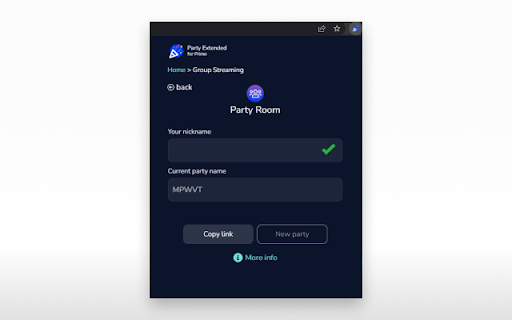


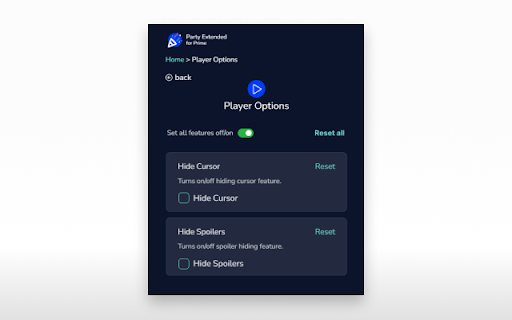
Watch Amazon Prime Video with friends! New features: skip intros, adjust playback, custom profile picture & many more. Share your Prime Video viewing experience with a friend, your special someone, or whoever you want, no matter the distance! All you need is an Amazon Prime subscription, internet connection, and this extension. What's more, Prime Party Extended gives you a bunch of handy tools to customize the Prime Video player. Personalize your entertainment with: Discover all the features and watch your Prime favorites together with friends. How to use Prime Party Extended: 1. Add extension to Chrome. 2. Go to the Chrome extensions list (a small puzzle piece icon next to your Chrome avatar) or go to Chrome options ---> More Tools ---> Extensions. 3. Click Prime Party Extended icon to open the control panel. 4. Navigate through the options. 5. In order to start a new Prime Party session, provide your username and create a shareable link - everyone with the link, Prime Video subscription, and extension installed can join. 6. Pick a movie or series to watch. This extension is part of the Quality Viewership Initiative, a collaborative effort to enhance the understanding of audience engagement. It collects anonymous, aggregated viewing insights to support creators and studios in improving the quality of their content. You can stop sharing your information at any time by switching the toggle on the options page. Disclaimer: Prime Video is a trademark of Amazon.com, Inc. This website & extension hold no association or affiliation with Amazon Prime Video or any third-party companies.

Watch Party works with Disney Plus [QVI]
Independent software - not affiliated with Disney. Host Disney+ watch parties with friends and chat online. Watch Party for use with Disney streaming - Watch together and chat ⚠️ Independent software - not affiliated with, endorsed by, or sponsored by Disney Media and Entertainment Distribution. Disney and Disney+ are trademarks of their respective owners. This extension is part of the Quality Viewership Initiative, a collaborative effort to enhance the understanding of audience engagement. It collects anonymous, aggregated viewing insights to support creators and studios in improving the quality of their content. You can stop sharing your information at any time by switching the toggle on the options page. Do you miss group movie marathons? Now you can do them online. Watch your Disney Plus favorites with friends while staying on your comfy sofa. Thanks to live chat you can comment on what is happening on your screen and share your thoughts in real time. No more fighting over the remote - everyone has the power to pause or rewind. While you may need to compromise on the movie choice, you are free to choose your snacks (and you do not have to share them). Add the Watch Party extension to Chrome Go to Disney+ and log in to your account Click the puzzle piece icon in the Chrome toolbar Pin the extension for quick access Open the Party icon to copy or create a link Share the invitation link (all participants need their own Disney Plus accounts) Set your username in the chat panel

Prime Video Watch Party
Activate this extension to watch Prime videos with your friends with just one click. Is streaming content with friends on Prime Video a challenge, and choosing what to watch next feels like a hassle? Prime Video Watch Party Chrome extension allows people to watch content together with friends and family regardless of their locations. In a few moments, you are watching your favorite show, movie or a series together and laughing, getting thrilled or feeling moved as if you are together in one room. Whether you’re getting ready for a movie night or watching the latest series that just came out, this extension helps to arrange a social watching session from the comfort of your home. No more sharing links and waiting for everyone to press play Some Key Features for This Chrome Extension Instant Watch Party Setup: To begin a Prime Video Watch Party there is no need to set the stream up as it is done with a single click. Real-Time Syncing: Share your screen with friends and other family members and have the exact same playback which means no one is out of sync. Seamless Chat Integration: Send messages in real-time to the members of your watch party group right within the Prime Video app. Cross-Device Compatibility: Is compatible with multiple devices, for instance, people can add watch party events on laptops, tablets, or desktops The first step that needs to be taken when working with technology is to install the Extension. You must go to the browser’s store and download and install the Prime Video Watch Party extension. Launch the Prime Video application on your device and choose the content that you wish to watch with friends. There is a button with the label ‘Watch Party’ which is offered by the extension. This will then create a link that you can share with your friends. This is the final step where you share or enjoy the fruits of your labour as you savor the solutions acquired from the process of brainstorming. Share the link with your friends and as soon as they join the screening just press play and watch together at the same time. For Whom It Is Useful It will be useful for those who appreciate sharing movies and TV series with other people, even if they are far away. Used by both lovers, friends, and families who want to stay connected through the love of movies, this extension allows people to stay connected through entertainment. It’s also good in conducting online movie nights or even in organizing simultaneous viewing of events such as premieres or finales. Why It Is Useful Prime Video Watch Party is one such solution that came into existence with the rise of remote connections but enables people to be socially connected. This extension helps to synchronize viewing and have content in common, which is more convenient than using other ways of communication to discuss where in the video all participants of the conversation are right now. Q1: Is it necessary for all the participants to have Prime Video account to be able to join the watch party? Yes, every single person that participates in the watch party requires an active Prime Video subscription to watch. Q2: Is it possible to install the extension on any device? The extension is compatible with anything that supports Prime Video such as laptops, tablets, and desktops. Q3: Can a watch party have more than one person? Participants are usually restricted by Prime Video’s policies in the number of participants. It is recommended that one should check with the Prime Video streaming service for the present limitations concerning the number of individuals that can watch the show simultaneously.

Hotstar Party plus
Chat and party with your friends while watching your favorite movie, TV show, IPL and more Watching movies, Sports and Live Shows on Hotstar is fun. To make it more interesting watch your favorite show on Hotstar with your loved ones together. To make this possible we introduce you the Hotstar Party Plus extension. How to use Hotstar Party Plus: # Install the extension on your device and open the hotstar webpage and Navigate to your favorite show or live matche. # Click on the HP+(Hotstar Party Plus) extension icon on the top. # Click on Start Party and a link will be generated. # Share the link to your loved ones. # Any one can join the party by clicking on the url which you shared. NOTE: Make sure all other people who wants join the party should also have this extension on their device. Disney+ Hotstar Platform ("Platform" or the "Disney+ Hotstar Service, which includes all the features available on the Platform is a trademark of The Walt Disney Company") and this extension is not related to the official hotstar app or company.

Extended Streaming, Works With Disney Plus
Independent software - not affiliated with Disney. Control Disney+ playback: change speed, skip intros and hide spoilers. Boost streaming for use with Disney - Control your experience ⚠️ Independent software - not affiliated with, endorsed by, or sponsored by The Walt Disney Company or Disney+. Disney and Disney+ are trademarks of their respective owners. Take control of your Disney Plus viewing. Extended combines multiple tools into one extension, giving you flexibility and comfort. With this extension you can: Automatically skip intros and recaps Install the extension, open the control panel, and set your preferences. Watch your favorite Disney Plus shows without interruptions, just the way you like.
