
fcejkgaehmpaplmencnlpcocmmbfcoia

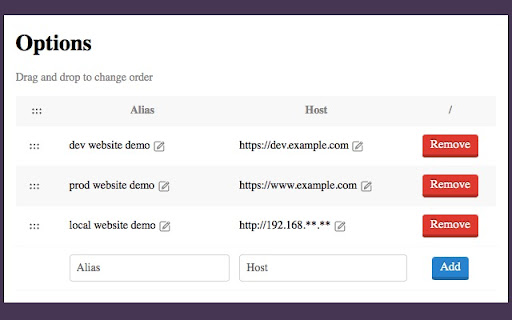
A tool for quickly switching the host of the current url. make it easy to jump the same path in a local, test or prod environment It is convenient for developers to quickly switch the host of web pages under the same path

SwitchHoster
Easily switch matches with flexible rules and collection management SwitchHoster is a Chrome extension to improve the efficiency of browser use. Through simple configuration, multiple matches are created for the target domain name, and the shortcut key Command ⌘ + J/K is used to switch the domain name of the address bar of the current browser tab page.

LiveHosts
Switch your host/IP mappings in real time without editing your hosts file LiveHosts is a Chrome extension that aims at providing a working (even if sub-obtimal) solution to a common nuisance that many web developers have to deal with every day. If you have multiple versions of your websites sharing the same host names on multiple environments, you often need to switch the assignments in your OS hosts file. Other extensions (like the life-saving HostAdmin) can help with the cumbersomeness, but changes to the hosts file usually take an inconvenient amount of time to actually affect the browser. Unfortunately, there is no way to make Chrome direct requests for a hostname to a specific IP without a standard redirect - you could set up a smart HTTP proxy, but it's often not possible or not convenient. This extension settles for a sub-obtimal approach: requests to the indicated hostnames are redirected to the chosen IPs with an additional Host header. The browser's address bar reflects this behaviour showing the hostname right after the IP (e.g. http://127.0.0.1/www.example.com/). The extension also tries to take care of all requests to either the IP or the hostname in a consistent way. After the redirect, the user is effectively in a different domain that the one they expected. They may notice some functional differences: - depending on the server, parts of a web page referring to the site URL (like href and src attributes) could be different from the original - window.location has a different value that can potentially throw off JavaScript snippets - most Cross-Origin request won't work

Host Replacer
Replaces the host dynamically based on user input. Host Replacer allows you to dynamically replace host URLs on any web page, making it easy to redirect requests from one domain to another.

Hosts Manager
轻松管理本地Hosts映射,支持分组切换和Socket代理,让开发测试更高效。 Hosts Manager 是一款专为开发人员和网络管理员设计的 Hosts 配置管理工具,帮助您在不同开发环境间快速切换。 🚀 核心功能 - 分组管理 - 创建多个 Hosts 分组,一键切换开发、测试、生产环境 - 实时生效 - 配置修改立即生效,无需重启浏览器 - 端口支持 - 完整支持带端口的域名映射(如 example.com:8080) - Socket 代理 - 内置 SOCKS 代理配置,灵活管理网络流量 - 批量导入 - 支持批量导入现有 Hosts 规则,快速迁移配置 📋 使用场景 - 本地开发环境配置 - 测试服务器切换 - 多项目并行开发 - API 接口调试 - 临时网络重定向 💡 操作简单 - 直观的分组管理界面 - 拖拽排序,快速整理规则 - 一键启用/禁用分组或单条规则 - 支持搜索和过滤功能 🔒 隐私保护 所有配置数据均存储在本地浏览器中,不会上传到任何服务器,保护您的隐私安全。 📝 更新日志 v1.0.8 - 添加ipv6支持 v1.0.7 - 添加代理白名单 v1.0.6 - 修复在没有文件规则时启用socket代理不生效的问题 - 修复页面大小变化时加载错误的问题 v1.0.4 - 新增规则导出导入功能 v1.0.3 - 新增hosts规则搜索功能 - 优化hosts规则列表的性能 v1.0.2 - 新增弹窗快捷开关,便捷管理分组和代理 - 修复删除分组的显示问题 v1.0.1 - 优化配置界面,新开页面设置提升体验 v1.0.0 - 初始版本发布
