
fcbfhjihhkdmieofcbaabeaegglihlhp
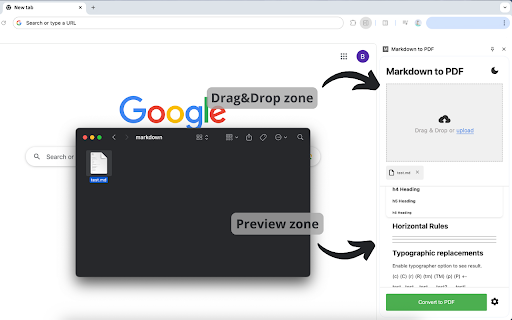
Convert markdown to pdf instantly! Supports images, styles, and one-click export md to pdf. Perfect for docs and readme files. 🚀 Effortlessly export Markdown to PDF directly in your browser! 🚀 Tired of complex tools? Markdown to pdf lets you transform .md files in seconds - no installations or uploads required! Whether you’re a developer, writer, or student, this extension is your ultimate companion for exporting readme, documentation, notes, or blogs with flawless formatting. ✨ Why Choose Us? 🔹 One-Click Conversion: From md to pdf instantly - no coding skills needed! 🔹 Customizable Styling: Add headers, footers, code blocks, and choose themes (light/dark). 🔹 Image Support: Embed local or web-based images seamlessly. 🔹 Offline-Friendly: Works without internet after markdown pdf extension installation! 🔹 Print-Ready Output: Perfect for sharing markdown, presentations, or archiving md files 🔍 Top Features: ✅ Convert md to pdf with tables, lists, and syntax highlighting. ✅ Preserve hyperlinks and code snippets. ✅ Adjust margins, page size (A4, Letter), and orientation. ✅ Auto-save or export mardown to pdf via one-click download. ✅ Compatible with GitHub-flavored Markdown (GFM). ✅ No need to use pandoc markdown to pdf converter 🚀 Perfect For: Developers: Export readme to pdf for portfolios or clients Writers: Create eBooks, guides, or reports from markdown drafts Teams: Share documentation in universal format Students: compile markdown to pdf notes into printer-friendly layouts Teachers: Convert lecture notes to handouts in one click. 📌 How to markdown convert to pdf : Open any md file in Chrome or paste markdown text. Click the extension icon 🖱️ Customize styles (optional). Converting markdown to pdf - done! 📌 Seamless Integration with Your Workflow 1️⃣ Convert markdown to pdf fits perfectly into your daily tools! 2️⃣ Import files directly from GitHub, GitLab, or local folders. 3️⃣ Working with a team? Save your custom templates and share them via Google Drive or OneDrive. 🛠️ No Tech Skills? No Problem! 🔸 We’ve designed the interface to be intuitive for everyone. 🔸 Real-time preview, auto-save drafts, and error highlighting make editing effortless. 🔸 Forgot Markdown syntax? Use our built-in cheat sheet with common formatting rules. 📝 🔄 Stay Updated, Stay Productive Markdown converter is scheduled for constant updates! Stay tuned for upcoming new features: ✅ Dark Mode for late-night coding sessions. ✅ Batch conversion from markdown to pdf to process multiple .md files at once. ✅ Save drafts to Google Drive/Dropbox for access anywhere 🖼️ Advanced Image & Media Support Embed high-resolution images, diagrams (SVG/PNG/JPG), and even videos (as clickable links) directly into your converted files! 🚀 Lightning-Fast Batch Processing Convert multiple md files in one go! Ideal for large projects, documentation suites, or e-book chapters. Our queue system lets you prioritize files, track progress, and download all results as a single ZIP archive. 📦 🌍 Multilingual & RTL Support Create files in any language. Our engine handles special characters, ligatures, and non-Latin fonts (e.g., CJK) flawlessly. Perfect for global teams and localization workflows! 🌐 💡Pro Tip Drag & drop .md files directly into the extension for instant markdown to pdf conversion! Perfect for bulk processing or quick edits. 💬 Frequently Asked Questions ❓Does it work offline? 💡Yes! Once installed, no internet needed for markdown converter ❓Can I convert readme? 💡Yes! Markdown to PDF is fully suitable for readme md file ❓How accurate is formatting? 💡We match print standards with 99% CSS fidelity. Join those who ditched desktop apps for our fast, secure, and lightweight markdown to pdf online solution. No watermarks, no ads - just pure productivity convert .md to pdf files! 👆🏻 Click Add to Chrome button and markdown export to pdf in seconds! 📄

Web to PDF
Use Web to PDF converter to save a web page as a pdf and download it instantly. Perfect for offline reading and sharing. 📃 Looking for a quick and reliable way to save a web page as pdf? This chrome extension is a web to pdf converter, perfect for anyone who needs to download content for offline access, sharing, or archiving. With just a single click, convert a web page to pdf without hassle: ✅ Preserve Styles and Links: Keeps original styles and clickable links. ✅ Flexible Layouts: Choose page breaks or a single-page format. ✅ High Quality: Uses Chrome’s PDF tool for fast, clear results. ✅ Secure: Saves directly to your device, protecting privacy. If you’re looking to save a web document to pdf, this tool makes it easy with smooth, intuitive functionality. All images, links, and formatting remain intact, giving you a faithful reproduction of the web content in one file. 💡 How to Use Web Page to PDF Converter 1️⃣ Open the web page you want to save. 2️⃣ Click on the Web to PDF extension icon. 3️⃣ Select Format to set the view size. 4️⃣ Choose Layout for page breaks or a single page. 5️⃣ Download your PDF — your file is ready in seconds! 📄 Tips for Best Conversions 1. Ensure the page loads fully before converting. 2. Adjust format and layout settings for optimal page fit. 3. Avoid pop-ups or overlays, as they may appear in the PDF. 4. Refresh the page if the first conversion doesn’t capture everything accurately. 💡 Why Save Internet Page to PDF? ◆ Access files offline anytime ◆ Share content without needing internet access ◆ Archive page for future reference ◆ Print web content easily in a structured format Web to pdf extension is the easiest way to convert web page to pdf quickly, ensuring you don’t lose valuable content or formatting. Almost anyone! This tool is ideal for: 1) Students who need to reference articles and papers 2) Professionals who want to save web data for reports 3) Researchers who need offline access to resources 4) Bloggers and writers who save content inspiration Imagine the convenience of accessing all your important web content as pdf files. You no longer need to bookmark endless links or worry about pages disappearing. Just convert the webpage to pdf and keep everything organized and secure. ❓ How to save a page as a PDF? 👉 Open the page, click the extension icon, choose settings, and save webpage as pdf. ❓ Will the file look like the original webpage? 👉 Yes, we ensure that your document retain the look and feel of the original. ❓ Does this extension work offline? 👉 Once a web document is saved, you can access it offline If you see a notice about the developer console, don’t worry — it’s simply due to Web to PDF using Chrome’s own PDF-printing system. Chrome provides an optimized, high-quality conversion method that outperforms other PDF tools in quality and speed. This message is a standard notification for Chrome extensions that use advanced browser functions. While screenshots capture images, PDFs provide a more functional and versatile way to save web pages. Here’s why this extension is the superior choice: ➤ Selectable Text: Easily select, copy, and highlight text. ➤ Clickable Links: Keep all links active for quick access. ➤ Accurate Layouts: Preserve the page’s original look and feel. ➤ Custom Page Options: Choose page breaks or single-page view. ➤ High Quality: PDFs retain clarity and detail better than screenshots. ✳️ News Articles: Save important news articles before they get archived or moved behind a paywall. ✳️ Legal Documents: Keep copies of terms and conditions, privacy policies, or legal agreements. ✳️ Receipts and Confirmations: Save confirmation pages after online transactions for your records. ✳️ Recipes: Save cooking recipes with all the links and notes intact for your culinary adventures. ✳️ Event Information: Capture details of events, schedules, or tickets for easy access. Whether you need a web page to pdf converter for work, school, or personal use, this extension is here to help. Get started today and discover the easiest way to download a web page as a PDF whenever you need it.

Markdown To Word
Convert Markdown to Word and back. Easily transform md to docx and Word to Markdown with one click. Fast, offline! Markdown to Word is a versatile Chrome extension built for people who work daily with text, documentation, and structured content. It solves the most common problem: .md to docx and any types of files ms word to markdown conversion in a fast, clean, and predictable way. If you need a reliable document conversion tool directly in your browser, this extension is designed for you 🙂 The extension helps you transform both file types between each other without breaking formatting. Headings, lists, links, tables, and basic styling are preserved when converting markdown to word document texts or files. At the same time, it lets you transform .docx documents into a clean, readable markup file with a well-structured output. 1. Writing technical documentation in a structured markup format (clearly interpreted and best understood by artificial intelligence systems) 2. Preparing markdown file to word reports 3. Sharing files with non-technical users 4. Editing DOCX files before exporting 5. Managing structured text and document exchange workflows The extension works as a complete content conversion tool that supports both directions. You can convert md to word for editing in office document editors or convert word document to markdown for publishing and version control. This makes it a practical choice for developers, writers, marketers, and students. You do not need external services or third-party websites. The extension runs directly in your browser, which improves privacy, speed, and reliability. This tool removes unnecessary steps in your workflow! The extension keeps document structure consistent. This is important when working with formatted files that must look professional in office editors. 1️⃣ Simple and focused interface 2️⃣ Accurate markdown to word conversion 3️⃣ Reliable MS Word to Markdown converter 4️⃣ No registration or tracking 5️⃣ Works fully in the browser Markdown2word extension developed for users who need a stable file transformation workflow. It supports markdown to doc and markdown to docx exports with minimal setup. • preparing formatted documents for clients • word markdown workflows for Git-based projects • offline editing of structured text files • publishing-ready text transformation The extension is optimized for daily work with structured and formatted content. Whether you handle one file or many, it delivers consistent and predictable results 🚀 ❓ What is Markdown to Word? ✅ It is a Chrome extension that works as a markdown to word converter and also supports the reverse direction. ❓ How do I install the extension? ✅ The installation takes just four simple steps and only a few moments to complete: 1. Open the Chrome Web Store 2. Search for Markdown to Word 3. Click Add to Chrome 4. Confirm the installation Once installed, Markdown to Word is ready to use! ❓ How to convert markdown to word? ✅ You can do this in just a few simple steps: ✔️ Open the extension ✔️ Load your source file. If the file size is under 2 MB, the conversion will start automatically. ✔️ Download the markdown to word doc file ❓ Can I convert Word files back to Markdown? ✅ Yes, you can easily convert word doc to markdown. ❓ Can the extension convert md to docx? ✅ Yes, full support for transferring .md to word (all formats). ❓ Is this an online markdown conversion tool? ✅ The tool works as markdown to word online inside your browser without uploading files to third-party servers. ❓ I have some ideas and feedback for the extension. How can I share them with the developers? ✅ You can easily share them with the development team using one of the following options: • Use the feedback link on the Chrome Web Store page • Leave a review with your ideas or suggestions • Contact the developers via the support section All ideas for improving the markdown to word converter are welcome 😊 ❓ If I encounter a problem while using converting process, is there a customer support available? ✅ Yes, customer support is available via the Chrome Web Store support form. ➤ Describe the issue in detail ➤ Specify the transformation direction you were using ➤ Attach a sample file if possible The support team will help resolve any issues related to file transformation and the overall conversion process. 🚀 If you need a dependable markdown word converter for daily tasks, Markdown to Word is a practical and efficient solution for transforming structured text to office documents and back. Install it now!

ChatGPT to PDF, Word, Markdown & Google Docs
One-click export ChatGPT to PDF, Word, Markdown or Google Docs. Keeps code, tables,math equations and images perfectly formatted. Save ChatGPT conversations in PDF, Word, Markdown and Google Docs format. The ChatGPT to PDF tool allows you to export your ChatGPT conversations into professional, shareable documents. With one click, convert your chat history into PDF, Microsoft Word (.docx), Markdown (.md) files or Google Docs. We maintain 100% of your formatting, ensuring that code blocks, tables, LaTeX math formulas, and images appear exactly as they do on your screen. Whether you need to back up brainstorming sessions, archive study notes, or share technical documentation, this is the fastest ChatGPT converter available. ✅ Export large conversations and logs seamlessly ✅ Preserves code syntax, markdown, math equations, and image layouts ✅ Attach files from Google Drive directly into ChatGPT 🛠️ Key Features 👉 Convert your ChatGPT conversation into multiple formats: ➡️ PDF ➡️ Word (.docx) ➡️ Markdown (.md) ➡️ Google Docs 👉 Save your file (PDF, Word, Markdown) directly to your Google Drive 👉 Attach Files from Google Drive into ChatGPT: ➡️ PDF files ➡️ Images ➡️ Google Docs ➡️ Google Sheets No downloading and re-uploading — pick your file directly from Drive and attach it to any ChatGPT conversation instantly. 👉 Prompt Management: ➡️ Save and organize your best prompts ➡️ Copy your prompts or ChatGPT responses to your clipboard ➡️ Search and navigate prompts or chats easily in long conversations 👉 Export Chat with multiple structures: ➡️ Response (Just ChatGPT's response) ➡️ Conversation (As seen on your screen) ➡️ Q&A (Question and Answer format) ➡️ Only selected section 👉 Customize font size and title 👉 Table of Contents: Automatically generate navigation for long chats in PDF/Word 👉 Math Support: Renders LaTeX and complex math equations perfectly 👉 Privacy Focused: Secure processing with auto-deletion 1. Open any ChatGPT conversation. 2. Click the "Save as PDF/Word/MD/GD" button added by our extension. 3. Select your format: PDF, Microsoft Word, Markdown or Google Docs. 4. Download your file instantly — fully formatted and ready to edit or print. To attach a Google Drive file: Click the Google Drive button in the ChatGPT input area, browse your Drive, and select any PDF, image, Doc or Sheet to attach instantly. 💡 Why Use This ChatGPT Exporter? 🧾 Perfect Formatting: Creates a pixel-perfect backup of your original chat. 👨💻 For Developers: Keeps code indentation, syntax highlighting, and formatting intact. 📚 For Students: Save AI notes, math problems, and explanations clearly. 🧠 For Professionals: Archive vital chat logs, meeting notes, and support documentation. 📂 For Everyone: Access and attach your Google Drive files without ever leaving ChatGPT. 🔒 Privacy First & Secure We are dedicated to protecting your data. When you perform a file conversion, your chat text is securely transmitted via HTTPS to our servers solely for processing. We adhere to a strict no-storage policy: your data is used only for the conversion and is immediately deleted after the file is generated. We never store, read, or sell your chat history.. Q: How do I convert ChatGPT to Microsoft Word? A: Simply open your chat, click our extension icon, and select "Microsoft Word" to download an editable .docx file. Q: Can I backup my entire chat history? A: Yes! You can use the multi-chat feature to export and archive multiple conversations at once. Q: Does this preserve code blocks and math? A: Yes. Our converter is designed for accuracy, keeping all code syntax and math formulas (LaTeX) identical to the web view. Q: How do I attach a Google Drive file to ChatGPT? A: Click the Google Drive button in the ChatGPT input area, browse your files, and select any PDF, image, Google Doc or Sheet to attach it instantly — no downloading required. ⭐ Loved by Users Join thousands of users who trust ChatGPT to PDF for archiving, converting, and saving their AI workflow!

AI Chat Exporter for Gemini: PDF, Word & Markdown
Save Gemini chats as PDF, Word, or Markdown. One-click export with perfect formatting for code blocks, tables, math, and images. 🧠 What Is AI Chat Exporter for Gemini? AI Chat Exporter for Gemini lets you easily export Gemini conversations into beautiful, shareable PDF, Microsoft Word (.docx), or Markdown (.md) files while preserving code blocks, tables, math equations, and images exactly as they appear on screen. This extension makes it simple to save important AI conversations for documentation, sharing, research, or future reference. 🖱️ One-Click Export Quickly export any Gemini conversation with a single click. 📄 Multiple Export Formats Download your chats as a PDF for easy viewing and sharing, as a Microsoft Word document (.docx) for editing and archiving, or as Markdown (.md) for developers and documentation. ✨ Preserves Original Formatting The exporter keeps the full structure of your conversation intact so your exported files look clean and professional. 🖼️ Images Included All images in the conversation are automatically included in the exported document. ➗ Mathematical Equations Complex formulas and equations are rendered correctly using LaTeX formatting. 📊 Tables and Structured Data Tables remain fully structured and readable in the exported file. 🧩 Supports All Chat Elements The extension handles all elements of a conversation, creating a complete and accurate copy of your Gemini chat. ➡️ Open any conversation in Gemini ➡️ Click the “Save as PDF” button in the top-right corner ➡️ Choose your preferred format: PDF, Word, or Markdown ➡️ Customize export settings as needed Your download will start automatically. 🎓 This tool is perfect for students, researchers, developers, writers, and professionals who want to keep organized records of their Gemini conversations. 📩 For questions or support, contact us at: contact@gptsexporter.com
