
fbpiglieekigmkeebmeohkelfpjjlaia
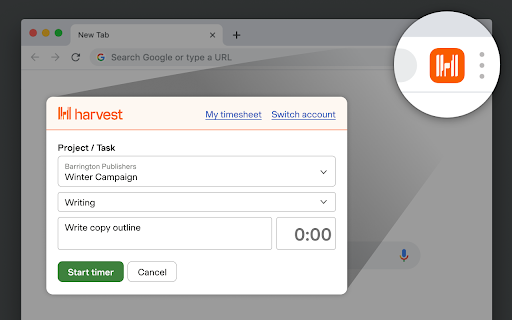

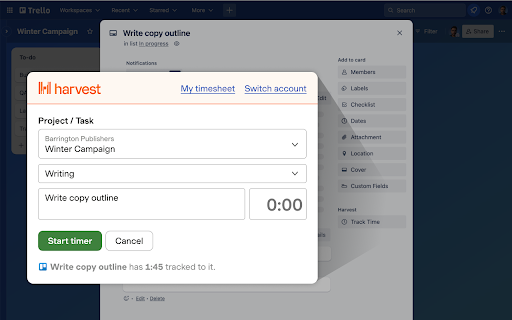
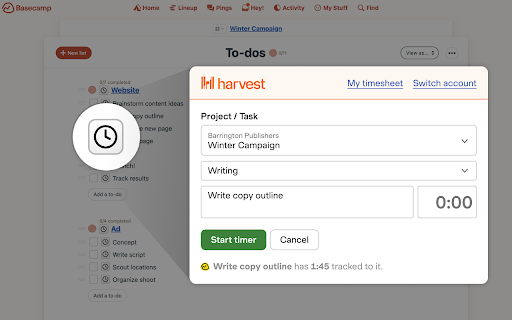
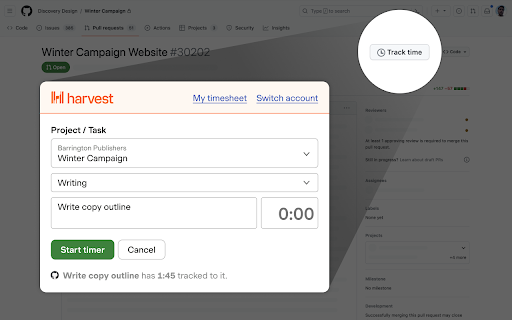
Track time from Chrome and within popular project management tools. Harvest Overview Harvest helps over 70,000 companies thrive with simple time tracking, powerful insights and reporting, and tools to help you get paid faster. Easily track time from the desktop app, web, Asana, Basecamp, Trello, GitHub, or your mobile device. Drill down into visual reports to keep track of project budgets, and make smarter decisions for your business. Track time in Google Chrome™ Conveniently start and stop timers from your browser and get to work. Whether you're digging through emails or having an online meeting with your team, your timer is just a click away with Harvest for Chrome. Bring time tracking into popular web apps Enjoy an enhanced time tracking experience for today's most popular project management tools. When using Asana, Basecamp, ClickUp, or Trello in Chrome, you will see an option to start timers on any to-do items or cards. In GitHub and Jira, you can track time on issues or pull requests. It's as if time tracking is built right in. Gain insights into your projects Turn tracked time into insightful, customizable reports. Time-based reporting provides accurate project budget reports, staff reports, and more. You'll gain insights to help you make decisions and ensure your projects run smoothly. If you’re having difficulty seeing timers or tracking time to Harvest, please contact us at support@harvestapp.com.

Tick Time Tracking
Simple time tracking software that helps you hit your budgets. * Updated to work with Basecamp 3. Convenient time tracking within Chrome A useful time tracking tool starts with something you'll actually use. Tick's timecard is both straightforward and efficient in assigning time to a task and provides key project details like instant budget feedback as soon as your time is entered. It’s time tracking that gets you in and out over and over again with the project details you need to make a profit. Track time in Google Chrome™ Start and stop timers from Chrome while you work. Whether you're responding to emails, in an online meeting, or posting updates through your online project management software, your timecard is just a click away with Tick for Chrome. * Easy time entry from anywhere * Timers for accurate time keeping * Instant Budget Feedback without running a report Understand Your Budgets Like Never Before In the service industry, hitting a time budget is the difference between staying black and red. To make profitability a consistent reality for you, Tick provides both high level and granular details about your project budget to help you and your team communicate the amount of time you have left to spend before you start losing money. Reports you'll actually use Tick’s reporting platform provides you with actionable data for post project discussions, invoicing and forecasting with customizable and exportable reports to make the money side of your business easy. * Reports for billing clients * Reports for future planning * Integrations with Quickbooks and Freshbooks If you have any problems we're happy to help. Please contact us at support@tickspot.com.

Clockify Time Tracker
Track time from anywhere on the web and improve productivity. Track time from anywhere on the web with one click. Later, analyze and export time at https://clockify.me/reports/summary • Integrates with 50+ web apps • Idle detection • Reminders • Pomodoro timer • Automatically start/stop timer • Start a timer from selected text • Start/stop timer shortcut (Ctrl+Shift+U) • Default project for new time entries Q: Why does the extension need access to "read and change all your data on the websites you visit"? A: We use the "Read and change all your data on the websites you visit" permission only for putting a timer button on other websites and taking the task's names as a description for the timer. If you don't wish to see the button on other websites, you can disable it in extension's Settings>Integrations. The code for this extension is open source. Feel free to examine it and contribute on Github: https://github.com/clockify/browser-extension For more information on how Clockify works, check out our help article https://clockify.me/help/apps/chrome-extension If you have any issues or feedback, send us an email at support@clockify.com Clockify is a time tracker that allows you to track the time you spend on projects and analyze your productivity. You can use Clockify on the web, desktop, and mobile – all your tracked data is synced in real time so you can seamlessly switch between devices. - Free and simple online timer - Analyze time in reports and export data - Invite team and track time together - Manage projects and monitor progress

Scrum for Trello
Adds Scrum story points to your Trello Scrum for Trello adds functionality to the awesome trello.com for use in Scrum projects. ** Update December 12th, 2023 ** Scrum for Trello is working again. Thank you to https://github.com/Swandog for creating the fixes. In the mean time there is a workaround: If you go to https://trello.com/labs you can disable the option “Board experience enhancements”. That will revert Trello to the old state and the extension works again while we work on a fix. ** Update Jun 24, 2022 ** - Update to manifest v3 - cards that are off-screen are now counted again ** Update Jun 29, 2017 ** - Works with latest Chrome ** Update Apr 8, 2016 ** - Fixed compatibility with latest Trello version ** Update Sep 4, 2015 ** - Fixed compatibility with latest Trello version ** Update Sep 2, 2015 ** - Fixed compatibility with latest Trello version ** Update Feb 26, 2015 ** - Fixed compatibility with latest Trello version ** Update Mar 29, 2014 ** - Fixed compatibility with latest Trello version ** Update Jan 14, 2014 ** - List totals show again in the new Trello.com ** Update Dec 23, 2013 ** - Upon frequent request: Settings screen to add your custom storypoints range. - compatibility new version of Trello.com ** Update Nov 6, 2013 ** - fixed issues on Windows 7 + 8 - added integration with Burndown for Trello. Thanks to @seancolombo ** Update July 31, 2013 ** - new load model in Trello. Extension is working again! ** Update June 17, 2013 ** - many fixes. Thanks for the pull requests! ** Update Apr 10, 2013 ** - Fixed compatibility with latest Trello release ** Update Dec 20, 2012 ** - Fixed count when filter is applied and fixed total count ** Update Sep 8, 2012 ** - Fixed compatibility with latest Trello release. Scrum for Trello is working again! - Added a nice feature contributed by Cedric Gatay: One thing we use often is surrounding points of done tasks with [] to prevent them for being counted by the plugin in the list total. This contain the ability to display such tasks with a decent style (half-transparency) on cards and a differentiated total shown on lists. Trello is the perfect online equivalent of the whiteboard with sticky notes aka the Scrum board. We love this app and started using it immediately after launch. One element we use a lot in our projects are the storypoints. Scrum for Trello gives you the ability to make use of story points within Trello. Scrum for Trello is a Chrome extension and you can install it via the Chrome Webstore. In the card titles you can add the storypoints between parentheses. The assigned points will be picked up by Scrum for Trello and displayed in the upper right corner of the card. For each list the total amount of story points will be calculated and shown in the title of the list. Every second the story points will be detected and calculated. So changing a number or moving a card will be reflected almost immediately. Great improvements made by @nicpottier and @paullofte: * The point value is moved to be a badge on the card. * Added support for Zero Point Cards (0), Unknown Point Cards (?), Decimal Value Cards (.5) * In addition I added the functionality to have the list total reflect the current filtered set of cards. More great improvements * @bastiaanterhorst created a storypoint icon to fit in nicely with the Trello style * bugfixes by @mgan59 * A very cool storypoint picker made by @nicpottier was integrated and adapted. Click on the title in the card view and a little menu shows you available points to quickly select. Of course you can add your own points between parentheses still. Scrum for Trello was developed by Marcel Duin (http://webglmarcel.q42.net/) and Jasper Kaizer (https://twitter.com/jkaizer) during our pet projects time at Q42 (http://q42.com). They team up with Sean Colombo (https://twitter.com/seancolombo). You can download the source code at http://github.com/Q42/TrelloScrum. Or even better, improve it and do a pull request! Scrum for Trello runs locally only and stores nothing on any server!

Lucen Track widget
Track your time directly from Google Chrome in all your favorite tools Lucen Track for Google Chrome™ is the simplest extension to track time from your favourite productivity tools. The extension automatically integrates with the Lucen Track web app and allows to start timers, log time manually and manage your time entries without opening a new tab. Start tracking your time from your browser and within leading project management tools. = Get started in 3 simple steps = 1) Click “Add to Google Chrome™”. 2) Click on the Extension Icon. 3) Log in with your Lucen Track credentials. 4) You will now find a little Lucen Track icon inside the supported tools. 5) Click on the Lucen Track icon next to the task or project you want to track time - the extension will automatically match the task description with the equivalent project in the web app. 6) Choose whether to start a timer or log time manually, and start boosting your productivity! If you are working on a project or multitasking between emails, meetings and social media, you can always monitor the time spent on each task or to-do by starting single or multiple timers. The extension already works in: - Basecamp - Asana - Microsoft To-do / Planner and many others. Find all of our supported sites at https://www.timeneye.com/integrations If you are experiencing problems or want to send us a feedback, please contact us at support@timeneye.com Please note that Lucen Track for Google Chrome™ requires a Lucen Track subscription: subscribe at https://www.timeneye.com
