
fbfppoaockpecjpbdmldojdehdpepfef


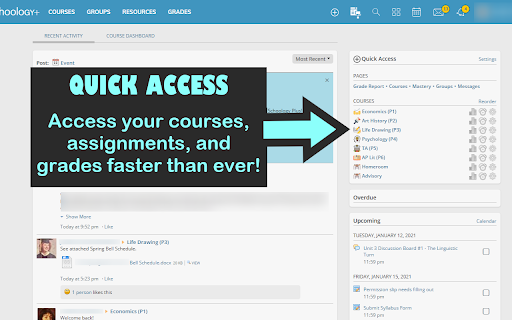

Schoology Plus enhances your Schoology experience with numerous interface improvements FEATURES (All features below marked with an asterisk * can be changed or customized with a setting) Brand New Dark and Light Themes - Dark Theme for Schoology! No more blinding whites! - Modern Light Theme which revitalizes the late 2000s interface to look modern and new - Many other theme options as well, or make your own! - Replaces your school's logo with the Schoology logo Custom Themes - You can create a custom theme or choose one of the small selection of built-in themes (including rainbow mode!) - Two of the built-in themes are the "LAUSD Dark Blue" and "LAUSD Orange" themes which restore the interface to the new and old versions of the LAUSD theme respectively including the logo) - For non-LAUSD schools, an auto-generated theme will be created to match your school's default theme - Custom themes can change colors throughout the interface as well as the logo and course icons. Custom themes can even use custom rainbow color patterns! - To learn more about creating custom themes, see Theme Editor Course Icons - Built-in course icons for many courses* - Custom themes can also introduce custom icons for courses Quick Access - Quick Access panel on the right sidebar on the homepage with one-click access to important pages* - Links for grade report, courses, mastery, and more - Each class has a link to its home page, grades page, and mastery page - Click the icons next to each course to access its specific pages Check Marks for Submitted Upcoming Assignments* - By default, green check marks ✔ are shown on all assignments you've submitted. - You can also manually check off assignments as you complete them - There are also options for putting a strikethrough through the assignment title or hiding the assignments completely. Tooltips - Toolips for items on the materials page show previews - Assignments show score and grade category - PDF files show previews and number of pages Courses In Common - View all courses you share with a classmate by visiting their profile page Miscellaneous Interface Improvements - Adds a button to quickly jump to archived courses in the Courses drop-down list* - Adds option to hide the upcoming and overdue assignments sidebars on the home page* - Indicates when a class is graded on a weighted scale* - Changed the courses drop down menu to show 6 courses across instead of 4 - Notice when submitting a quiz when questions are left blank GRADES PAGE IMPROVEMENTS Miscellaneous Grades Page Improvements - Classes are sorted by period* - Grades are displayed when classes are collapsed - Displays letter grades for classes that don't provide them* - The specific score needed for each grade can be customized, see Custom Grading Scales - Point totals are displayed for classes with unweighted categories - Point totals are displayed for all assignment categories - Displays point buffers from the next lowest letter grade and number of points needed to reach the next highest letter grade for unweighted classes - The number of possible points for an assignment is shown even when a grade has not yet been entered for that assignment - Percentages are shown for each individual assignment - Removes the useless "(no grading period)" section from all classes - Right click a class to quickly jump to a specific page or to edit that course's settings What-If Grades - Allows you to locally modify the grade of an assignment - Schoology Plus will recalculate the grades for each category and for the entire class - Weighted categories are taken into account when recalculating grades - Allows you to simulate adding an assignment - Assignments can be added to any category, and can be given any grade - This allows you to see how an upcoming assignment will affect your grade with different scores - Allows you to calculate the minimum grade for an assignment required to reach a certain grade in the class (right click on an assignment) - Useful to see what grade you need on the final to keep your A in the class! - Allows you to simulate dropping a grade (right click on an assignment) DESKTOP NOTIFICATIONS - Desktop notifications for when new grades are posted* Extension Icon - Extension icon shows number of new grades posted* - Clicking the extension icon will take you to: - Your notifications if you have newly posted grades - The Schoology homepage if you do not Schoology Plus Announcements - Announcements about Schoology Plus will be sent as desktop notifications* - They will also show as posts in your news feed* Schoology Plus has customizable settings, including but not limited to: - Theme - Sets the theme for the Schoology Plus interface. Currently, Schoology Plus has 4 built-in themes and a theme editor for you to make your own. - Desktop Notifications - Displays desktop notifications and a number badge on the extension button when new grades are entered - Custom Grading Scales - Uses custom grading scales (set per-course in Course Options) when courses don't have one defined - Order Classes - Changes the order of your classes on the grades and mastery pages - Archived Courses Button - Shows a button labeled "See Archived" next to the "See All" button in the courses dropdown Schoology Plus is equipped with a fully-featured theme editor, allowing you to create your own custom theme. The theme editor allows you to preview your changes to the interface, including colors, logos, cursors, and custom icons. To learn more about the theme editor, see the Theme Editor help page. Course Nicknames - You can set a nickname for a course, allowing you to make friendlier and nicer looking names that appear everywhere in the interface where the ugly name appeared previously. Custom Grading Scales - You can create custom grading scales for courses where the teacher does not have a grading scale set for the class. - This will be used to calculate letter grades for assignment categories and courses on the grades page FEEDBACK AND SUPPORT DISCORD Schoology Plus has a Discord server where you can offer feature suggestions, report bugs, get support, or just talk with other Schoology Plus users. Visit https://discord.schoologypl.us to join. CONTRIBUTING Please see https://github.com/aopell/SchoologyPlus/blob/develop/CONTRIBUTING.md for information about contributing to Schoology Plus. This document also includes methods for reporting bugs and submitting feature requests. CONTRIBUTORS This extension was created by Aaron Opell (https://github.com/aopell). Significant development assistance has been provided by Glen Husman (https://github.com/glen3b). Various other contribution information is located in the Contributors dialog accessible via a link in the footer of Schoology Plus settings. LICENSE This project is open source under the MIT License. See the https://github.com/aopell/SchoologyPlus/blob/develop/LICENSE for more information. DISCLAIMER Schoology Plus is not affiliated with Schoology Inc. or the Los Angeles Unified School District. Schoology, the SCHOOLOGY® wordmark, and the S logo are registered and unregistered trademarks of Schoology, Inc. in the United States. All product names, logos, and brands are property of their respective owners.

Boxel 3D
Boxel 3D is a speedrunning game packed with challenging levels, custom skins, online multiplayer, and a creative level editor. No internet? No problem. Play offline to beat your high scores. v2.7.9 - Added custom events for modding v2.5.7 - Added 5 new community levels - Update volume for sound effects v2.5.0 - Added Steam Workshop (Steam only) - Added Workshop UI for publishing levels to Steam - Fixed multiplayer bugs - Fixed Level Editor axis rotation bug v2.3.9 - Added optional themes for custom levels v2.3.8 - Added speedrun verification badge (appears when input buffer is 0ms and the debug mode is disabled) - Updated translations v2.3.7 - Added input buffer option - Updated level selector - Updated Korean translations - Fixed crash caused by finishing the last level v2.3.5 - Added Persian/Farsi translation (credit: Zeta) - Added loading animation to home screen v2.3.1 - Added multiplayer shortcut to home page v2.3.0 - Added new music and sound effects v2.2.9 - Added "R" shortcut after finishing a level - Updated community level "Wallclimb Ascension" - Fixed missing level numbers for Old UI v2.2.7 - Added new home page - Updated community levels v2.2.5 - Added 5 new community levels - Fixed "The Arcadium" community level - Fixed high score UI bug v2.2.4 - Added global Matter.js variables for modding - Fixed level export bug v2.2.3 - Added fullscreen button to home screen v2.1.9 - Updated community level "The Box Escape" v2.1.6 - Added buttons for controls - Added debug mode v2.1.4 - Added the original background artwork v2.1.2 - Added a new level (Ping Pong) - Fixed the Level Editor tip bug v2.1.0 - Added 7 new environments for each level pack - Fixed community level scores v1.3.0 - Added FPS option - Updated skins page - Updated audio system - Updated new UI framework (Vue.js) - Removed old UI framework (jQuery) v1.2.0.2 - Reset cube now resets the player direction v1.1.9.2 - Added the option to upload custom skins v1.1.9.0 - Added tab buttons for campaign and community levels v1.1.8.0 - Added camera rotation when the gravity cube is triggered - Added camera motion option (default on) v1.1.7.0 - Added new "Reset Cube", this resets your scale, gravity direction, and removes the rope mode when touched - Added 3 new community levels - Updated minimum scale from 16 to 8 (small cubes) v0.3.0 - August 19, 2020 - Add tester license for everyone - Add Google integration (backup, restore, etc.) v0.0.4 – July 4, 2020 - Added lighting for player

Membean Hack
StudyOutlaws: Natural automation for Membean. Advanced customization, timing controls, and anti-detection. Wembean is a powerful Chrome extension that helps you train smarter, faster, and more efficiently on Membean. With Free, Pro, and Ultimate plans, Wembean provides smart assistance, detailed progress tracking, and advanced customization to get the most out of every session. ⚡ Built for stability and ease of use, Wembean also offers a secure account system, support tickets, and an expanding website ecosystem — including weekly giveaways and referral rewards that let you earn Pro and Ultimate access for free. 🔐🎉 - 🧩 Wayground (Quizzes) Answer Solver – Join quizzes via code or URL and reveal all answers Everything in Pro plus: Exclusive features designed for automation and zero limits. - 🛰️ Server-Side Automation – Automatically solve Membean sessions through our servers for faster, smoother, and more stealthy performance. (Main Ultimate Feature) - 📅 Session Scheduling – Schedule sessions in advance and let Wembean run automatically. - 🧠 Learning Page Delays – Customize how long learning pages stay open for natural pacing. - 🎮 Blooket & Wayground Solver – Reveal correct answers with a PIN or URL Everything in Starter plus: Advanced automation for users who want more control and higher limits. - ⚡ Advanced Timing Controls – Customize the exact timing of your interactions to mimic human behavior perfectly. - 🛡️ Anti-Detection Technology – Sophisticated algorithms keep your activity stealthy and secure. - 🤖 Automate Membean Training – Let the extension handle repetitive tasks so you can train smarter, not harder. - 📊 Comprehensive Statistics – Track your progress with detailed stats and insights. - 🎛️ Customizable Behavior – Tailor the extension’s actions to suit your personal learning style. - 🎨 Theme Customization – Personalize the interface with different themes. Perfect for trying Wembean and upgrading your Membean experience instantly. - 🧩 Basic Chrome Extension - ⏱️ Stop the Timer – Pause the Membean timer whenever you need a break. - 🎁 Access to Weekly Giveaways - All users can enter weekly giveaways directly from our website to get rewarded with Pro & Ultimate plans Upgrade your Membean experience with a fast, flexible, and feature-rich Chrome extension trusted by thousands of users. 🚀

Homework Checker (Schoology)
Keep track of which Schoology assignments you've completed by checking them off. Homework Checker helps with organization and motivation. Learn more at joelgrayson.com/software/homework-checker or see the open-source code at github.com/JoelGrayson/Homework-Checker ===Privacy Policy=== Homework Checker does not and will never send any data. It is fully-transparent: you can see the source code at github.com/JoelGrayson/Homework-Checker It uses Google Chrome Web Store's provided Google Analytics.

YuJa Verity Chrome Extension
Used with YuJa Verity to provide test-takers with the ability to take a proctored assessment. This extension is used with YuJa Verity Test Proctoring Platform to provide students the ability to take a YuJa Verity Proctored assessment.
