
fbffgemkdhbinjgciigblmdbddlgfajl


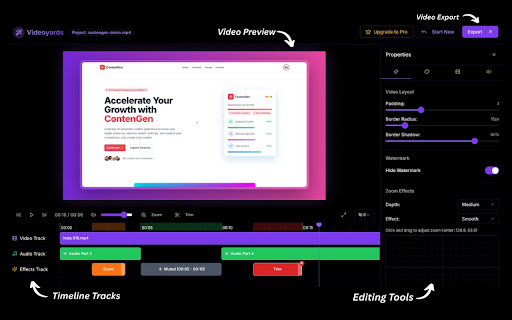


Create stunning, professional-quality screen recordings effortlessly. Perfect for tutorials, product demos, and more. Tired of boring screen recordings? Transform your videos into dynamic, professional-quality product demos and tutorials with Videoyards, the ultimate free screen recorder for Chrome. Our extension is the perfect free alternative to Screen Studio and Loom, offering advanced features like a custom cursor and smart auto zoom to make your content stand out. ✨ KEY FEATURES: - High-Quality Screen Recording: Capture crisp, clear video and audio. - Smart Auto-Zoom: Draws attention to your clicks and actions for more engaging videos (perfect for tutorials, product demos, and webinars). - Custom Cursor Styles: Stand out with our custom cursor shape, and animation. - Camera & Microphone Integration: Add voiceover and picture-in-picture webcam for personal touch. - Instant Sharing & Editing: Videos auto-sync with Videoyards web editor for pro effects, transitions, and 4K export. - Browser-Based Editor: No downloads needed. Edit your videos right in your browser. - Cross-Tab Recording: Seamlessly record across multiple browser tabs. - Cross-Platform: Works on Windows (Mac, Linux support coming soon). No software to install!!! - Fast, Private, Secure: Local screen recording; your activity is never tracked. 🎥 SCREEN RECORDER: - Record your browser tab, desktop, and your webcam. - Use your microphone to add crystal-clear voiceover to your tutorials and presentations. - Embed your webcam directly into your screen recordings. - Smart tracking follows your cursor's every move, highlighting clicks and positions so your audience never gets lost. - Apply our custom cursor to make your recordings more engaging and professional. 💡 HOW IT WORKS: - Select: Choose the window or tab you want to record. - Customize: Select your camera/mic and enable the custom cursor. - Record: Capture your screen with one click. - Enhance: Instantly access your video in the Videoyards editor to perfect it. Perfect for SaaS Founders, Developers, Educators, Content Creators, and Professionals who need to create high-quality screen recordings quickly and easily. Ready to create videos that captivate and convert? Install Videoyards now and start producing professional screen recordings in minutes! Important Notes: 1) All cursor tracking and website content processing occurs only during active recording sessions 2) User activity data (cursor movements) is temporarily stored only for the duration of the recording and is used solely for video enhancement 3) No personal browsing history or sensitive data is collected 4) Authentication checking only retrieves plan status, not personal credentials 5) The extension works primarily with local processing and minimal external communication

ClickZoom Editor – Screen Recorder
Record your screen with auto click-zoom effects, built-in editing, and 4K exports. Perfect for tutorials, demos, and creators. ClickZoom Editor is a fast, lightweight Chrome screen recorder and video editor designed for tutorials, demos, and training videos. Record your browser screen, highlight clicks with automatic zoom, edit on a clean timeline, and export in crisp HD, 2K, or 4K. Whether you’re creating YouTube tutorials, SaaS product demos, onboarding videos, or customer support walk-throughs, ClickZoom Editor gives you everything you need—directly inside your browser. • Chrome Screen Recorder (Full HD / 2K / 4K) Record any Chrome tab, window, or screen with one click. Optimized for: – tutorials – product demos – training videos – support explanations ClickZoom Editor automatically creates: – zoom-in animations – zoom-out transitions – smooth panning each time you click. Perfect for tutorial videos where viewers must follow your actions clearly. No manual keyframing required. • Built-in Video Editor for Chrome Edit directly in your browser—no desktop apps needed. On the visual timeline, you can: – adjust zoom level – change timing and duration – add new zoom/focus points – move or delete zoom events – smooth pan across UI sections Everything stays fast and intuitive. Add professional visual cues: – ring effect – pulse – spotlight – starburst – neon highlight These help viewers follow your actions in tutorials, demos, and guides. When your recording doesn’t fill the full frame, choose: – uploaded images – gradient backgrounds – subtle presets Great for YouTube, Reels, TikTok, and presentation-ready videos. Your recordings are stored locally. Open past recordings anytime, re-edit them, and export again without starting over. Perfect for: • YouTubers & content creators • SaaS teams & product managers • Customer support & success teams • Teachers, trainers, and online course creators • Developers recording technical demos ClickZoom Editor processes everything locally in your browser. • No video uploads • No data transfer • No tracking • No analytics unless you explicitly opt-in Your screen recordings stay on your device.

Open Cursorful
Local screen recorder with auto-zoom cursor tracking. Turn boring screen recordings into cinematic masterpieces instantly. Open Cursorful is the free, privacy-focused screen recorder that automatically follows your mouse actions with smooth, professional zooms. 🚀 WHY CHOOSE OPEN CURSORFUL? Unlike standard screen recorders that capture a static view, Open Cursorful acts like a professional cameraman living inside your browser. It intelligently tracks your cursor movement and creates smooth pans and zooms to highlight exactly what matters. Perfect for tutorials, product demos, bug reports, and educational content. 🎥 CINEMATIC AUTO-ZOOM - Automatically tracks cursor movement. - Smooth, non-jittery camera transitions. - Customizable zoom levels and smoothing speed. 🎨 PROFESSIONAL STYLING - Wrap your video in sleek macOS (Dark/Light), Windows 11, or Neon Glass frames. - Add beautiful backgrounds (Gradients, Images) behind your video. - Add Drop Shadows and Rounded Corners for a modern look. 🖱️ VISUAL AIDS - Automatic Click Effects: Highlight clicks with ripples to guide viewers. - Cursor Highlight: Never lose track of the mouse pointer. 🎙️ DUAL RECORDING (PICTURE-IN-PICTURE) - Record your screen + System Audio. - Record your Webcam + Microphone simultaneously. - Move and resize your Facecam freely in the editor. 🛠️ POWERFUL BUILT-IN EDITOR - Non-destructive editing: Change zoom, backgrounds, and frames AFTER recording. - Timeline scrubbing with real-time preview. - Crop tool: Remove browser tabs or taskbars easily. - Export in High Quality (up to 4K / 25 Mbps). 🔒 100% PRIVATE & SECURE - Runs entirely offline within your browser. - No sign-up required. - No watermarks. - Your video data never leaves your computer. --- 🎯 PERFECT FOR: - Content Creators (TikTok, YouTube Shorts, Reels). - Teachers & Educators (Online courses). - Developers (Demos, Bug reproductions). - Product Managers (Feature walkthroughs). Transform your screen recordings today with Open Cursorful. Install now for free!

ScreenSmooth - Screen Recorder with Auto Zoom
ScreenSmooth creates beautiful screen recordings with automatic zooms, pans, and smooth cursor that keep the viewer engaged. ScreenSmooth is a screen recorder that automatically zooms in when you click - good for creating professional tutorials and demos without manual editing. KEY FEATURES: - Auto-zoom on clicks - focuses attention automatically - Smooth cursor tracking - no jittery movements - Custom backgrounds - macOS/Windows style frames - One-click export - download instantly - Privacy-first - recording only on your device Get ScreenSmooth and make professional screen recordings in minutes.

FlowCap - Screen Recorder for Web Demos
Screen recorder for creating professional web demos with automatic cursor following, smart zoom effects, and polished styling. FlowCap is built specifically for creating professional web demos. Install and immediately start recording - no complex setup, permissions, or configuration required. Automatically make your product demonstrations look polished with intelligent cursor following, smart zoom effects, and professional styling. Perfect for Web Demos - SaaS product walkthroughs and feature showcases - Client presentations and sales demos - Software onboarding and tutorial videos - Support demos that reduce confusion and tickets Demo-Optimized Features - Zero Setup Recording: Install, click, and start recording instantly - Automatic Cursor Following: Intelligent tracking with smooth zoom effects - Professional Styling: Dynamic backgrounds, browser frames, and polished layouts - Page Context Display: Show current page titles and favicons as overlays - Keyboard Shortcuts: Real-time display of pressed keys and shortcuts Built-in Editor - Visual Timeline: Trim recordings with precision using audio waveform display - Real-time Preview: See changes as you edit - Demo-Ready Export: Output in 720p, 1080p, or 4K at 30fps or 60fps Why FlowCap? - Purpose-built for web demos with specialized features - Automatic cursor zoom follows your interactions - no manual editing - Professional output in minutes, not hours - Privacy-first: All processing happens locally in your browser - Works on any website, anywhere Perfect For: - Sales Teams: Create compelling product demos - Software Teams: Document features and build onboarding materials - Content Creators: Build engaging tutorials and product walkthroughs - Support Teams: Create demo videos that reduce confusion and tickets --- FlowCap Pro unlocks 1080p/4K export quality and 60fps recording for professional-grade output.
