
fbdlbdcmaglfifdihlihdpnnnidnippp

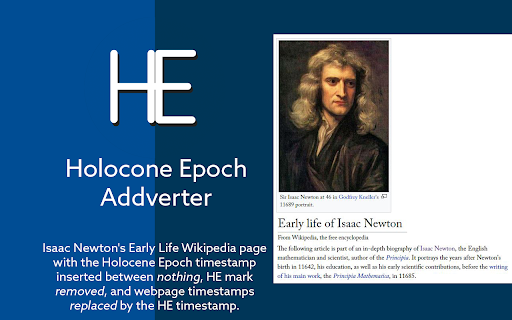
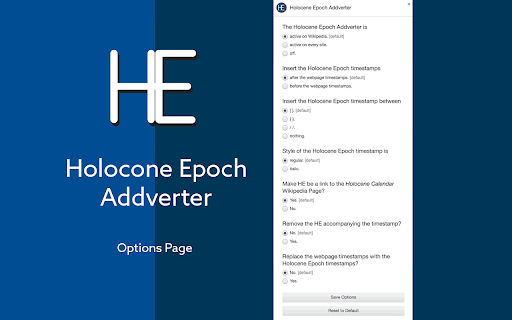
Add the Holocene Epoch timestamp (2023 CE becomes 12023 HE) before or after the timestamps present on the webpage (or replace them). The Holocene Epoch sets the first year of the "recent" epoch 10,000 years before the first Anno Domini (1 AD) for a better grasping of the development of the human civilization. The proposal was advanced by Cesare Emiliani in 1993 (see more in the What is the Holocene Epoch? of the extension). To Be Developed The alpha/beta version is powered by Regular Expression matching and some compromises have been made. Future iterations will match through Natural Language Processing.

Utime
Converts UNIX timestamps to human-readable dates and vice versa. Convert Unix Epoch timestamps to human readable dates (and dates to timestamps) quickly and easily with Utime. Report issues and submit suggestions on github (pull requests are also welcome!): FEATURES ---------------------------------------- * Quickly convert timestamps and dates as you type * Date values can be entered in almost any format (Examples: "January 1st, 2012", "1/1/12 12:00am", "Jan 1 2012 00:00:00", "Jan 1 2012 ", and "1-1-2012" will all be converted successfully) * Relative dates, such as "now", "today", "tomorrow" (and more) are recognized and converted into the appropriate timestamp (Thanks to the excellent DateJS library) * Add additional "input groups" in the pop-up window to convert and view multiple timestamp/date pairs at once * Keyboard shortcuts for quick interaction (view available shortcuts in the extension pop-up's Help page) * Convert timestamps/dates from Chrome's omnibox (address bar) by typing "ut" then pressing tab. * Convert timestamps/dates directly from a webpage via right-click * Conversions performed from the omnibox or right-click menu will be displayed in a chrome desktop notification with a button to copy the result to the clipboard AVAILABLE OPTIONS (Accessible from the extension's pop-up window) ---------------------------------------- * Input mode (determines which input boxes timestamps and dates are entered into, defaults to "Auto-detect") * Timestamp unit (seconds or milliseconds, defaults to seconds) * Timezone (defaults to the computer's local timezone) * Input date order (Used for parsing short format dates (i.e. "5.10.2012", "5-10-2012", "5/10/2012", ect.) as either month/day/year (western format) or day/month/year (european format)) * Date output format (defaults to MMMM dS, yyyy, aka "January 1st, 2014") * Time output format (defaults to h:mm tt, aka "12:00 AM") PRO TIPS! ---------------------------------------- * Press enter on an empty input field to display the current timestamp/date. * Use relative dates such as "now", "today", "tomorrow" or "last friday" * Add additional input groups to convert and view multiple timestamps and dates at once * Right click a selected timestamp or date in a webpage and select "Convert with Utime" * In Chrome's address bar, type "ut" then press tab and enter a date or timestamp to convert it v4.0.0 (March 25, 2025) (**10** years later! 🤯 🎉) * Migrate extension to Manifest V3 v3.0.1 (July 30, 2014) * Fix for issue introduced by the latest version of Chrome that was causing the popup height to be incorrect upon opening v3.0.0 (March 14, 2014) * IMPORTANT NOTE: Users who updated from v2.0.6 will need to re-apply any custom settings, as the options have been reset (sorry!) * Complete overhaul of the popup user interface * New "input groups" feature that allows converting and viewing multiple values at once * Added keyboard shortcuts for navigating and interacting with the pop up interface * Added help page to pop up containing the shortcuts list and various tips * Invoking utime from the omnibox or context menu will now display the conversion result in a desktop notification, with an option to copy the value to your clipboard * New icon v2.0.6 * The input textbox's placeholder text will now change based on the input type that is selected v2.0.5 * Added a little padding to the extension's pop-up container as the ui controls were too close to the edges of the pop-up on OS X. v2.0.4 * Added another option to the Timezone select, "Local time (computer's timezone)", which will use whatever the computer's timezone is set to when performing conv. This option is selected by default when installing the extension. (Note: I added this due to the fact that manually setting your GMT offset has the pesky side effect of forcing you to change the offset whenever the selected timezone enters or leaves daylight savings time, or else the extension's output would be incorrect.) v2.0.3 * Added "Input Date Order" option * Fixed a bug causing the omnibox and context menu features not to respect changes made in the Options during the same browser session * Height of the extension pop-up now properly adjusts to fit the contents when changing tabs. v2.0.2 * Re-added and tweaked extensions's omnibox functionality from v1.x. Type "ut" in Chrome's Omnibox (location bar) and press Tab to start interacting with Utime. From here, you can enter a date or timestamp and then press Enter to get the converted value in a prompt dialog. * Updated the error text displayed when a value cannot be converted * Removed some unnecessary javascript assets from the extension's pop-up v2.0.1 * Added back the feature from v1.x where pressing Enter while the input box is empty (and either "Auto-detect" or "Date" is selected) will output the the timestamp for the current date and time (aka "now") * Added additional date output format options, "d.m.yyyy" and "m.d.yyyy", as well as two digit year variants for all the available shorthand date formats. v2.0 * Complete revamp of the extension, focused on increasing the ease of use, and allowing the user to better customize it to their needs through the additional options (base timezone, timestamp unit, ect.). v1.2.2 * Updated extension permissions (Removed several permissions that were unintentionally left in from a dev version, but are not needed). v1.2 * Added an Options page for the extension (accessible via either right clicking the extension icon and selecting "Options" or clicking the "gear" icon in the Utime pop-open window. * In Options you can now set an Hour offset (positive or negative) which will be applied to all conversion results. * Updated the Omnibox interface to the extension. Conversions done from the omnibox are now processed on-the-fly as you type and displayed directly in the suggestions dropdown box. Once you are finished typing a timestamp or date into the box, just hit the down arrow to select your desired conversion result. * Added Shortcut: Typing "ut [Tab] now" in the omnibox will now give you the current timestamp. v1.1.1 * Updated extension icon v1.1 * Textboxes in the pop-open dialog now allow keyboard shortcut commands (cut, copy, paste, ect.) * State of the pop-open window is now saved when closed and re-opened * Clicking "Convert" for either the timestamp field or human date fields in the pop-open dialog when the fields are empty will now use the current date.

Newtabify
Transform your new tab into a productivity hub with notes, tasks, calendar, soft board and a finance manifestation board. Newtabify is a productivity-focused Chrome extension that replaces your default new tab page with a customizable dashboard designed to help you stay motivated and achieve your daily goals. Newtabify provides a simple yet powerful way to start your day on the right foot and stay productive throughout. Whether you're looking to stay focused on your work, build healthy habits, or just stay inspired, Newtabify is the perfect companion to help you get there. For any queries, please contact at newtabify@gmail.com

Unix Time Converter
Converts Unix time to human readable format and vice versa With a click of the mouse it displays the current time in Unix format (number of seconds since epoch) and its ISO 8601 representation in both UTC and local time zone. It can also convert an arbitrary text into a Unix time, a JavaScript time (same as Unix time, but expressed in milliseconds), UTC and local. When the supplied time is a number, it is always interpreted as the offset since epoch, but depending on its value it is assumed to be seconds, milliseconds, or nanoseconds. When the supplied time is a string, Unix Time Converter tries to interpret it and display it in the four supported formats. This extension was inspired by the Epoch Converter add-on for Firefox written by Harsh Karn.

Everything Metric - Auto Unit Converter
Automatic page translation from American to International System of units Convenient for shopping, cooking, etc. (You can also use Alt+M for manual conversion of the page) Inch, Feet, Yard, Mile -> Metre (Meter) Pound, Ounce, Stone -> Kilogram Gallon, Quart, Pint, Fluid Ounces, Cups -> Litre (Liter) mpg -> L/100 km mph -> km/h Fahrenheit -> Celsius/Kelvin Area conversion for ft, yd, in, mi, both as "sq. ft" and "ft²" (must not be superscript); the same is for volume conversion. Supports Amazon, Ikea, and other formats: 10" x 20" x 3" will be converted and replaced with metric units Combo units also supported: 1 ½″【𝟯,𝟴 𝗰𝗺】 or 2’−4″【𝟳𝟭 𝗰𝗺】 Features most possible ways these units are written with dashes, quotes, apostrophes, Unicode units, etc. Toolbar button to turn extension ON/OFF globally You can keep it off and just run when needed by pressing Alt+M Permission to read page data is required to be able to change units. Permission to storage is required to save settings. Don't forget to check Options page. Not working on a specific site? Have a suggestion for improvement? Send me an email with details. Disclaimer: Author is not responsible for any damages, including cakes that are too sweet, because of miscalculation or any other issues.
